CotEditor
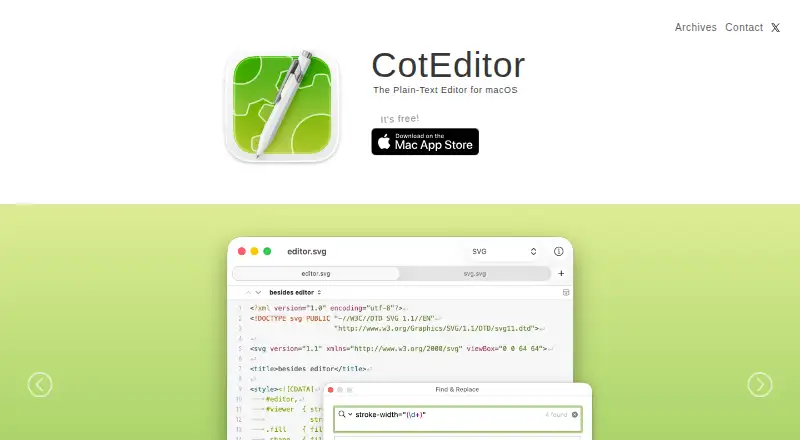
What CotEditor is
CotEditor is a free plain-text editor for macOS, designed for source code, notes, Markdown, web content and other text. It provides syntax highlighting for more than 70 preset languages, regular-expression find and replace, and live character, word and line counts. Editing tools include multi-cursor and column editing, plus an outline menu based on document syntax. CotEditor can handle large files and supports text encodings, line endings, Unicode normalization, CJK text, vertical layout and right-to-left text. It also supports extensions, scripting in the user's preferred language and a command-line tool. The App Store version integrates with Dark Mode, Versions, iCloud and VoiceOver. The project says personal data recorded in the editor is not collected, used, saved or accessed, and settings stay on the device. App Store and direct-download versions are sandboxed. The listed CotEditor 7.1.1 release requires macOS 26 or later; the project does not support earlier macOS versions listed in its archive.
Who it suits
CotEditor suits Mac users who want a plain-text editor for code, notes, Markdown or web content. It is made exclusively for Mac.
What it does well
- Free, with all features available
- Syntax highlighting for more than 70 languages
- Supports large files and column editing
- Includes scripting and a command-line tool
What to know first
- Available only for macOS
- Listed 7.1.1 release requires macOS 26 or later
Limits
All CotEditor features are available free, with optional in-app purchases supporting the project. The listed CotEditor 7.1.1 release requires macOS 26 or later, and the project does not support earlier macOS versions listed in its archive.
Plans
| Plan | Billed and limits | Price |
|---|---|---|
| Free | All features available for free · Optional in-app purchases support the project | Free |
As coteditor.com lists them, read 7 Oct 2026. The maker's own page has the final word.
Getting started
- Visit https://coteditor.com/ and choose an App Store or non-App-Store version.
- Install the chosen macOS edition.
- Open the app and consult guides in its Help menu.
- Use the built-in command-line tool or scripting options if they suit your workflow.
- Report issues on GitHub or contact the project by email if you need support.
Verdict
CotEditor offers a broad set of text-editing tools at no cost, including language highlighting, scripting and encoding controls. Check the macOS 26 requirement for the listed current release before choosing it.
Questions
How much does CotEditor cost?
CotEditor is free. Optional in-app purchases support the project.
Is there a free plan?
Yes. All features are available for free.
Which platforms does CotEditor support?
CotEditor is made exclusively for macOS. The listed CotEditor 7.1.1 release requires macOS 26 or later.
Can CotEditor be extended or scripted?
Yes. It supports extensions, scripting in the user's preferred language, and a command-line tool.
What does CotEditor do?
It is a plain-text editor for source code, notes, Markdown, web content, and more. It includes syntax highlighting, regular-expression find and replace, and tools such as multi-cursor editing.
How can users get help?
Users can consult guides in the app's Help menu, report issues on GitHub, or contact the project by email.
Facts from CotEditor's own pages
- Column editing
- Yes · coteditor.com, 22 Sept 2026
- Current system requirement
- The listed CotEditor 7.1.1 release requires macOS 26 or later. · coteditor.com, 7 Oct 2026
- Distribution and security
- The App Store and non-App-Store versions are sandboxed, and the non-App-Store version is notarized by Apple. · coteditor.com, 7 Oct 2026
- Earlier macOS support
- The project says it does not provide support for earlier macOS versions listed in its archive. · coteditor.com, 7 Oct 2026
- Editing tools
- Features include live character, word, and line counts, multi-cursor editing, and a syntax-based outline menu. · apps.apple.com, 7 Oct 2026
- Extension support
- Yes · coteditor.com, 22 Sept 2026
- Find and replace
- It provides find and replace with regular expressions. · apps.apple.com, 7 Oct 2026
- Free plan
- Yes · coteditor.com, 22 Sept 2026
- Large-file handling
- Yes · coteditor.com, 22 Sept 2026
- macOS integration
- The App Store listing says CotEditor integrates with Dark Mode, Versions, iCloud, and VoiceOver. · apps.apple.com, 7 Oct 2026
- Multi-cursor editing
- Yes · coteditor.com, 22 Sept 2026
- Privacy
- The project says it does not collect, use, save, or access personal data recorded in CotEditor, and app settings are stored only on the device. · coteditor.com, 7 Oct 2026
- Scripting
- CotEditor is scriptable in the user's preferred language and includes a command-line tool. · apps.apple.com, 7 Oct 2026
- Support
- Users can consult guides in the app's Help menu, report issues on GitHub, or contact the project by email. · coteditor.com, 7 Oct 2026
- Supported platforms
- macOS · coteditor.com, 22 Sept 2026
- Syntax highlighting
- It includes syntax highlighting for more than 70 preset languages. · apps.apple.com, 7 Oct 2026
- Text handling
- It supports text encodings, line endings, Unicode normalization, CJK text, vertical text layout, and right-to-left text. · apps.apple.com, 7 Oct 2026
- Updater
- The non-App-Store version includes Sparkle to notify users of and install new releases; the App Store version is updated by macOS. · coteditor.com, 7 Oct 2026
- What it does
- CotEditor is a lightweight plain-text editor for source code, notes, Markdown, web content, and more. · apps.apple.com, 7 Oct 2026
- Who it is for
- CotEditor is made exclusively for Mac and is presented for everyday plain-text editing, including code, notes, Markdown, and web content. · apps.apple.com, 7 Oct 2026
Where CotEditor stands on Freedom251
- Editor Software#12 of 32
- Text Editors#34 of 82
- Code editors#31 of 45