Freedom251 › Game Library Managers

Console Launcher
What Console Launcher is
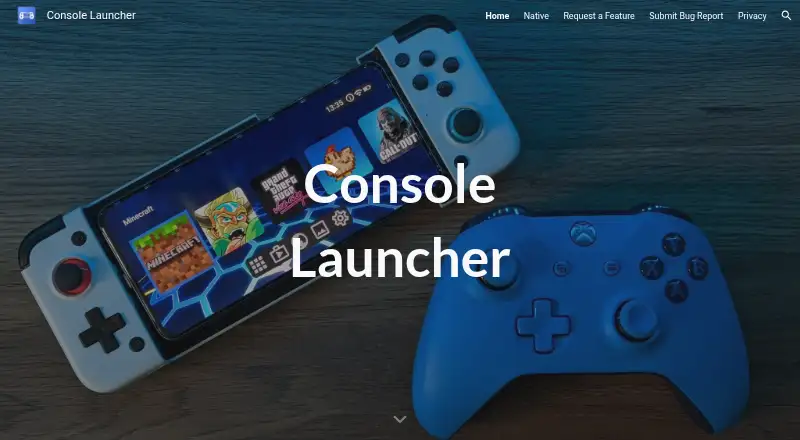
Console Launcher is an Android home screen for turning a phone into a console-style interface for gaming. Its home screen comes populated with games, and landscape mode is enabled by default, so the layout is ready to use without first arranging it. The app does not include games; it changes how apps are presented and navigated. With a controller, users can browse, launch, and uninstall apps without touching the screen. The maker names the Gamesir X2 and Razer Kishi as controllers that can pair with the launcher. Console Launcher supports emulators and metadata editing. It is free, with optional Console Launcher Pro customization options. The maker says the app has no ads and does not pressure users to upgrade for customization. The privacy policy says information requested by the app is retained on the device, while third-party services may collect identifying information. It links to Google Play Services, Google Firebase, and Godot. Error logs collected through third-party products may include an IP address, device name, operating system version, app configuration, use date and time, and other statistics. The developer identified on Google Play is Kyle Andrew Eichlin.
Who it suits
Console Launcher suits Android users who want a landscape, console-style home screen and prefer navigating apps with a controller. It may also suit users who use emulators and want metadata editing, while those looking for games themselves will need to get them separately.
What it does well
- Preloaded game-filled home screen requires no setup.
- Landscape mode is enabled out of the box.
- Controller navigation can launch, browse, and uninstall apps.
- Supports emulators and metadata editing.
- Free app with no ads, according to the maker.
What to know first
- Does not include games.
- Privacy policy describes identifying information collection by third-party services.
- Third-party error logs may include device and usage details.
Limits
The free app provides the launcher but does not include games. Console Launcher Pro customization options are optional.
Plans
| Plan | Billed and limits | Price |
|---|---|---|
| Console Launcher | Free app; optional Console Launcher Pro customization options | Free |
As consolelauncher.app lists them, read 8 Oct 2026. The maker's own page has the final word.
Getting started
- Open the Console Launcher website at https://www.consolelauncher.app/.
- Get the Android app through its app listing.
- Use the preloaded home screen, which requires no setup to populate.
- Pair a controller such as a Gamesir X2 or Razer Kishi for controller navigation.
Verdict
Pick Console Launcher if you want an Android phone to present apps in a landscape, console-like layout and be navigable with a controller. Look elsewhere if you expect the launcher to supply games, or if its described third-party data collection is unsuitable for you.
Questions
How much does Console Launcher cost?
The listed Console Launcher plan is free. Optional Console Launcher Pro customization options are available.
Is there a free plan?
Yes. Console Launcher is listed as a free app.
Which platforms does it support?
The listed platform is Android.
Does Console Launcher include games?
No. It changes the phone’s home screen and app navigation, but does not include games.
Can I use a controller?
Yes. Users can browse, launch, and uninstall apps with a controller without using the touchscreen. The maker names Gamesir X2 and Razer Kishi as pairing examples.
What does its privacy policy say?
It says requested information is retained on the device, while third-party services may collect identifying information. Linked services include Google Play Services, Google Firebase, and Godot.
Facts from Console Launcher's own pages
- Ads and purchases
- The maker says the app has no ads and no pressure to upgrade to Pro for customization options. · consolelauncher.app, 8 Oct 2026
- Controller examples
- The maker names the Gamesir X2 and Razer Kishi as controllers that can pair with Console Launcher. · consolelauncher.app, 8 Oct 2026
- Controller use
- Users can launch, browse, and uninstall apps using only a controller, without a touchscreen. · consolelauncher.app, 8 Oct 2026
- Developer
- Google Play identifies the developer as Kyle Andrew Eichlin. · play.google.com, 8 Oct 2026
- Error logs
- The privacy policy says error log data collected through third-party products may include IP address, device name, operating system version, app configuration, use date and time, and other statistics. · consolelauncher.app, 8 Oct 2026
- Game inclusion
- The app does not include games; it makes the phone look like a video game console. · play.google.com, 8 Oct 2026
- Headquarters
- Waipahu, Hawaii, United States · consolelauncher.app, 28 Sept 2026
- Landscape mode
- Landscape mode is enabled out of the box. · consolelauncher.app, 8 Oct 2026
- Preloaded home screen
- The home screen is filled with games out of the box, with no setup required. · consolelauncher.app, 8 Oct 2026
- Privacy collection
- The privacy policy says information requested by the app is retained on the device, and that the app uses third-party services that may collect identifying information. · consolelauncher.app, 8 Oct 2026
- Purpose
- Console Launcher is an Android home screen designed to create a mobile console-like experience for gamers. · consolelauncher.app, 8 Oct 2026
- Security
- The privacy policy says the maker uses commercially acceptable means to protect information but cannot guarantee absolute security. · consolelauncher.app, 8 Oct 2026
- Support
- Google Play lists support email [email protected]. · play.google.com, 8 Oct 2026
- Third-party services
- The privacy policy links to Google Play Services, Google Firebase, and Godot as third-party services used by the app. · consolelauncher.app, 8 Oct 2026
Where Console Launcher stands on Freedom251
- Game Library Managers#10 of 40
- Game launchers#34 of 68