Freedom251 › AI Image Recognition Software
CompreFace
What CompreFace is
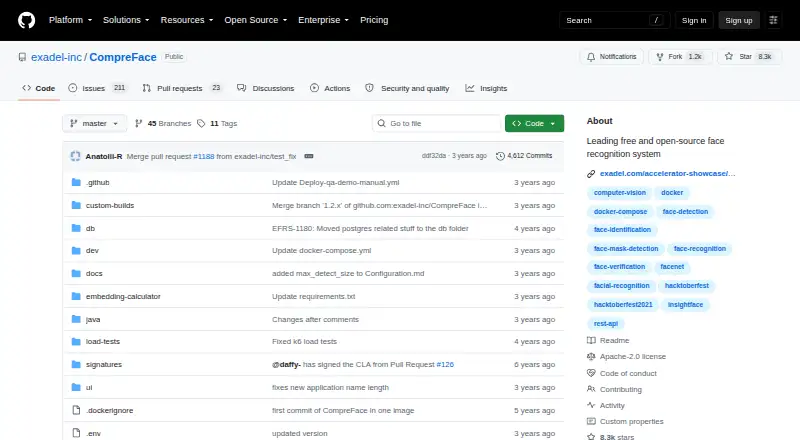
CompreFace is a free, open-source face recognition service that exposes its functions through a REST API. Its capabilities include face recognition and verification, face and landmark detection, mask and head-pose detection, age recognition, and gender recognition. The project says it can be set up without prior machine-learning skills. It is delivered as a Docker Compose configuration and can run as a standalone server or in the cloud; listed deployment options also include hybrid use. Setup instructions cover Windows, macOS, and Linux and require Docker with Docker Compose or Docker Desktop. The service supports CPU and GPU models, with an x86 processor featuring AVX among the stated requirements. A UI panel and role-management system provide controls for users and access to recognition services. The project names FaceNet and InsightFace among its underlying libraries and links JavaScript, Python, and .NET SDK repositories. CompreFace is self-hosted and released under Apache 2.0. Its documented quick start uses a release archive and starts the service with docker-compose. The project directs users to GitHub for ideas and bug reports and also provides a community chat link.
Who it suits
CompreFace may suit teams that need a self-hosted face recognition API and can run Docker on Windows, macOS, or Linux. The project says it does not require prior machine-learning skills to set up and use.
What it does well
- Free and open-source under Apache 2.0
- REST API covers recognition and multiple detection functions
- Supports CPU and GPU models
- Includes UI and role-management controls
- Links JavaScript, Python, and .NET SDK repositories
What to know first
- Requires Docker and Docker Compose or Docker Desktop
- Hardware requirements include an x86 processor with AVX support
- Self-hosted deployment requires a server environment
Plans
| Plan | Billed and limits | Price |
|---|---|---|
| CompreFace | free and open-source; Docker-based deployment; CPU and GPU support | Free |
| Free | face recognition · verification · detection · landmark, mask, age, gender and head-pose plugins · REST API · Docker deployment | Free |
As github.com lists them, read 4 Oct 2026. The maker's own page has the final word.
Getting started
- Open the CompreFace GitHub website.
- Use a Windows, macOS, or Linux system with Docker and Docker Compose or Docker Desktop.
- Download a release archive.
- Start the service with `docker-compose up -d`.
- Use the web panel to manage roles and access to recognition services.
Overview
CompreFace is a free, open-source service for face analysis, built around a REST API. It is best suited to developers and teams that want face-related functions on infrastructure they manage, without requiring machine-learning expertise. Its range is appealing, but Docker and compatible x86 hardware make it a poor fit for deployments that need a lightweight, managed service.
Key features
The API covers face recognition, verification and detection, as well as landmark, mask and head-pose detection, age recognition and gender recognition. That breadth can consolidate several face-analysis tasks behind one service; it is more than a recognition-only API. CompreFace is based on libraries including FaceNet and InsightFace, and supports custom models.
A UI panel and role-management system let administrators manage roles and control access to the face-recognition services. JavaScript, Python and .NET SDK repositories offer starting points for application integration. The project also invites contributors to add support for platforms such as Home Assistant or DreamFactory; those are not presented as built-in integrations.
Deployment uses Docker Compose. The documented quick start downloads a release archive and starts the service with docker-compose up -d; the service can run on a standalone server or be deployed in the cloud. The project says setup does not require prior machine-learning skills, but Docker and Docker Compose or Docker Desktop are required. CPU and GPU models are supported, and the requirements include an x86 processor with AVX support. That makes the deployment flexible across supported hardware, but rules out environments without the required processor support.
Self-hosting gives teams control over where the service runs, which the project frames as an additional data-security guarantee. It does not remove the work of operating the deployment. The software is released under the Apache 2.0 license. For help, users can report ideas and bugs on GitHub or use the community chat.
Pricing
CompreFace costs nothing. Its CompreFace plan includes free and open-source software, Docker-based deployment, and CPU and GPU support. There are no paid plan tiers or usage quotas described; the trade-off is that users manage their own deployment and hardware rather than choosing a managed subscription.
| Plan | Price | Includes |
|---|---|---|
| CompreFace | free | Free and open-source; Docker-based deployment; CPU and GPU support |
Platforms
CompreFace supports API, Linux, macOS, self-hosted, web and Windows. Setup instructions cover Windows, macOS and Linux, with Docker and Docker Compose or Docker Desktop required. Its hybrid deployment options accommodate standalone-server and cloud deployments, but the Docker and AVX requirements should be checked against the intended environment first.
Who it's for
Choose CompreFace if you need several face-analysis capabilities behind a REST API, want to keep the service self-hosted, and can operate Docker-based software on supported x86 hardware. It is less suitable if you want a service without infrastructure responsibilities or cannot meet the processor and Docker requirements.
Pros and cons
- Pros: A wide range of face-analysis functions in one API is useful for projects that need more than recognition alone.
- Pros: Self-hosting, role management and an Apache 2.0 license give teams control over deployment, service access and software use.
- Pros: CPU and GPU support, custom models and linked JavaScript, Python and .NET SDK repositories support different implementation needs.
- Cons: Docker and Docker Compose or Docker Desktop are prerequisites, so setup still calls for container tooling even without ML expertise.
- Cons: The x86 AVX requirement narrows hardware compatibility.
- Cons: Self-hosting puts deployment and operation on the user rather than providing a managed service.
Alternatives
AI Image Recognition Software is the broader category for comparing tools in this space.
- MediaPipe is a free alternative with on-device ML solutions and a framework; consider it when on-device use or mobile platform support matters more than CompreFace's self-hosted face-analysis API.
- Google Cloud Vision API is a freemium API billed per image, with each feature applied to an image counted as a billable unit in monthly usage tiers. Consider it if per-image cloud billing better suits your use than running a Docker deployment.
- DeepDetect offers a free open-source single-machine plan for CPU or GPU and an AWS plan priced on request. Consider it when a single-machine or AWS deployment is a better fit than CompreFace's face-focused API.
- LandingLens has a free plan at no cost with 1,000 credits per month, unlimited projects, three users, up to 10k images per project and one active project. Consider it when those project and image allowances suit your work better than a self-hosted service.
- PaddleOCR is an alternative with an Official API Free Tier and a daily document-parsing limit of 20,000 pages; choose it when document parsing is the relevant task.
- Roboflow has a free tier with 10 credits a month, described as enough to train about 30 models or run 80,000 inferences, and a Core plan at $39 a month. Consider it if that credit-based model-training or inference allowance better fits your project.
- Amazon Rekognition Content Moderation has a free tier lasting 12 months from account creation, including 60 free video analysis minutes per month. Consider it when content moderation is the priority and a time-limited free tier is acceptable.
- Imagga API has a free plan at no cost with 100 API requests and basic tagging, categorization, cropping and color solutions. Consider it when that request allowance and set of image tools are a closer match than face analysis.
Verdict
CompreFace is a strong fit for developers and teams that need multiple face-analysis functions through a free API they can run themselves. Its breadth, role management and CPU/GPU support make it compelling when deployment control matters. Look elsewhere if you need a managed service or cannot meet its Docker and x86 AVX requirements.
Verdict
CompreFace offers a broad set of face-related functions through a self-hosted REST API. Check the Docker and processor requirements before choosing it for a deployment.
Questions
Is CompreFace free?
Yes. The listed CompreFace plan costs nothing, and the software is free and open source.
What platforms does it support?
Its listed platforms are API, Linux, macOS, self-hosted, web, and Windows. Setup instructions require Docker and Docker Compose or Docker Desktop.
What does CompreFace do?
It offers a REST API for face recognition and verification, face and landmark detection, mask detection, head pose detection, age recognition, and gender recognition.
Is CompreFace open source?
Yes. It is released under the Apache 2.0 license.
Can it use custom models?
Yes. Custom models are listed as supported.
What deployment options are listed?
The service can run as a standalone server or be deployed in the cloud; hybrid deployment is also listed.
Facts from CompreFace's own pages
- Access management
- The web interface includes roles and permissions for controlling access to face services. · github.com, 15 Oct 2026
- Age recognition
- An age-recognition plugin is listed among the available services. · github.com, 15 Oct 2026
- API documentation depth
- The repository documentation includes endpoint descriptions for subjects, examples, recognition, verification, detection, embeddings and base64 requests. · github.com, 15 Oct 2026
- Cloud and on-premises
- Official feature documentation says the software can be deployed in the cloud or on premises. · github.com, 15 Oct 2026
- Company headquarters and founding
- LinkedIn lists Walnut Creek, California as headquarters and 1998 as the founding year. · linkedin.com, 15 Oct 2026
- CPU and GPU
- The project documents model variants that run on both CPU and GPU hardware. · github.com, 15 Oct 2026
- Data-control positioning
- The project presents self-hosting and on-premises deployment as ways to keep face data under the operator’s control. · github.com, 15 Oct 2026
- Deployment
- It is delivered as a Docker Compose configuration and can run as a standalone server or be deployed in the cloud. · github.com, 4 Oct 2026
- Deployment model
- CompreFace is distributed as Docker Compose configuration and can run as a standalone server or in cloud environments. · github.com, 15 Oct 2026
- Documentation scope
- The documentation index also covers configuration, architecture and scalability, custom builds, migration, roles, plugins, Kubernetes and installation options. · github.com, 15 Oct 2026
- Extensibility
- The project invites contributors to add SDKs, plugins and integrations such as Home Assistant or DreamFactory. · github.com, 15 Oct 2026
- Face detection
- A face-detection service is included alongside recognition and verification. · github.com, 15 Oct 2026
- Face recognition
- The service can identify enrolled people from submitted images. · github.com, 15 Oct 2026
- Face verification
- The API supports comparing faces to verify whether they belong to the same person. · github.com, 15 Oct 2026
- Gender recognition
- A gender-recognition plugin is available. · github.com, 15 Oct 2026
- Hardware
- CompreFace supports CPU and GPU models and lists an x86 processor with AVX support among its requirements. · github.com, 4 Oct 2026
- Independent deployment example
- A 2026 technical article used CompreFace with Immich, Home Assistant, UniFi Protect and Double Take in a self-hosted doorbell workflow. · whitematter.tech, 15 Oct 2026
- Integrations
- The project invites contributors to add support for other platforms such as Home Assistant or DreamFactory; it does not describe these as built-in integrations on the page. · github.com, 4 Oct 2026
- Landmark detection
- A plugin provides facial-landmark detection. · github.com, 15 Oct 2026
- Legal name and owner
- Crunchbase identifies the legal entity as Exadel, Inc. and says it was acquired by Sun Capital Partners. · crunchbase.com, 15 Oct 2026
- Licence
- CompreFace is released under the Apache 2.0 open-source licence. · github.com, 15 Oct 2026
- Limit: Docker operational burden
- An independent project report said CompreFace required multiple Docker instances, complicating deployment on machines without Docker or docker-compose. · adrianchen8662.github.io, 15 Oct 2026
- Limit: ecosystem maintenance
- A Home Assistant community thread described CompreFace as having gone many months without an update and noted that it does not understand Frigate by itself. · community.home-assistant.io, 15 Oct 2026
- Limit: hardware and containers
- Open-Awesome warns that x86 with AVX excludes many ARM devices and that Docker may be unsuitable where containerization is unavailable. · open-awesome.com, 15 Oct 2026
Where CompreFace stands on Freedom251
- AI Image Recognition Software#1 of 37
- Image Recognition Software#1 of 28
- Facial Recognition Software#1 of 16