Freedom251 › Construction payroll software

CMiC
by CMiC
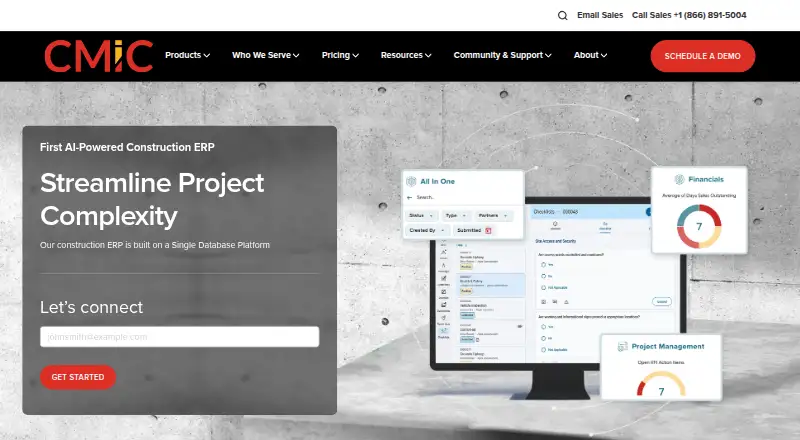
What CMiC is
CMiC is a construction ERP organized around Construction Financials, Project Management, Workflow, and Analytics. Its financial tools include construction accounting, project controls, equipment and inventory, opportunity management, payroll, and HCM. Project Management covers project controls, drawings and construction documents, prequalification and procurement, quality, and safety. CMiC says its Single Database Platform manages financials, projects, resources, and content assets together. Organizations can choose on-premise deployment, private-cloud Platform-as-a-Service, or multi-tenant cloud Software-as-a-Service. Listed integrations include Bluebeam, Kofax, DocuSign, Microsoft Integration Package, Power BI, and ImageTrust. CMiC APIs expose enterprise business logic through endpoints for use by other applications; a global API request record limit began with Patch 22. Mobile products for smartphones, tablets, and desktops include Construct APR, CHK, CT, ESS, OM, PM, and PR. Construct ESS is available for iOS and Android. CMiC serves general and specialty contractors, heavy/highway firms, and project owners. Pricing is available on request.
Who it suits
CMiC is aimed at general and specialty contractors, heavy/highway firms, and project owners. It may suit construction organizations seeking financial, project, workflow, and analytics tools in one ERP.
What it does well
- Construction accounting, controls, equipment, and payroll.
- Project tools cover procurement, quality, and safety.
- On-premise and cloud deployment options.
- Mobile products include Construct ESS for iOS and Android.
- APIs let other software interact with CMiC business logic.
What to know first
- Pricing is available on request.
- Global API request record limit began with Patch 22.
Plans
| Plan | Billed and limits | Price |
|---|---|---|
| CMiC | Quote requested through sales form; no public amount shown | On request |
As cmicglobal.com lists them, read 15 Oct 2026. The maker's own page has the final word.
Getting started
- Visit the CMiC website.
- Contact CMiC for pricing and deployment details.
- Choose an on-premise, private-cloud PaaS or multi-tenant cloud SaaS deployment.
- Use the support portal or call the 24-hour support line for technical support.
- For mobile access, get Construct ESS from the Apple App Store or Google Play.
Overview
CMiC is an enterprise resource planning system built for construction businesses, combining accounting and project operations. It is best suited to contractors and project owners that need financial, project and resource management in one platform. Its breadth is a strength, but the paid, custom-priced model is a substantial commitment for organizations that need only a narrow set of tools.
Founded in 1974 and headquartered in Toronto, CMiC serves general and specialty contractors, heavy/highway firms and project owners. Its single-database approach gives those organizations a common platform for financials, projects, resources and content assets.
Key features
Financial and project operations
CMiC Financials brings together construction accounting, project controls, equipment and inventory, opportunity management, payroll and human capital management. The scope is more compelling for organizations coordinating project costs with wider financial operations than for a team looking only for bookkeeping or job costing.
Project Management covers controls, drawings and construction documents, prequalification and procurement, quality and safety. RFI and submittal management, scheduling, field reporting, bid management and project financials round out its construction workflow. Having these functions alongside financial management may help teams work from shared project information, though the breadth may be more than a smaller operation needs.
Workflow, integrations and API
Workflow and analytics are part of the product scope. CMiC lists integrations with Bluebeam, Kofax, DocuSign, Microsoft Integration Package, Power BI and ImageTrust. Its APIs expose Enterprise business logic through endpoints for interaction with other applications, supporting organizations that need connections beyond the listed integrations. A global API request record limit introduced with Patch 22 is a relevant constraint for teams planning substantial integrations; they should account for it in their integration design.
Deployment, security and support
Organizations can choose on-premise deployment, private-cloud Platform-as-a-Service or multi-tenant cloud Software-as-a-Service. This range accommodates different deployment preferences, but the right option depends on the organization's operating requirements. CMiC states that it maintains SOC 2 compliance and aligns with ISO/IEC 27001 and ISO/IEC 42001.
CMiC provides a 24-hour support line at +1-833-264-2353 and a support portal for technical support. That gives customers both phone and portal routes when they need assistance.
Pricing
CMiC is paid, with custom pricing available on request. Its CMiC plan is positioned for general contractors, subcontractors and heavy highway firms. The plan covers the product's broad construction ERP scope, including financials and project management; no separate lower-cost plan or narrower included feature set is described. Buyers should request a quote to understand the cost for their organization.
With custom pricing and no stated plan term or seat allowance, it is difficult to compare costs in advance. CMiC makes the most sense when a business expects to use its joined-up finance and project capabilities, rather than paying for an ERP when only one function is required.
Platforms
CMiC supports Android, iOS, web, API and self-hosted deployments. Its mobile portfolio includes Construct APR, Construct CHK, Construct CT, Construct ESS, Construct OM, Construct PM and Construct PR, for smartphones, tablets and desktops. Construct ESS is available on iOS and Android.
Who it's for
CMiC is aimed at general and specialty contractors, heavy/highway firms and project owners that want construction financials and project management in the same ERP. It is a stronger fit for organizations seeking broad operational coverage and deployment choices than for those seeking a standalone accounting, scheduling or document tool.
Pros and cons
Pros
- Broad construction scope: Financial management, project workflows, field reporting, scheduling and bid management sit within one ERP.
- Deployment choice: On-premise, private-cloud and multi-tenant cloud options support different infrastructure preferences.
- Multiple integration routes: Named integrations and APIs allow connections with other business applications.
- Mobile products: The Construct portfolio includes products for mobile devices and desktops, with Construct ESS on both major mobile platforms.
Cons
- Custom pricing: Buyers need to request a quote, making upfront cost comparisons difficult.
- Wide scope may be unnecessary: Organizations needing only one or two construction functions may not need an ERP with this range.
- API request limit: Integrators need to account for the global request record limit introduced with Patch 22.
Alternatives
For a broader comparison, see Project Accounting Software, Job Costing Software, Construction CRM Software, Construction Project Management Software, Construction Management Software and Construction Bid Management Software.
- Trimble Viewpoint Vista is another paid construction ERP option, with cloud-hosted and on-premises deployments; its Vista plan has a free plan available.
- Oracle Primavera Cloud may suit buyers comparing paid cloud services with published monthly prices, including a Hosted Named User service at $12 a month and a Task Management service at $55 a month.
- Unanet ERP AE is another paid option, with pricing provided through a demo request.
- Infor Learning Management System is a paid web and API product with a free trial.
- Sage 300 Construction and Real Estate is a paid option for Android, iOS and Windows, with subscription pricing available on request.
- Certinia Professional Services Cloud is a paid option covering resources, projects and financials.
- Deltek Maconomy is an enterprise ERP for professional services firms, priced by demo request.
- Sage 100 Contractor is a paid Windows product with pricing available from Sage.
Verdict
Choose CMiC if your construction organization needs an ERP that brings financial management and project operations together, with deployment options to match different infrastructure choices. Its central appeal is breadth in a construction-focused system; look elsewhere if you need only a narrower tool or require clear pricing before starting a sales conversation.
Verdict
CMiC brings construction financial and project functions into an ERP with several deployment options and mobile products. Organizations integrating through its APIs should account for the global request record limit introduced with Patch 22.
Questions
How much does CMiC cost?
Pricing is available on request.
Which deployment options does CMiC offer?
CMiC offers on-premise, private-cloud Platform-as-a-Service and multi-tenant cloud Software-as-a-Service deployments.
What platforms does CMiC support?
The listed platforms are Android, API, iOS, self-hosted and web. Construct ESS is available for iOS and Android.
What does CMiC integrate with?
Listed integrations include Bluebeam, Kofax, DocuSign, Microsoft Integration Package, Power BI and ImageTrust.
Who makes CMiC?
CMiC makes the product. The company was founded in 1974 and is headquartered in Toronto, Ontario, Canada.
Facts from CMiC's own pages
- Analytics
- CMiC provides analytics intended to support data-driven project-delivery decisions. · cmicglobal.com, 15 Oct 2026
- API
- CMiC APIs expose Enterprise business logic through endpoints so CMiC can interact with other software applications. · docs.cmicglobal.com, 1 Oct 2026
- API authentication
- The API supports Basic Authentication or OAuth 2.0 through identity providers such as Azure AD, Okta and Google. · docs.cmicglobal.com, 15 Oct 2026
- API authorization
- API permissions use endpoint-level role-based access control for create, update, retrieve and delete operations. · docs.cmicglobal.com, 15 Oct 2026
- API limit
- CMiC introduced a global API request record limit beginning with Patch 22. · docs.cmicglobal.com, 1 Oct 2026
- Apple compatibility
- Construct Project Management requires iOS 15 or later and supports iPhone and iPad. · apps.apple.com, 15 Oct 2026
- Company history
- CMiC was founded in 1974 by Allen Berg. · cmicglobal.com, 1 Oct 2026
- Company size
- LinkedIn lists CMiC as a privately held software company with 201–500 employees. · linkedin.com, 15 Oct 2026
- Customers
- CMiC serves general and specialty contractors, heavy/highway firms and project owners. · cmicglobal.com, 1 Oct 2026
- Deployment
- GetApp states that CMiC can be deployed on-premise, as platform-as-a-service or in a multi-tenant cloud environment. · getapp.com, 15 Oct 2026
- Documentation
- The documentation portal provides R12 and Nexus knowledge bases, PDF manuals, videos, process guides and API documentation. · docs.cmicglobal.com, 15 Oct 2026
- DocuSign integration
- The DocuSign connector sends selected CMiC documents for electronic signature and stores signed documents as new revisions. · docs.cmicglobal.com, 15 Oct 2026
- Extensibility
- CMiC Enterprise includes tools for custom treeviews, queries, processes and dashboards. · support.cmicglobal.com, 15 Oct 2026
- Financials
- Financial modules cover accounting, payroll, human capital management, equipment, inventory and opportunity management. · cmicglobal.com, 15 Oct 2026
- Founded
- LinkedIn states that CMiC was founded in 1974. · linkedin.com, 15 Oct 2026
- Headquarters
- LinkedIn lists CMiC headquarters at 4850 Keele Street in Toronto, Ontario, Canada. · linkedin.com, 15 Oct 2026
- Integrations
- Official integrations include Bluebeam, Kofax, DocuSign, Microsoft integration tools, Power BI and ImageTrust. · docs.cmicglobal.com, 15 Oct 2026
- Legal developer name
- Google Play identifies the developer as Computer Methods International Corp. · play.google.com, 15 Oct 2026
- Limit: bugs and performance
- Reviewers report glitches, slow performance, unstable upgrades and occasional system errors. · trustradius.com, 15 Oct 2026
- Limit: learning curve
- Reviewers commonly describe a steep learning curve and substantial training or implementation effort. · getapp.com, 15 Oct 2026
- Limit: mobile app
- Google Play reviewers report crashes, slow logins and inability to view punch-list photos without connectivity. · play.google.com, 15 Oct 2026
- Limit: support and implementation
- Some reviewers describe lengthy implementations, costly consulting and slow resolution of support cases. · trustradius.com, 15 Oct 2026
- Limit: usability
- Independent reviews criticize unintuitive navigation, an outdated interface and difficult configuration. · softwareadvice.com, 15 Oct 2026
- Mobile apps
- CMiC offers mobile products for smartphones, tablets and desktops, including Construct APR, Construct CHK, Construct CT, Construct ESS, Construct OM, Construct PM and Construct PR. · docs.cmicglobal.com, 1 Oct 2026
Where CMiC stands on Freedom251
- Construction payroll software#1 of 9
- Cost Accounting Software#11 of 46
- Project-Based ERP Software#5 of 20
- Construction Accounting Software#7 of 27
- Construction CRM Software#11 of 41
- Construction ERP Software#5 of 18
- Construction Project Tracking Software#8 of 26
- Project Accounting Software#8 of 25
- Job Costing Software#12 of 32
- Construction Management Software#19 of 45
- Construction Project Management Software#15 of 35
- Construction Bid Management Software#15 of 31
- ERP Software#68 of 128
- Construction change order software#11 of 18