Freedom251 › Sales Follow-Up Software

CloseFlow
What CloseFlow is
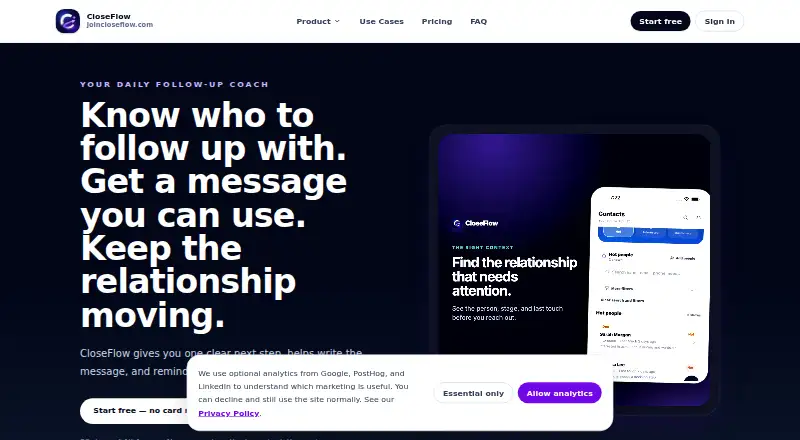
CloseFlow helps relationship-driven sellers decide whom to follow up with, what to say, and when to make the next contact. Its daily queue identifies people needing attention, why now is the right time, and which action to prioritize. AI drafts messages using contact context, notes, objections, stage, and the intended next step. A compliance review checks drafts for risky claims, pressure language, guarantees, and sensitive wording, with safer alternatives suggested when appropriate. CloseFlow does not send messages automatically: sellers review drafts and choose whether and how to send them. Contacts can be imported from CSV or Excel, pasted lists, or mobile phone contacts; the import process previews fields and flags duplicates. Google Contacts sync and Zapier or webhook feeds are described as possible future additions, while current imports focus on those three methods. CloseFlow runs in a browser and native iPhone and Android apps using the same account. It offers a 30-day free account period with no payment method or automatic charge required. Afterward, All Access costs $19.99 a month, and subscription requires an active choice.
Who it suits
CloseFlow is aimed at independent and relationship-driven sellers, including direct sellers, consultants, creators, real estate professionals, and service providers. Small teams may also use it, with leaders seeing privacy-safe progress summaries rather than private notes or full contact lists by default.
What it does well
- Daily queue prioritizes follow-ups and next steps.
- AI drafts use contact context and notes.
- Draft review flags risky or pressuring language.
- Imports accept files, pasted lists, and phone contacts.
- Available on web, iPhone, and Android.
What to know first
- No free plan is listed.
- Messages are not sent automatically.
- Google Contacts sync is a possible future expansion.
- AI features may send relevant text and context to an AI provider.
Limits
The free account period lasts 30 days, and access may pause afterward unless you subscribe. All Access costs $19.99 a month after that period.
Plans
| Plan | Billed and limits | Price |
|---|---|---|
| All Access (free account period) | 30 days; no payment method required and no automatic charge · every available feature · access may pause after day 30 unless you subscribe | Free |
| All Access | per month, after the 30-day free account period; subscription requires an active choice · contacts and imports · AI-assisted follow-up messages · message safety checks · daily action list · web, iPhone, and Android · reminders · relationship timeline · privacy-safe team coaching | $19.99 a month |
As joincloseflow.com lists them, read 4 Oct 2026. The maker's own page has the final word.
Getting started
- Open https://www.joincloseflow.com/ in a browser, or use the iPhone or Android app.
- Start the 30-day All Access free account period; no payment method is required.
- Import contacts from CSV or Excel, paste a list, or use mobile phone contacts.
- Review the daily action list and AI-assisted message drafts.
- Review safety suggestions, then choose whether and how to send each message.
- After the free account period, actively choose whether to subscribe to All Access at $19.99 a month.
Verdict
CloseFlow combines prioritized follow-up prompts with AI drafting and a safety review, while leaving sending decisions to the seller. It offers a 30-day free account period, followed by an optional $19.99 a month subscription.
Questions
How much does CloseFlow cost?
The All Access plan is $19.99 a month after the 30-day free account period. Subscribing requires an active choice.
Is there a free plan or trial?
There is no ongoing free plan. The All Access free account period lasts 30 days, needs no payment method, and does not automatically charge; access may pause afterward unless you subscribe.
Which platforms does CloseFlow support?
It is available as a browser app and native iPhone and Android apps, using the same account.
Does CloseFlow send messages automatically?
No. Sellers review drafts and choose whether and how to send them.
How can I import contacts?
Contacts can be imported from CSV or Excel files, pasted lists, or mobile phone contacts. The import flow previews fields and flags duplicates.
What happens to AI message data?
When AI features are used, relevant message text and contact context may be sent to an AI provider or processed through CloseFlow’s backend.
Facts from CloseFlow's own pages
- AI data handling
- Relevant message text and contact context may be sent to an AI provider or processed through CloseFlow’s backend when AI features are used. · joincloseflow.com, 4 Oct 2026
- Contact imports
- Contacts can be imported from CSV or Excel, pasted lists, and mobile phone contacts; the import flow previews fields and flags duplicates. · joincloseflow.com, 4 Oct 2026
- Daily actions
- Its daily queue shows who to follow up with, why they matter now, and which next step should come first. · joincloseflow.com, 4 Oct 2026
- Data use
- The privacy policy says CloseFlow does not sell personal information or use contact lists or customer relationship data for third-party advertising. · joincloseflow.com, 4 Oct 2026
- Integrations
- Google Contacts sync and Zapier or webhook feeds are described as possible future expansions; the current focus is file, pasted-list, and phone-contact imports. · joincloseflow.com, 4 Oct 2026
- Manual sending
- CloseFlow does not auto-send messages; sellers review drafts and choose whether and how to send them. · joincloseflow.com, 4 Oct 2026
- Message drafts
- AI drafts warm, low-pressure follow-up messages using contact context, notes, objections, stage, and the intended next step. · joincloseflow.com, 4 Oct 2026
- Platform availability
- CloseFlow is available as a browser app and native iPhone and Android apps using the same account. · joincloseflow.com, 4 Oct 2026
- Purpose
- CloseFlow helps relationship-driven sellers decide who to follow up with, draft a message, and schedule the next touch. · joincloseflow.com, 4 Oct 2026
- Safety review
- Compliance review checks drafts for risky claims, pressure language, guarantees, and sensitive phrasing, and can suggest safer wording. · joincloseflow.com, 4 Oct 2026
- Security
- The privacy policy describes authentication controls, encrypted transport, cloud access controls, and least-privilege practices as safeguards. · joincloseflow.com, 4 Oct 2026
- Support
- Support is handled by email at [email protected]. · joincloseflow.com, 4 Oct 2026
- Team privacy
- Team leaders see privacy-safe progress rollups and coaching cues, not private notes, message content, or full contact lists by default. · joincloseflow.com, 4 Oct 2026
- Who it serves
- CloseFlow is aimed at independent and relationship-driven sellers, including direct sellers, consultants, creators, real estate professionals, service providers, and small teams. · joincloseflow.com, 4 Oct 2026
Where CloseFlow stands on Freedom251
- Sales Follow-Up Software#20 of 42