Freedom251 › Help Authoring Tools

ClickHelp
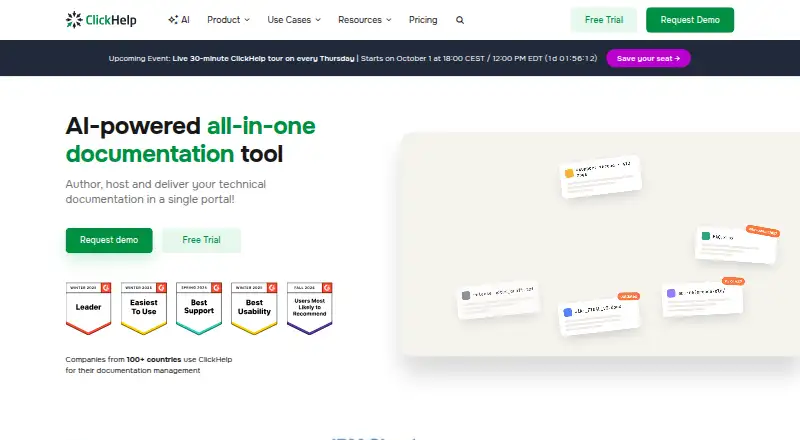
What ClickHelp is
ClickHelp is a cloud platform for authoring, hosting, and publishing technical documentation. It runs in a browser and requires JavaScript and a stable internet connection. Authors can reuse material with snippets, variables, and conditions, while topic statuses, reviewer accounts, and update notifications support review workflows. Reporting covers project readiness, content contribution, reader behavior, readability, and more than 30 topic content metrics. ClickHelp lists 20+ out-of-the-box integrations, including Google Analytics, Azure AD, Salesforce, and Google Translate, and supports Zapier. Its optional AI Suite includes AnswerGenius, AI Overview in search results, and WriteAssist, with 30,000 monthly CAPs and no overage charges. The company states it is SOC 2 Type II certified, encrypts data at rest with AES-256 and in transit with TLS 1.2+, makes daily backups, and has a 99.5% uptime SLA. Hosting locations include Luxembourg, the USA, and Australia, but the authoring environment cannot be installed on-premises. The 14-day full-access trial needs no credit card. Plans start at $194 a month before tax.
Who it suits
ClickHelp suits teams that create and publish technical documentation and need review workflows, reporting, and reusable content. It is aimed at organizations comfortable working in a browser with a stable internet connection.
What it does well
- Reusable content with snippets, variables, and conditions
- Reporting includes more than 30 topic metrics
- Lists 20+ integrations and supports Zapier
- 14-day full-access trial requires no credit card
What to know first
- No free plan
- Requires JavaScript and a stable internet connection
- Authoring environment cannot be installed on-premises
- Starter plan includes 500 topics
Limits
The cheapest plan, Starter, costs $194 a month before tax and includes 500 topics, 2 contributors, one documentation site, and 5 GB of file storage. The 14-day trial offers full platform access equivalent to Professional with the Translation Module included.
Plans
| Plan | Billed and limits | Price |
|---|---|---|
| Starter | $2,328.00 per year (= $194.00/month, billed annually) · 1 documentation site · unlimited projects · unlimited reader accounts · 500 topics · 2 contributors · 5 GB file storage | $2,328 a year |
| Growth | $3,900.00 per year (= $325.00/month, billed annually) · 1 documentation site · unlimited projects · unlimited reader accounts · unlimited topics · 5 contributors · 15 GB file storage | $3,900 a year |
| Professional | $7,680.00 per year (= $640.00/month, billed annually) · 1 documentation site · unlimited projects · unlimited reader accounts · unlimited topics · 10 contributors · 30 GB file storage | $7,680 a year |
As clickhelp.com lists them, read 30 Sept 2026. The maker's own page has the final word.
Getting started
- Open https://clickhelp.com/.
- Start the 14-day full-access trial; no credit card is needed.
- Use the browser-based authoring environment with JavaScript enabled and a stable internet connection.
- Choose hosting in Luxembourg, the USA, or Australia.
- Select a plan: Starter, Growth, or Professional.
Verdict
ClickHelp combines documentation authoring and publishing with collaboration, analytics, and optional AI tools. Its browser-only authoring and paid plans are important considerations for teams evaluating it.
Questions
How much does ClickHelp cost?
Starter is $194 a month before tax, Growth is $325 a month before tax, and Professional is $640 a month before tax.
Does ClickHelp have a free plan or trial?
It has no free plan. Its free trial lasts 14 days, includes full platform access equivalent to Professional with the Translation Module, and requires no credit card.
Which platforms does ClickHelp support?
The listed platforms are API and web. It runs in a browser and requires JavaScript and a stable internet connection.
Can ClickHelp be installed on-premises?
Customers can choose hosting in Luxembourg, the USA, or Australia, but the authoring environment cannot be installed on-premises.
What integrations does ClickHelp offer?
It lists more than 20 out-of-the-box integrations, including Google Analytics, Google, Azure AD, Salesforce, GraphComment, and Google Translate, and supports Zapier.
What does Starter include?
Starter includes one documentation site, 500 topics, 2 contributors, and 5 GB of file storage.
Facts from ClickHelp's own pages
- AI
- The optional AI Suite includes AnswerGenius, AI Overview in search results, and WriteAssist, with 30,000 monthly CAPs and no overage charges. · clickhelp.com, 30 Sept 2026
- Analytics
- Reporting includes project readiness, content contribution, reader behavior, readability, and more than 30 topic content metrics. · clickhelp.com, 30 Sept 2026
- Browser requirements
- ClickHelp runs in a browser without installs or downloads and requires JavaScript and a stable internet connection. · docs.clickhelp.com, 30 Sept 2026
- Content reuse
- The platform supports reusable content through snippets, variables, and conditions. · clickhelp.com, 30 Sept 2026
- Custom domain
- Yes · clickhelp.com, 20 Sept 2026
- Data protection
- The site states AES-256 encryption at rest, TLS 1.2+ in transit, daily automatic backups, and a 99.5% uptime SLA. · clickhelp.com, 30 Sept 2026
- Free plan
- No · clickhelp.com, 20 Sept 2026
- Hosting
- Customers can choose data hosting in Luxembourg, the USA, or Australia; the authoring environment cannot be installed on-premises. · docs.clickhelp.com, 30 Sept 2026
- Integrations
- ClickHelp lists 20+ out-of-the-box integrations, including Google Analytics, Google, Azure AD, Salesforce, GraphComment, and Google Translate, and supports Zapier. · docs.clickhelp.com, 30 Sept 2026
- Notable limit
- The Starter plan includes 500 topics, while Growth and Professional list unlimited topics. · clickhelp.com, 30 Sept 2026
- Product
- ClickHelp is a cloud documentation platform for authoring, hosting, and publishing technical documentation. · clickhelp.com, 30 Sept 2026
- Security
- The site states ClickHelp is SOC 2 Type II certified and that customer content is never used to train AI models. · clickhelp.com, 30 Sept 2026
- Paid from
- 194 · clickhelp.com, 20 Sept 2026
- Support
- ClickHelp says professional support is provided free to all clients. · clickhelp.com, 30 Sept 2026
- Teamwork
- Its workflow and review tools include topic statuses, reviewer accounts, and email notifications for topic updates. · clickhelp.com, 30 Sept 2026
- Trial
- The free trial provides access to all platform features, equivalent to the Professional plan with the Translation Module included. · clickhelp.com, 30 Sept 2026
- Trial term
- The current trial page advertises a 14-day full-access trial with no credit card needed. · clickhelp.com, 30 Sept 2026
Where ClickHelp stands on Freedom251
- Help Authoring Tools#6 of 29
- Technical Documentation Software#25 of 37
- Knowledge base software#98 of 138
- Technical Writing Platforms#21 of 27