Freedom251 › Contractor Payment Software

Cleo Pay
What Cleo Pay is
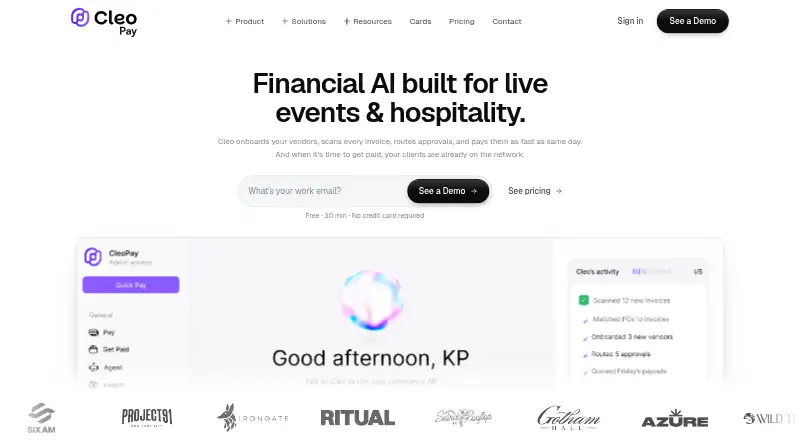
Cleo Pay automates accounts payable for small and mid-sized businesses, covering invoice intake, approvals, vendor onboarding, ACH payments, W-9 collection, 1099 compliance, and QuickBooks Online synchronization. Users can forward invoices by email or upload photos; AI extracts vendor, amount, and line-item details and maps expenses to QuickBooks accounts. Approval chains can be based on amount, GL code, or vendor, and approvers can act from email or mobile. Businesses can schedule ACH payments and track transfers through scheduled, processing, paid, or error statuses. Vendors can use a web link to submit W-9 details and connect a bank through Plaid without downloading an app or paying account fees. Cleo Pay says Plaid connections use OAuth, credentials do not reach its servers, and sensitive data is encrypted at rest and in transit. The two-way QuickBooks Online connection syncs vendor records, invoices, bills, payments, and chart-of-accounts data. The free Get Paid plan is for vendors and contractors and includes incoming payments only. Paid plans start at $99 per month, with monthly payment allowances and extra-payment charges.
Who it suits
Cleo Pay is aimed at small and mid-sized businesses, especially hospitality and service operators such as restaurants, hotels, and event production companies. Vendors and contractors can use Get Paid to receive incoming payments.
What it does well
- Invoices can be forwarded by email or uploaded as photos.
- Approvals can be set by amount, GL code, or vendor.
- Scheduled ACH transfers have trackable statuses.
- QuickBooks Online syncs data in both directions.
- Vendors can onboard through a web link without app fees.
What to know first
- Get Paid does not include outbound payments.
- Basic includes 15 monthly payments.
- Extra payments cost $3 each on Basic.
- Paid plans require a monthly subscription.
Limits
The free Get Paid plan has one user seat and includes unlimited incoming payments, but no outbound payments. Basic includes 15 payments per month and one seat, with each additional payment costing $3; Plus includes 50 payments and three seats, with additional payments at $2.50 each; Pro includes 100 payments and ten seats, with additional payments at $2 each.
Plans
| Plan | Billed and limits | Price |
|---|---|---|
| Get Paid | free forever · send invoices · receive unlimited payments from Cleo Pay customers | Free |
| Venues & Promoters Plus | $199/mo · venues & promotion companies · 50 payments/month · $2.50/additional payment · 3 user seats | $199 a month |
| Growth | yearly ($2,868/year; regular $299/mo) · 5 seats · 100 payments/month · AI Finance Manager · same-day payments · guided migration · extra payments $2 each | $239 a month |
| Pro | $299/mo · 100 payments/month · $2/additional payment · 10 user seats · dedicated support | $299 a month |
| Max | yearly ($4,788/year; regular $499/mo) · 15 seats · 300 payments/month · API and MCP access · AI budgeting · extra payments $1 each | $399 a month |
| Starter | yearly ($948/year; regular $99/mo) · 2 seats · 20 payments/month · charge cards · AI bill scanning · extra payments $3 each | $79 a month |
| Basic | $99/mo · independent business operators · 15 payments/month · $3/additional payment · 1 user seat | $99 a month |
| Custom | unlimited seats · volume payment pricing · multiple venues/entities · custom integrations | On request |
As cleo-pay.com lists them, read 14 Oct 2026. The maker's own page has the final word.
Getting started
- Open cleo-pay.com on the web, or use its Android or iOS platform.
- Choose the free Get Paid plan to receive incoming payments as a vendor or contractor.
- Select a paid plan for business payments and its monthly payment allowance.
- Invite vendors by link to submit W-9 information and connect a bank through Plaid.
- Forward invoices by email or upload a photo, then set approval chains.
- Connect QuickBooks Online for two-way syncing of accounting data.
Cleo Pay is accounts-payable software for small and mid-sized businesses, particularly hospitality and service operators. It is best suited to teams that want invoice processing, vendor approvals, ACH payments, and QuickBooks Online working together; vendors can onboard and receive payments without downloading an app.
Overview
The workflow covers invoice intake through payment tracking: businesses can collect invoices, route them for approval, onboard vendors, and pay by ACH. That breadth is useful for operators managing recurring vendor bills, but the product’s accounting connection is specifically to QuickBooks Online, so it is a narrower fit for businesses using other accounting systems.
Vendors complete onboarding and receive payments through a web link without account fees. For businesses that need to connect their own systems, Cleo Pay also provides a REST API covering payables, contacts, bank accounts, and payments. The company was founded in 2025 and is headquartered in New York.
Key features
Invoice capture and QuickBooks sync
Invoices can be forwarded by email or submitted as a photo. AI extracts vendor, amount, and line-item details and maps expenses to QuickBooks accounts, reducing manual handling between receipt and coding. The two-way QuickBooks Online connection syncs vendor records, invoices, bills, payments, and chart-of-accounts data, which makes Cleo Pay most useful to businesses already using QuickBooks Online.
Vendor onboarding and approvals
Businesses invite vendors by link; vendors provide W-9 information and connect a bank account through Plaid to receive ACH payments. Cleo Pay says onboarding includes TIN verification. Approval chains can be set by amount, GL code, or vendor, and approvers can respond from email or mobile. Those routing options suit businesses with different approval rules for different bills, though the number of seats in each plan will matter as the team grows.
Payments and safeguards
Businesses can pay vendors by ACH, schedule future payments, and follow transfers through scheduled, processing, paid, or error statuses. Cleo Pay says Plaid connections use OAuth, bank credentials do not touch its servers, and sensitive data is encrypted at rest and in transit. Audit trails add a record of payment activity. Support is by email, with a personalized 15-minute onboarding call for setup help and payment issues.
Pricing
The free Get Paid plan costs nothing and is for vendors and contractors. It includes one user seat and unlimited incoming payments, but no outbound payments. It is useful for receiving funds, not for a business that needs to pay its own vendors.
Basic costs $99 a month, billed $99/mo, and is aimed at independent business operators. It includes one user seat and 15 payments per month; each additional payment costs $3. This is the entry point for businesses paying vendors, but the single seat and low allowance can become restrictive as payment volume or team involvement increases.
Venues & Promoters Plus costs $199 a month, billed $199/mo. It includes three seats and 50 payments monthly, with additional payments at $2.50 each. Its higher allowance and shared access make it a more natural fit for venues and promotion companies handling more bills than Basic can cover.
Pro costs $299 a month, billed $299/mo. It raises the allowance to 100 payments, includes 10 seats, charges $2 for each additional payment, and adds dedicated support. It is the strongest fit for larger teams with higher payment volume; users should still compare the allowance and overage charge with their expected monthly total.
Platforms
Cleo Pay supports Android, iOS, web, and API access. Its payout coverage is single-country, so businesses needing payouts across multiple countries should look elsewhere.
Who it's for
Cleo Pay is aimed at small and mid-sized hospitality and service businesses, including restaurants, hotels, and event production companies. It suits teams that use QuickBooks Online, need configurable invoice approvals, and want vendors to submit tax and bank details through self-service onboarding. It is less suitable for organizations needing multiple-country payouts, a different accounting integration, or outbound payments at no monthly cost.
Pros and cons
- Pros: Invoice capture, approval routing, vendor onboarding, ACH payments, and two-way QuickBooks Online sync sit in one workflow.
- Pros: Vendors can onboard and receive payments through a web link without an app download or account fee.
- Pros: Approval rules can vary by amount, GL code, or vendor, with approvals available by email or mobile.
- Cons: The free plan excludes outbound payments, so businesses must take a paid plan to pay vendors.
- Cons: Paid plans cap monthly payments and charge for each payment above the allowance.
- Cons: Basic has only one seat, and payout coverage is limited to a single country.
Alternatives
For a broader set of contractor payment software options, compare tools by their payment and workforce needs. PayWow is worth considering when unlimited contractors and check payments matter; its free Basic plan has limited reports, while Pro costs $9 a month. Zoho Payroll may suit teams seeking payroll software, with a free tier for up to 10 employees and basic payroll at no cost. Plane Contractor Management is an option when hiring, onboarding, contractor and employee records, custom reports, holidays, and time tracking are the priority. Lano Contractor Management may fit businesses needing compliant contracts across 170+ countries; its contractor plan costs €19 a month per contractor. YunoJuno Contractor Payments is another contractor-network option, with custom pricing. IRIS Practice Engine, Petl Pay, and BuildFair are also alternatives to compare.
Verdict
Cleo Pay is a strong fit for a QuickBooks Online business that wants to connect invoice handling, approvals, vendor compliance, and ACH payments. Its clearest advantages are the linked workflow and vendor self-service; the main reasons to look elsewhere are the single-country payout scope, lack of free outbound payments, and paid-plan limits with per-payment overages.
Verdict
Cleo Pay brings invoice handling, approvals, vendor onboarding, payments, and QuickBooks Online sync into one accounts-payable workflow. Check the plan’s payment allowance and additional-payment charge against expected volume.
Questions
Is there a free Cleo Pay plan?
Yes. Get Paid is free for vendors and contractors, with one user seat and unlimited incoming payments. It does not include outbound payments.
How much do Cleo Pay's business plans cost?
Basic is $99 per month, Venues & Promoters Plus is $199 per month, and Pro is $299 per month.
Which platforms does Cleo Pay support?
Cleo Pay lists Android, iOS, web, and API access.
Does Cleo Pay connect to QuickBooks?
Yes. Its two-way QuickBooks Online connection syncs vendor records, invoices, bills, payments, and chart-of-accounts data.
Can vendors receive payments without installing an app?
Yes. Vendors can onboard and receive payments through a web link without downloading an app or paying account fees.
What payment limits apply to paid plans?
Basic includes 15 monthly payments, Plus includes 50, and Pro includes 100. Additional payments are charged at $3, $2.50, and $2 each, respectively.
Facts from Cleo Pay's own pages
- 1099 compliance
- Cleo collects W-9s, tracks contractor totals, prepares 1099 forms and supports electronic filing. · cleo-pay.com, 14 Oct 2026
- ACH payments
- The service supports standard ACH, next-day or same-day transfers, with payment status tracking and scheduling. · cleo-pay.com, 14 Oct 2026
- Additional safeguards
- Cleo Pay says its vendor onboarding includes TIN verification and its payment workflow includes audit trails. · cleo-pay.com, 30 Sept 2026
- AI Finance Manager
- Growth and higher plans include an assistant that answers questions about bills, vendors and cash in plain English. · cleo-pay.com, 14 Oct 2026
- AI invoice scanning
- Users can upload or email invoices and Cleo extracts vendors, amounts, dates and line items, then maps expenses to QuickBooks accounts. · cleo-pay.com, 14 Oct 2026
- API and MCP
- The Cleo Pay API and MCP server are included with Max and Custom plans for connecting agents such as Claude or ChatGPT. · cleo-pay.com, 14 Oct 2026
- Approvals
- Approval chains can be set by amount, GL code, or vendor, and approvers can approve from email or mobile. · cleo-pay.com, 30 Sept 2026
- Approval workflows
- Invoices can follow single-step, multi-step or custom approval rules based on amount, GL code, vendor or location. · cleo-pay.com, 14 Oct 2026
- Cards
- Every subscription plan includes commercial charge cards, while Max adds budgeting by team, event or venue. · cleo-pay.com, 14 Oct 2026
- Company locations
- LinkedIn says Cleo Pay is based in New York and Miami. · linkedin.com, 14 Oct 2026
- Company size on LinkedIn
- LinkedIn lists Cleo Pay as privately held with 2–10 employees and eight discoverable employees. · linkedin.com, 14 Oct 2026
- Core audience
- The company says Cleo Pay is built for hospitality and service businesses, including restaurants, hotels, and event production companies. · cleo-pay.com, 30 Sept 2026
- Developer access
- Cleo Pay provides a REST API with endpoints for payables, contacts, bank accounts, and payments. · docs.cleo-pay.com, 30 Sept 2026
- Developer documentation
- The website links to a separate developers area described as API documentation and integration tools. · cleo-pay.com, 14 Oct 2026
- Eligibility limit
- Terms restrict the service to United States residents or U.S.-registered businesses with a U.S. bank account and tax ID. · cleo-pay.com, 14 Oct 2026
- Founded
- 2025 · cleo-pay.com, 28 Sept 2026
- Founded year
- LinkedIn lists Cleo Pay as founded in 2024. · linkedin.com, 14 Oct 2026
- Funding
- FinTech Futures reported that the founders and angel investors self-funded Cleo Pay, with Dwolla and Plaid supplying payment and open-banking infrastructure. · fintechfutures.com, 14 Oct 2026
- Geographic limitation
- Terms state that Cleo facilitates payments between U.S.-based businesses and U.S.-based contractors, vendors and sole proprietors. · cleo-pay.com, 14 Oct 2026
- Headquarters
- New York, United States · cleo-pay.com, 28 Sept 2026
- Independent funding record
- Gritt lists one investor, Steve Kaplan, and records the latest funding in December 2025. · gritt.io, 14 Oct 2026
- Integration
- Cleo Pay syncs vendor records, invoices, bills, payments, and chart-of-accounts data with QuickBooks Online using a two-way connection. · cleo-pay.com, 30 Sept 2026
- Invoice capture
- Users can forward invoices by email or upload a photo, and AI extracts vendor, amount, and line-item details and maps expenses to QuickBooks accounts. · cleo-pay.com, 30 Sept 2026
- Limit: no API on lower tiers
- Starter and Growth exclude the Cleo Pay API, MCP server and custom integrations. · cleo-pay.com, 14 Oct 2026
Where Cleo Pay stands on Freedom251
- Contractor Payment Software#1 of 26