Freedom251 › AI Video Search Tools

Cinestar
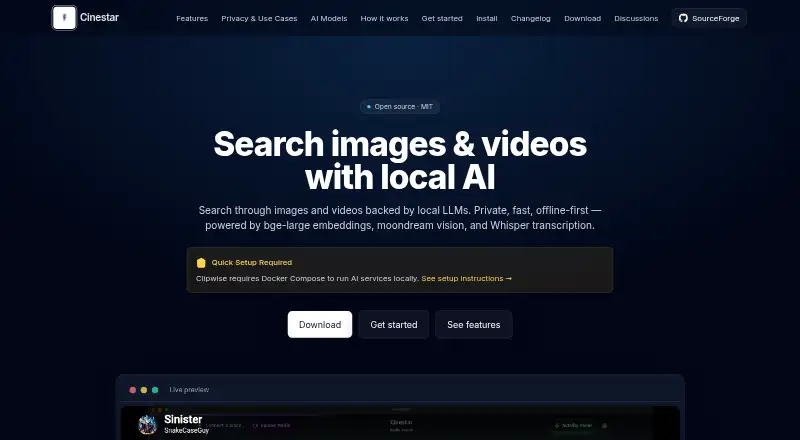
What Cinestar is
Cinestar is an open-source application for searching images and videos with AI processing performed locally. It can ingest folders or videos, transcribe audio with Whisper, embed frames with BGE and generate captions with Moondream. Natural-language searches return matching moments with timecodes and thumbnails. Cinestar stores vectors in SQLite-Vec and uses Llama 3.2 for language tasks and content organization. The maker says it has no analytics, telemetry, usage tracking or data uploads. The MIT-licensed open-source core is listed as free and is available for Linux and macOS. Local AI services require Ollama; the listed BGE, Moondream and Llama 3.2 models total about 2–4 GB to download. The site also describes plugins for face recognition, album creation, metadata extraction, transcoding, collaboration, LDAP, audit trails, backups, compliance reporting and multi-user access, plus an open API for custom plugins. The maker identifies potential uses for personal media managers, content creators, media organizations and academic or market researchers.
Who it suits
Cinestar may suit personal media managers, content creators, media organizations and academic or market researchers who want local AI-assisted search across images and videos.
What it does well
- Natural-language searches return timecodes and thumbnails
- AI processing runs locally, according to the maker
- Open-source core is listed as free
- An open API supports custom plugins
What to know first
- Local AI services require Ollama
- Listed model downloads total about 2–4 GB
- Available for Linux and macOS
Limits
The listed free plan is the open-source core, and local AI services require Ollama. The guide lists model downloads totaling about 2–4 GB.
Plans
| Plan | Billed and limits | Price |
|---|---|---|
| Cinestar (MIT open-source core) | Open-source core; local AI services require Ollama | Free |
As cinestar.sourceforge.io lists them, read 4 Oct 2026. The maker's own page has the final word.
Getting started
- Open the Cinestar website and follow its installation guide.
- Install Ollama for local AI services.
- Download the listed BGE, Moondream, and Llama 3.2 models.
- On macOS, download Cinestar.app, move it to Applications, and open it past Gatekeeper.
- On Linux, follow the guide's Linux commands for installing Ollama.
- Add folders or videos for indexing and search.
Overview
Cinestar is open-source software for searching images and video on Linux and macOS. It is best suited to people who want to find material inside local collections and are willing to install local AI services. Its breadth of search is useful, but the setup has a real cost in time and downloads.
Key features
Cinestar can ingest folders and videos, transcribe audio with Whisper, turn video frames into BGE embeddings, and caption images and video with Moondream v2. Llama 3.2 (3B) processes language tasks and organizes content, while SQLite-Vec stores vectors. Natural-language searches return moments with timecodes and thumbnails, helping users locate a scene rather than just a file. Visual, audio, and multimodal search make it a flexible option for collections that need more than one way to search.
The maker says AI processing runs locally and Cinestar has no analytics, telemetry, usage tracking, or data uploads. That makes it a compelling choice for privacy-conscious users, though local processing puts responsibility for setup and operation on the user. Ollama is required, and the BGE, Moondream, and Llama 3.2 model downloads total about 2–4 GB.
Plugins are intended to add capabilities such as face recognition, metadata extraction, transcoding, collaboration, LDAP, audit trails, backups, compliance reporting, and multi-user access. An open API allows custom plugins. This extensibility may suit organizations with specialized workflows, but the core's open API should not be mistaken for a ready-made guarantee that a particular integration meets their needs. Cinestar is released under the MIT license.
Pricing
Cinestar's MIT open-source core costs nothing. There is no paid tier in the stated plan, so it suits users who can work with the core software and local AI setup rather than those seeking a priced support or hosted option. The tradeoff is that free does not mean setup-free: Ollama and roughly 2–4 GB of model downloads are required for local AI services.
Platforms
Cinestar supports Linux and macOS. The macOS guide walks users through downloading Cinestar.app, moving it to Applications, and opening it past Gatekeeper; the Linux guide includes commands for installing Ollama. Users on other platforms should look elsewhere.
Who it's for
Cinestar fits personal media managers, content creators, media organizations, and academic or market researchers who want local search across images and video. Its privacy stance and plugin API are particularly relevant to users who want control over where processing happens or need to adapt workflows. It is a weaker fit for people who want a hosted service, broad platform coverage, or to avoid installing models.
Pros and cons
- Pros: Local visual, audio, and multimodal search can surface moments with timecodes and thumbnails, useful for finding scenes across a collection.
- Pros: The maker's no-upload and no-tracking claims, combined with the MIT license, make Cinestar attractive to users who prioritize local control and an open-source core.
- Pros: An open API and a broad set of plugin use cases leave room to tailor it to specialized media workflows.
- Cons: Ollama is a prerequisite for AI services, and the listed models require about 2–4 GB of downloads; users must accept that setup burden.
- Cons: Linux and macOS are the supported platforms, limiting its reach for users on other systems.
Alternatives
AI Video Search Tools is a useful starting point for comparing more options. Choose FrameQuery instead if you need API, web, or Windows access as well as macOS; its free plan includes metadata search and local, Drive, and NAS sharing and backup, but no monthly indexing hours. Choose DISKO if you want a macOS and web option with screenwriting and shot-list tools and review links in its free 2 GB cloud plan. Scout Suite is a free, self-hosted Linux and macOS tool for multi-cloud security auditing, not a direct media-search substitute.
Twelve Labs may suit users who prefer API or web access and can work within its free allowance of 600 video minutes, 90-day index access, 10 hours per index, 100 videos per index, and five concurrent indexing tasks. ViSearch is another API, self-hosted, or web option; its free plan allows up to 20 minutes of video processing. Vivu offers API and web access, with a free monthly allowance of 20 indexing minutes and 50 search credits. MomentSearch is a free alternative spanning API, Linux, macOS, self-hosted, web, and Windows. SentrySearch is a free option for Linux, macOS, self-hosted, and Windows.
Verdict
Choose Cinestar if you want open-source, local-AI search across images and video, and are comfortable installing Ollama and the required models. Its strongest reason to choose is the combination of local processing, multimodal search, and an extensible API. Look elsewhere if you need a hosted workflow, support for platforms beyond Linux and macOS, or a lighter setup.
Verdict
Cinestar pairs local multimodal media search with an open-source core and an API for custom plugins. Using its AI services requires Ollama and downloading the listed models.
Questions
How much does Cinestar cost?
The listed MIT open-source core plan is free.
Which platforms does Cinestar support?
The listed platforms are Linux and macOS.
Is Cinestar open source?
Yes. The site identifies it as open source under the MIT license.
Does Cinestar process media locally?
The maker says AI processing runs locally and that Cinestar has no analytics, telemetry, usage tracking, or data uploads.
What does Cinestar need for local AI?
Ollama is required. The listed BGE, Moondream, and Llama 3.2 model downloads total about 2–4 GB.
Who makes Cinestar?
The provided facts identify Cinestar's website and describe what its maker says, but do not name the maker.
Facts from Cinestar's own pages
- AI dependency
- The install guide requires Ollama and lists roughly 2–4 GB of model downloads. · cinestar.sourceforge.io, 20 Oct 2026
- API
- Cinestar’s site advertises an open API for creating custom plugins. · cinestar.sourceforge.io, 20 Oct 2026
- Audio processing
- Audio files are transcribed and analyzed for searchable content. · github.com, 20 Oct 2026
- Changelog
- Version 0.1.52, dated October 11, 2025, unified configuration files and fixed Whisper model downloading in packaged builds. · cinestar.sourceforge.io, 20 Oct 2026
- Developer setup
- Building from source requires Node.js 18 or newer, npm, and the commands npm install followed by npm run dev or npm run build. · cinestar.sourceforge.io, 20 Oct 2026
- Docker deployment
- The documentation supplies Docker Compose configurations for Ollama and Whisper services, including optional multi-GPU load balancing. · cinestar.sourceforge.io, 20 Oct 2026
- Documentation depth
- The install page includes health checks, Ollama API testing, service ports, memory reservations, and Nginx routing examples. · cinestar.sourceforge.io, 20 Oct 2026
- Downloads
- The v0.1.64 directory contains Linux ARM64, Linux x86_64, and macOS installers dated November 5, 2025. · sourceforge.net, 20 Oct 2026
- GitHub activity
- The public release repository shows 1 star, 1 fork, and zero listed issues or pull requests. · github.com, 20 Oct 2026
- Image recognition
- Images receive AI-generated captions that can be searched. · github.com, 20 Oct 2026
- Independent architecture detail
- The independent report says Cinestar combines 70% vector similarity from sqlite-vec with 30% SQLite FTS5 scoring. · ikouchiha47.github.io, 20 Oct 2026
- Independent performance detail
- That write-up reports approximately 40 seconds to make a 60-minute video searchable during its initial audio phase. · ikouchiha47.github.io, 20 Oct 2026
- Independent technical report
- An independent engineering write-up describes a five-phase pipeline that makes video segments searchable after local Whisper transcription and later enriches them with visual captions. · ikouchiha47.github.io, 20 Oct 2026
- Indexing
- Vectors are stored in SQLite-Vec and organized with Llama 3.2. · cinestar.sourceforge.io, 20 Oct 2026
- Installation
- The install guide instructs macOS users to copy Cinestar.app into Applications and clear Gatekeeper quarantine when necessary. · cinestar.sourceforge.io, 20 Oct 2026
- Integrations
- Listed plugin possibilities include Google Photos-style face recognition, social sharing, LDAP, audit trails, backups, compliance reporting, and multi-user access control. · cinestar.sourceforge.io, 20 Oct 2026
- Intended users
- The maker presents personal media managers, content creators, media organizations, and academic or market researchers as use cases. · cinestar.sourceforge.io, 4 Oct 2026
- Licence
- Cinestar is presented as open source under the MIT licence. · sourceforge.net, 20 Oct 2026
- License
- The site identifies Cinestar as open source under the MIT license. · cinestar.sourceforge.io, 4 Oct 2026
- Limit: hardware demand
- The independent report estimates about 4 GB memory with all models loaded and about 500 MB of disk per hour of video. · ikouchiha47.github.io, 20 Oct 2026
- Limit: project maturity
- SourceForge labels Cinestar Alpha, shows zero weekly downloads on the project summary, and says users should be the first to post a review. · sourceforge.net, 20 Oct 2026
- Linux install
- The install guide includes Linux commands for installing Ollama and names Linux in the site's Mac/Linux install link. · cinestar.sourceforge.io, 4 Oct 2026
- Local processing
- The project says AI processing runs on the user’s own machine for privacy. · github.com, 20 Oct 2026
- macOS install
- The install guide provides steps for downloading Cinestar.app, moving it to Applications, and opening it past Gatekeeper. · cinestar.sourceforge.io, 4 Oct 2026
Where Cinestar stands on Freedom251
- AI Video Search Tools#1 of 24