Freedom251 › Cheque Printing Software
Checkrun
What Checkrun is
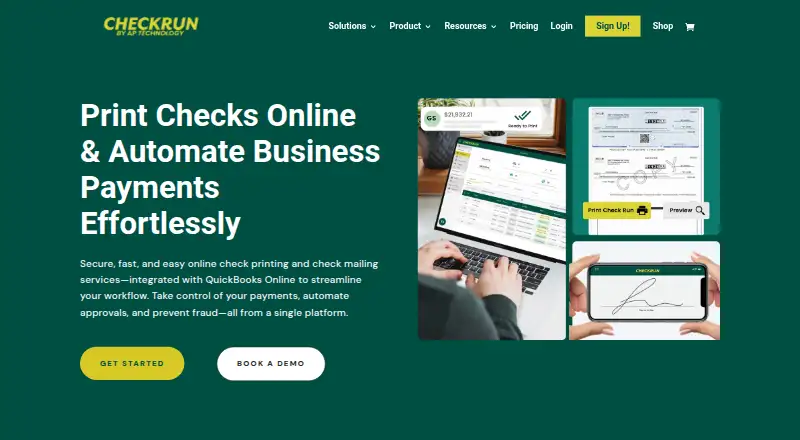
Checkrun is a cloud payment platform for businesses and accounting firms to manage bills from approval through payment. Vendors can be paid by paper check or ACH bank transfer, with remittance advice for electronic payments. Payment data syncs with QuickBooks Online in both directions in real time, and payment activity and check images can be attached to QuickBooks payments for reference. Teams can set approval workflows, roles, and permissions; mobile users can approve payments and sign checks. Checks can be printed on existing, preprinted, or blank stock, or sent through Print and Mail. Checkrun generates Positive Pay files for more than 200 bank formats and lets users customize checks with logos, watermarks, and a QR code for authenticity checks. It is available on Android, iOS, and the web. The Business subscription is $50 a month, billed monthly, with a $199 one-time implementation fee. Local check printing and ACH file export cost $0.35 per payment; Print and Mail costs $1.95 per check. A 15-day trial excludes full-layout checks and Print and Mail.
Who it suits
Checkrun suits small and mid-sized businesses, accountants, and bookkeepers that need to manage bill approvals and payments. It may fit teams using QuickBooks Online and paper checks or ACH transfers.
What it does well
- Two-way, real-time QuickBooks Online sync
- Approvals and check signing through mobile app
- Prints on existing, preprinted, or blank stock
- Positive Pay support for over 200 bank formats
What to know first
- No free plan
- 15-day trial excludes full-layout checks and Print and Mail
- $199 one-time implementation fee
- Printing, ACH export, and mail services have per-use charges
Limits
There is no free plan. The 15-day trial excludes full-layout checks and Print and Mail; the Business subscription allows up to 10 bank accounts and has a $199 one-time implementation fee.
Plans
| Plan | Billed and limits | Price |
|---|---|---|
| Business subscription | Monthly; the page also lists an annual option without stating its price. · Unlimited users · Up to 10 bank accounts · $199 one-time implementation fee · Local check printing $0.35/payment · ACH file export $0.35/payment · Print and Mail $1.95/check | $50 a month |
As checkrun.com lists them, read 30 Sept 2026. The maker's own page has the final word.
Getting started
- Visit the Checkrun website
- Choose the Business subscription or start the 15-day trial
- Use the web service or access the app on Android or iOS
- Connect payment data with QuickBooks Online
- Set approval workflows, roles and permissions
Verdict
Checkrun combines bill approvals, check printing, ACH payments, and QuickBooks Online syncing. Consider the monthly subscription, implementation fee, and transaction charges alongside the trial exclusions.
Questions
How much does Checkrun cost?
The Business subscription is $50 a month, billed monthly, plus a $199 one-time implementation fee. Local check printing and ACH file export cost $0.35 per payment, and Print and Mail costs $1.95 per check.
Does Checkrun have a free plan or trial?
There is no free plan. A 15-day trial is available, but full-layout checks and Print and Mail are excluded.
Which platforms does Checkrun support?
Checkrun is available on the web, Android and iOS.
Does Checkrun work with QuickBooks Online?
Yes. It syncs payment data with QuickBooks Online in both directions in real time, and payment activity and check images can be attached to QuickBooks payments.
Can Checkrun print checks and pay vendors electronically?
Yes. Vendors can be paid by paper check or ACH bank transfer. Checks can be printed locally on existing, preprinted or blank stock, or sent through Print and Mail.
Facts from Checkrun's own pages
- Approval controls
- The product supports custom approval workflows, user roles, and permissions, with approvals and check signing available through its mobile app. · checkrun.com, 30 Sept 2026
- Audit trail
- Payment activity and check images can be logged and attached to payments in QuickBooks Online for reference. · checkrun.com, 30 Sept 2026
- Check printing
- Users can print checks locally on existing, preprinted, or blank check stock, or use the Print and Mail service. · checkrun.com, 30 Sept 2026
- Check security
- Check customization includes logos, watermarks, and a secure QR code for payees to validate check authenticity. · checkrun.com, 30 Sept 2026
- Headquarters
- Carlsbad, California · checkrun.com, 28 Sept 2026
- Intended users
- Checkrun says it was designed for small and mid-sized businesses, accountants, and bookkeepers. · help.checkrun.com, 30 Sept 2026
- Mobile access
- The company describes Checkrun as a cloud platform and mobile application with mobile payment approvals. · checkrun.com, 30 Sept 2026
- Payment methods
- Users can pay vendors by paper check or ACH bank transfer, with remittance advice for electronic payments. · checkrun.com, 30 Sept 2026
- Positive Pay
- Checkrun generates Positive Pay files and says it supports more than 200 bank formats. · checkrun.com, 30 Sept 2026
- Purpose
- Checkrun is a cloud-based payment platform and mobile app for businesses and accounting firms to manage, approve, track, and pay business bills. · checkrun.com, 30 Sept 2026
- QuickBooks integration
- Checkrun syncs payment data with QuickBooks Online, and the site describes the sync as two-way and real-time. · checkrun.com, 30 Sept 2026
- Security claims
- Checkrun says its systems are backed by encryption, layered security, and secure infrastructure, and that it will not share customer data. · checkrun.com, 30 Sept 2026
- Support
- The pricing page includes customer support, and the site lists 1-833-242-5786 and [email protected]. · checkrun.com, 30 Sept 2026
- Trial limits
- During the 15-day trial, full-layout checks and Print and Mail services are excluded. · help.checkrun.com, 30 Sept 2026
Where Checkrun stands on Freedom251
- Cheque Printing Software#8 of 21
- Check Printing Software#16 of 28