Freedom251 › AAC Communication Software
Cboard
What Cboard is
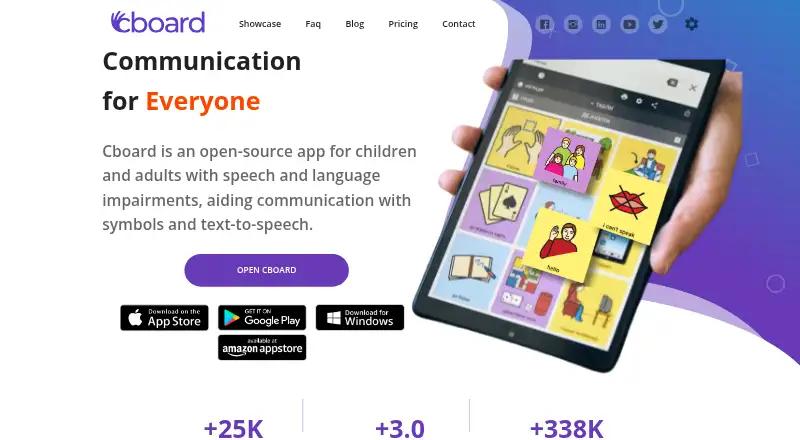
Cboard is an open-source communication app for children and adults with speech and language impairments. Users communicate with symbols and text-to-speech, and can personalize boards; registered users can save their changes to an account, while non-registered users cannot safely save changes. Live Mode lets users type into the output bar and combine text with symbols. Available voice controls include voice selection, pitch and speaking rate. Cboard states that it supports 46 languages and works on modern browsers, as well as Android, iOS, macOS and Windows. Offline use is available in Google Chrome on desktop and Android. Boards can be exported to OpenBoard Format, PDF or Cboard’s native format, and users can import OpenBoard files or previously exported files. Access methods include touchscreen, keyboard and mouse. A free plan is listed as free, billed Forever. The Pro Monthly Plan is $8 a month, and the Pro Yearly Plan is $79 a year. Listed plan features include online neural voices, board sharing, voice recording for tiles and a private support channel.
Who it suits
Cboard is intended for children and adults with speech and language impairments who communicate using symbols, text-to-speech or both. It also suits users who need boards on supported platforms or offline Chrome access on desktop and Android.
What it does well
- Supports symbols and text-to-speech.
- Offers voice, pitch and speaking-rate controls.
- States support for 46 languages.
- Boards export to OpenBoard Format, PDF or native format.
- Offline Chrome use on desktop and Android.
What to know first
- Non-registered users cannot safely save board changes.
- Offline support is specified for Chrome on desktop and Android.
- Pro Monthly Plan costs $8 a month.
- Pro Yearly Plan costs $79 a year.
Limits
The free plan is listed as free. The listed Pro options cost $8 a month or $79 a year; users without registration cannot safely save board changes, and offline use is supported only in Chrome on desktop and Android.
Plans
| Plan | Billed and limits | Price |
|---|---|---|
| Free | Forever · Basic communication features · symbol libraries · board creation and editing · limited feature set | Free |
| Pro Yearly Plan | Yearly · All Pro Monthly features | $79 a year |
| Pro Monthly Plan | Monthly · Online neural voices · copy and publish boards · copy tiles · analytics · board and phrase sharing · ad-free · OBF export · private support · tile voice recording | $8 a month |
As cboard.io lists them, read 14 Oct 2026. The maker's own page has the final word.
Getting started
- Open the Cboard website or use its app on Android, iOS, macOS, or Windows.
- Register or sign in with Google, Apple, Facebook, or an email address to save personalized board changes.
- Personalize boards and adjust the available voice, pitch, and speaking rate.
- Use Live Mode to combine typed text with symbols in the output bar.
- Choose the free plan or a Pro monthly or yearly plan for the listed features.
Overview
Cboard is an open-source AAC app for people with speech and language impairments, including children and adults. It is a strong fit for users who want to build symbol-based communication around speech output, then carry boards between formats. The trade-off is that reliable saving depends on an account, even though the app itself is free to use.
Key features
Cboard pairs symbols with text-to-speech and supports touchscreen, keyboard, and mouse access. Users can customize layouts, choose available voices, and adjust pitch and speaking rate. Cboard states support for 46 languages, making its language range a notable strength for a widely varied user base.
Live Mode lets users type into the output bar and combine typed text with symbols. That offers a way to express something beyond the prepared board without abandoning symbol-supported communication. Registered users can personalize boards and save changes to their accounts; users who do not register cannot safely save changes. Google, Apple, Facebook, and email sign-in options make account access flexible, but registration remains an important condition for dependable board editing.
Boards can be exported as OpenBoard Format (OBF), PDF, or Cboard's native format, and users can import OpenBoard files and previously exported files. This is useful for portability and keeping shareable copies. Cboard works in modern browsers and supports offline use in Google Chrome on desktop and Android, though that offline support is narrower than its overall platform reach.
Privacy measures Cboard says it uses include secured networks, SSL encryption for sensitive information, regular malware scanning, and gateway processing so transactions are not stored on its servers. Password resets are handled by email; Pro subscribers also get a private support channel.
Pricing
The Free plan costs nothing, billed Forever. It includes online neural voices, copying public boards and tiles, publishing and sharing boards, usage analytics, ad-free use, OBF export, phrase sharing, private support, and voice recording for tiles. That is an unusually broad set of listed capabilities for a no-cost plan, including the private support channel also named in the paid plans.
Pro Monthly costs $8 a month, billed Monthly; Pro Yearly costs $79 a year, billed Yearly. Both list the same included features as Free: online neural voices, public-board and tile copying, publishing, analytics, sharing, ad-free use, OBF export, phrase sharing, private support, and tile voice recording. The annual option costs less than twelve monthly payments at the stated rates, but both paid plans repeat the Free plan's feature set, so the published plan differences do not establish a practical reason to upgrade. No seat or usage quota is given.
Platforms
Cboard is available on Android, iOS, macOS, web, and Windows. It supports modern browsers, with offline use specifically supported in Google Chrome on desktop and Android. Users of other platforms should not assume offline availability.
Who it's for
Cboard suits children and adults with speech and language impairments who benefit from symbols, text-to-speech, adaptable boards, or multiple input methods. It is particularly appealing when export and import options matter, or when Chrome offline use on desktop or Android is useful. It is less suitable for someone who cannot or does not want to register but needs reliable saved board changes.
Pros and cons
- Pros: The combination of symbols, speech, Live Mode, and adjustable voice controls supports both prepared and typed communication.
- Pros: OBF, PDF, and native-format exports, plus imports, give users practical ways to move and preserve boards.
- Pros: The free plan includes a substantial feature set, while Android, iOS, macOS, web, and Windows coverage gives users broad device choice.
- Cons: Safe saving of personalized boards requires registration, which adds an account dependency to ongoing use.
- Cons: Offline use is specifically limited to Google Chrome on desktop and Android, not the full platform range.
- Cons: The paid tiers list the same features as Free, making their additional value unclear.
Alternatives
AAC Communication Software is a useful starting point for comparing AAC options across the category. Choose AsTeRICS AAC instead if a free option spanning Linux and self-hosted use is important. Jellow is another free-plan option for Android, iOS, web, and Windows users. Choose Speech Assistant AAC if Android, iOS, or macOS support and a one-time full-version upgrade are a better fit. Spoken may suit someone who wants a free core app with a trial for premium features. TD Snap is worth considering for iOS or Windows, though speaking requires a subscription after a one-month free trial. SymboTalk is a free-core alternative on Android and web, with cloud sharing, sync, and backup as paid features. CoughDrop offers a paid communicator plan at $9 a month, billed $9 per month per communicator, and a free trial. Niki Talk is another option to compare for its listed platform coverage.
Verdict
Choose Cboard if you need adaptable symbol-and-speech communication across several devices, with useful board import and export options and a capable free plan. Its account requirement for dependable saving is the main drawback; look elsewhere if saved boards must not depend on registration, or if you expect a clear feature distinction before paying for Pro.
Verdict
Cboard offers customizable symbol-and-speech communication, with board export and a range of access methods. Saving changes safely requires registration, and paid Pro plans are also listed.
Questions
Is Cboard free?
Yes. The Free plan is listed as free. Pro costs $8 a month or $79 a year.
Which platforms does Cboard support?
Cboard is available on web, Android, iOS, macOS, and Windows. It works in modern browsers.
Can Cboard work offline?
Offline use is supported in Google Chrome on desktop and Android.
Is Cboard open source?
Yes. Cboard is described as an open-source app.
Can users save and export boards?
Registered users can personalize boards and save changes to their accounts. Boards can be exported to OpenBoard Format, PDF, or Cboard’s native format.
How can users sign in?
Users can register or sign in with Google, Apple, Facebook, or an email address.
Facts from Cboard's own pages
- Authentication
- Users can register or sign in with Google, Apple, Facebook, or an email address. · cboard.io, 1 Oct 2026
- Board editing
- Users can add, remove, rearrange and customize symbols, tiles, folders and board layouts. · cboard.io, 14 Oct 2026
- Board portability
- Cboard supports export to OpenBoard Format, PDF, and its native format, plus importing OpenBoard and previously exported files. · cboard.io, 1 Oct 2026
- Browser support
- The product runs in modern browsers and supports desktop, tablet and mobile devices; offline operation is specified for Chrome on desktop and Android. · cboard.io, 14 Oct 2026
- Communication method
- The app facilitates communication with symbols and text-to-speech. · cboard.io, 1 Oct 2026
- Company backing
- LinkedIn says the project is supported by UNICEF's Office of Innovation and Microsoft. · linkedin.com, 14 Oct 2026
- Company profile
- LinkedIn lists Cboard as a Córdoba, Argentina software-development organization with 2-10 employees. · linkedin.com, 14 Oct 2026
- Developer API
- The project wiki points contributors to a separate Cboard API repository and a mobile application repository. · github.com, 14 Oct 2026
- Developer stack
- Development uses React, Redux and Material-UI, with npm start, npm test and npm run build workflows. · github.com, 14 Oct 2026
- Documentation and support
- User help covers configuration, speech, scanning, board editing, import/export and display settings, with password help handled through [email protected]. · cboard.io, 14 Oct 2026
- Import and export
- Boards can be exported as Cboard files, PDF or OpenBoard Format and imported from Cboard or OpenBoard files. · cboard.io, 14 Oct 2026
- Independent clinical review
- Healthify's April 2026 speech-language-therapist review rated Cboard four stars and described it as a relatively easy free resource with unusually broad language coverage. · healthify.nz, 14 Oct 2026
- Integrations
- The repository documents Crowdin for translations, BrowserStack for testing and Discord for developer collaboration. · github.com, 14 Oct 2026
- Intended users
- Cboard is designed for people with speech and language impairments, including children and adults. · cboard.io, 1 Oct 2026
- Languages
- The official FAQ says Cboard supports 46 languages. · cboard.io, 14 Oct 2026
- Licence
- Cboard code is released under the GNU General Public License version 3; bundled symbol sets have separate Creative Commons licences. · github.com, 14 Oct 2026
- Limit: Apple subscription and voices
- Apple reviewers complained that basic features require a subscription, some downloadable voices are unavailable on Apple devices, and word highlighting is missing. · apps.apple.com, 14 Oct 2026
- Limit: Google Play paywall
- Google Play reviewers objected that copying and other previously free functions became subscription features. · play.google.com, 14 Oct 2026
- Limit: Google Play saving
- A Google Play reviewer warned that edits may be lost across devices unless the user is logged in or synchronization works correctly. · play.google.com, 14 Oct 2026
- Limit: vocabulary coverage
- Healthify says the two free preset boards are not robust vocabulary sets and that creating personalized boards can take substantial time. · healthify.nz, 14 Oct 2026
- Live Mode
- Live Mode lets users type directly into the output bar and play the resulting speech quickly. · cboard.io, 14 Oct 2026
- Personalization
- Registered users can personalize boards and save changes to their accounts, while non-registered users cannot safely save changes. · cboard.io, 1 Oct 2026
- Phrase improvement
- An Improve Phrase setting uses artificial intelligence to grammatically improve an output phrase. · cboard.io, 14 Oct 2026
- Praise: Apple reviewer usability
- An Apple reviewer who had used Cboard for about two years called it easy to use and affordable. · apps.apple.com, 14 Oct 2026
Where Cboard stands on Freedom251
- AAC Communication Software#2 of 25