Freedom251 › AAC Communication Software
Speech Assistant AAC
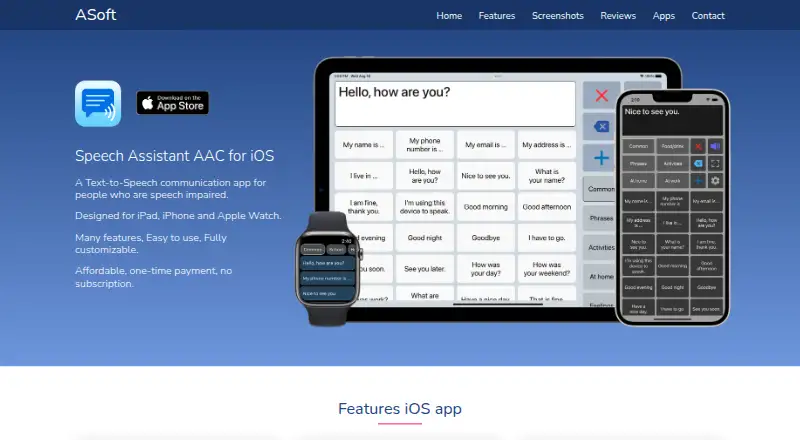
What Speech Assistant AAC is
Speech Assistant AAC is a text-to-speech communication app for people with speech impairments, including people with aphasia, MND/ALS, or autism. It can speak typed text or saved phrases, display messages in large full-screen type, and flip text for someone facing the user. Phrases can be organized into categories and subcategories, with buttons that include photos or symbols from a set of 3,400 Mulberry symbols. On iOS, voice options include iOS voices, Apple Personal Voice, recorded speech, and ElevenLabs voices. Backups can use iCloud, Mail, or AirDrop; AirDrop can also transfer categories, phrases, images, and recordings to another iPhone or iPad. The Android basic version costs nothing. Its full-version upgrade costs $9.99, paid once, with no subscription, and includes features such as unlimited categories and up to 250 phrases per category. The maker says the iOS app stores information locally and does not require an internet connection; Android data is also stored locally and can be deleted in the app or by uninstalling. The Android version cannot be used during phone calls.
Who it suits
Speech Assistant AAC is intended for people with speech impairments who need spoken phrases or typed messages presented aloud or on screen. It may also suit users who want to organize phrases with photos or symbols.
What it does well
- Speaks typed text and saved phrases.
- Displays messages in large type and can flip text.
- Phrase buttons can use 3,400 Mulberry symbols.
- Android full-version upgrade is a one-time payment.
- iOS app supports several voice options and backup methods.
What to know first
- Android version cannot be used during phone calls.
- Android full version requires a 9.99 USD one-time upgrade.
- Switch scanning is in a separate iOS version.
Limits
The free Android Basic version is distinct from the $9.99 USD one-time full-version upgrade, which adds listed features such as unlimited categories and up to 250 phrases per category. Android cannot be used during phone calls.
Plans
| Plan | Billed and limits | Price |
|---|---|---|
| Android basic | Basic version; full version upgrade adds features | Free |
| Android full version upgrade | One-time payment; no subscription · Unlimited categories · up to 250 phrases per category · backup and restore · colors · symbols · history · multiple conversations · voice recordings · user profiles | $9.99, paid once |
| iOS standard | One-time payment; no subscription | On request |
As asoft.nl lists them, read 3 Oct 2026. The maker's own page has the final word.
Getting started
- Visit https://www.asoft.nl/ for the app and maker contact form.
- Choose the Android or iOS version for your device.
- On Android, start with the free Basic version or choose the $9.99 USD one-time full-version upgrade.
- On iOS, use iPhone or iPad with iOS 12 or newer, Apple Watch with watchOS 9 or newer, or a Mac with Apple silicon.
- Create categories and subcategories, then add phrases and optional photos or symbols.
- Choose a supported voice or backup option on iOS if needed.
Speech Assistant AAC is an offline text-to-speech communication app for people with speech impairments, including aphasia, MND/ALS and autism. It suits users who rely on reusable phrases but still need to type spontaneous messages. The strongest case is a highly configurable phrase board with several visual and voice options; the main caveat is that Android cannot be used during phone calls.
Overview
The app combines typed speech with a library of saved phrases. Categories and subcategories let users arrange frequent messages around their own routines, while a fully customizable layout can be adapted to different presentation preferences. That approach is more practical for repeated conversations than starting from a blank text field every time, without removing the ability to compose something new.
Communication does not have to be spoken. Messages can be shown full screen in large type, and the text can be flipped for someone sitting opposite the user. Offline operation keeps those functions usable without an internet connection, which is important for dependable communication away from a network.
Key features
Phrases, symbols and presentation
Phrase buttons can include photos or symbols from the 3,400-symbol Mulberry set. This gives users a substantial visual vocabulary for personalizing buttons, though the usefulness of any symbol system depends on whether it matches the user's communication style. Typed text and saved phrases both produce speech output, so the app supports quick routine messages and one-off statements in the same interface.
Voices and transfer
On iOS, voice choices include built-in iOS voices, Apple Personal Voice, recorded speech and ElevenLabs voices. That range is valuable for users who need a familiar or personally recorded voice, although these options are specific to the Apple version. iOS backups can use iCloud, Mail or AirDrop; AirDrop can move categories, phrases, images and recordings to another iPhone or iPad, making device changes less disruptive.
Privacy and access
The iOS privacy policy says information is stored locally, not collected or shared, and that an internet connection is not required. Android data is likewise stored locally rather than on external servers and can be deleted in the app or by uninstalling it. Touch is supported, while switch scanning requires the separate Speech Assist Switch iOS version using iOS Switch Control and either touch or an external switch. iOS head tracking is not verified for this product.
Pricing
The Android Basic version is free. It provides the basic app, while the full-version upgrade costs 9.99 USD as a one-time payment with no subscription. The upgrade adds unlimited categories, up to 250 phrases per category, backup and restore, colors, symbols, history, multiple conversations, voice recordings and user profiles. Users who only need straightforward phrase and typing functions can start free; those needing the listed organization, backup or personalization tools must pay once.
The iOS Standard plan uses a one-time payment with no subscription, but its price is custom pricing. The Android upgrade's 250-phrase-per-category ceiling is the relevant capacity limit for users building very large libraries.
Platforms
Speech Assistant AAC is available on Android and iOS, with support for iPhone and iPad running iOS 12 or newer, Apple Watch with watchOS 9 or newer, and Macs with Apple silicon. Android has a significant limitation: it cannot be used during phone calls. The separate Speech Assist Switch edition is for iOS switch scanning rather than a general replacement for the main app.
Who it's for
Choose it if you need a personal phrase library, typed fallback, large-text display and offline access in one communication tool. It is particularly suited to people with aphasia, MND/ALS or autism who benefit from arranging recurring language and tailoring visual buttons. iOS users who want Apple Personal Voice, recorded speech or AirDrop transfer have the broadest voice and backup choices. Look elsewhere if communication during Android calls is essential or if you require a public API; no public API is described.
Pros and cons
- Pros: reusable phrases plus free typing; categories and subcategories; fully customizable layout; 3,400 Mulberry symbols and photo buttons; large full-screen and flipped text; offline use; local data storage; iOS voice, backup and AirDrop options.
- Cons: Android cannot operate during phone calls; the full Android feature set costs 9.99 USD; the Android upgrade allows up to 250 phrases per category; switch scanning is a separate iOS app; iOS pricing is custom.
Alternatives
AAC Communication Software is the broader directory choice when you want to compare communication tools rather than select this phrase-focused app.
Asterics AAC is free and spans Android, iOS, Linux, macOS, self-hosted, web and Windows, making it the better starting point for wider platform coverage.
Cboard has a free plan with online neural voices, board sharing and usage analytics, so choose it when collaborative, web-connected boards matter more than Speech Assistant AAC's offline model.
Jellow is another freemium AAC communicator for Android, iOS, web and Windows.
Avaz is a paid Android/iOS option with a free two-week trial, suited to readers who want to evaluate a paid product before committing.
Flexspeak AAC offers Android, iOS and web access, including an evaluator license with monthly visual limits and translation features.
Spoken is freemium on Android, iOS and macOS, with premium features offered through subscription or purchase.
TD Snap is an iOS/Windows freemium app whose speaking requires a subscription after a one-month trial.
Weave Chat AAC is free on Android and iOS, with optional board hosting at $4 a month.
Verdict
Speech Assistant AAC is a good choice for someone who wants customizable phrase-based communication, typed speech and offline, local-data operation, especially on iOS. Its main reasons to look elsewhere are the Android call restriction, the paid upgrade for the complete Android toolkit and the absence of a described public API.
Verdict
Speech Assistant AAC offers phrase-based and typed communication, with customizable presentation and symbol support. Android users should note the call limitation and the one-time upgrade for the full version.
Questions
Is Speech Assistant AAC free?
The Android Basic version is free. The Android full-version upgrade costs $9.99 USD once, with no subscription; an iOS standard plan is also described as a one-time payment, but no price is given here.
Which platforms does it support?
It is available on Android and iOS, and macOS is also listed. The iOS app supports iPhone and iPad with iOS 12 or newer, Apple Watch with watchOS 9 or newer, and Macs with Apple silicon.
Can it work offline?
Yes. The iOS privacy policy says the app does not require an internet connection, and the Android policy says user data is stored locally.
What voice options are available?
The iOS app supports iOS voices, Apple Personal Voice, recorded speech and ElevenLabs voices.
Can users back up or transfer phrases?
On iOS, backups can use iCloud, Mail or AirDrop. AirDrop can transfer categories, phrases, images and recordings to another iPhone or iPad.
Does it support switch access?
A separate iOS app called Speech Assist Switch supports switch scanning through iOS Switch Control, using touch or an external switch.
Facts from Speech Assistant AAC's own pages
- Accessibility version
- Speech Assist Switch is a separate iOS version for switch scanning with iOS Switch Control, using touch or an external switch. · asoft.nl, 3 Oct 2026
- Android data handling
- The Android privacy policy says user data is stored locally, is not stored on external servers, and can be deleted in the app or by uninstalling it. · asoft.nl, 3 Oct 2026
- Android limit
- The Android version cannot be used during phone calls, which the maker identifies as an Android limitation. · asoft.nl, 3 Oct 2026
- Backups
- The iOS app supports backups through iCloud, Mail or AirDrop, and AirDrop can transfer categories, phrases, images and recordings to another iPhone or iPad. · asoft.nl, 3 Oct 2026
- Communication tools
- The app can speak typed or saved phrases, display messages full screen in large type and flip text for someone opposite the user. · asoft.nl, 3 Oct 2026
- Customization
- Users can customize the app and organize phrases into categories and subcategories. · asoft.nl, 3 Oct 2026
- Headquarters
- The Hague, Netherlands · asoft.nl, 28 Sept 2026
- Integrations
- The maker describes support for iCloud, Mail, AirDrop, Apple Personal Voice and ElevenLabs; it does not describe a public API. · asoft.nl, 3 Oct 2026
- Platform support
- The iOS app runs on iPhone and iPad with iOS 12 or newer, Apple Watch with watchOS 9 or newer, and Macs with Apple silicon. · asoft.nl, 3 Oct 2026
- Privacy
- The iOS app privacy policy says the app does not collect or share information, stores information locally and does not require an internet connection. · asoft.nl, 3 Oct 2026
- Purpose
- Speech Assistant AAC is a text-to-speech communication app for people with speech impairments, including people with aphasia, MND/ALS or autism. · asoft.nl, 3 Oct 2026
- Support
- The maker invites users to submit questions or requests for information through its contact form. · asoft.nl, 3 Oct 2026
- Symbols and photos
- Phrase buttons can include photos or symbols from a set of 3,400 Mulberry symbols. · asoft.nl, 3 Oct 2026
- Voice options
- The iOS app supports iOS voices, Apple Personal Voice, recorded speech and ElevenLabs voices. · asoft.nl, 3 Oct 2026
Where Speech Assistant AAC stands on Freedom251
- AAC Communication Software#9 of 25