Freedom251 › Screen Recording Software

Capscreen
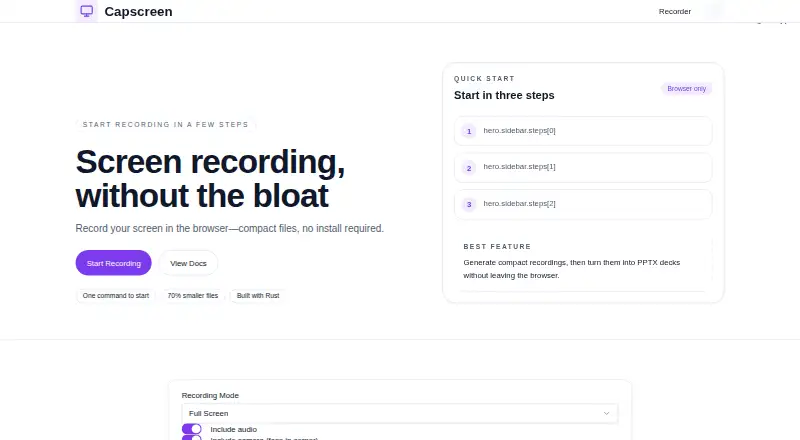
What Capscreen is
Capscreen is a free, open-source screen recorder with a browser recorder and a native command-line tool for macOS. The browser recorder works on macOS, Windows, and Linux, while the command-line tool targets macOS 10.15 and later. Captures can combine the screen, webcam, microphone narration, and system audio. Effects include cursor zoom and highlighting, click and keystroke cues, smooth cursor movement, and a drawing overlay. The browser editor can trim, split, and merge videos, then export GIF, MP4, WebM, HTML slideshow, or PPTX files. Audio tools cover noise suppression, loudness normalization, silence removal, and background music mixing. AI transcription can generate transcripts and chapter markers. The site says WebM/VP9 and H.265 can produce files up to 70% smaller. It says recordings stay in the browser until downloaded, while the self-hosted app requires no account. Capscreen uses the MIT license and says its recorder has no watermarks or recording-length limits. Listed uses include product demos, tutorials, bug reports, async updates, and social content.
Who it suits
Capscreen may suit people creating demos, tutorials, bug reports, async updates, or social content on macOS, Windows, or Linux. Mac users who prefer a command-line recorder can use the separate tool for macOS 10.15 and later.
What it does well
- Browser recording works on macOS, Windows, and Linux.
- Captures screen, webcam, microphone, and system audio together.
- Editor exports GIF, MP4, WebM, HTML slideshow, and PPTX.
- No watermarks or recording-length limits.
- MIT-licensed and open source.
What to know first
- The native command-line tool targets macOS 10.15 and later.
- Recordings stay in the browser until downloaded.
- Self-hosted app requires no account, but the browser recorder is distinct.
Limits
The free plan has no recording-length limits or watermarks. The command-line tool is limited to macOS 10.15 and later.
Plans
| Plan | Billed and limits | Price |
|---|---|---|
| Free | 100% free · No watermarks · no trial limits · no recording-length limits | Free |
As capscreen.dev lists them, read 11 Oct 2026. The maker's own page has the final word.
Getting started
- Open https://www.capscreen.dev/.
- Use the browser recorder on macOS, Windows, or Linux.
- Alternatively, use the native command-line tool on macOS 10.15 or later.
- Record screen, webcam, microphone, or system audio.
- Edit in the browser and download an available export format.
Verdict
Capscreen combines browser-based capture, editing, and multiple export formats, with a separate macOS command-line tool. Its stated no-watermark and no-length-limit terms make it worth considering for longer recordings.
Questions
How much does Capscreen cost?
The Free plan costs nothing and is billed 100% free.
Is there a free plan or trial?
Capscreen has a free plan and no free trial. The plan has no watermarks or recording-length limits.
Which platforms does it support?
The browser recorder works on macOS, Windows, and Linux. The command-line tool targets macOS 10.15 and later.
Is Capscreen open source?
Yes. Capscreen is open source under the MIT license.
What can recordings be exported as?
The browser editor exports GIF, MP4, WebM, HTML slideshow, and PPTX files.
Facts from Capscreen's own pages
- Audio and transcription
- Audio tools include noise suppression, loudness normalization, silence removal, and background music mixing; AI transcription can generate transcripts and chapter markers. · capscreen.dev, 11 Oct 2026
- Capture
- The recorder captures the screen, webcam, and microphone, and can capture system audio, microphone narration, and a webcam feed at the same time. · capscreen.dev, 11 Oct 2026
- Compression
- The site says WebM/VP9 and H.265 can produce files up to 70% smaller. · capscreen.dev, 11 Oct 2026
- Editing and export
- The browser editor can trim, split, and merge videos, and export GIF, MP4, WebM, HTML slideshow, and PPTX files. · capscreen.dev, 11 Oct 2026
- Free plan
- Yes · capscreen.dev, 20 Sept 2026
- License
- Capscreen is open source under the MIT license. · capscreen.dev, 11 Oct 2026
- Limits
- The site says Capscreen has no recording-length limits and no watermarks. · capscreen.dev, 11 Oct 2026
- Microphone recording
- Yes · capscreen.dev, 20 Sept 2026
- Supported platforms
- web,windows,macos,linux · capscreen.dev, 20 Sept 2026
- Privacy
- The site says recordings stay in the browser until downloaded, and the self-hosted app requires no account. · capscreen.dev, 11 Oct 2026
- Product
- Capscreen is a free, open-source screen recorder with a browser recorder and a native macOS command-line tool. · capscreen.dev, 11 Oct 2026
- Recording effects
- Features include automatic cursor zoom, cursor highlighting, click and keystroke effects, smooth cursor movement, and a drawing overlay. · capscreen.dev, 11 Oct 2026
- Supported systems
- The browser recorder works on macOS, Windows, and Linux; the command-line tool targets macOS 10.15 and later. · capscreen.dev, 11 Oct 2026
- System audio
- Yes · capscreen.dev, 20 Sept 2026
- Use cases
- The site lists product demos, tutorials, bug reports, async updates, and social content as use cases. · capscreen.dev, 11 Oct 2026
- Webcam recording
- Yes · capscreen.dev, 20 Sept 2026
Where Capscreen stands on Freedom251
- Screen Recording Software#14 of 132