Freedom251 › AI Mascot Generators
BudgetPixel AI
What BudgetPixel AI is
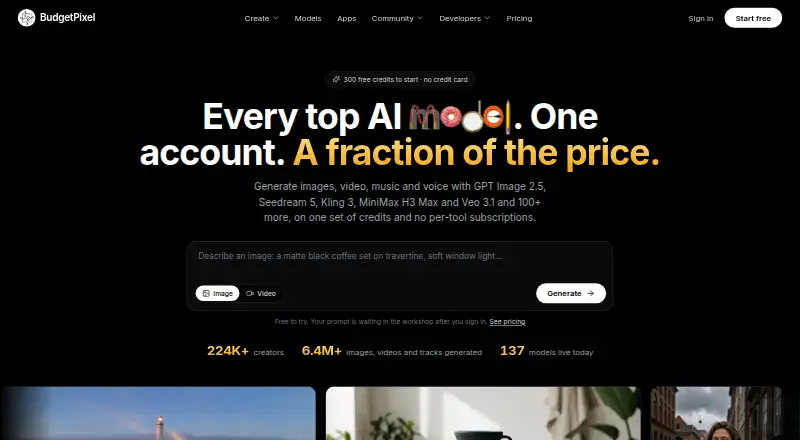
BudgetPixel AI brings image, video, music, speech, and sound-effect generation into one account with a shared credit balance. It advertises access to more than 100 hosted AI models, with credit costs displayed before generation. Its design canvas includes background and object removal, reframing, restyling, 4K upscaling, and layered editing. Users can create a character and refer to it in prompts to keep its identity consistent across images and videos without training a model. The Free plan provides 300 credits per month. Basic costs $8.33 a year when billed annually ($100/yr); it includes 11,000 monthly credits, 20 GB storage, and API and MCP access. Paid plans also include API and MCP connectors, using credits shared with the web app. BudgetPixel works on the web and through an API; its website works on phones and tablets, but there is no native iOS or Android app. Commercial use is listed with Premium and higher tiers.
Who it suits
It suits designers, content creators, and marketers who want image, video, audio, or speech generation tools in one account. It may also suit developers looking for API or MCP access with a paid plan.
What it does well
- More than 100 hosted models are advertised.
- Canvas supports layered editing and 4K upscaling.
- Character prompts preserve identity across images and videos.
- Free plan includes 300 credits each month.
What to know first
- No native iOS or Android app.
- API and MCP access require a paid plan.
- Commercial use is listed for Premium and higher tiers.
Limits
The Free plan provides 300 credits per month and does not include API or MCP access. Commercial usage is listed as a Premium-plan feature and is included in higher tiers through their benefits.
Plans
| Plan | Billed and limits | Price |
|---|---|---|
| Free | 300 credits / month · 1 generation at a time · 500 MB storage · personal non-commercial use | Free |
| Starter Pack | 10,000 credits · credits valid 12 months | $10, paid once |
| Mega Pack | 100,000 credits · credits valid 12 months | $100, paid once |
| Premium | billed annually ($200/yr); $22/mo monthly · 25,000 credits / month · 40 GB storage · full commercial use · 5 concurrent video/audio generations · Studio and voice cloning | $16.67 a month |
| Popular Pack | 20,000 credits · credits valid 12 months | $20, paid once |
| Pro | billed annually ($495/yr); $55/mo monthly · 60,000 credits / month · 50 GB storage · priority queue · 7 concurrent generations · 5% credit-pack bonus | $41.25 a month |
| Starter | billed annually ($50/yr); $5/mo monthly · 5,000 credits / month · 10 GB storage · LoRA training · API and MCP | $4.17 a month |
| Power Pack | 50,000 credits · credits valid 12 months | $50, paid once |
The first 8 of 11 plans, as budgetpixel.com lists them, read 14 Oct 2026. The maker's own page has the final word. Every plan
Getting started
- Visit https://budgetpixel.com/ in a web browser.
- Choose the Free plan or a paid plan, or buy a one-time credit pack.
- Use the web app to generate or edit media with the available credits.
- For API or MCP access, choose a paid plan; the same credits are used as in the web app.
BudgetPixel AI is a web and API service for generating and editing images, video, music, speech, and sound effects. It is best suited to creators who move between media types and want developer integrations alongside a visual editor. Its breadth is a strong reason to consider it; the shared credit balance and annual billing make usage planning important.
Overview
More than 100 hosted models sit behind one account, with credit costs shown before generation. That range suits varied creative work, while a single balance means image, video, and audio tasks draw on the same allowance. The canvas adds background and object removal, reframing, restyling, layered editing, and upscaling to 4K, so the service covers finishing work as well as generation.
Character references can maintain an identity across images and videos without model training. Style references and batch generation add further control and throughput. Those features are useful for recurring visual work; someone who needs only one simple, specialized tool may find the wider suite unnecessary.
Key features
- Five media types: Image, video, music, speech, and sound-effect generation share an account. This is convenient for mixed-format projects, but credit use across them needs monitoring.
- Editing canvas: Removal, reframing, restyling, layers, and 4K upscaling make it possible to refine output in the same service rather than stop at generation.
- Character consistency: Reusing a prompted character across images and videos avoids training a model, a practical advantage for creators maintaining a recurring identity.
- Developer integrations: The MCP server, API, Cursor plugin, ComfyUI node pack, and WordPress plugin give the service routes into both coding and content workflows. API and MCP access come with every paid plan and use the same credits as the web app.
- Privacy and storage: Generations remain in a private library unless shared to the community. Uploaded media is used to fulfill generation requests and for safety review. Account data and generated content are stored in AWS US East 1; model inputs may be processed by providers in several regions. The service says it uses TLS, access controls, and secure cloud infrastructure.
Pricing
The Free plan costs nothing and gives 300 credits per month for text-to-image, image-to-image editing, image enhancement, text-to-video, and image-to-video. It is a useful way to explore recurring image and video use, but the stated free allowance does not include the broader paid-plan benefits such as API and MCP access or commercial usage.
Basic costs $8.33 a year, billed annually at $100/yr, or $10/mo monthly. It includes 11,000 credits per month, 20 GB storage, and API and MCP access. This is the lowest-priced paid plan and fits modest regular use, though the monthly credit balance still has to cover every format.
Premium costs $16.67 a year, billed annually at $200/yr, or $22/mo monthly. Its 25,000 credits per month, 40 GB storage, commercial usage, and capacity for up to 5 video and audio generations at a time make it the clearer choice for commercial work or heavier concurrent production.
Pro costs $41.25 a year, billed annually at $495/yr, or $55/mo monthly. It raises the allowance to 60,000 credits per month and storage to 50 GB, adds a 5% bonus on credit purchases and priority queueing, and permits up to 7 video and audio generations at a time. It suits higher-volume workflows that benefit from a queue advantage.
Ultra costs $87.50 a year, billed annually at $1050/yr, or $125/mo monthly. The plan provides 130,000 credits per month, 60 GB storage, a 10% credit-purchase bonus, the highest priority queue, and up to 10 video and audio generations at a time. That capacity is aimed at sustained, high-volume production rather than occasional projects.
One-time credit packs run from Starter Pack at $10, paid once for 10,000 credits to Ultimate Pack at $500, paid once for 500,000 credits; the other options are Popular Pack at 20.00 USD for 20,000, Power Pack at 50.00 USD for 50,000, and Mega Pack at 100.00 USD for 100,000. Pack credits last 12 months from purchase, offering a way to add credits without choosing a recurring tier. Commercial usage is a Premium feature and is inherited by higher tiers. There is no free trial.
Platforms
BudgetPixel AI works on the web and through its API. The website works on phones and tablets, but there is no native iOS or Android app.
Who it's for
The service is aimed at designers, content creators, and marketers, as well as people looking to turn an idea into media. Its mix of generation, editing, and integrations is most compelling for users with varied formats or workflows that connect to developer tools. Email and Discord support is available, with typical replies within 1–2 business days.
Pros and cons
- Pro: More than 100 models across five media types, plus editing and character consistency, cover a wide production range in one account.
- Pro: API and MCP access on every paid plan, with additional integrations for Cursor, ComfyUI, and WordPress, suit users who want to connect generation to other workflows.
- Pro: Credit costs shown before generation help users judge a task before committing shared credits.
- Con: All formats draw on one credit balance, so frequent use of one media type can reduce the allowance for another.
- Con: Commercial usage starts at Premium, so Basic is not the tier for work requiring that benefit.
- Con: Mobile access is through the website rather than a native app.
Alternatives
For a different creative focus, compare these options:
- AI Icon Generators is a category to explore when the task is specifically making icons.
- Podcast Cover Maker Software is a category to explore when the priority is podcast cover design.
- Appilot has a free plan with 15 credits per month and one project, plus a Pro plan at $19.99 a month with 100 credits and three projects; choose it when its project-based allowance and Android or iOS availability are a better fit.
- CleanVector offers a free plan with 10 credits a month, one permanent SVG download, unlimited PNG exports, a color editor, and browser tools; consider it when vector exports are the central need.
- IconsCove starts with 20 signup credits and no card required; it may suit someone who wants to begin with a small one-time credit allotment.
- IconsMint provides five AI icons on signup, browsing of more than 100,000 icons, 30 downloads a day, and SVG and PNG formats on its free plan; choose it when browsing and downloading icons matter more than broad media generation.
- Icovela gives 200 one-time credits for five photo-to-3D-icon uses on its free plan; it is the more focused choice for that specific conversion workflow.
- Imagcon offers a one-time Starter purchase at 5.00 USD for 10 credits, with generations, edits, and icon exports charged against credits; consider it for an icon-oriented workflow with Android and iOS availability.
- IconKit sells one-time credit packs, including 50 credits for 6.99 USD and 100 for 9.99 USD; it is an option when a paid API and web tool with pack-based pricing is preferable.
- MiniMind AI is a freemium web alternative.
Verdict
BudgetPixel AI is a strong fit for designers, creators, and marketers who need several kinds of generated media, editing, character consistency, and developer connections in one service. Its broad model selection and paid API/MCP access are the main reasons to choose it. Look elsewhere if you need a native mobile app, commercial use at the lowest paid tier, or a narrowly focused tool with no shared cross-media credit balance to manage.
Verdict
BudgetPixel AI combines several types of generation with editing tools, character consistency, and developer integrations. Check the credit allowance and plan benefits against the kinds of generation and commercial use you need.
Questions
Is BudgetPixel AI free?
Yes. Its Free plan costs nothing and includes 300 credits per month.
What does the paid plan cost?
The pricing note says paid plans start at $8.33/mo (annual). Listed examples include Basic at $100 a year, billed annually, and one-time credit packs starting at 10.00 USD.
Which platforms does it support?
The listed platforms are web and API. The website works on phones and tablets, but there is no native iOS or Android app.
Does a paid plan include API access?
The developer API and MCP connector are included with every paid plan. Their usage draws from the same credits as the web app.
Can I use the generated work commercially?
Commercial usage is listed as a Premium-plan feature and is included in higher tiers through inherited benefits.
What happens to uploaded media and generations?
Generations remain in a private library unless shared to the community. Uploaded media is used to fulfill the requested generation and for safety review.
Facts from BudgetPixel AI's own pages
- API
- A REST API at api.budgetpixel.com/v1 exposes image, video, music, moderation, classification, conversion and cost-estimation endpoints. · budgetpixel.com, 14 Oct 2026
- API access
- The developer API and MCP connector are included with every paid plan, with usage charged in the same credits as the web app. · budgetpixel.com, 2 Oct 2026
- API limits
- API keys are limited to 600 requests per minute and generated outputs are retained for 24 hours unless saved to assets. · budgetpixel.com, 14 Oct 2026
- Character consistency
- Users can create a character and mention it in prompts to preserve its identity across images and videos without training a model. · budgetpixel.com, 2 Oct 2026
- Commercial rights
- Free accounts are non-commercial, Basic permits limited commercial use, and Premium, Pro and Ultra include full commercial rights. · budgetpixel.com, 14 Oct 2026
- Commercial use
- The pricing page lists commercial usage as a Premium-plan feature and as included in higher tiers through their inherited benefits. · budgetpixel.com, 2 Oct 2026
- Community and libraries
- The service offers a community feed, daily challenges, Model Arena and free image, sound-effect and music libraries under CC BY 4.0. · budgetpixel.com, 14 Oct 2026
- Company database record
- Crunchbase lists Beyond Star Technology LLC as BudgetPixel's legal name and the company as privately held and active. · crunchbase.com, 14 Oct 2026
- Company headquarters
- The maker states that BudgetPixel is operated from the United States. · budgetpixel.com, 14 Oct 2026
- Company legal name
- BudgetPixel is a trading name of Beyond Star Technology LLC. · budgetpixel.com, 14 Oct 2026
- Data location
- The privacy policy says account data and generated content are stored in AWS US East 1, while model inputs may be processed by third-party providers in several regions. · budgetpixel.com, 2 Oct 2026
- Design Studio
- Its Design Studio provides an AI canvas, editable templates, image editing, upscaling, background removal and aspect-ratio changes. · budgetpixel.com, 14 Oct 2026
- Developer extension depth
- The ComfyUI pack exposes 60 model nodes spanning image, video, audio, upscaling, lip sync, motion control and account utilities. · github.com, 14 Oct 2026
- Developer installation
- ComfyUI users can install the node pack through ComfyUI-Manager or by cloning the public GitHub repository and installing requirements. · github.com, 14 Oct 2026
- Documentation
- The API is OpenAPI-documented and provides model-specific endpoints, examples, asynchronous job polling and preflight cost estimates. · budgetpixel.com, 14 Oct 2026
- Editing features
- Its design canvas supports background and object removal, reframing, restyling, upscaling to 4K, and layered editing. · budgetpixel.com, 2 Oct 2026
- Independent GitHub adoption
- The official ComfyUI repository showed 5 stars, 1 fork and 6 commits when opened. · github.com, 14 Oct 2026
- Independent listing
- WithAI describes BudgetPixel as a web-based platform aggregating more than 139 media models with a single credit balance, REST API, MCP server and plugins. · withai.top, 14 Oct 2026
- Independent resource listing
- A developer-resource directory lists BudgetPixel's free library as more than 9,000 AI-generated images and illustrations under CC BY 4.0. · github.com, 14 Oct 2026
- Integrations
- The listed integrations include an MCP server, developer API, Cursor plugin, ComfyUI node pack, and WordPress plugin. · budgetpixel.com, 2 Oct 2026
- Intended users
- The about page describes the service as designed for designers, content creators, marketers, and people who want to realize an idea. · budgetpixel.com, 2 Oct 2026
- Licence
- The BudgetPixel ComfyUI node pack is MIT-licensed, while the hosted BudgetPixel service remains proprietary. · github.com, 14 Oct 2026
- Limit: credit expiry
- Monthly plan credits do not roll over, while purchased credit packs expire 12 months after purchase. · budgetpixel.com, 14 Oct 2026
- Limit: failed jobs
- Submitted jobs that keep running after a client interruption can still complete and consume credits server-side. · github.com, 14 Oct 2026
Where BudgetPixel AI stands on Freedom251
- AI Mascot Generators#2 of 40
- AI Icon Generators#2 of 25
- Podcast Cover Maker Software#7 of 35