Freedom251 › AI Icon Generators
IconsCove
What IconsCove is
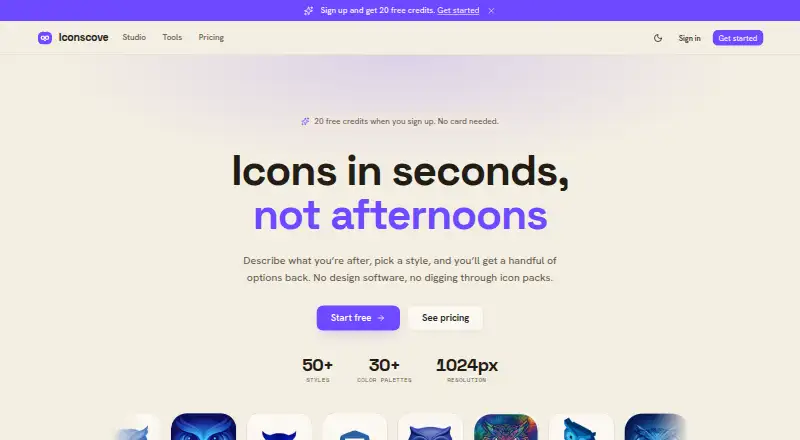
IconsCove generates app icons, favicons and UI icons from text prompts, with a selected style and colors. Users can choose from more than 50 styles, including 3D, neon, watercolor and pixel art, and set one, two or three brand colors. Standard and Premium tiers support an uploaded image or existing icon as a style reference. Generated icons download as PNG files up to 1024×1024; SVG export is listed as planned, not available. Collections can be nested, searched, moved in bulk and downloaded as ZIP files. Signup provides 20 credits at no charge and does not require a card. One-time packages start at $5, paid once for 50 credits; 100 credits cost $9, paid once and 250 cost $20, paid once. Fast icons use two credits, Standard three and Premium five. Credits do not expire, and failed or short generations return credits. Purchases include full commercial rights. The service is operated by Mantas Gerulskis in Lithuania.
Who it suits
IconsCove suits people creating icons for apps, websites or products for sale who want prompt-based generation and collection tools. It may also fit users who want to apply brand colors or reference an image on Standard or Premium tiers.
What it does well
- More than 50 listed icon styles
- Free signup includes 20 credits
- Credits do not expire
- Purchases include full commercial rights
What to know first
- Downloads are PNG only
- SVG export is planned, not available
- Purchased credits generally are not refundable
Limits
The free signup plan includes 20 credits. Each Fast icon uses 2 credits, Standard uses 3, and Premium uses 5; style references are available on Standard and Premium tiers.
Plans
| Plan | Billed and limits | Price |
|---|---|---|
| Free signup credits | 20 credits on signup · no card required | Free |
| 250 credits | one-time · 250 credits · up to 4 icons per prompt · credits never expire · full commercial rights | $20, paid once |
| 50 credits | one-time · 50 credits · up to 4 icons per prompt · credits never expire · full commercial rights | $5, paid once |
| 100 credits | one-time · 100 credits · up to 4 icons per prompt · credits never expire · full commercial rights | $9, paid once |
As iconscove.com lists them, read 3 Oct 2026. The maker's own page has the final word.
Getting started
- Open https://iconscove.com/
- Sign up for the free plan to receive 20 credits without a card
- Write a prompt and choose an icon style
- Set one, two, or three brand colors
- Generate icons and download PNG files or organize them in collections
- Buy a one-time credit package if you need more credits
IconsCove is a web-based generator for app icons, favicons and UI icons, aimed at people who want a coordinated set of graphics from text prompts. It is a practical fit if PNG files meet your needs; look elsewhere if editable vector exports are essential.
Overview
Choose from more than 50 styles, including 3D, neon, watercolor and pixel art, and guide the output with one, two or three brand colors. Standard and Premium tiers add image references, which can help keep a series visually aligned. The trade-off is a fixed PNG workflow: downloads reach 1024×1024, while SVG is not an export option.
Key features
Prompting and credit use
IconsCove generates app icons, favicons and UI icons from text prompts, with batch generation supported. Credit costs vary by generation type: Fast uses 2 credits, Standard 3 and Premium 5. Failed or short generations return credits, so unsuccessful outputs do not necessarily consume the balance. Paid packages allow up to four icons per prompt.
Style references and organization
On Standard and Premium tiers, users can upload an image or reuse one of their icons as a style reference. That gives users an additional way to guide a visual direction beyond prompt wording and palette choices. Nested collections, search, bulk move and ZIP downloads make it easier to manage sets of generated icons.
Rights and account terms
Purchases include full commercial rights, including use in products for sale without crediting IconsCove. Credits do not expire, whether earned, purchased or received through a subscription. Checkout uses Stripe, and card details do not touch IconsCove’s servers. Purchased credits are generally non-refundable, although verifiable service failures are refunded.
Pricing
The free signup gives 20 credits with no card required, a useful way to try the generator before paying. Credit costs of 2, 3 or 5 per icon mean the number of outputs depends on the generation type.
- 50 credits — 5.00 USD, one-time: includes up to four icons per prompt and full commercial rights. A modest paid option for occasional work; credits never expire.
- 100 credits — 9.00 USD, one-time: doubles the balance for less than twice the price of the 50-credit pack, while retaining the same per-prompt limit and rights. Better suited to a larger set or repeat use.
- 250 credits — 20.00 USD, one-time: the largest listed pack, for sustained generation without a recurring charge. It has the same per-prompt limit and rights as the smaller packs.
These purchases use one-time payments, and unused credits do not expire. The free signup balance is smaller than any paid pack, while Standard and Premium are the tiers that provide reference-image support.
Platforms
IconsCove is available on the web.
Who it's for
IconsCove suits makers who need prompt-generated icons, want to keep a set within chosen colors and styles, and value one-time credits with commercial rights. It is less suitable for workflows that depend on SVG or other editable vector output, or for buyers who need a published price for Standard and Premium reference-image access.
Pros and cons
- Pros: More than 50 styles and up to three chosen brand colors give users concrete controls for creating a consistent look.
- Pros: Non-expiring credits and one-time packs make spending predictable for occasional use.
- Pros: Purchased icons include full commercial rights, including use in products for sale without attribution.
- Cons: PNG-only downloads up to 1024×1024 leave out vector files for workflows needing editable scaling.
- Cons: Reference images are limited to Standard and Premium, rather than the free signup credits.
- Cons: Premium generations cost 5 credits each, more than twice the 2-credit Fast option.
Alternatives
For broader icon and favicon options, browse AI Icon Generators and Favicon Generators.
- Appilot is worth considering if a monthly credit allowance and project limits suit you better: its free plan gives 15 credits per month for one project, while Pro is $19.99 a month for 100 credits and three projects. It also supports Android and iOS alongside the web.
- BudgetPixel AI may fit users seeking a wider mix of image and video generation: its free plan includes 300 monthly credits and text-to-image, image editing, enhancement and video tools.
- CleanVector is the more relevant option when vector output matters: its free plan includes one permanent SVG download and unlimited PNG exports, as well as a color editor and browser tools.
- IconAI.art offers five signup icons and one icon per run on its free plan, making it an alternative for users who prefer that smaller starting allowance.
- IconsMint may suit users who want a browsable icon library in addition to generation: its free plan includes 100k+ icons, 30 downloads per day, and SVG and PNG formats.
- Icovela is another freemium option, with 200 one-time free credits and five Photo to 3D Icon uses.
- MiniMind AI is an alternative to consider for its enterprise offering.
- IconScout AI Icon Generator is an alternative for users comparing icon-generation tools across web, desktop and API platforms.
Verdict
Choose IconsCove if you want prompt-driven app, favicon or UI icons, useful style controls and commercial rights on a one-time credit budget. Its non-expiring credits make it a sensible choice for occasional projects. Look elsewhere if your workflow requires SVG or if reference-image guidance must be available without moving to a higher tier.
Verdict
IconsCove combines prompt-based icon creation with style references, collections and commercial rights. Its current listed export is PNG, and credit use varies by generation type.
Questions
Is there a free plan?
Yes. Free signup provides 20 credits and does not require a card.
How much do credit packages cost?
The 50-credit package is $5, paid once, 100 credits are $9, paid once, and 250 credits are $20, paid once.
Which file formats can I export?
Icons download as PNG files up to 1024×1024.
Can I use generated icons commercially?
Purchases include full commercial rights. IconsCove says generated icons can be used in products for sale without crediting the service.
Do credits expire?
No. Credits do not expire, whether earned, purchased, or received through a subscription.
Who operates IconsCove?
The service is operated by Mantas Gerulskis in Lithuania.
Facts from IconsCove's own pages
- Collections
- Icons can be organized into nested collections with search, bulk move, and ZIP download options. · iconscove.com, 3 Oct 2026
- Color palettes
- Users can set one, two, or three brand colors so generated icons follow the chosen palette. · iconscove.com, 3 Oct 2026
- Commercial use
- The pricing page says purchases include full commercial rights, and the homepage says generated icons can be used in products for sale without crediting IconsCove. · iconscove.com, 3 Oct 2026
- Credit expiration
- Credits do not expire, whether they are earned, purchased, or received through a subscription. · iconscove.com, 3 Oct 2026
- Credit use
- Fast icons cost 2 credits, Standard icons cost 3 credits, and Premium icons cost 5 credits; failed or short generations return credits to the balance. · iconscove.com, 3 Oct 2026
- Headquarters
- Lithuania · iconscove.com, 28 Sept 2026
- Maker
- The legal notice says the service is operated by Mantas Gerulskis in Lithuania. · iconscove.com, 3 Oct 2026
- Output
- Generated icons download as PNG files up to 1024×1024; the site says SVG is planned for later. · iconscove.com, 3 Oct 2026
- Payments and card handling
- Checkout uses Stripe, and the pricing page says card details do not touch IconsCove’s servers. · iconscove.com, 3 Oct 2026
- Reference images
- Users can upload an image or reuse one of their icons as a style reference; reference images are available on Standard and Premium tiers. · iconscove.com, 3 Oct 2026
- Refunds
- Purchased credits generally are not refundable, but the pricing page says verifiable service failures are refunded. · iconscove.com, 3 Oct 2026
- Styles
- The site lists 50+ icon styles, including 3D, neon, watercolor, and pixel art. · iconscove.com, 3 Oct 2026
- Support
- The legal notice lists [email protected] for general support. · iconscove.com, 3 Oct 2026
- What it does
- IconsCove generates app icons, favicons, and UI icons from text prompts, with a selected style and colors. · iconscove.com, 3 Oct 2026
Where IconsCove stands on Freedom251
- AI Icon Generators#12 of 25
- Favicon Generators#20 of 30