Freedom251 › Online Fax Services
Browserfax
What Browserfax is
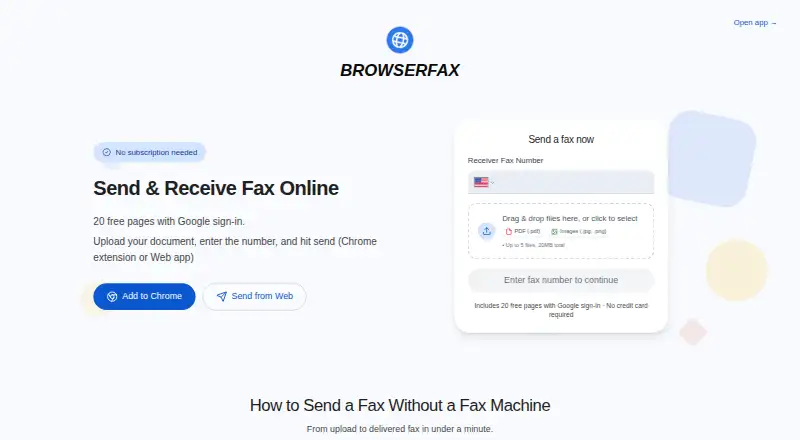
Browserfax is a web fax service for sending and receiving documents through a browser, with free pages, one-time page packs, and subscriptions for a dedicated US fax number. It accepts PDF, JPG, and PNG files, including multi-page documents, with uploads limited to five files and 20MB total. Google sign-in provides 20 free pages without a credit card, subscription, or trial timer; free pages do not expire according to its free-plan wording. One-time options include 25 pages for $4.00 USD once, 100 for $11.00 USD once, and 1,000 for $49.00 USD once. Monthly Basic is $8 a month for 100 outgoing pages, while Pro is $16 a month for 500. Paid plans include unlimited incoming faxes and a dedicated US number. Incoming faxes prompt an email with a secure download link, and status is shown as Queued, Sending, Delivered, or Failed. Documents are encrypted in transit and at rest and processed locally in the browser. Browserfax supports HIPAA but does not offer a signed HIPAA Business Associate Agreement. The web app works on any device, and a Chrome extension adds one-click faxing and an inbox.
Who it suits
It suits people who need browser-based faxing, including on phones, and want a choice between free pages, page packs, or a fax-number subscription. Users requiring a signed HIPAA Business Associate Agreement should note that Browserfax does not provide one.
What it does well
- 20 free pages with Google sign-in.
- Free pages do not expire.
- Paid plans include unlimited incoming faxes.
- Tracks queued, sending, delivered, or failed status.
- Works in any browser on any device.
What to know first
- Uploads are limited to five files and 20MB.
- No signed HIPAA Business Associate Agreement.
- Mobile apps are not available.
Limits
The free plan includes 20 pages. Monthly Basic includes 100 outgoing pages and Pro includes 500; paid plans include unlimited incoming faxes.
Plans
| Plan | Billed and limits | Price |
|---|---|---|
| Start free | Free pages do not expire according to the site’s free-plan wording. · 20 pages | Free |
| 25-page pack | One-time payment · 25 pages | $4 a month |
| 100-page pack | One-time payment · 100 pages | $11 a month |
| 1000-page pack | One-time payment · 1,000 pages | $49 a month |
| Basic | billed monthly · 100 pages per month · Unlimited incoming faxes · 1 US fax number | $8 a month |
| Pro | billed monthly · 500 pages per month · Unlimited incoming faxes · 1 US fax number | $16 a month |
| Basic annual | Annual billing = 3 months free · 100 outgoing pages per month · Unlimited incoming faxes | $72 a year |
| Pro annual | Annual billing = 3 months free · 500 outgoing pages per month · Unlimited incoming faxes | $144 a year |
The first 8 of 12 plans, as browserfax.com lists them, read 20 Sept 2026. The maker's own page has the final word. Every plan
Getting started
- Open https://browserfax.com/ in a browser
- Sign in with Google to receive the free page allowance
- Upload PDF, JPG, or PNG documents within the file and size limits
- Use the web app or Chrome extension to fax
- Choose a one-time page pack or a monthly or annual subscription if needed
Overview
Browserfax is a browser-based fax service with a Chrome extension, built for people who want to send documents without installing a desktop app. It is strongest for occasional faxing or modest ongoing use: unused one-time pages do not expire, while paid subscriptions add a dedicated US number and unlimited inbound faxing.
That flexibility suits individuals and small teams who can work through a Google account. Healthcare organizations that need a signed HIPAA Business Associate Agreement should choose another service.
Key features
The web app works in any browser and on any device, including phones; there are no mobile apps. The Chrome extension adds one-click faxing and an inbox in the browser sidebar, and the same Google account balance works in both places. This is a practical setup for people who already work in Chrome, but less compelling for users who require a native mobile app.
Browserfax accepts PDF, JPG and PNG files, including multi-page documents, with a limit of five files and 20MB per upload. Delivery status progresses through Queued, Sending, Delivered or Failed. Failed faxes automatically return the pages to the account, so an unsuccessful send does not consume the page allowance.
Documents are encrypted in transit and at rest and processed locally in the browser. Paid plans include a dedicated US fax number and unlimited incoming faxes; incoming documents prompt an email with a secure download link. Browserfax supports HIPAA, but does not provide a signed Business Associate Agreement, an important limitation for organizations handling protected health information.
Pricing
The free plan costs nothing and provides 20 pages after Google sign-in. There is no credit card, subscription or trial timer, and free pages do not expire. It is useful for trying occasional outbound faxing, but it does not provide a dedicated fax number.
One-time packs are best for senders whose workload is irregular. The 25-page pack is $4, paid once, the 100-page pack is $11, paid once, and the 1,000-page pack is $49, paid once; pages never expire. These avoid a recurring bill but do not include a fax number, so they are not a fit for users who need to receive faxes through Browserfax.
For a number and a recurring allowance, Basic costs $8 a month and includes 100 outgoing pages per month, one dedicated US number and unlimited incoming faxes. Pro costs $16 a month and raises the outgoing allowance to 500 pages per month, with the same number and inbound terms. The annual options are Basic annual at $72 a year and Pro annual at $144 a year; both include unlimited incoming faxes and respectively 100 or 500 outgoing pages per month. Annual billing is described as three months free, but commits the buyer to a yearly payment rather than month-to-month billing.
There are no seat limits or separate inbound quotas stated in these plans; each includes one fax number and unlimited receiving. Failed sends refund pages, which helps preserve the outgoing allowance.
Platforms
Browserfax is available on the web, across browsers and devices, and through its Chrome extension. It has no mobile apps, though the web app works on phones. That makes it accessible on the move, but users seeking a dedicated iOS or Android workflow should compare app-based services.
Who it's for
Browserfax is a good fit for individuals and small organizations that send occasional documents, want pages that remain available until needed, or need a US number with unlimited inbound faxing. Its range from free pages to larger packs and monthly subscriptions accommodates changing fax volumes without forcing every user into a recurring plan.
It is a poor fit for organizations that require a signed HIPAA agreement, teams needing multiple numbers or a native mobile app, and users whose faxing needs exceed the monthly outgoing allowance without wanting to move to a larger plan.
Pros and cons
- Pro: The free 20 pages and one-time packs do not expire, so occasional senders can avoid paying for unused time.
- Pro: Paid subscriptions combine a dedicated US number with unlimited incoming faxes, useful for users who need to receive as well as send.
- Pro: Failed faxes automatically refund pages, and status tracking makes delivery outcomes clear.
- Con: No signed HIPAA Business Associate Agreement makes it unsuitable where that agreement is required.
- Con: The free plan and one-time packs do not provide a fax number; receiving through Browserfax requires a paid subscription.
- Con: The service has no mobile apps, and subscription plans include only one US fax number.
Alternatives
Dropbox Fax (formerly HelloFax) is worth considering for a sending-only free option: its free plan includes five outbound pages, with up to 20 more earnable, while inbound faxing requires a paid account. FAX.PLUS is a better fit for someone who wants Android or iOS apps, a 10-page free allowance and a 30-day free period on paid plans.
FaxTerra offers Android and iOS apps and a free monthly allowance of 10 pages to the US and Canada. FaxBurner may suit users looking for a disposable number, with 25 inbound pages per month and five outbound pages total on its free plan. GotFreeFax is another web option, with free faxes capped at three pages each and two faxes per day.
ETHERFAX is a paid alternative with cloud fax services and pricing available by contacting the provider or a partner. OVHcloud Fax offers paid EcoFax plans with email and PC sending and receiving and a dedicated number. TELUS Cloud Fax is a paid option with apps for mobile and desktop platforms and a single-number plan that includes 300 pages per month.
For a broader comparison, browse Online Fax Services.
Verdict
Choose Browserfax if you want flexible, non-expiring page packs or a straightforward subscription that pairs one US number with unlimited incoming faxes. Its clear delivery states and refunded pages on failed sends strengthen the case for routine browser-based faxing. Look elsewhere if your organization requires a signed HIPAA Business Associate Agreement or if you need native mobile apps or more than one number.
Verdict
Browserfax offers browser and Chrome-extension faxing with several payment options and clear delivery status. Its HIPAA support does not include a signed Business Associate Agreement.
Questions
Is Browserfax free?
Yes. Google sign-in provides 20 pages, with no credit card, subscription, or trial timer required. The free-plan wording says those pages do not expire.
How much do the page packs cost?
One-time packs cost $4.00 USD once for 25 pages, $11.00 USD once for 100 pages, and $49.00 USD once for 1,000 pages.
What do the monthly plans cost?
Basic costs $8 a month for 100 outgoing pages. Pro costs $16 a month for 500 outgoing pages; both include unlimited incoming faxes and a dedicated US fax number.
Which devices and file types does Browserfax support?
The web app works in any browser and on any device, including phones, and there is also a Chrome extension. It accepts PDF, JPG, and PNG files, with up to five files and 20 MB total per upload.
Does Browserfax provide a signed HIPAA agreement?
Browserfax offers HIPAA support but does not offer a signed HIPAA Business Associate Agreement.
Facts from Browserfax's own pages
- Billing model
- Users can pay once for page packs or subscribe for a fax number · browserfax.com, 28 Sept 2026
- Chrome extension
- Extension provides one-click faxing and a fax inbox in Chrome's sidebar · browserfax.com, 28 Sept 2026
- Company location
- Browserfax lists Kirkland, Washington, United States · browserfax.com, 28 Sept 2026
- Compliance support
- hipaa · browserfax.com, 20 Sept 2026
- Delivery tracking
- Fax status is shown as Queued, Sending, Delivered, or Failed · browserfax.com, 28 Sept 2026
- Fax-to-email delivery
- Incoming faxes generate an email notification with a secure download link · browserfax.com, 28 Sept 2026
- Supported file formats
- Accepts PDF, JPG, and PNG files, including multi-page documents · browserfax.com, 28 Sept 2026
- Upload limits
- Up to five files and 20MB total · browserfax.com, 28 Sept 2026
- Free page allowance
- 20 free pages with Google sign-in · browserfax.com, 28 Sept 2026
- Free plan
- Yes · browserfax.com, 20 Sept 2026
- Free tier limits
- No credit card, subscription, or trial timer is required · browserfax.com, 28 Sept 2026
- HIPAA BAA
- Browserfax does not offer a signed HIPAA Business Associate Agreement · browserfax.com, 28 Sept 2026
- Inbound faxing
- Yes · browserfax.com, 20 Sept 2026
- Incoming fax policy
- Plans include unlimited incoming faxes · browserfax.com, 28 Sept 2026
- International faxing
- Faxes can be sent to more than 40 countries · browserfax.com, 28 Sept 2026
- Mobile apps
- No · browserfax.com, 20 Sept 2026
- Monthly page allowance
- 100 · browserfax.com, 20 Sept 2026
- Encryption coverage
- Documents are encrypted in transit and at rest and processed locally in the browser · browserfax.com, 28 Sept 2026
- Support contact
- Support is available at [email protected] · browserfax.com, 28 Sept 2026
- Supported platforms
- Web app works in any browser and on any device, including phones · browserfax.com, 28 Sept 2026
- Account sharing
- One Google account balance works across the web app and Chrome extension · browserfax.com, 28 Sept 2026
- Trial and refunds
- There is no trial timer, and failed faxes automatically refund pages · browserfax.com, 28 Sept 2026
- Dedicated fax number
- Paid plans provide a dedicated US fax number instantly · browserfax.com, 28 Sept 2026
Where Browserfax stands on Freedom251
- Online Fax Services#8 of 103
- Online fax services#8 of 102