Freedom251 › Minecraft Banner Generators

BlockForge Minecraft Banner Designer
Visit BlockForge Minecraft Banner Designer Alternatives Pricing
What BlockForge Minecraft Banner Designer is
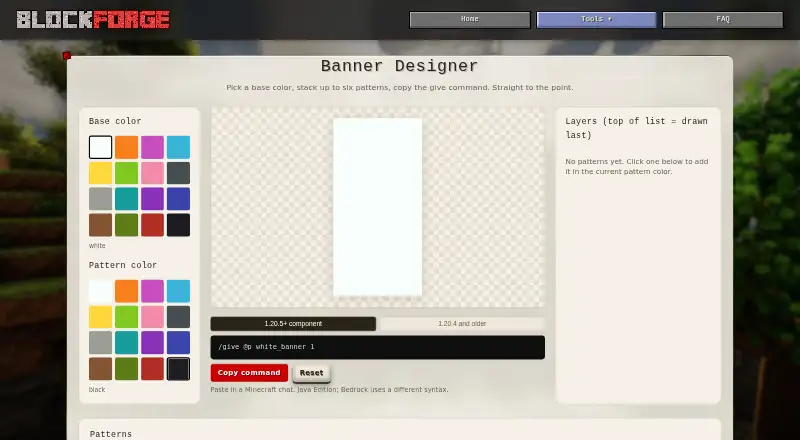
BlockForge Minecraft Banner Designer is a free browser tool for building Minecraft banners and generating a `/give` command for them. A design has a base color and can include up to six pattern overlays; later patterns are drawn over earlier ones. Users can choose a color for each pattern and view the banner with a live preview and pattern catalog. The generated command targets `@p`. It uses modern Java Edition component syntax for Minecraft 1.20.5 and later, or legacy syntax for version 1.20.4 and older. The output can bypass the special matching-item requirement for Creeper, Skull, Flower, and Mojang banner charges. The maker says the tool processes inputs in the browser and does not upload them. No signup is stated as required. The command is for Java Edition; Bedrock uses different syntax. The maker says site-wide analytics may collect page, device, browser, and approximate location information when consent permits. The service is described as free and best-effort, without warranty, and bug reports or feedback can be sent through a contact form.
Who it suits
This tool suits Minecraft Java Edition players who want to design banners and produce a command for them. It does not provide Bedrock command syntax.
What it does well
- Free browser tool with no signup stated.
- Supports up to six pattern overlays.
- Provides a live preview and pattern catalog.
- Offers command syntax for modern and older Java versions.
- Inputs stay in the browser, according to the maker.
What to know first
- Commands are for Java Edition; Bedrock uses different syntax.
- Site analytics may collect data when consent allows.
- Service is provided as-is without warranty.
Plans
| Plan | Billed and limits | Price |
|---|---|---|
| Free | Free browser tool · no signup stated | Free |
As blockforge.saturnitystools.com lists them, read 3 Oct 2026. The maker's own page has the final word.
Getting started
- Open the banner designer in a web browser.
- Choose a base color and colors for your patterns.
- Add up to six pattern overlays and arrange them in layer order.
- Use the generated Java Edition command in Minecraft chat.
Overview
BlockForge Minecraft Banner Designer is a free web tool for composing Minecraft banners and turning them into an in-game command. It is best for Java Edition players who want to shape a design visually and use it without creating an account. Its tight focus is useful, but players on Bedrock need a different tool.
Key features
Choose a base color, then add colored patterns from the banner catalog. The live preview keeps the design visible as it takes shape, and up to six overlays are enough for layered compositions while keeping the tool focused on banners. Later patterns sit over earlier ones, so order can change which parts of a design remain visible.
When ready, the tool generates a /give command aimed at @p. It uses modern Java Edition component syntax for version 1.20.5 and later, and the older BlockEntityTag format for 1.20.4 and earlier. That makes it useful across those Java versions, provided players select syntax that matches their game. Creeper, Skull, Flower, and Mojang patterns can be included without the special matching items normally required for those charges. The output is for Java Edition; Bedrock uses different syntax.
The maker says banner inputs stay in the browser and are not uploaded. The page also says the tool itself tracks nothing beyond site-wide analytics governed by cookie consent; when consent allows, the privacy policy says analytics may collect page views, device and browser type, and approximate location. That is a more nuanced privacy picture than local processing alone suggests.
Pricing
BlockForge is free: the Free plan costs nothing, with no signup required. There is no free trial because there is no paid tier described. The maker presents its browser tools as free and provides them best-effort, as-is and without warranty; users who need guaranteed support should bear that limitation in mind. Bug reports and feedback go through a contact form, and replies may take a while.
Platforms
BlockForge runs on the web. Its generated command is intended to be pasted into Minecraft chat, and its stated edition support is Java, not Bedrock.
Who it's for
This suits Java builders who want a preview, a compact pattern workflow and a ready-to-paste command without an account. The two Java syntax formats and special banner-charge handling are particularly useful when players want a design represented directly in a command. It is not the right fit for Bedrock players or anyone who needs a broader editor than banner composition.
Pros and cons
- Pros: Free and signup-free, with a live preview, color controls and a catalog dedicated to banner patterns.
- Pros: Supports up to six overlays and generates commands for both modern and older Java syntax.
- Pros: Can include four special banner charges without their matching items.
- Cons: Java-only output excludes Bedrock players.
- Cons: Six overlays cap design complexity, and layer order affects the result.
- Cons: Analytics may collect page and device information and approximate location when cookie consent permits; support is best-effort.
Alternatives
Compare Minecraft Banner Generators if you want to survey banner-design options before choosing a tool.
- Mcgic Banner Maker is a free option across Android, iOS and web, so it fits players who want mobile access as well as a browser version.
- DoneInBrowser Minecraft Banner Designer offers up to six layers in Survival mode and 16 in Creative / Commands mode, making it a better fit when command designs need more layers.
- Gamer Geeks Minecraft Tools has a free account with lower save storage than subscribers and a yearly supporter subscription, suited to readers considering a broader freemium tool.
- MineBuildr Banner Generator has a free tier with copying, downloading and sharing, plus a $9 a month Premium plan; it may suit users who want those result-sharing options.
- Minecraft Banner Maker offers up to six layers for Survival designs and 16 for Command designs, another choice for more complex command banners.
- siutil Minecraft Banner Maker combines up to six layers with Java /give commands and PNG export, useful if exporting an image matters.
- Zerobot Minecraft Banner Creator is a free option for web and Windows.
- Astroworld Banner Designer offers free Minecraft tools with no signup and no ads.
Verdict
Choose BlockForge if you play Java Edition and want a free, account-free route from a visual banner design to a version-appropriate command. Its focused preview-and-command workflow is the main draw; Bedrock support, more than six layers, or stronger support commitments are reasons to look elsewhere.
Verdict
BlockForge combines banner design, preview, and Java Edition command generation in a free browser tool. Confirm that its edition and version syntax match your game.
Questions
How much does BlockForge Minecraft Banner Designer cost?
The tool is free. BlockForge describes its tools as free browser tools for Minecraft builders.
Do I need to create an account?
No signup is required to use the banner tool.
Which Minecraft editions does it support?
The tool specifies Java Edition and generates commands for it. Bedrock uses different syntax.
Which Java versions does the generated command support?
It provides component syntax for Minecraft 1.20.5 and later, and legacy syntax for 1.20.4 and older.
Does the tool upload banner inputs?
The maker says the tool runs in the browser and inputs stay there. Site-wide analytics may collect page, browser and device, and approximate location data when consent allows.
Who makes BlockForge?
The site identifies its maker as Kody, known online as Saturnity, and says the tools are built and maintained by one person.
Facts from BlockForge Minecraft Banner Designer's own pages
- Analytics
- The banner page says activity is tracked only through site-wide analytics subject to the cookie popup; the privacy policy says Google Analytics can collect page, device, and approximate location data when consent allows it. · saturnitystools.com, 2 Oct 2026
- Audience
- BlockForge describes its tools as free browser tools for Minecraft builders. · blockforge.saturnitystools.com, 3 Oct 2026
- Browser processing
- The maker says the tool runs in the browser and does not upload user designs or make a server round-trip. · blockforge.saturnitystools.com, 3 Oct 2026
- Color controls
- The tool lets users choose a base color and a pattern color before adding patterns. · blockforge.saturnitystools.com, 3 Oct 2026
- Command output
- The generated command targets `@p` and outputs a `banner_patterns` component for modern versions or `BlockEntityTag` for older versions. · blockforge.saturnitystools.com, 2 Oct 2026
- Integrations
- The banner command is intended to be pasted into Minecraft chat; the page specifies Java Edition and says Bedrock uses different syntax. · blockforge.saturnitystools.com, 3 Oct 2026
- Layer limit
- A banner has a base color and supports up to six pattern overlays, with later layers drawn on top. · blockforge.saturnitystools.com, 2 Oct 2026
- Maker
- The site identifies its maker as Kody, known online as Saturnity, a self-taught developer and amateur photographer. · saturnitystools.com, 3 Oct 2026
- No account
- The banner tool requires no signup. · blockforge.saturnitystools.com, 2 Oct 2026
- Pattern layers
- A banner can have up to six pattern overlays, and later layers are drawn over earlier ones. · blockforge.saturnitystools.com, 3 Oct 2026
- Price
- BlockForge describes its tools as free browser tools for Minecraft builders. · blockforge.saturnitystools.com, 2 Oct 2026
- Privacy policy
- The maker's privacy policy says tool inputs stay in the browser, while site analytics may collect page views, browser and device type, and approximate location subject to consent settings. · saturnitystools.com, 3 Oct 2026
- Purpose
- The Banner Designer creates Minecraft banner designs and copies a ready-to-paste /give command. · blockforge.saturnitystools.com, 3 Oct 2026
- Service terms
- The maker's terms describe the service as free, best-effort, and provided as-is without warranty. · saturnitystools.com, 3 Oct 2026
- Special charges
- Its command output can include Creeper, Skull, Flower, and Mojang charges without the special crafting item normally required at a loom. · blockforge.saturnitystools.com, 3 Oct 2026
- Support
- The maker invites bug reports and feedback through its contact page and says replies may take a while. · saturnitystools.com, 3 Oct 2026
- Tracking
- The banner page says the tool itself tracks nothing beyond the site-wide analytics governed by the cookie consent choice. · blockforge.saturnitystools.com, 3 Oct 2026
- Version support
- It supports component syntax for Minecraft Java 1.20.5+ and legacy NBT syntax for 1.20.4 and older. · blockforge.saturnitystools.com, 3 Oct 2026
Where BlockForge Minecraft Banner Designer stands on Freedom251
- Minecraft Banner Generators#4 of 25