Freedom251 › Minecraft Banner Generators

BeeForge Minecraft Banner Generator
Visit BeeForge Minecraft Banner Generator Alternatives Pricing
What BeeForge Minecraft Banner Generator is
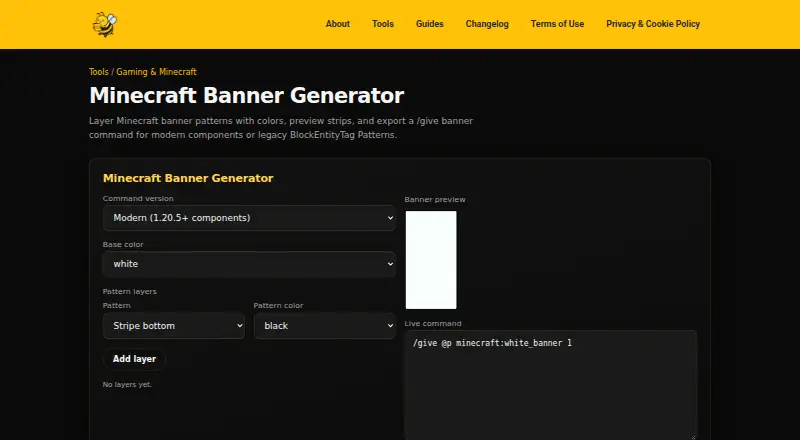
BeeForge Minecraft Banner Generator is a free web tool for making Minecraft banner `/give` commands from ordered layers. Users select a base banner color, add patterns, and choose a dye color for each layer. The generator can export modern `banner_patterns` component syntax for Java Edition 1.20.5 and later, or legacy `BlockEntityTag` Patterns NBT for older Java versions. A one-click option copies the generated command. The tool previews common banner shapes as colored CSS strips, though the preview is approximate, and its pattern catalog includes specialty faces. Layer design and command export run in the browser, and the page says banner data is not uploaded. The tool is available without registration, and BeeForge says its tools are free for personal or commercial use. The page names map makers, server admins, players recreating emblems, and educators demonstrating Minecraft data components as intended users. It targets Java rather than Bedrock patterned give syntax, and very long layer lists may exceed chat length. After registration, users can embed it on BeeForge WordPress pages using the `beeforge_minecraft_banner_generator` shortcode.
Who it suits
The tool may suit Java Edition map makers, server admins, players recreating emblems, and educators demonstrating Minecraft data components. It is not intended for Bedrock patterned give syntax.
What it does well
- Builds commands from a base color and ordered layers.
- Exports modern and legacy Java command formats.
- One-click command copying.
- Banner data is not uploaded, according to the page.
- Available without registration for personal or commercial use.
What to know first
- Targets Java rather than Bedrock patterned give syntax.
- Preview is approximate.
- Very long layer lists may exceed chat length.
Plans
| Plan | Billed and limits | Price |
|---|---|---|
| Free | all BeeForge tools · no registration required · personal or commercial use | Free |
As beeforge.dev lists them, read 15 Oct 2026. The maker's own page has the final word.
Getting started
- Open the BeeForge Minecraft Banner Generator website.
- Choose a base banner color.
- Add patterns and choose a dye color for each layer.
- Select modern syntax for Java Edition 1.20.5 and later, or legacy syntax for older Java versions.
- Copy the generated `/give` command with one click.
Overview
BeeForge Minecraft Banner Generator builds Java Edition banner commands from a chosen base color and ordered pattern layers. It is a good fit for players recreating emblems, map makers, server admins and educators who want a direct path from a banner design to a copyable command. Its two Java command formats are useful across versions, but Bedrock users and anyone needing an exact preview should look elsewhere.
Key features
Choose a base banner color, add patterns in sequence and assign a dye color to each layer. The catalog includes specialty faces, which helps when a design calls for more than common shapes. Very long layer lists can produce commands that exceed chat length, so complex designs may need another way to use the output.
A live preview renders common banner shapes as colored CSS strips. It gives a visual check on the arrangement, but BeeForge calls it approximate; treat it as a guide rather than a faithful rendering of the finished banner. One-click copying makes the generated /give command easy to transfer.
Modern mode produces banner_patterns component syntax for Java Edition 1.20.5 and later; legacy mode outputs BlockEntityTag Patterns NBT for older Java versions. That split makes the generator more useful to Java players working across versions. It does not target Bedrock patterned give syntax. Layer construction and export run in the browser, and banner data is not uploaded.
Registration is required to embed the generator on BeeForge WordPress pages using the beeforge_minecraft_banner_generator shortcode. The generator itself is accessible without registration. BeeForge permits personal and commercial use of its tools.
Pricing
The Free plan costs nothing and includes all tools, with no registration required. There are no paid tiers to weigh against the free offer, making it a straightforward choice for occasional banner creation as well as regular use. The key practical limits are Java-only command output and potential chat-length issues for very long designs, not a paid-plan quota.
Platforms
BeeForge is a web tool. It creates Java Edition commands rather than Bedrock patterned give syntax, so the relevant compatibility question is the Minecraft edition and version, not a desktop or mobile app installation.
Who it's for
Map makers and server admins can use it to produce commands for custom banners; players can recreate emblems; educators can demonstrate Minecraft data components. It is a sensible pick when a browser-based builder and copyable Java command are the goal. Bedrock players or users who need a precise visual preview should choose another option.
Pros and cons
- Two Java output formats: Modern component syntax and legacy NBT cover Java Edition 1.20.5 and later as well as older Java versions.
- Broad design catalog: Specialty faces add options for emblem recreation beyond common patterns.
- No-account use and in-browser processing: The tool is accessible without registration, and banner data is not uploaded.
- Approximate preview: Colored CSS strips help check a design but are not an exact finished-banner rendering.
- Java-only scope: It does not provide Bedrock patterned give syntax.
- Long-command constraint: Very long layer lists may exceed chat length.
Alternatives
Minecraft Banner Generators is a useful place to compare more options. Choose Mcgic Banner Maker instead if you want a free tool available on Android, iOS and the web. BlockForge Minecraft Banner Designer is another free web option, built and maintained by one person.
Consider DoneInBrowser Minecraft Banner Designer if its stated caps of six Survival layers or 16 Creative/Commands layers and 35 geometric patterns fit your design. Gamer Geeks Minecraft Tools may suit users who value saved app storage, though its free account has less save storage than subscribers. MineBuildr Banner Generator offers a free directory of tools and a $9 a month Premium plan with 10 members, so it may fit users looking for a broader tool directory or team plan.
Minecraft Banner Maker is another browser option with Survival designs up to six layers and command designs up to 16. Pick siutil Minecraft Banner Maker if PNG export, 16 dye colors and a stated six-layer cap suit your needs. Zerobot Minecraft Banner Creator is a free option for web or Windows.
Verdict
Choose BeeForge if you need a free, no-registration browser tool that turns layered banner designs into modern or legacy Java commands. Its useful pattern catalog and two Java formats are the main reasons to use it; the approximate preview, chat-length risk for elaborate designs and lack of Bedrock syntax are good reasons to look elsewhere.
Verdict
BeeForge Minecraft Banner Generator turns layered banner designs into Java Edition commands, with both modern and legacy formats. Its approximate preview and Java-only target are worth noting before relying on a finished design or command.
Questions
Is BeeForge Minecraft Banner Generator free?
Yes. The Free plan costs nothing, and BeeForge says its tools are free for personal or commercial use.
Which Minecraft editions and versions does it support?
It targets Java Edition. Modern mode is for Java Edition 1.20.5 and later; legacy mode is for older Java versions. It does not target Bedrock patterned give syntax.
Do I need to register to use it?
No. The tool is accessible without registration. Registration is needed to embed it on BeeForge WordPress pages with its shortcode.
Does it show a banner preview?
Yes. It previews common banner shapes as colored CSS strips, and the preview is approximate.
Does the tool upload banner data?
Layer building and command export run in the browser, and BeeForge says banner data is not uploaded.
Can I use it commercially?
BeeForge says its tools are free for personal or commercial use.
Facts from BeeForge Minecraft Banner Generator's own pages
- Base colors
- The builder lets users select a base banner color ranging from white through black. · beeforge.dev, 15 Oct 2026
- Browser processing
- Layer construction and command generation run in the browser. · beeforge.dev, 15 Oct 2026
- Command formats
- The tool exports modern banner_patterns component syntax or legacy BlockEntityTag Patterns NBT. · beeforge.dev, 5 Oct 2026
- Commercial use
- The terms allow personal or commercial use of the tools. · beeforge.dev, 15 Oct 2026
- Component replacement
- Minecraft's 1.20.5 documentation says the banner_patterns component replaces the older BlockEntityTag.Patterns tag. · minecraft.net, 15 Oct 2026
- Copy command
- A one-click control copies the generated /give command. · beeforge.dev, 15 Oct 2026
- Data handling
- The product page says banner data is not uploaded. · beeforge.dev, 15 Oct 2026
- Dynamic registry
- The 1.20.5 changelog says banner patterns can be loaded into a dynamic registry from data packs. · minecraft.net, 15 Oct 2026
- Embedding
- Registered users can embed the generator on BeeForge WordPress pages with the beeforge_minecraft_banner_generator shortcode. · beeforge.dev, 15 Oct 2026
- Empty-pattern default
- Minecraft's official documentation states that banners and shields default to an empty banner_patterns list when none is present. · minecraft.net, 15 Oct 2026
- Intended users
- The page names map makers, server admins, players recreating emblems, and educators demonstrating Minecraft data components as intended users. · beeforge.dev, 5 Oct 2026
- Java-only scope
- The generator targets Java patterned-give syntax and does not provide Bedrock patterned-give syntax. · beeforge.dev, 15 Oct 2026
- Layer colors
- Each added pattern layer can have its own dye color. · beeforge.dev, 15 Oct 2026
- Layer design
- Users choose a base banner color and add patterns with a dye color for each layer. · beeforge.dev, 5 Oct 2026
- Layer ordering
- Earlier layers render beneath later layers, so order affects the resulting banner. · beeforge.dev, 15 Oct 2026
- Legacy syntax
- Legacy mode emits BlockEntityTag Patterns NBT for older Java versions. · beeforge.dev, 15 Oct 2026
- Long-command limit
- Very long layer lists can exceed Minecraft chat length; the page suggests using a command block. · beeforge.dev, 15 Oct 2026
- Maker description
- The About page describes BeeForge as a solo-built project by Seraph using vanilla PHP and JavaScript. · beeforge.dev, 15 Oct 2026
- Minecraft 1.20.5 context
- Mojang's 1.20.5 release was published on April 23, 2024, matching the product's stated modern-version boundary. · minecraft.net, 15 Oct 2026
- Modern pattern fields
- The official 1.20.5 documentation defines banner_patterns entries with a registry pattern identifier and a dye color name. · minecraft.net, 15 Oct 2026
- Modern syntax
- Modern mode emits the banner_patterns item-component form for Java Edition 1.20.5 and newer. · beeforge.dev, 15 Oct 2026
- No registration
- BeeForge states that its tools are accessible without registration. · beeforge.dev, 15 Oct 2026
- Notable limits
- The tool targets Java rather than Bedrock patterned give syntax, and very long layer lists may exceed chat length. · beeforge.dev, 5 Oct 2026
- Ownership statement
- The terms identify Seraph as the owner of BeeForge content, code and tools unless otherwise stated. · beeforge.dev, 15 Oct 2026
Where BeeForge Minecraft Banner Generator stands on Freedom251
- Minecraft Banner Generators#3 of 25