Freedom251 › Minecraft Banner Generators
Zerobot Minecraft Banner Creator
What Zerobot Minecraft Banner Creator is
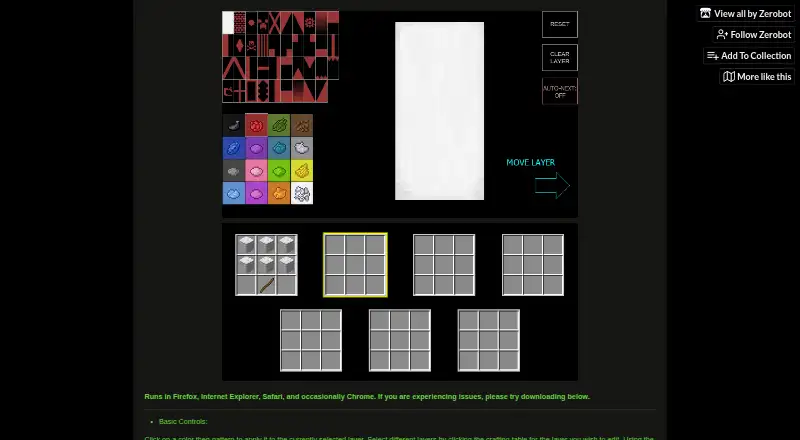
Zerobot Minecraft Banner Creator is a free tool for trying different war banner designs for Minecraft. It is available through a web version and a Windows executable. In the editor, users select a layer through the crafting table interface, then apply a color and pattern to the selected layer. They can clear a layer, move it forward or behind other layers, and set it to advance automatically to the next layer after a pattern is chosen.
The editor includes undo, which reverses a change, and a reset control for clearing the entire banner. Keyboard shortcuts provide another way to work: A or D changes the selected layer, Shift+A or Shift+D moves it, Ctrl+Z undoes, W applies the current color, and S clears the selected layer. The browser version runs in Firefox, Internet Explorer, and Safari, and occasionally in Chrome. If it does not display properly, the maker suggests trying another browser or downloading the Windows file, BannerCreatorv9_2.exe, which is 2.4 MB. The Free plan costs nothing and covers banner creation, with no specific usage limits stated. The page links to Reddit and Minecraft Forum threads for support.
Who it suits
This tool suits Minecraft players who want to try banner color and pattern combinations using layers. It can work for people who prefer a browser editor as well as Windows users who want to download the executable.
What it does well
- Free banner creation is available on the web and Windows.
- Layers can be colored, patterned, cleared, and reordered.
- The editor can advance to the next layer after a pattern choice.
- Undo and full-banner reset controls are provided.
- Keyboard shortcuts cover layer selection, movement, undo, color, and clearing.
What to know first
- Chrome support is occasional.
- The Windows option is a 2.4 MB executable download.
- Support links lead to Reddit and Minecraft Forum threads.
Plans
| Plan | Billed and limits | Price |
|---|---|---|
| Free | Banner creation; no specific usage limits stated | Free |
As zerobot.itch.io lists them, read 4 Oct 2026. The maker's own page has the final word.
Getting started
- Open the creator website in Firefox, Internet Explorer, or Safari; Chrome works occasionally.
- Select a layer through the crafting table interface.
- Choose a color and pattern for the selected layer.
- Use the layer controls or keyboard shortcuts to reorder, clear, or change layers.
- If the browser version does not display properly, try another browser or download BannerCreatorv9_2.exe for Windows.
Verdict
Choose Zerobot Minecraft Banner Creator if you want a free way to experiment with Minecraft war banner designs using layers and patterns. The Windows executable is an alternative if the browser version does not display properly. Chrome works only occasionally, so users relying on that browser may prefer to try another supported browser or the download.
Questions
Is Zerobot Minecraft Banner Creator free?
Yes. Its Free plan costs nothing and covers banner creation, with no specific usage limits stated.
Which platforms can I use it on?
It is available on the web and as a Windows executable. The download is BannerCreatorv9_2.exe, a 2.4 MB file.
Which browsers does the web version run in?
It runs in Firefox, Internet Explorer, and Safari, and occasionally in Chrome.
How do I edit a banner layer?
Select a layer through the crafting table interface, then apply a color and pattern. Controls also let you clear or move layers and advance to the next layer after choosing a pattern.
What keyboard shortcuts are available?
A and D change the selected layer, Shift+A or Shift+D moves it, Ctrl+Z undoes, W applies the current color, and S clears the current layer.
Where can I find support?
The page links to a Reddit thread and a Minecraft Forum thread.
Facts from Zerobot Minecraft Banner Creator's own pages
- Browser access
- The creator runs in Firefox, Internet Explorer, Safari, and occasionally Chrome. · zerobot.itch.io, 4 Oct 2026
- Browser fallback
- The maker suggests trying another browser or downloading the executable if the creator is not displaying properly. · zerobot.itch.io, 4 Oct 2026
- Integrations
- The page does not state any integrations. · zerobot.itch.io, 4 Oct 2026
- Keyboard shortcuts
- A/D changes the selected layer, Shift+A/D moves it, Ctrl+Z undoes, W applies the current color, and S clears the current layer. · zerobot.itch.io, 4 Oct 2026
- Layer controls
- Controls include clearing a layer, moving a layer forward or behind other layers, and automatically advancing to the next layer after choosing a pattern. · zerobot.itch.io, 4 Oct 2026
- Layer editing
- Users apply a color and pattern to the currently selected layer and select layers through the crafting table interface. · zerobot.itch.io, 4 Oct 2026
- Purpose
- The creator lets users test different Minecraft war banner designs. · zerobot.itch.io, 4 Oct 2026
- Security and compliance
- The page does not state security measures or compliance certifications. · zerobot.itch.io, 4 Oct 2026
- Support
- The page links to a Reddit thread and a Minecraft Forum thread. · zerobot.itch.io, 4 Oct 2026
- Undo and reset
- The controls include undo, clearing the selected layer, and resetting the entire banner. · zerobot.itch.io, 4 Oct 2026
- Windows download
- The page offers the 2.4 MB executable BannerCreatorv9_2.exe for download. · zerobot.itch.io, 4 Oct 2026
Where Zerobot Minecraft Banner Creator stands on Freedom251
- Minecraft Banner Generators#18 of 25