Freedom251 › Minecraft Banner Generators

DoneInBrowser Minecraft Banner Designer
Visit DoneInBrowser Minecraft Banner Designer Alternatives Pricing
What DoneInBrowser Minecraft Banner Designer is
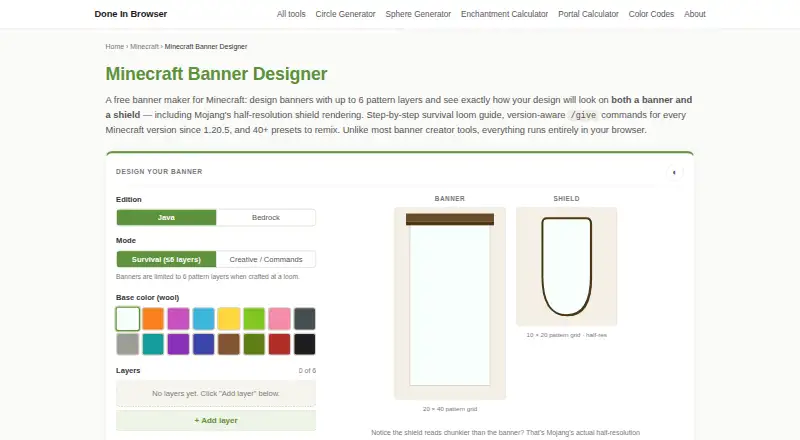
DoneInBrowser Minecraft Banner Designer is a free web tool for creating Minecraft banners and generating commands for them. It shows live banner and shield previews, including the shield’s half-resolution appearance, and offers more than 40 presets such as flags, mob faces, and kingdom crests. Users can work with 35 geometric patterns; eight detailed charge patterns are not included and can be added in-game at a loom. The tool generates version-aware `/give` commands for Java and Bedrock, with options for legacy and newer Java syntax. A survival crafting panel lists required items and can be printed or saved as a PDF. Designs can be saved and shared in a URL without an account, with the design encoded in the URL hash. Banner design work runs in the browser, and the maker says design data is not sent to its server. Survival mode follows the loom’s six-layer cap; Creative / Commands mode supports up to 16 layers.
Who it suits
It suits Minecraft players who want to preview banner or shield designs, prepare commands, or check survival crafting materials. It also supports people sharing designs by URL without an account.
What it does well
- Live banner and shield previews
- More than 40 hand-designed presets
- Generates commands for Java and Bedrock
- Crafting list can be printed or saved as PDF
- Designs can be shared without an account
What to know first
- Eight detailed charge patterns are omitted
- Survival mode is limited to six layers
- Only 35 geometric patterns are supported
Limits
The free plan supports 35 geometric patterns, up to six layers in Survival mode, and up to 16 layers in Creative / Commands mode. Eight detailed charge patterns are omitted and can be added in-game at a loom.
Plans
| Plan | Billed and limits | Price |
|---|---|---|
| Free | Free · Up to 6 layers in Survival mode · 16 layers in Creative / Commands mode · 35 geometric patterns | Free |
As doneinbrowser.com lists them, read 3 Oct 2026. The maker's own page has the final word.
Getting started
- Open the Minecraft Banner Designer website in a browser.
- Start from a preset or build a design with geometric patterns.
- Review the live banner and shield previews.
- Choose Java or Bedrock command output and the relevant Java syntax option.
- Use the crafting panel for survival materials, then print it or save it as a PDF.
- Save or share a design through its URL; no account is required.
DoneInBrowser Minecraft Banner Designer is a free web tool for composing Minecraft banners, previewing them on shields, and generating game commands. It is best for players who want to plan and share designs without an account. The main trade-off is a focused pattern catalog: eight detailed charge patterns are left for the in-game loom.
Overview
The tool brings visual design, crafting guidance, and command generation into one browser workflow. More than 40 hand-designed presets—including flags, mob faces, and kingdom crests—give users a starting point to customize rather than requiring every design to begin from a blank canvas. Live banner and shield previews help judge how a composition reads in both formats; the shield preview uses its half-resolution rendering, which makes small details harder to rely on.
Designs can be saved and shared through a URL that encodes the design, with no account required. Design work runs in the browser, and the maker says it is not sent to its server. The privacy policy says advertising and analytics scripts load only after cookie consent and do not receive tool inputs. Cloudflare Pages hosting logs standard request data, including IP address, browser type, and requested URL.
Key features
Design and preview
The catalog covers 35 geometric patterns, while eight detailed charge patterns must be added at a loom in the game. That makes the designer useful for planning many layered geometric looks, but not a complete in-browser catalog for every charge. The presets can speed up experimentation, and the shield view provides a practical check before committing to a design.
Commands and crafting
Version-aware /give commands are generated for Java and Bedrock, with options for legacy and newer Java syntax. This is useful for players who want to apply a design in Creative mode or need output suited to different editions. For survival play, the crafting panel lists the needed items and can be printed or saved as a PDF, turning the design into a reference for the loom.
Survival mode follows the loom's six-layer limit. Creative / Commands mode allows up to 16 layers, so the tool supports more elaborate command-based designs without implying that the same builds can be made through survival crafting.
Sharing and embedding
URL-based sharing avoids account setup and makes it straightforward to pass a design along. The tool can also be embedded on other sites for free, provided the embed keeps its credit link. Done In Browser describes itself as an independent, one-person project and directs feedback and questions to its contact page.
Pricing
DoneInBrowser Minecraft Banner Designer has one free plan: free, billed Free. It includes up to six layers in Survival mode, up to 16 in Creative / Commands mode, and 35 geometric patterns. There is no free trial because the plan itself is free; no paid plan is presented. The six-layer survival cap and omitted charge patterns are the meaningful constraints, rather than a subscription or account quota.
Platforms
The designer is available on the web. It supports both Java and Bedrock command output, with legacy and newer Java syntax options. No separate desktop or mobile app is part of the offering described here.
Who it's for
This is a strong fit for Minecraft players who want to visualize a banner and its shield version, generate edition-aware commands, or keep a printable survival crafting list. It also suits people sharing designs through URLs and site owners who want a credited embed. Players seeking a broader charge-pattern catalog in the designer, or a mobile app rather than a web tool, should consider alternatives.
Pros and cons
- Pros: Banner and half-resolution shield previews make it possible to assess how a design translates between formats.
- Pros: Java and Bedrock command generation, including Java syntax choices, serves players using different editions and command conventions.
- Pros: A printable or PDF crafting list connects the design to survival-mode materials and loom steps.
- Pros: URL sharing works without an account, and design data stays in the browser according to the maker.
- Cons: Eight detailed charge patterns are not in the catalog and must be added in-game.
- Cons: Survival designs stop at six layers; the 16-layer limit applies only to Creative / Commands mode.
Alternatives
Minecraft Banner Generators is a useful starting point for comparing banner tools beyond this designer.
Choose Mcgic Banner Maker or NeedCoolerShoes if you want a free option that is also available on Android and iOS. BeeForge Minecraft Banner Generator is another free web option, with no registration required.
BlockForge Minecraft Banner Designer is a free browser tool built and maintained by one person. Minecraft Banner Maker is a free browser alternative with survival designs up to six layers and command designs up to 16. For PNG export and a Java command alongside 16 dye colors, consider siutil Minecraft Banner Maker.
Gamer Geeks Minecraft Tools may suit users who want an account with save storage, though free accounts have less storage than subscribers and its supporter subscription uses a supporter-set pledge amount. MineBuildr Banner Generator offers a free tier with no account required and a paid Premium plan at $9 a month; choose it if its broader directory of tools and premium access are more relevant than a banner-focused designer.
Verdict
Choose DoneInBrowser Minecraft Banner Designer if you want a free, account-free way to preview a banner and shield, prepare Java or Bedrock commands, and carry a crafting list into survival play. Its browser-based sharing and practical workflow are compelling; look elsewhere if you need the eight omitted charge patterns inside the editor or want a native mobile app.
Verdict
The tool brings banner previews, command generation, and a printable crafting guide into one browser-based designer. Its pattern catalog omits eight detailed charge patterns, and survival designs follow the six-layer loom limit.
Questions
Is Minecraft Banner Designer free?
Yes. The tool is free to use.
Do I need an account to save or share a design?
No account is needed. The design is encoded in the URL hash.
Does it support Java and Bedrock?
Yes. It generates version-aware `/give` commands for both editions, with options for legacy and newer Java syntax.
How many patterns and layers can I use?
The tool supports 35 geometric patterns. Survival mode allows up to six layers, while Creative / Commands mode allows up to 16.
Does the tool include every banner pattern?
It omits eight detailed charge patterns; those can be added in-game at a loom.
Who makes the tool, and how can I contact them?
Done In Browser describes the project as an independent, one-person effort and directs visitors to its contact page for feedback and questions.
Facts from DoneInBrowser Minecraft Banner Designer's own pages
- Commands
- It generates version-aware `/give` commands for Java and Bedrock, with options for legacy and newer Java syntax. · doneinbrowser.com, 3 Oct 2026
- Crafting guide
- A survival crafting panel lists the items needed for the design and can be printed or saved as a PDF. · doneinbrowser.com, 3 Oct 2026
- Data handling
- Banner design work runs in the browser, and the maker says design data is not sent to its server; sharing encodes the design in the URL hash. · doneinbrowser.com, 3 Oct 2026
- Design sharing
- Designs can be saved and shared through a URL that encodes the design, without an account. · doneinbrowser.com, 3 Oct 2026
- Hosting
- The privacy policy says the site is hosted on Cloudflare Pages, which logs standard server data such as IP address, browser type and requested URL. · doneinbrowser.com, 3 Oct 2026
- Integrations
- The tool can be embedded on other sites for free, with a credit link retained. · doneinbrowser.com, 3 Oct 2026
- Layer limit
- Survival mode reflects the loom’s six-layer cap; Creative / Commands mode raises the tool’s cap to 16. · doneinbrowser.com, 3 Oct 2026
- Maker and support
- Done In Browser describes itself as an independent, one-person project and directs visitors to its contact page for feedback and questions. · doneinbrowser.com, 3 Oct 2026
- Pattern limit
- The tool supports 35 geometric patterns and omits eight detailed charge patterns that can instead be added in-game at a loom. · doneinbrowser.com, 3 Oct 2026
- Presets
- The page offers 40+ hand-designed presets to remix, including country flags, mob faces and kingdom crests. · doneinbrowser.com, 3 Oct 2026
- Previews
- It shows live banner and shield previews, including the shield’s half-resolution rendering. · doneinbrowser.com, 3 Oct 2026
- Privacy and analytics
- The privacy policy says Google advertising and analytics scripts load only after cookie consent, and do not receive tool inputs. · doneinbrowser.com, 3 Oct 2026
- Purpose
- A free in-browser tool for designing Minecraft banners. · doneinbrowser.com, 3 Oct 2026
Where DoneInBrowser Minecraft Banner Designer stands on Freedom251
- Minecraft Banner Generators#7 of 25