Freedom251 › 3D Texturing Software
Blacksmith3D
What Blacksmith3D is
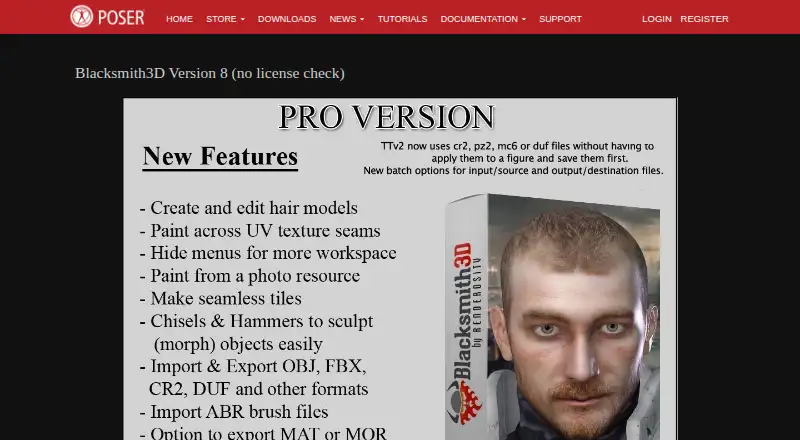
Blacksmith3D is a Windows application for painting textures and morphing 3D models. Its 64-bit texture painting supports high-resolution work, with performance depending on system RAM and CPU power. You can build multiple image layers and adjust each layer’s blending mode and strength. Chisel deformers let you bulge, smooth, flatten, sharpen, and contour models in the viewport, and the Paint Setup Wizard can automatically UV-map an object file.
The Hair tab supports creating or editing transmapped, non-dynamic hair models in OBJ, FBX, CR2, PP2, HR2, and DUF formats. Blacksmith3D describes compatibility with 3D Studio Max, Maya, Lightwave, Cinema 4D, Photoshop, Poser, Daz Studio, and applications that import and export OBJ files and use standard texture maps. It supports OBJ and CR2 import and export, PP2 and DUF import, and MAT and MOR export. The Version 8 distribution is listed as free, with no license check; its free distribution is temporarily available to customers who can no longer run older versions. The maker recommends Windows 10 or later, at least a 1 GHz CPU and 1 GB RAM, and 8 GB RAM or more for optimal performance with 4000×4000 texture maps.
Who it suits
Blacksmith3D suits artists who need desktop tools for 3D texture painting, morphing, sculpting, UV mapping, or supported hair formats. Its listed integrations and import/export formats may also suit users working with Poser, Daz Studio, and other applications that handle OBJ files and standard texture maps.
What it does well
- High-resolution 64-bit texture painting uses system RAM and CPU.
- Image layers have adjustable blending modes and strengths.
- Chisel deformers offer five viewport sculpting actions.
- Paint Setup Wizard can automatically UV-map object files.
- Version 8 is distributed free without a license check.
What to know first
- Available for Windows only.
- ABR import supports only versions 6.1 and 6.2 bitmap brushes.
- Some imported brush attributes may not be preserved.
- Texture baking is not supported.
Limits
Version 8 is described as a free distribution temporarily available to customers who could no longer run older versions. ABR brush import is limited to versions 6.1 and 6.2 and bitmap-based brushes, and some brush attributes may not carry over.
Plans
| Plan | Billed and limits | Price |
|---|---|---|
| Blacksmith3D Version 8 (no license check) | Free distribution temporarily available to customers who could no longer run older versions | Free |
As posersoftware.com lists them, read 8 Oct 2026. The maker's own page has the final word.
Getting started
- Visit the Blacksmith3D website.
- Use a Windows computer; Windows 10 is the minimum recommended operating system.
- Download the Version 8 free distribution.
- Start with the maker’s video tutorials or official Blacksmith3D forum for education and support.
Verdict
Choose Blacksmith3D if you want free Windows software for texture painting and morphing, with sculpting, UV mapping, and the listed Poser and Daz Studio formats. Look elsewhere if you need texture baking, broader platform support, or ABR brush support beyond the stated versions and bitmap-based brushes.
Questions
How much does Blacksmith3D cost?
Version 8 is listed as free as a free distribution.
Is there a free plan?
Yes. Version 8 is distributed free without a license check; the free distribution is temporarily available to customers who could no longer run older versions.
Which platforms does Blacksmith3D support?
Windows is the listed platform. Windows 10 is the minimum recommended operating system.
Which applications and formats are listed as compatible?
Compatibility includes 3D Studio Max, Maya, Lightwave, Cinema 4D, Photoshop, Poser, Daz Studio, and applications using OBJ files and standard texture maps. The listed format support includes OBJ and CR2 import and export, PP2 and DUF import, and MAT and MOR export.
Does Blacksmith3D support texture baking?
No. Texture baking is listed as unsupported.
What learning and support options are listed?
The maker lists video tutorials and an official Blacksmith3D forum for education and product support.
Facts from Blacksmith3D's own pages
- Brush-file limit
- ABR brush import supports versions 6.1 and 6.2 and bitmap-based brushes only; some brush attributes may not be preserved. · posersoftware.com, 8 Oct 2026
- Hair tools
- The Hair tab supports creating or editing transmapped, non-dynamic hair models in formats including OBJ, FBX, CR2, PP2, HR2, and DUF. · posersoftware.com, 8 Oct 2026
- Hardware guidance
- The page recommends at least a 1 GHz CPU and 1 GB RAM; for editing 4000×4000 texture maps, it recommends 8 GB RAM or more for optimal performance. · posersoftware.com, 8 Oct 2026
- Headquarters
- Murfreesboro, Tennessee, United States · posersoftware.com, 28 Sept 2026
- Image layers
- Users can create multiple image layers and adjust their blending modes and strengths. · posersoftware.com, 8 Oct 2026
- Integrations
- The page lists compatibility with 3D Studio Max, Maya, Lightwave, Cinema 4D, Photoshop, Poser, and Daz Studio, plus applications that import and export OBJ files and use standard texture maps. · posersoftware.com, 8 Oct 2026
- License check
- The listed Version 8 distribution is labeled “no license check.” · posersoftware.com, 8 Oct 2026
- Operating system
- The minimum recommended operating system is Windows 10. · posersoftware.com, 8 Oct 2026
- Poser and DAZ formats
- The page describes OBJ and CR2 import/export, PP2 and DUF import, and MAT and MOR export capabilities. · posersoftware.com, 8 Oct 2026
- Purpose
- Blacksmith3D provides 3D painting and morphing tools for artists. · posersoftware.com, 8 Oct 2026
- Sculpting
- Chisel deformers let users bulge, smooth, flatten, sharpen, and contour models in the viewport. · posersoftware.com, 8 Oct 2026
- Security or compliance
- The Blacksmith3D page does not state security certifications or compliance standards. · posersoftware.com, 8 Oct 2026
- Support
- The maker lists video tutorials and an official Blacksmith3D forum for education and product support. · posersoftware.com, 8 Oct 2026
- Texture painting
- Its 64-bit high-resolution texture painting is limited by system RAM and CPU power, rather than 3D video card capabilities. · posersoftware.com, 8 Oct 2026
- UV mapping
- The Paint Setup Wizard can automatically UV-map an object file. · posersoftware.com, 8 Oct 2026
Where Blacksmith3D stands on Freedom251
- 3D Texturing Software#5 of 29
- Game Texture Software#9 of 34