Freedom251 › Drum Machine Software
Beatmaker 3
What Beatmaker 3 is
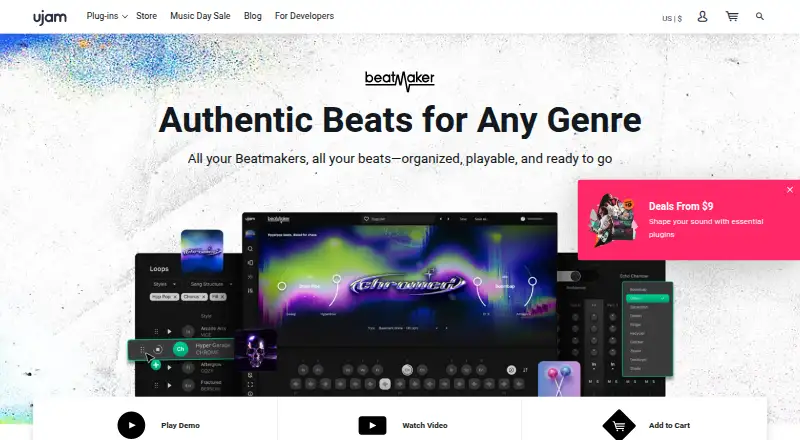
Beatmaker 3 is a virtual drum machine for building beats from genre-focused kits, rhythmic phrases, and built-in effects. It brings the Beatmaker titles a user owns into one plugin with unified control. Its browser searches by mood, genre, or BPM and can preview kits and loops from titles the user does not own. Each title includes 10 drum kits and rhythmic phrases that can be triggered in real time. The mixer provides per-track volume, pan, filter, ambience, saturation, and individual output routing. MIDI can be dragged into a DAW for editing or layering with other instruments. Beatmaker supports 64-bit VST 2, VST 3, AU 2, and AAX formats; AU 2 requires Logic Pro X or newer, and AAX does not have native Apple Silicon support. Individual genre-focused titles cost $49, paid once, while the 17-instrument bundle costs $99.50, paid once. A free 7-day trial is available, but there is no free plan.
Who it suits
Beatmaker 3 suits producers and composers seeking ready-to-play beats and grooves organized by genre. It is available for iOS, macOS, and Windows, with plugin formats for supported DAWs.
What it does well
- Search the browser by mood, genre, or BPM.
- Each title includes 10 genre-specific drum kits.
- Trigger rhythmic phrases in real time.
- Drag MIDI into a DAW for customization or layering.
What to know first
- There is no free plan.
- AU 2 requires Logic Pro X or newer.
- AAX lacks native Apple Silicon support.
- Native Instruments NKS is not currently supported.
Limits
There is no free plan; the free trial lasts 7 days. Individual titles cost $49, paid once, while the bundle costs $99.50, paid once.
Plans
| Plan | Billed and limits | Price |
|---|---|---|
| Individual Beatmaker title | One genre-focused drum instrument | $49, paid once |
| Beatmaker 3 Bundle | 17 genre-focused drum instruments | $99.50, paid once |
As ujam.com lists them, read 3 Oct 2026. The maker's own page has the final word.
Getting started
- Visit https://www.ujam.com/beatmaker/.
- Choose an Individual Beatmaker title or the Beatmaker 3 Bundle.
- Start the free 7-day trial or purchase a title.
- Install the latest UJAM App; it installs the host plugin with your first Beatmaker title.
- Log in to authorize the plugin, then use it in a supported host format.
Beatmaker 3 is a virtual drum-machine plugin built around genre-focused kits, grooves, and effects. It is aimed at producers and composers who want usable rhythmic ideas quickly, with enough routing and MIDI access to finish the work in a DAW. It is strongest as a fast, pattern-based instrument; users seeking extensive original sound design or broad hardware integration should look elsewhere.
Overview
Beatmaker 3 puts the Beatmaker titles you own inside one host with shared control. Its browser searches by mood, genre, or BPM and previews kits and loops from titles you have not bought, so you can audition a direction before adding another instrument. Every title contains 10 genre-specific drum kits plus rhythmic phrases that can be triggered in real time. This favors immediate songwriting and performance over programming every hit from an empty sequence.
Pattern sequencing, live-performance tools, sample import, MIDI support, and WAVE and AAC export cover the main routes from sketch to arrangement. Dragging MIDI into a DAW is particularly valuable when you want to edit a phrase, layer another instrument, or move beyond the supplied drum sounds.
Key features
Browser and playable content
The unified browser makes a growing collection easier to navigate than separate instruments. Mood, genre, and BPM searches are practical starting points, while previews from unowned titles help identify suitable material before purchase. The trade-off is that the creative center remains the supplied kits and phrases rather than a deep, from-scratch drum-design environment.
Mixer and routing
Each track has volume, pan, filter, ambience, and saturation controls, with individual output routing. That gives a producer meaningful control over balance, tone, and effects sends inside the plugin, and makes it easier to hand separate parts to a DAW mixer. It is a more useful mixing layer than a simple loop player, although the published feature set does not position it as a full recording or mastering system.
MIDI and export
Real-time phrase triggering and MIDI drag-and-drop keep patterns editable after they leave Beatmaker 3. Sample import supports bringing your own material into the workflow, while WAVE and AAC export provide straightforward audio handoff. These options suit composers who want fast starting points but still need arrangement flexibility.
Installation and compatibility
The latest UJAM App installs the host plugin with the first Beatmaker title and authorizes it after login. Beatmaker 3 supports 64-bit VST 2, VST 3, AU 2, and AAX formats. AU 2 requires Logic Pro X or newer, and AAX has no native Apple Silicon support. Native Instruments NKS is not supported, which may matter to users building around NKS browsing and control.
Pricing
There is no free plan, but the product page offers a seven-day free trial. The Individual Beatmaker title costs $49, paid once and supplies one genre-focused drum instrument. It is the sensible entry point if you need a particular style and do not want to buy a collection.
The Beatmaker 3 Bundle costs $99.50, paid once and includes 17 genre-focused drum instruments. That is the better fit for producers working across styles or who expect to use the shared browser regularly. Both are one-time purchases rather than subscriptions; the bundle costs more upfront but gives substantially broader kit coverage. Plugin use, MIDI support, sample import, live performance tools, and pattern sequencing are part of the product rather than separate tiers.
Platforms
Beatmaker 3 is available on iOS, macOS, and Windows, with plugin use as its core format. Desktop requirements are Windows 10–11 or macOS Big Sur 11 through macOS Tahoe 26. The format caveats are important for studio planning: AU 2 needs Logic Pro X or newer, while AAX lacks native Apple Silicon support. UJAM supplies a FAQ, user guide, and support requests through its support center.
Who it's for
UJAM positions Beatmaker as a genre-focused instrument for producers and composers seeking ready-to-play beats and grooves. It fits songwriters, electronic producers, and scoring workflows that benefit from quickly auditioning patterns, shaping individual tracks, and exporting editable MIDI. It is less suitable for users who need a free option, Native Instruments NKS integration, or a primarily synthesis-driven drum workstation.
Pros and cons
- Pros: One host organizes owned titles with unified controls; mood, genre, and BPM search speeds sound selection; each title combines 10 focused kits with playable phrases; per-track processing and individual outputs support detailed mixing; MIDI export keeps patterns editable in a DAW; the seven-day trial lowers the risk of choosing a title.
- Cons: There is no free plan, and the individual purchase covers only one genre instrument; the bundle is the larger upfront commitment; NKS is unsupported; AAX has no Apple Silicon native support; the ready-made, pattern-led design is less appropriate for producers who want wholly original drum synthesis and sequencing.
Alternatives
For broader category browsing, see Drum Machine Software, Beat Making Software, and Audio Editing Software.
- Zenbeats is the better choice if you want a freemium music-production environment spanning Android, iOS, macOS, and Windows, with a free version and optional iOS unlock.
- mpump suits users who want a free browser groovebox with drums, bass, synths, effects, and shareable beat links across Android, iOS, and the web.
- 0x808 is a free alternative for Linux, macOS, and Windows users.
- Hydrogen is a free, non-trial option for Linux, macOS, Windows, and API-based workflows.
- Atlas 2 is worth choosing instead if you want a paid drum instrument for Linux, macOS, and Windows with a 99.00 USD one-time license and installation on three machines.
- Playbeat 4 is an alternative paid drum plugin for iOS, macOS, and Windows, with a 29.00 EUR upgrade and an 89.00 EUR full purchase.
- BeatForge is a lower-priced paid option for macOS and Windows at 39.00 EUR once.
- DM1 – The Drum Machine is the better fit if you want a low-cost app for iOS or macOS rather than a multi-title plugin host.
Verdict
Choose Beatmaker 3 if you want genre-specific drum kits, playable grooves, integrated per-track mixing, and MIDI handoff in one plugin. The individual title is a focused purchase, while the bundle makes more sense for multi-genre work. Look elsewhere if free software, NKS, native Apple Silicon AAX, or deep original drum synthesis is central to your setup.
Verdict
Beatmaker 3 brings owned titles, kit browsing, mixing, and MIDI workflows into one plugin. Its trial offers a way to try it, while title and bundle purchases are one-time costs.
Questions
Is Beatmaker 3 free?
There is no free plan. A free 7-day trial is available.
How much does it cost?
An Individual Beatmaker title costs $49, paid once. The Beatmaker 3 Bundle costs $99.50, paid once and includes 17 genre-focused drum instruments.
Which platforms does it support?
It is listed for iOS, macOS, and Windows. System requirements specify Windows 10–11 and macOS Big Sur 11 through macOS Tahoe 26.
Which plugin formats are supported?
Beatmaker supports 64-bit VST 2, VST 3, AU 2, and AAX. AU 2 requires Logic Pro X or newer, and AAX has no Apple Silicon native support.
Does it support MIDI?
Yes. You can drag MIDI into a DAW to customize it or layer it with other instruments.
How do I install and authorize it?
The latest UJAM App installs the host plugin with the first Beatmaker title. Log in to authorize it.
Facts from Beatmaker 3's own pages
- Browser
- Its browser searches by mood, genre, or BPM and can preview kits and loops from titles the user does not own. · ujam.com, 3 Oct 2026
- Founded
- 2010 · ujam.com, 28 Sept 2026
- Headquarters
- Bremen, Germany · ujam.com, 28 Sept 2026
- Installation and authorization
- Beatmaker requires the latest UJAM App, which installs the host plugin with the first Beatmaker title and authorizes it after login. · ujam.com, 3 Oct 2026
- Kits and rhythms
- Each title includes 10 genre-specific drum kits and built-in rhythmic phrases that can be triggered in real time. · ujam.com, 3 Oct 2026
- MIDI export
- Users can drag MIDI into their DAW to customize or layer it with other instruments. · ujam.com, 3 Oct 2026
- Mixer
- The mixer provides per-track volume, pan, filter, ambience, saturation, and individual output routing. · ujam.com, 3 Oct 2026
- NKS compatibility
- Beatmaker 3 does not currently support Native Instruments NKS. · support.ujam.com, 3 Oct 2026
- Operating systems
- The listed requirements are Windows 10–11 and macOS Big Sur 11 through macOS Tahoe 26. · ujam.com, 3 Oct 2026
- Plugin formats
- Beatmaker supports 64-bit VST 2, VST 3, AU 2, and AAX formats; AU 2 requires Logic Pro X or newer, and AAX has no Apple Silicon native support. · ujam.com, 3 Oct 2026
- Product
- Beatmaker is a virtual drum machine for creating beats with ready-made kits, grooves, and built-in effects. · ujam.com, 3 Oct 2026
- Support
- UJAM provides a Beatmaker 3 FAQ and user guide, and its support center lets users submit a request. · support.ujam.com, 3 Oct 2026
- Target users
- UJAM describes the series as genre-focused instruments for producers and composers seeking ready-to-play beats and grooves. · ujam.com, 3 Oct 2026
- Trial
- The product page offers a free 7-day trial of Beatmaker 3. · ujam.com, 3 Oct 2026
- Unified plugin
- Beatmaker 3 hosts the titles a user owns in one plugin with unified control. · ujam.com, 3 Oct 2026
Where Beatmaker 3 stands on Freedom251
- Drum Machine Software#4 of 30
- Beat Making Software#20 of 32
- Audio Editing Software#107 of 131