Freedom251 › Drum Machine Software
0x808
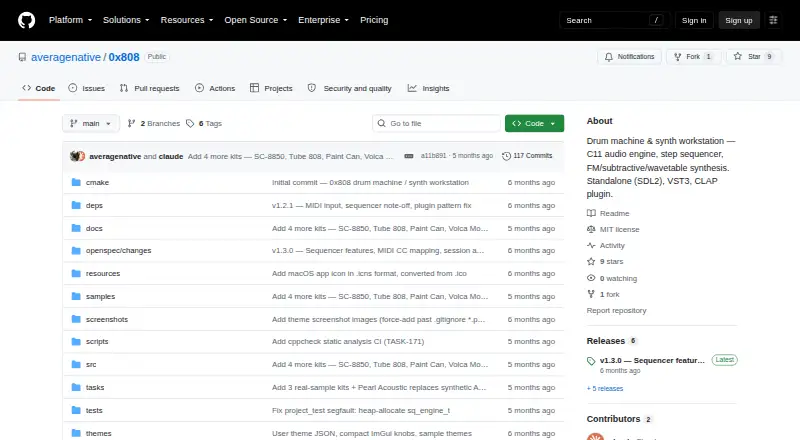
What 0x808 is
0x808 is a drum machine, step sequencer, and synthesizer for Linux, macOS, and Windows. It can run as a standalone workstation or as VST3 and CLAP plugins, and the project also provides a terminal frontend. Its 16-track drum grid lets you set velocity and pitch for each step, then mute or solo tracks. Patterns can be linked in song or perform mode. For sound creation, it offers subtractive, four-operator FM, and wavetable synthesis, with built-in presets. The sample browser accepts WAV, MP3, and FLAC files, and the project includes 72 CC0 drum samples. Filter, delay, reverb, overdrive, fuzz, and chorus are available as track and master-bus effects. Offline export supports WAV at 16-, 24-, or 32-bit; MP3 export supports 128–320k and requires an optional build setting. USB MIDI is supported across all three desktop platforms. The project is free and open source under the MIT license, and its README says dependencies are vendored with no external runtime dependencies. Platform downloads include installers or archives, and the plugins install into the corresponding plugin folders.
Who it suits
0x808 suits desktop music makers who want sequencing, synthesis, sample loading, and performance modes in one workstation. It also fits producers who want VST3 or CLAP plugins, or USB MIDI controller support on Linux, macOS, or Windows.
What it does well
- 16 sequencer tracks with per-step velocity and pitch controls
- Three synthesis modes with built-in presets
- Loads WAV, MP3, and FLAC samples
- Includes 72 CC0 drum samples
- Free, MIT-licensed, and available on three desktop platforms
What to know first
- Bluetooth MIDI is not directly supported
- MP3 export requires an optional build setting
Getting started
- Open the project website on GitHub
- Choose the release download for Windows, Linux, or macOS
- Install or unpack the platform download
- For DAW use, install the VST3 or CLAP plugin in the corresponding plugin folder
- Connect a USB MIDI controller if you want to use MIDI input
0x808 brings sequencing, synthesis, sampling, and arrangement into a free desktop workstation for beat-makers who want to work standalone or inside a DAW. Its 16-track grid and three synthesis modes give it range beyond a basic drum sequencer. It is a strong fit across Linux, macOS, and Windows, with Bluetooth MIDI and MP3 export carrying specific caveats.
Overview
Use 0x808 as a standalone drum machine and synth, or load its VST3 or CLAP plugin into a DAW. Terminal and standalone frontends add further ways to work. That flexibility suits producers who want one tool for building patterns and shaping sounds, whether or not a DAW is part of their setup.
The project is MIT-licensed and says its dependencies are vendored, with no external runtime dependencies. Releases include installable and portable formats for Windows, tarballs and AppImages for Linux, and DMGs and ZIPs for macOS, giving desktop users a choice of package type.
Key features
Sequencing and sound design
The 16-track drum grid has per-step velocity and pitch controls, plus mute and solo. These controls let producers shape individual hits and manage parts directly in a pattern. Subtractive, four-operator FM, and wavetable synthesis, each with built-in presets, make 0x808 useful for creating sounds as well as arranging drum parts.
The sample browser loads WAV, MP3, and FLAC, and the project includes 72 CC0 drum samples. That gives users a ready set of sounds and room to bring in samples in common audio formats.
Arrangement, effects, and export
Patterns can be chained in song or perform mode, and per-track and master-bus effects include filter, delay, reverb, overdrive, fuzz, and chorus. This combination supports both arranging patterns and shaping their sound within the workstation.
Offline WAV export offers 16-, 24-, and 32-bit output. MP3 export spans 128–320k, but requires an optional build setting, which makes WAV the more straightforward route for users who need export without changing that setting.
DAW and controller support
VST3 and CLAP versions are available for Linux, macOS, and Windows and install into the corresponding plugin folders. USB MIDI works on all three platforms. Bluetooth MIDI is not directly supported; the project describes a Windows virtual-port bridge workaround, so users who depend on direct Bluetooth connections should look elsewhere.
Pricing
0x808 is free and open source under the MIT license. There are no paid plans to choose between, making it a practical option for producers who want a capable desktop drum machine and synth without a software purchase.
Platforms
0x808 is a desktop application for Linux, macOS, and Windows, with standalone builds and VST3 and CLAP plugins for DAWs on those platforms. The releases page offers platform-specific installers or archives, including portable ZIPs for Windows and ZIPs for macOS. USB MIDI is supported across the same three operating systems.
Who it's for
Choose 0x808 if you want a free desktop setup that combines step sequencing, sample import, synthesis, effects, and pattern chaining. It suits beat-makers who value both standalone use and DAW integration, or who want to move between those workflows. Producers who require direct Bluetooth MIDI support, or MP3 export without an optional build setting, are better served by another tool.
Pros and cons
Pros
- Free and MIT-licensed, with standalone, VST3, and CLAP options across Linux, macOS, and Windows.
- A 16-track grid with per-step velocity and pitch controls, plus three synthesis modes, covers both beat programming and sound creation.
- WAV, MP3, and FLAC sample import, 72 included CC0 drum samples, pattern chaining, and six named effects give a beat-making setup considerable scope.
- USB MIDI works on all three desktop platforms, and the project says it has no external runtime dependencies.
Cons
- Bluetooth MIDI is not directly supported, which rules it out for workflows that rely on a direct Bluetooth controller connection.
- MP3 export requires an optional build setting, adding a configuration step for users who need that format.
Alternatives
Zenbeats is worth considering if you want music-production software with a free version across Android, iOS, macOS, and Windows; its free plan includes basic production features and access to the in-app store.
mpump suits someone who prefers a free browser groovebox with shareable beat links, or wants to work on Android, iOS, or the web rather than use a desktop workstation.
Hydrogen is another free option for Linux, macOS, and Windows if you want a drum machine without a paid plan.
Atlas 2 may suit desktop users willing to pay for a one-time purchase: its full version costs $99, paid once and installs on three machines.
Beatmaker 3 is an option for users seeking genre-focused drum instruments, with individual titles at $49, paid once or a 17-instrument bundle at $99.50, paid once.
Playbeat 4 is a paid alternative for desktop users who want a product with a trial; its listed one-time prices are 29.00 EUR for the upgrade and 89.00 EUR for the full version.
BeatForge is a paid macOS and Windows alternative with a listed one-time price of 39.00 EUR.
DM1 – The Drum Machine is an option for those seeking an iOS or macOS drum machine, with separate listed prices for its iPhone, Mac, and iPad apps.
Browse more options in Drum Machine Software.
Verdict
0x808 is an easy recommendation for desktop beat-makers who want a free, open-source workstation with sequencing, synthesis, samples, effects, and DAW plugins in one package. Its platform coverage and standalone-to-plugin flexibility are the main reasons to choose it. Look elsewhere if direct Bluetooth MIDI is essential or MP3 export must work without an optional build setting.
Verdict
Choose 0x808 if you want a free, open-source drum machine and synth with standalone and DAW plugin options. Look elsewhere if direct Bluetooth MIDI support is essential, or if you need MP3 export without changing the build setting.
Questions
How much does 0x808 cost?
It is free and open source under the MIT license.
Which operating systems does it support?
The standalone application and plugins are listed for Linux, macOS, and Windows.
Can I use it inside a DAW?
Yes. It is available as VST3 and CLAP plugins, which embed in DAW host windows.
What sample formats can it load?
The sample browser loads WAV, MP3, and FLAC files.
Can it export MP3?
Yes, at 128–320k, but MP3 export requires an optional build setting.
Does it support MIDI controllers?
USB MIDI is supported on Linux, Windows, and macOS. Bluetooth MIDI is not directly supported.
Facts from 0x808's own pages
- Arrangement and effects
- Patterns can be chained in song or perform mode, with filter, delay, reverb, overdrive, fuzz, and chorus effects. · github.com, 7 Oct 2026
- DAW and MIDI support
- VST3 and CLAP plugins embed in DAW host windows, and USB MIDI controllers are supported across the listed platforms. · github.com, 7 Oct 2026
- DAW integration
- The VST3 and CLAP plugins are listed for Linux, macOS, and Windows and install into the corresponding plugin folders. · github.com, 7 Oct 2026
- Downloads
- The releases page lists Windows installers and portable ZIPs, Linux tarballs and AppImages, and macOS DMGs and ZIPs. · github.com, 7 Oct 2026
- Effects and export
- It offers per-track and master-bus effects and offline WAV export; MP3 export requires an optional build setting. · github.com, 7 Oct 2026
- Export
- Offline export supports WAV at 16-, 24-, or 32-bit and MP3 at 128–320k; MP3 export requires an optional build setting. · github.com, 7 Oct 2026
- Intended users
- The project describes itself as a drum machine and synth workstation and provides standalone, plugin, and terminal frontends. · github.com, 7 Oct 2026
- License
- The repository identifies the project as MIT licensed. · github.com, 7 Oct 2026
- MIDI
- USB MIDI is supported on Linux, Windows, and macOS; Bluetooth MIDI is not directly supported. · github.com, 7 Oct 2026
- MIDI limitation
- Bluetooth MIDI is not directly supported; the README describes a Windows virtual-port bridge workaround. · github.com, 7 Oct 2026
- Platforms
- The maker lists standalone builds for Windows, macOS, and Linux, with a GTK 4.0 native frontend for Linux. · github.com, 7 Oct 2026
- Product
- 0x808 is a standalone drum machine, step sequencer, and synthesizer, also available as VST3 and CLAP plugins. · github.com, 7 Oct 2026
- Release
- The releases page lists v1.3.0 downloads for Windows, Linux, and macOS. · github.com, 7 Oct 2026
- Runtime dependencies
- The README says all dependencies are vendored and there are zero external runtime dependencies. · github.com, 7 Oct 2026
- Samples
- The sample browser loads WAV, MP3, and FLAC files, and the project includes 72 CC0 drum samples. · github.com, 7 Oct 2026
- Samples and formats
- It includes 72 CC0 drum samples and can load WAV, MP3, and FLAC samples. · github.com, 7 Oct 2026
- Security and compliance
- The project page identifies an MIT license and does not state a security certification or compliance program. · github.com, 7 Oct 2026
- Sequencer
- Its drum grid has 16 tracks with per-step velocity and pitch controls, plus mute and solo. · github.com, 7 Oct 2026
- Synthesis
- It includes subtractive, four-operator FM, and wavetable synthesis modes with built-in presets. · github.com, 7 Oct 2026
Where 0x808 stands on Freedom251
- Drum Machine Software#14 of 30