Freedom251 › Home Builder Software

Beam
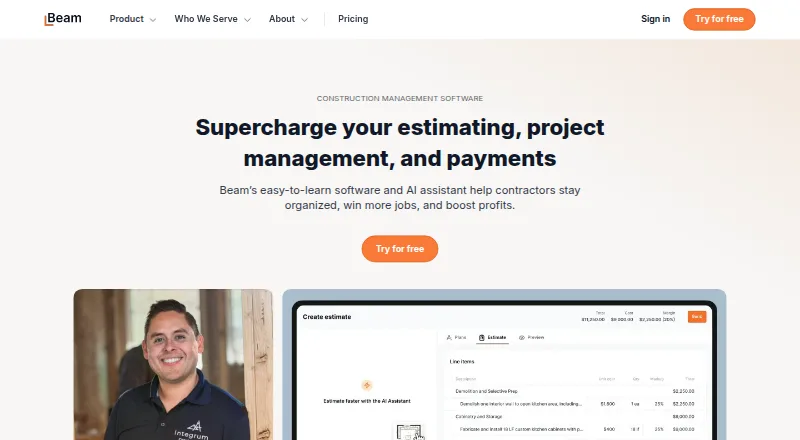
What Beam is
Beam provides AI and financial tools for construction businesses, covering estimating, project coordination, and payments. Its AI Assistant turns plans, takeoffs, or notes into proposals and learns a contractor’s pricing and style. Project tools include daily logs, schedules, task management, change orders, and a client portal for updates and documents. Financial features cover invoicing and online payments, bill payment, expense management, job costing, and lien waiver management. Beam integrates with QuickBooks Online and lists CompanyCam, busybusy, Dash Solutions, RenoFi, and XactRemodel as partners. The free Core plan has no subscription cost, supports up to two users, and includes the first five AI estimates; it also offers unlimited estimates, projects, invoices, and payments. Plus costs $200 a month when billed annually, or $250 per month when billed monthly. Beam lists Scale at $400 / mo and $500 / mo without clarifying their billing periods. Payment processing has a $5 flat ACH fee and a 3% credit card fee, which can be passed to the customer. Beam says it supports major desktop browsers and mobile devices.
Who it suits
Beam is intended for small and midsized contractors, including home builders, remodelers, specialty trade contractors, and commercial general contractors. Core may suit businesses needing basic estimating and project tools for up to two users without a subscription cost.
What it does well
- Core has no subscription cost.
- Core allows unlimited estimates, projects, invoices, and payments.
- AI Assistant turns plans, takeoffs, or notes into proposals.
- Includes scheduling, task management, and a client portal.
- Integrates with QuickBooks Online.
What to know first
- Core is limited to two users.
- Core includes only five free AI estimates.
- ACH transfers have a $5 flat fee.
- Credit card payments have a 3% fee.
Limits
Core supports up to 2 users and includes the first 5 AI estimates; unlimited AI estimating is listed on Plus. Plus costs $250 a month with monthly billing or $200 a month billed annually.
Plans
| Plan | Billed and limits | Price |
|---|---|---|
| Core | monthly · Up to 2 internal users · 5 AI estimates · unlimited estimates, projects, invoices and payments · client portal · daily logs · change orders · QuickBooks Online sync · email and chat support | Free |
| Enterprise | contact sales · Unlimited users · custom permissions · custom data imports and implementation · advanced compliance · unlimited onboarding · weekly training | On request |
| Scale | monthly or annually · Up to 10 internal users · lien-waiver management · compliance tracking · cost-plus invoicing · unlimited Visa cards · direct phone support | On request |
| Plus | monthly or annually · Up to 5 internal users · unlimited AI estimating · e-signatures · SMS · job costing · AIA invoicing · up to 50 Visa cards · bill approval workflows · send lien waivers | On request |
As trybeam.com lists them, read 15 Oct 2026. The maker's own page has the final word.
Getting started
- Visit trybeam.com in a major desktop browser or use a mobile device.
- Choose Core, Plus, Scale, or contact Beam about Enterprise.
- Create a business account; businesses processing payments must verify their identity under Beam's KYC and KYB requirements.
- Connect QuickBooks Online if needed, or review Beam's listed partner integrations.
- Set up estimating, project coordination, or financial tools for your work.
Beam is a construction-focused platform for contractors who want estimating, project coordination and financial workflows in one product. It suits small and midsized builders and trades, but its free plan’s user and AI-estimate caps and its payment fees deserve attention.
Overview
Beam brings proposal creation, job coordination and financial administration together, aiming to reduce spreadsheet and paperwork work across a construction business. That breadth is its strongest case: contractors can manage project activity and money alongside estimates rather than relying on a standalone estimator. The fit is less compelling for teams that need broad access on a free plan or want to avoid transaction charges.
Key features
Estimating and project coordination
The AI Assistant turns plans, takeoffs or notes into proposals and learns a contractor’s pricing and style. That tailoring can help with repeat proposal work; however, Core covers only the first five AI estimates, so regular AI-assisted estimating points toward Plus. Beam also includes daily logs, schedules, task management, change orders and a client portal for updates and documents, linking job coordination with client communication.
Financial workflows, integrations and security
Invoicing and online payments sit alongside bill payment, expense management, job costing and lien waiver management. This range makes Beam relevant to contractors seeking more than project tracking, though Scale is the plan that adds lien waiver management, compliance tracking and cost-plus invoicing. QuickBooks Online integration and partners including CompanyCam, busybusy, Dash Solutions, RenoFi and XactRemodel connect Beam with named tools in the construction workflow.
Beam says it encrypts data in transit using HTTPS and TLS, and tokenizes sensitive bank and card data instead of storing the actual numbers. Businesses processing payments must complete identity verification under its Know Your Customer and Know Your Business requirements. Payments carry a $5 flat ACH fee or a 3% credit card fee, which a business can pass on to its customer; that is a material consideration for frequent payment collection.
Pricing
Beam is freemium, with no free trial. Core costs $0 / mo and has no subscription cost; it allows up to 2 users, includes the first 5 AI estimates, and provides unlimited estimates, projects, invoices and payments. It is a useful starting point for a small operation, but the two-user ceiling and limited AI allowance make it a poor fit for a larger team or continuing AI-estimate volume.
Plus is $250 / mo billed monthly or $200 / mo billed annually. It raises access to up to 5 users, includes unlimited AI estimating and allows up to 50 cards, making it the clearest step up for a team that needs regular AI estimating. Scale is shown at $400 / mo and $500 / mo, with no billing periods clarified for those amounts; it allows up to 10 users and adds lien waiver management, compliance tracking and cost-plus invoicing. Enterprise has custom pricing, unlimited users, unlimited cards and unlimited onboarding. Direct phone support is listed for Scale and Enterprise; Beam also offers email and chat support, with contact hours Monday through Friday, 8am–6pm PST.
Platforms
Beam is web-based and supports major desktop browsers and mobile devices. Its stated platform is web, so readers who need a dedicated mobile app should compare alternatives before choosing.
Who it's for
Beam is purpose-built for small and midsized contractors, including home builders, remodelers, specialty trade contractors and commercial general contractors. Its combination of estimating, project tools and financial workflows is most persuasive for firms that want those jobs under one roof and can fit within a suitable seat tier.
Pros and cons
- Pro: Estimates, project coordination, invoicing and cost-related tools are combined, which can reduce the need to split those workflows across separate products.
- Pro: Core offers unlimited estimates, projects, invoices and payments without a subscription cost, useful for trying the broader product with a small team.
- Con: Core limits access to two users and includes only five AI estimates, constraining larger teams and sustained AI-assisted proposal work.
- Con: Payment processing adds $5 per ACH transfer or 3% for credit cards, costs that can affect collection economics even when passed to customers.
- Con: The Scale price is shown as both $400 / mo and $500 / mo without a clarified billing term, making the cost harder to evaluate.
Alternatives
For a broader home-builder shortlist, start with Home Builder Software. Choose Buildxact if Android and iOS apps, a free plan with five complimentary credits or Home Depot material ordering are priorities. BuildBook is another freemium option with Android and iOS apps. Consider Hyphen CRM if its paid, demo-led approach suits your buying process. BuildTools Bidding starts at $499 a month with a 12-month commitment billed monthly and guided onboarding included, so it is an option for buyers willing to take on that stated commitment. NEWSTAR, HomebuilderONE, Konstria and MarkSystems are other paid alternatives.
Verdict
Beam is a strong candidate for small and midsized contractors who want estimating, coordination and financial administration together, especially if Core’s two seats and five AI estimates are enough to get started. Choose it for that breadth and the no-subscription Core plan; look elsewhere if your team needs more users without moving up a tier, if payment fees undermine your model, or if a dedicated mobile app is essential.
Verdict
Beam brings estimating, project coordination, and financial features into one construction-focused product. Check the user and estimate limits on Core and account for payment processing fees.
Questions
Does Beam have a free plan?
Yes. Core is free, with no subscription cost. It supports up to 2 users and includes 5 free AI estimates.
What does Plus cost?
Plus is $250 a month with monthly billing, or $200 a month billed annually.
Does Beam offer a free trial?
No. Beam is listed as having no free trial.
Which devices can I use Beam on?
Beam says it supports major desktop browsers and mobile devices.
Which accounting integration is available?
Beam integrates with QuickBooks Online. Its listed partners include CompanyCam, busybusy, Dash Solutions, RenoFi, and XactRemodel.
What fees apply to payments?
Beam lists a $5 flat fee for ACH bank transfers and a 3% credit card fee. The credit card fee can be passed on to the customer.
Facts from Beam's own pages
- AI documentation
- Help articles cover supported upload file types, files over 50MB, prompting, pricing accuracy and team estimating rules. · faq.trybeam.com, 15 Oct 2026
- AI estimating
- Its AI Assistant drafts and edits professional estimates and proposals from construction plans. · trybeam.com, 15 Oct 2026
- Availability
- Beam says it supports major desktop browsers and mobile devices. · trybeam.com, 28 Sept 2026
- Bill payment
- The platform supports vendor and subcontractor bill payment with approval workflows. · trybeam.com, 15 Oct 2026
- CompanyCam integration
- The Help Center documents an integration connecting Beam with CompanyCam. · faq.trybeam.com, 15 Oct 2026
- Company headquarters
- LinkedIn lists Beam’s headquarters in San Francisco, California. · linkedin.com, 15 Oct 2026
- Company size
- LinkedIn lists Beam as privately held with 11–50 employees. · linkedin.com, 15 Oct 2026
- Daily logs and tasks
- Project tools include daily logs, schedules, tasks and client updates. · trybeam.com, 15 Oct 2026
- Digital signatures
- The product supports client approvals through digital signatures. · trybeam.com, 15 Oct 2026
- Email tracking
- Beam tracks proposal email opens so contractors can time follow-ups. · trybeam.com, 15 Oct 2026
- Estimating
- Its AI Assistant turns plans, takeoffs, or notes into professional proposals and learns a contractor’s pricing and style. · trybeam.com, 28 Sept 2026
- Expense management
- Beam provides project expense tracking and Visa cards for field spending. · trybeam.com, 15 Oct 2026
- Financial-services status
- Beam says it is a financial-technology company rather than a bank and uses Stripe and Fifth Third Bank for listed services. · trybeam.com, 15 Oct 2026
- Financial tools
- The product suite includes invoicing and online payments, bill payment, expense management, job costing, and lien waiver management. · trybeam.com, 28 Sept 2026
- Free tier limits
- The Core plan includes up to 2 users and the first 5 AI estimates; Beam says its core product is offered without a subscription cost. · trybeam.com, 28 Sept 2026
- Headquarters
- San Francisco, California, United States · trybeam.com, 28 Sept 2026
- Help documentation
- Beam’s Help Center contains sections for setup, estimates, bill payment, integrations, invoicing, compliance, cards and account settings. · faq.trybeam.com, 15 Oct 2026
- Identity verification
- Beam requires payment-processing businesses to pass federal Know Your Customer and Know Your Business checks. · trybeam.com, 15 Oct 2026
- Integrations
- Beam integrates with QuickBooks Online and lists partners including CompanyCam, busybusy, Dash Solutions, RenoFi, and XactRemodel. · trybeam.com, 28 Sept 2026
- Invoicing
- Users can send invoices, manage change orders and accept online payments through a client portal. · trybeam.com, 15 Oct 2026
- Job costing
- Beam compares estimates with actual bills and expenses using real-time job-cost reports. · trybeam.com, 15 Oct 2026
- Legal name
- Beam’s site footer identifies the company as Beam Finance Inc. · trybeam.com, 15 Oct 2026
- Lien waivers
- Higher tiers automate sending, collecting and tracking lien waivers and related compliance documents. · trybeam.com, 15 Oct 2026
- Limit: subcontractor adoption
- A Capterra reviewer says some subcontractors were uncomfortable entering financial information into a new platform. · capterra.com, 15 Oct 2026
Where Beam stands on Freedom251
- Home Builder Software#4 of 32