Freedom251 › Safety Management Software
BeaconHS
What BeaconHS is
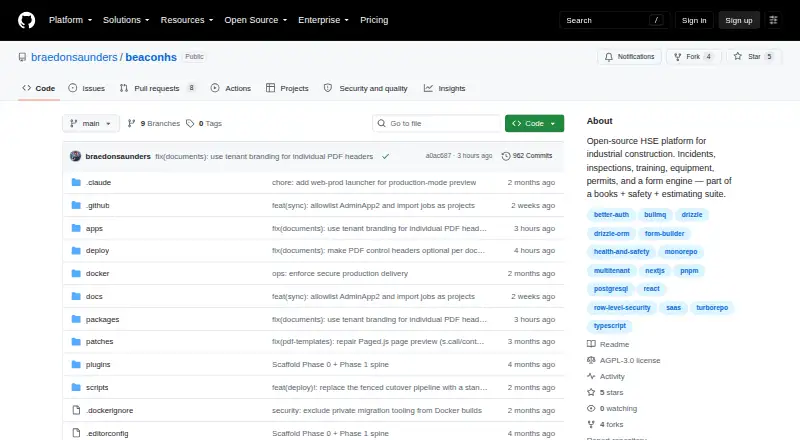
BeaconHS is an open-source health, safety, and environment platform for industrial construction teams managing work across sites. Its modules cover incidents, inspections, hazard assessments, corrective actions, journals, training, documents, equipment, personal protective equipment, people, locations, and compliance. A visual form builder supports conditional rules, formulas, repeatable sections, signatures, multi-step workflows, and automation for forms such as lift plans, job safety analyses, confined-space permits, and toolbox talks. Built-in analytics provides query building, visualizations, and shareable dashboards; reports can also be sent by scheduled email as HTML or PDF. Data-sync connectors include databases, NetSuite, CSV, and Nango. Tenant administrators can configure AI providers, with provider settings and API keys encrypted at rest. BeaconHS is free and self-hostable, with responsive web access and QR and kiosk entry. It requires an internet connection, though autosave and resumable drafts support intermittent connectivity. The project is pre-launch, and its license requires publishing modifications when running a modified version as a network service.
Who it suits
BeaconHS suits industrial-construction HSE programs coordinating crews, equipment, certifications, permits, and audit records across sites. It is relevant to teams that want configurable safety forms and self-hosted deployment.
What it does well
- Safety workflows cover incidents, inspections, and corrective actions.
- Forms support conditional logic, signatures, and automation.
- Scheduled reports can be emailed as HTML or PDF.
- Tenant AI settings and keys are encrypted at rest.
What to know first
- The app is online-only.
- The project is labeled pre-launch.
- Network-service modifications must publish modified source.
Getting started
- Open the BeaconHS project website on GitHub.
- For self-hosting, prepare Node 24 LTS, pnpm 10+, and Docker.
- Follow the README’s local setup instructions.
- Configure tenant workflows, integrations, analytics, and AI providers as needed.
BeaconHS is an open-source HSE platform aimed at industrial-construction teams coordinating safety work across sites. It is best suited to organizations willing to self-host and configure workflows around their operations. Its broad toolkit is appealing, but pre-launch status and online-only access make it a cautious fit for field-critical programs.
Overview
BeaconHS brings safety records, operational workflows, forms and reporting together. Its modules span incidents, inspections, hazard assessments, corrective actions, journals, training, documents, equipment, PPE, people, locations and compliance. That breadth can give HSE teams a common system for work that might otherwise be split among separate tools.
The GNU Affero General Public License v3.0 allows self-hosting, but organizations running a modified version as a network service must publish the modified source. That condition matters if a team plans to customize BeaconHS and keep those changes private. Self-hosting also means taking responsibility for deployment and operation. The project is marked pre-launch, with work focused on hardening, depth and migration tooling, so teams needing an established production system should consider alternatives.
Key features
Safety workflows and configurable forms
The visual Builder supports conditional logic, formulas, repeating sections, signatures, multi-step workflows and automations. Teams can use it for forms such as lift plans, JSAs, confined-space permits and toolbox talks, which offers room to reflect different site procedures rather than force every task into a basic checklist. Its modules also cover incident management, inspections, corrective actions, training and hazard assessments.
Insights, reports and integrations
The native analytics engine combines a query builder and visualizations with dashboards that can be shared by role. Reports can be sent on a schedule by email as HTML or PDF, giving managers a way to circulate recurring updates. Inbound data-sync connectors include databases, NetSuite, CSV and Nango; teams relying on other data sources should not assume a connector is available.
AI configuration and security
Tenant administrators can configure AI providers including Anthropic, OpenAI, Google, OpenRouter, Groq, xAI, DeepSeek, Mistral and custom providers. Provider, model and API-key settings are kept per tenant and encrypted at rest. PostgreSQL row-level security enforces tenant isolation, and mutations are audited with before-and-after diffs. These are useful controls for organizations managing separate tenants and traceable changes.
Field access and deployment
The mobile-first interface supports responsive web access, QR and kiosk entry, autosave and resumable drafts. But BeaconHS is online-only: resumable drafts can help with intermittent connections, not replace offline operation. The self-hosting quick start calls for Node 24 LTS, pnpm 10+ and Docker, so deployment requires technical capacity. The README also provides local setup instructions using Node, pnpm and Docker.
Pricing
BeaconHS is free and open source; there are no paid plans, seat charges or published usage quotas in its pricing model. Its cost is not the whole ownership picture: self-hosting requires deployment and ongoing operation, and the AGPL v3.0 requires publication of modified source when a modified version is run as a network service.
Platforms
BeaconHS supports web access, API use, Linux, macOS, Windows and self-hosted deployment. Its responsive interface supports mobile access, but the online-only requirement rules it out for crews who need to complete work without a network connection.
Who it's for
BeaconHS is aimed at industrial-construction HSE programs managing crews across sites, equipment, certifications, permits and audit records. It makes most sense for technically capable organizations that want an open-source, self-hostable system and can accept a pre-launch product. Teams that need offline field workflows or a more established platform should look elsewhere.
Pros and cons
Pros
- Broad safety coverage: Incidents, inspections, hazard assessments, corrective actions, training and related records sit within one platform.
- Flexible forms: Conditional logic, formulas, signatures and multi-step workflows can accommodate varied site procedures.
- Self-hosting and open source: Organizations can run the software themselves, provided they accept the operational work and AGPL obligations.
- Built-in analytics and reporting: Role-shared dashboards and scheduled HTML or PDF reports support recurring oversight.
Cons
- Pre-launch status: The project is still focused on hardening, feature depth and migration tooling, which is a concern for production-critical deployments.
- No offline mode: Autosave and resumable drafts do not let disconnected crews complete work offline.
- Technical deployment burden: Self-hosting calls for Node 24 LTS, pnpm 10+ and Docker, plus ongoing operational ownership.
- AGPL source-publication obligation: Modified versions run as network services must publish their modified source.
Alternatives
Tap Into Safety is a better fit for teams seeking paid safety training courses: it offers a seven-day free demo of a selection of courses and an annual unlimited-use subscription.
HammerTech may suit subcontractors who need free access through a general contractor managing their project; its broader offering is tailored to organizations.
Safesite is worth considering for teams that want a free plan with unlimited members and guests, though its free reporting only covers the last 30 days; Premium is $16 a month per member.
HCSS is an option for organizations prepared to request a custom quote based on company type and role.
IsoMetrix may suit buyers who prefer to request a demo for a paid platform with self-hosting among its supported platforms.
ShipManager Crewing is another paid option for teams considering software focused on crewing.
SpheraCloud may fit organizations able to meet its minimum of 250 named users per core module and accept setup fees based on configuration.
EcoOnline is a paid alternative for buyers seeking EHS software with pricing based on features, users and customization.
For more options, see Safety Management Software.
Verdict
Choose BeaconHS if your industrial-construction HSE team wants a broad open-source toolkit, can self-host it and is comfortable working with a pre-launch product. Its configurable forms, connected safety modules and built-in analytics are the strongest reasons to consider it. Look elsewhere if crews need offline operation or your program cannot accept pre-launch risk and AGPL source-publication terms.
Verdict
BeaconHS brings safety workflows, configurable forms, and reporting into one platform for industrial-construction programs. Its pre-launch status, online-only access, and network-service licensing terms are important considerations.
Questions
What does BeaconHS cost?
BeaconHS is listed as free and open source.
Can BeaconHS be self-hosted?
Yes. The README provides self-hosting and local setup instructions using Node, pnpm, and Docker.
What does the license require?
BeaconHS uses the GNU Affero General Public License v3.0. Its stated terms require publishing modified source when running a modified version as a network service.
Can teams use BeaconHS offline?
No. The app is online-only, though autosave and resumable drafts are described for intermittent connections.
Which integrations are listed?
Listed inbound data-sync connectors include database, NetSuite, CSV, and Nango.
Which AI providers can tenant administrators configure?
The listed providers include Anthropic, OpenAI, Google, OpenRouter, Groq, xAI, DeepSeek, Mistral, and custom providers.
Facts from BeaconHS's own pages
- AI key handling
- AI providers, models and API keys are configured per tenant, and the README says these settings are encrypted at rest. · github.com, 9 Oct 2026
- AI key storage
- AI providers, models, and API keys are configured per tenant and encrypted at rest. · github.com, 9 Oct 2026
- AI providers
- Tenant administrators can configure AI providers including Anthropic, OpenAI, Google, OpenRouter, Groq, xAI, DeepSeek, Mistral, and custom providers. · github.com, 9 Oct 2026
- Analytics
- BeaconHS includes a native analytics engine with a query builder, visualizations, dashboards, and role-based sharing. · github.com, 9 Oct 2026
- Analytics and reports
- Built-in Insights provides queries, visualizations and shareable dashboards, while reports can be delivered by scheduled email as HTML or PDF. · github.com, 9 Oct 2026
- Connectivity limit
- The app is online-only, with autosave and resumable drafts described for intermittent connections. · github.com, 9 Oct 2026
- Core modules
- It includes tools for incidents, inspections, hazard assessments, corrective actions, training, documents, equipment, PPE, people and locations. · github.com, 9 Oct 2026
- Deployment
- BeaconHS can be self-hosted, and the README gives local setup instructions using Node, pnpm, and Docker. · github.com, 9 Oct 2026
- Field use
- The interface is mobile-first and supports QR and kiosk entry, autosave and resumable drafts, but the app is online-only. · github.com, 9 Oct 2026
- Form builder
- Its visual Builder supports conditional logic, formulas, repeating sections, signatures, multi-step workflows, and automations for forms such as lift plans, JSAs, confined-space permits, and toolbox talks. · github.com, 9 Oct 2026
- Integrations
- Listed inbound data-sync connectors include database, NetSuite, CSV, and Nango. · github.com, 9 Oct 2026
- Intended users
- The project is aimed at industrial-construction HSE programs managing crews across sites, equipment, certifications, permits and audit records. · github.com, 9 Oct 2026
- License
- BeaconHS uses the GNU Affero General Public License v3.0, whose stated terms require publishing modified source when running a modified version as a network service. · github.com, 9 Oct 2026
- Platforms
- The README provides development launchers for macOS, Windows, and Linux and describes a mobile-first web interface. · github.com, 9 Oct 2026
- Project status
- The repository describes BeaconHS as pre-launch and says its current focus is hardening, depth and migration tooling. · github.com, 9 Oct 2026
- Purpose
- BeaconHS is an open-source Health, Safety & Environment platform for industrial construction. · github.com, 9 Oct 2026
- Safety workflows
- The platform includes incidents, inspections, hazard assessments, corrective actions, journals, training, documents, equipment, PPE, people, locations, compliance, insights, and reports. · github.com, 9 Oct 2026
- Security
- PostgreSQL row-level security enforces tenant isolation, and every mutation is audited with a before-and-after diff. · github.com, 9 Oct 2026
- Self-hosting
- The README provides a self-hosting quick start requiring Node 24 LTS, pnpm 10+ and Docker. · github.com, 9 Oct 2026
- Status
- The README labels BeaconHS pre-launch and says its current focus is hardening, depth, and migration tooling. · github.com, 9 Oct 2026
- Support
- The maintainers invite contributions through issues, discussions, and pull requests, and direct vulnerability reports to GitHub security advisories. · github.com, 9 Oct 2026
Where BeaconHS stands on Freedom251
- Safety Management Software#20 of 35