Freedom251 › AI Stem Splitters

BandLab Splitter
What BandLab Splitter is
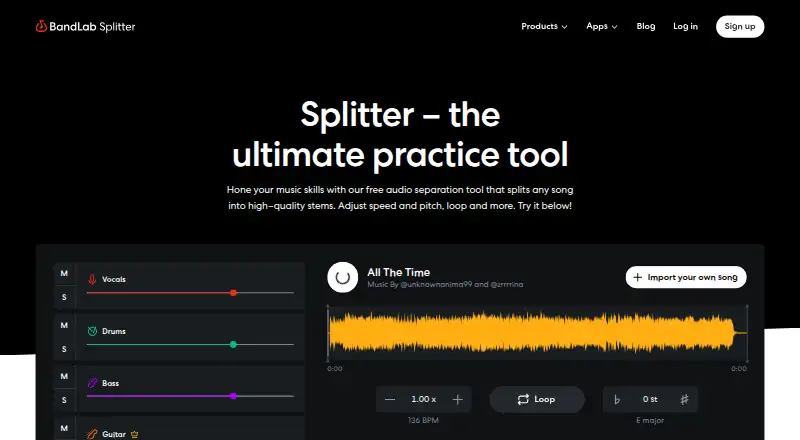
BandLab Splitter separates songs into stems so musicians can work on individual parts. The free version provides vocals, bass, drums, and other instruments, and allows unlimited uploads as long as each file is under 15 minutes. It accepts audio files such as MP3, WAV, and M4A, along with video. Users can adjust stem volume, solo or mute parts, change the split configuration, and work with BPM, pitch, or loop sections. Stems can be downloaded as audio or MIDI, or opened in BandLab Studio in either format. Pro and Max add guitar, strings, and piano isolation, along with faster separation. Splitter is available on Android, iOS, and the web, though features may differ by platform and the latest features may not yet be fully accessible on Android. Recently Imported retains up to three previous sessions. The Free plan costs nothing; Pro monthly is $14.99 a month after a free 3-day trial. Annual plan prices are listed as $99,149 a year for Pro and $199,299 a year for Max.
Who it suits
It suits musicians at any skill level who want to practice with separated song parts. Android users should note that the latest Splitter features may not yet be fully accessible there.
What it does well
- Free version separates four stem categories.
- Unlimited uploads on the free version.
- Accepts audio files and video.
- Exports stems as audio or MIDI.
- Volume, mute, solo, BPM, and pitch controls.
What to know first
- Each file must be under 15 minutes.
- Latest features may not be fully accessible on Android.
- Recently Imported keeps up to three sessions.
- Pro and Max add paid stem options.
Limits
The free version provides vocals, bass, drums, and other instrument stems, and uploaded files must be under 15 minutes. Pro and Max add guitar, strings, and piano isolation and faster separation. Pro monthly renews monthly after a free 3-day trial.
Plans
| Plan | Billed and limits | Price |
|---|---|---|
| Free | 4 stems · unlimited track uploads · files under 15 minutes | Free |
| BandLab Pro (monthly) | Automatically renews monthly after a free 3-day trial · Faster separation · guitar, strings and piano stem isolation · direct Studio access | $14.99 a month |
| BandLab Pro (annual) | Annual · Faster separation · guitar, strings and piano stem isolation · direct Studio access | $99,149 a year |
| BandLab Max (annual) | Annual · Faster separation · guitar, strings and piano stem isolation · direct Studio access | On request |
As bandlab.com lists them, read 3 Oct 2026. The maker's own page has the final word.
Getting started
- Open BandLab Splitter on the web or use it on Android or iOS.
- Upload an audio file or video file under 15 minutes.
- Choose the available split configuration and separate the song into stems.
- Adjust stem volume, solo or mute parts, or change BPM, pitch, and loop sections.
- Download stems as audio or MIDI, or open them in BandLab Studio.
- Choose a plan if you need the additional stem options and faster separation in Pro or Max.
BandLab Splitter is an AI stem-separation tool for musicians who want to isolate parts of a recording for practice, arranging, or remix preparation. It is especially suitable for BandLab users who want a direct route into Studio, while the free tier also gives casual users substantial room to work. Its main limitation is the difference between broad free stems and the more specific instrument isolation reserved for paid plans.
Overview
Splitter accepts MP3, WAV, M4A, and video files, then separates a song into individual components. Free users get vocals, bass, drums, and other instruments. That four-part grouping is enough for rehearsing a singer, rhythm section, or general instrumental bed, but it cannot isolate guitar, strings, or piano individually. Pro and Max add those three stem types and perform separation faster, making them the more practical choices for detailed transcription or part-focused rehearsal.
Each result can be shaped before export. Volume controls, solo and mute functions, split-configuration changes, BPM and pitch adjustment, and loop sections let a player concentrate on a passage at a manageable speed or in a different key. Splitter can download stems as audio or MIDI, or open them in BandLab Studio in either format, so it serves both quick practice and a path into a larger project. The Recently Imported list retains up to three previous sessions, useful for short-term continuity but not as a complete project archive.
Key features
- Broad free separation: Vocals, bass, drums, and other instruments cover common practice tasks without a per-track upload quota.
- Instrument-specific paid stems: Guitar, strings, and piano isolation in Pro and Max is the meaningful upgrade for players who need one part separated from the rest of the mix.
- Practice controls: Solo, mute, volume, looping, BPM, and pitch adjustments support focused repetition rather than simple one-click extraction.
- Audio and MIDI workflow: Exports and direct BandLab Studio access let users continue editing instead of stopping at a preview.
- File flexibility: Audio and video uploads are supported, with each media file limited to 15 minutes.
Pricing
Free — free. This plan includes four stems and unlimited track uploads, provided every file is under 15 minutes. It is the sensible starting point for practice and occasional stem work, but the four-group ceiling rules out separate guitar, strings, or piano parts.
BandLab Pro (monthly) — $14.99 a month. After a free 3-day trial, billing renews automatically each month. Pro adds faster separation, guitar, strings, and piano isolation, plus direct Studio access. Choose it when you need those outputs temporarily or prefer a monthly commitment; cancel before renewal if the trial or a short project is all you need.
BandLab Pro (annual) — $99,149 a year. It carries the same faster processing, expanded stems, and direct Studio access as monthly Pro, with annual billing. The annual term suits a sustained workflow only if that commitment matches your use.
BandLab Max (annual) — $199,299 a year. Max includes the same listed Splitter capabilities as Pro and adds priority support with faster response times. It is aimed at users who place a premium on support handling; it offers little reason to upgrade solely for stem features.
Platforms
Splitter runs on web, Android, and iOS. BandLab cautions that web and mobile features can differ, and the newest Splitter features may not yet be fully accessible on Android. Check the platform you intend to use before relying on a particular workflow.
Who it's for
BandLab positions Splitter for musicians of any skill level who want more efficient practice. The free plan fits learners, singers, and producers needing broad vocal or rhythm separation with unlimited uploads. Pro is better for instrumentalists and arrangers requiring guitar, strings, or piano stems, while Max makes sense when priority support matters. It is less suitable for files longer than 15 minutes or for anyone requiring an extensive session history beyond three recent imports.
Pros and cons
- Pros: Unlimited free uploads remove a recurring usage quota; audio and video input broadens the material you can process; BPM, pitch, and looping controls make the output practical for rehearsal; audio and MIDI export plus Studio handoff support continued production.
- Cons: Free separation stops at four broad groups; the 15-minute file cap excludes longer recordings; Android may lag behind web and iOS features; Max's distinctive benefit is support priority rather than additional listed stem types.
Alternatives
For a wider platform range and an always-free starter tier with a 10-minute relaxed queue and 200 MB file limit, consider LALAL.AI. Choose Moises instead if five-minute files and five uploads per month are acceptable in exchange for its dedicated mobile, desktop, web, and extension coverage. Pymss is the better fit for a free, open-source, locally run option. Fadr suits users wanting a free tier with vocals, melodies, drums, bass, MP3 downloads, MIDI detection, and a Remix Maker. MVSEP is an alternative for users seeking many AI models and a stated daily separation allowance. Sonura is oriented toward loop and sound creation rather than straightforward song stem practice. StemRoller is a free, open-source desktop choice for macOS and Windows. Suno is aimed at AI music creation rather than conventional stem separation. Browse the AI Stem Splitters list for more options.
Verdict
Choose BandLab Splitter if you want unlimited free uploads, useful rehearsal controls, and audio or MIDI delivery into BandLab Studio. Look elsewhere if you need files over 15 minutes, a complete Android feature set today, or more than four free stem groups; Pro is the necessary step for guitar, strings, and piano isolation.
Verdict
Splitter offers stem separation, editing controls, and audio or MIDI export across web and mobile. Check platform feature differences and the listed limits before choosing a plan.
Questions
What does BandLab Splitter cost?
The Free plan costs nothing. BandLab Pro monthly is $14.99 a month, automatically renewing monthly after a free 3-day trial. Listed annual prices are $99,149 a year for Pro and $199,299 a year for Max.
What is included in the free version?
It separates vocals, bass, drums, and other instruments. Free users can upload unlimited tracks, with each file under 15 minutes.
Which platforms can I use Splitter on?
Splitter is available on Android, iOS, and the web. BandLab says features can differ by platform and the latest features may not yet be fully accessible on Android.
Which file types does Splitter accept?
It accepts audio files, including MP3, WAV, and M4A, as well as video files.
What do Pro and Max add?
Both add guitar, strings, and piano stem isolation and faster separation. BandLab Max also includes priority support and faster response times for support requests.
Can I export stems?
Yes. Stems can be downloaded as audio or MIDI, or opened in BandLab Studio as audio or MIDI.
Facts from BandLab Splitter's own pages
- Editing controls
- Users can adjust stem volume, solo or mute tracks, change split configuration, and adjust BPM, pitch or loop sections. · help.bandlab.com, 3 Oct 2026
- Export and Studio
- Users can download stems as audio or MIDI, or open them in BandLab Studio as audio or MIDI. · help.bandlab.com, 3 Oct 2026
- Free stems
- The free version separates audio into vocals, bass, drums and other instruments. · blog.bandlab.com, 3 Oct 2026
- Intended users
- BandLab describes Splitter as an AI-powered tool to help musicians practice more efficiently, regardless of skill level. · blog.bandlab.com, 3 Oct 2026
- Paid stem options
- Pro and Max add guitar, strings and piano stem isolation and faster separation speeds. · blog.bandlab.com, 3 Oct 2026
- Platform differences
- BandLab says web and mobile features can differ, and notes that the latest Splitter features may not yet be fully accessible on Android. · help.bandlab.com, 3 Oct 2026
- Platforms
- BandLab is available on the web, iOS and Android, and an internet connection is required. · help.bandlab.com, 3 Oct 2026
- Purpose
- Splitter separates a song into individual track stems so users can work on each element separately. · help.bandlab.com, 3 Oct 2026
- Recent sessions
- Splitter saves up to three previous sessions in the Recently Imported list. · blog.bandlab.com, 3 Oct 2026
- Security
- BandLab says it is committed to securing user accounts and personal data and prohibits activity that compromises account or platform security. · help.bandlab.com, 3 Oct 2026
- Support
- BandLab Max includes priority support and faster response times for support requests. · help.bandlab.com, 3 Oct 2026
- Supported media
- Splitter accepts audio files, including MP3, WAV and M4A, as well as video files. · blog.bandlab.com, 3 Oct 2026
- Upload limit
- Free users can upload unlimited tracks, but each media file must be under 15 minutes. · blog.bandlab.com, 3 Oct 2026
Where BandLab Splitter stands on Freedom251
- AI Stem Splitters#5 of 26