Freedom251 › Image Vectorization Software
Autotracer
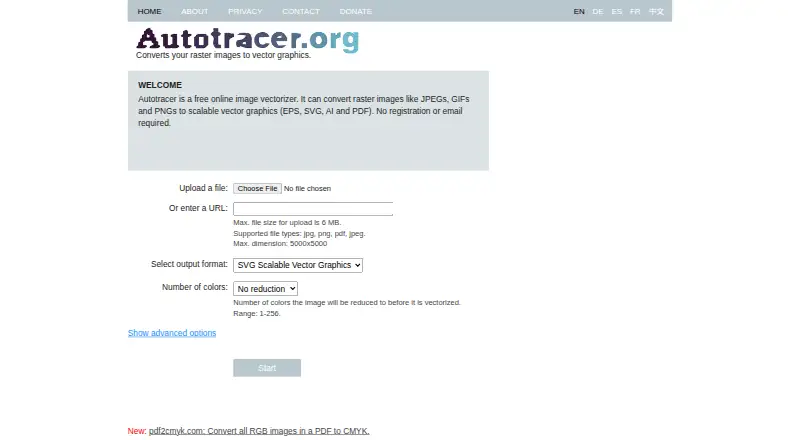
What Autotracer is
Autotracer is a free web service that converts raster images into scalable vector graphics. It lists EPS, SVG, AI and PDF as output formats; the site describes converting JPEG, GIF and PNG, while its upload field lists JPG, PNG, PDF and JPEG. No registration or email is required. Uploads can be up to 6 MB and 5000×5000 pixels. Before conversion, users can select a color count from 1 to 256 and adjust smoothing, despeckling, or whether a white background is ignored. The service uses the autotrace library developed by Martin Weber and Java Advanced Imaging API for image preprocessing. The About page identifies logos, page layouts, type, line art and illustrations as graphics suited to vector format, while noting that automatic tracing usually needs post-processing. Submitted files, inputs and outputs are automatically deleted after half an hour, with no backups. The privacy policy says only Maklabu GmbH employees can access submitted files and that the company does not inspect them or mine data from them. It collects IP address, access date and access type for less than a week, usually no more than three days, and uses no analytics system. Google AdSense may use cookies and web beacons for advertising. The service is free and says it will remain free.
Who it suits
Autotracer may suit people converting logos, line art, type, illustrations or page layouts into vector files. It is web-based and requires no account, but users should expect that automatic tracing may need further work.
What it does well
- No registration or email required.
- Outputs EPS, SVG, AI and PDF.
- Color selection ranges from 1 to 256.
- Submitted files and outputs are deleted after half an hour.
What to know first
- Uploads are limited to 6 MB and 5000×5000 pixels.
- Automatic tracing usually needs post-processing.
- Google AdSense may use cookies and web beacons.
Limits
The free service accepts uploads up to 6 MB and 5000×5000 pixels, with a color selection from 1 to 256. Automatic tracing usually requires post-processing.
Plans
| Plan | Billed and limits | Price |
|---|---|---|
| Free online image vectorizer | 6 MB max upload · 5000×5000 max dimensions · 1–256 colors | Free |
As autotracer.org lists them, read 8 Oct 2026. The maker's own page has the final word.
Getting started
- Visit https://www.autotracer.org/.
- Choose a supported file and upload it within the 6 MB and 5000×5000 limits.
- Select a color count from 1 to 256.
- Adjust smoothing, despeckling, or the white-background option if needed.
- Convert the image and select an available vector output format.
Autotracer is a browser-based raster-to-vector converter for logos, line art, type, layouts and illustrations. It suits occasional users who need EPS, SVG, AI or PDF output without signing up, provided they can stay within modest upload limits and clean up the result afterward. Its strongest case is quick, controlled conversion rather than finished artwork.
Overview
Autotracer converts raster images into scalable vector files through a web interface. The service describes JPEG, GIF and PNG conversion, while its upload field lists JPG, PNG, PDF and JPEG; use that field as the practical guide for accepted input. Output is available as EPS, SVG, AI and PDF, covering common print, design and editing workflows.
No registration or email is required. Uploads are capped at 6 MB and 5000×5000 pixels, so very large source images or high-resolution scans may need preparation before conversion. Automatic tracing is a starting point: the service says results usually require further post-processing, making Autotracer less suitable when you need a polished vector with no manual correction.
Key features
Palette control
Before vectorization, you can reduce the image to any number of colors from 1 through 256. Lower settings can produce simpler, more manageable paths for flat logos or line work; higher settings preserve more color variation at the cost of potentially more complex output. This is useful control for balancing visual fidelity against editability.
Cleanup options
Smoothing can soften jagged contours, while despeckling targets isolated marks that would otherwise become unwanted vector elements. An option to ignore a white background helps separate foreground artwork from a plain backdrop. These settings improve the starting trace, but they do not replace inspection and editing of the converted file.
Processing and retention
The service uses the autotrace library developed by Martin Weber together with Java Advanced Imaging API preprocessing. Submitted files, inputs and converted outputs are automatically deleted after 30 minutes, with no backups. Only Maklabu GmbH employees can access submitted files; its policy says they do not inspect them or mine data from them. Logs contain an IP address, access date and access type for less than a week, usually no more than three days, and no analytics system is used. Google AdSense may use cookies and web beacons for advertising.
Support
A feedback and question form is provided. An email address is optional, but you should include one if you expect a reply.
Pricing
Autotracer is free, with no free trial because there is no paid trial structure. The “Free online image vectorizer” plan costs nothing and includes web access, a 6 MB maximum upload, 5000×5000 maximum dimensions, and a selectable range of 1–256 colors. The donations page says the service will remain free. This suits occasional conversions and budget-conscious users; it offers no larger-upload tier for demanding production files.
Platforms
Autotracer runs on the web. A browser is the appropriate choice for users who do not want to install desktop software, while offline or native-app workflows should look elsewhere.
Who it's for
Choose Autotracer for one-off or occasional conversion of logos, page layouts, type, line art and illustrations when no-account access matters. Designers who can perform post-processing will get the most from its palette, smoothing and despeckling controls. It is a weaker fit for oversized source files, unattended batch work or anyone expecting the first trace to be production-ready.
Pros and cons
Pros
- No account or email required: you can start a conversion without creating credentials.
- Four vector output formats: EPS, SVG, AI and PDF cover varied downstream tools and delivery needs.
- Adjustable color range: choosing 1–256 colors gives useful control over simplicity and detail.
- Practical cleanup controls: smoothing, despeckling and white-background removal address common tracing problems.
- Short retention window: files and outputs are deleted after half an hour and are not backed up.
Cons
- 6 MB and 5000×5000 caps: larger artwork must be reduced or handled by another service.
- Post-processing is usually necessary: automatic output is not a substitute for vector editing.
- Web-only access: there is no stated desktop, mobile or offline platform.
- Advertising cookies may be used: Google AdSense can use cookies and web beacons.
Alternatives
Image Vectorization Software is the broader category list for comparing additional converters.
VTracer is the better pick if you want free, open-source software across Linux, macOS, Windows, self-hosted and web platforms.
SVGcode suits users who want a free, no-login option on Android, web or Windows.
Vecto is preferable for desktop users seeking an open-source build with no watermark, or a one-time Microsoft Store purchase on Windows 10/11.
VectorIt is a free, open-source desktop alternative for Windows, macOS and Linux.
Adobe Capture is the mobile choice for Android and iOS users who want a free app linked to Creative Cloud storage.
AI Vectorizer offers web and API access, but its free tier limits conversions, file size and watermark-free SVG exports.
ImageTracerJS is a free web, API and self-hosted option with no paid plans or usage limits stated.
Vectorization.eu is worth considering if you want a no-registration web/API tool with both free and subscription plans.
Verdict
Autotracer is a sensible choice for occasional, no-account raster conversion when 6 MB and 5000×5000 limits are sufficient and you are prepared to refine the vectors. Its palette and cleanup controls, broad output selection and short file-retention period are meaningful advantages. Look elsewhere for larger inputs, offline or desktop work, batch-oriented workflows, or reliably finished artwork without post-processing.
Verdict
Autotracer provides several vector output formats and conversion controls without requiring an account. Keep its upload limits and likely need for post-processing in mind.
Questions
Does Autotracer cost anything?
No. The service is free, and its donations page says it will remain free.
Do I need an account or email address?
No registration or email is required to use the service.
Which input and output formats are supported?
The site describes conversion from JPEG, GIF, and PNG to EPS, SVG, AI, and PDF. Its upload field lists JPG, PNG, PDF, and JPEG as supported file types.
What are the upload limits?
Uploads are limited to 6 MB and dimensions of 5000×5000 pixels.
What happens to uploaded files?
Submitted inputs and converted outputs are automatically deleted after half an hour, and no backups are made.
Which platform can I use?
Autotracer is available on the web.
Facts from Autotracer's own pages
- Advanced options
- The interface offers smoothing, despeckling and an option to ignore a white background during conversion. · autotracer.org, 8 Oct 2026
- Advertising
- The privacy policy says the site uses Google AdSense, which may use cookies and web beacons for advertising. · autotracer.org, 8 Oct 2026
- Color control
- Before vectorization, the image can be reduced to a selected number of colors from 1 to 256. · autotracer.org, 8 Oct 2026
- File access
- The privacy policy says only Maklabu GmbH employees can access submitted files and that the company does not inspect them or mine data from them. · autotracer.org, 8 Oct 2026
- File retention
- Submitted files, inputs and converted outputs are automatically deleted after half an hour, and the policy says no backups are made. · autotracer.org, 8 Oct 2026
- Free availability
- The donations page says the service is free and will remain free in the future. · autotracer.org, 8 Oct 2026
- Headquarters
- Laure Minervois, France · autotracer.org, 28 Sept 2026
- Input and output formats
- The site says it converts JPEG, GIF and PNG images to EPS, SVG, AI and PDF; its upload field lists JPG, PNG, PDF and JPEG as supported file types. · autotracer.org, 8 Oct 2026
- Intended use
- The About page identifies logos, page layouts, type, line art and illustrations as graphics suited to vector format. · autotracer.org, 8 Oct 2026
- Logs and analytics
- The privacy policy says it collects IP address, access date and access type for less than a week, usually no more than three days, and does not use an analytics system. · autotracer.org, 8 Oct 2026
- No account required
- The site says no registration or email is required. · autotracer.org, 8 Oct 2026
- Post-processing
- The About page says automatic tracing usually requires further post-processing. · autotracer.org, 8 Oct 2026
- Purpose
- Autotracer converts raster images into scalable vector graphics. · autotracer.org, 8 Oct 2026
- Support
- The contact page offers a feedback and question form, and says an email address is optional but should be provided if a response is expected. · autotracer.org, 8 Oct 2026
- Technology
- The service uses the autotrace library developed by Martin Weber and Java Advanced Imaging API for image preprocessing. · autotracer.org, 8 Oct 2026
- Upload limits
- Uploads are limited to 6 MB and dimensions of 5000×5000. · autotracer.org, 8 Oct 2026
Where Autotracer stands on Freedom251
- Image Vectorization Software#7 of 26