Freedom251 › Image Vectorization Software
AI Vectorizer
What AI Vectorizer is
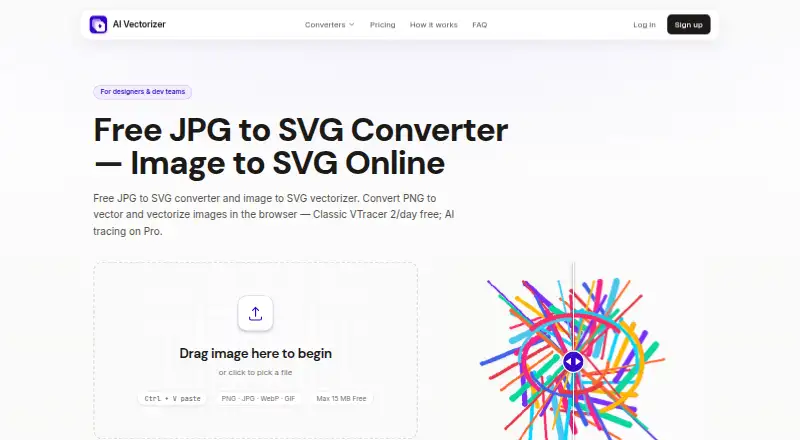
AI Vectorizer converts raster images into downloadable SVG files through a browser-based service that requires no installation. Supported uploads include PNG, JPEG, and WebP. Users can choose Classic VTracer tracing or, on Pro, an AI mode intended for photos and complex artwork. An interactive preview compares the raster image with the SVG result before download. Paid tiers include SVGO optimization to clean paths and reduce redundant nodes, while Pro also provides API access for programmatic conversion. The free plan costs nothing, billed forever, and permits two Classic conversions per rolling 24 hours, with a 15 MB maximum file size and a watermark on exports. Free uploads and generated SVGs are deleted within 48 hours. Pro is listed at $49.90 a month and allows 200 vectorizations per rolling 24 hours, with a 150 MB maximum file size, AI mode, API access, and exports without a watermark. A separate seven-day access offer costs 1.95 USD once, then $49.90/month until canceled. The service is aimed at designers and developers, including users seeking design-tool compatibility.
Who it suits
It suits designers and developers who need raster-to-SVG conversion in a browser. The free tier is a fit for occasional Classic conversions within its file and usage limits.
What it does well
- Converts PNG, JPEG, and WebP uploads to SVG.
- Interactive preview compares raster and vector results.
- Pro includes AI mode and programmatic API access.
- Free uploads and outputs are deleted within 48 hours.
What to know first
- Free plan allows two Classic conversions per rolling 24 hours.
- Free uploads are limited to 15 MB.
- Free SVG exports have a watermark.
- Pro is listed at $49.90 a month.
Limits
The Free plan permits two Classic conversions per rolling 24 hours, limits files to 15 MB, adds a watermark to SVG exports, and retains files for 48 hours. Pro lists 200 vectorizations per rolling 24 hours and a 150 MB maximum file size.
Plans
| Plan | Billed and limits | Price |
|---|---|---|
| Free | Forever · 2 Classic conversions per rolling 24 hours · 15 MB max file size · Watermark on Free SVG exports · 48h file retention | Free |
| Pro — 7-Day Full Access | Paid today for 7 days; then $49.90/month until you cancel · 200 vectorizations per rolling 24 hours · 150 MB max file size · AI mode · API access · No watermark · Advanced SVGO optimization | $1.95, paid once |
| Pro | Monthly until you cancel, after the 7-day access period · 200 vectorizations per rolling 24 hours · 150 MB max file size · AI mode · API access · No watermark · Advanced SVGO optimization | $49.90 a month |
As ai-vectorizer.org lists them, read 30 Sept 2026. The maker's own page has the final word.
Getting started
- Open https://ai-vectorizer.org/ in a web browser.
- Upload a PNG, JPEG, or WebP image within the plan's file-size limit.
- Choose Classic tracing, or use Pro AI mode if subscribed.
- Review the raster and SVG in the before-and-after preview.
- Download the SVG file.
AI Vectorizer is a browser-based raster-to-SVG converter for designers and developers. It is most suitable for occasional image cleanup or teams that need an API, while the free tier is better treated as a limited sampler than a production pipeline.
Overview
The service accepts PNG, JPEG, and WebP uploads and produces downloadable SVG files, with MIME type and file-size checks before processing. Classic VTracer tracing handles standard artwork, while the Pro-only AI mode targets photos and more intricate illustrations. An interactive comparison of the original and vector result gives you a chance to reject a poor conversion before downloading. Output is SVG with up to 64 colors.
Conversion happens in the browser, so there is no installation or desktop setup. Batch conversion is supported, although the Free quota makes large batches impractical. Free uploads and generated files are automatically removed within 48 hours. The service says files sit in isolated object storage, run in sandboxed workers, travel over TLS, and are never executed. It does not sell personal data; optional PostHog analytics runs when cookies are accepted.
Key features
- Classic and AI tracing: Classic VTracer is available without payment and is the sensible route for simple logos, icons, and illustrations. AI tracing is reserved for Pro, so users evaluating photo or complex-art results must pay.
- Interactive preview: Side-by-side before-and-after inspection helps identify lost detail or an unsuitable shape treatment before an SVG enters a design workflow.
- SVGO optimization: Paid plans clean paths and remove redundant nodes. That can produce tidier files for downstream editing, but it is not part of the free export.
- Batch and API workflows: Batch processing helps with sets of images. Pro adds API keys and documented rate limits, making it the only practical choice for automated conversion.
- Browser delivery: A web interface is convenient across supported devices, but there is no separately listed desktop application.
Pricing
Free — $0.00 USD, billed forever: You get two Classic conversions per rolling 24 hours, a 15 MB maximum file, watermarked SVG exports, and 48-hour retention. This fits infrequent personal conversions and basic evaluation, not recurring client work or high-volume queues.
Pro — 7-Day Full Access — $1.95 USD once: The seven-day period includes 200 vectorizations per rolling 24 hours, 150 MB files, AI mode, API access, watermark-free exports, and advanced SVGO optimization. It then renews at $49.90 per month until cancelled. The low entry payment is useful for a short project, but the renewal is substantial if you forget to cancel.
Pro — $49.90 a month: This is the continuing Pro tier after the access period, with the same 200-per-day quota, 150 MB limit, AI, API, unwatermarked output, and optimization. It suits teams with regular demand or integration needs; lighter users give up considerable value compared with occasional free Classic conversions. Checkout is handled by Creem as merchant of record, with cards and wallets where available. Support and billing questions go by email.
Platforms
The product is offered on the web and through an API on Pro. Its browser delivery avoids installation, while programmatic use requires the paid tier.
Who it's for
Designers needing quick SVG versions of raster assets can use the preview and Classic mode for occasional work. Developers benefit from the Pro API when vectorization must be incorporated into software or batch processes. Users with frequent conversions, large files, complex artwork, or a requirement for clean, watermark-free deliverables should budget for Pro. It is a poor fit for anyone seeking a permanently free, high-volume desktop tool.
Pros and cons
Pros
- Supports common PNG, JPEG, and WebP inputs and returns SVG.
- Previewing both versions reduces unpleasant surprises before download.
- Pro combines AI tracing, optimization, batch capability, and API access.
- Sandboxed processing, TLS, isolated storage, and automatic Free-file deletion provide defined handling safeguards.
Cons
- Free use is limited to two Classic conversions per rolling 24 hours.
- Free exports carry a watermark and files are retained for only 48 hours.
- AI tracing and API access require Pro, whose regular price is $49.90 monthly.
- The seven-day offer renews at that monthly rate unless cancelled.
Alternatives
VTracer is the better choice if you want free, open-source software across desktop, web, and self-hosted environments under an MIT license.
SVGcode suits users seeking a free web or Windows/Android option with no login required.
Vecto is preferable for a free open-source build without watermarks, or a one-time $7.99 Microsoft Store purchase on Windows 10/11.
VectorIt is a free, open-source desktop app for Windows, macOS, and Linux.
Adobe Capture is the alternative for Android and iOS users who want a free app tied to Creative Cloud storage.
Autotracer is a free web option when a 6 MB upload limit, 5000×5000 dimensions, and 1–256 colors are sufficient.
ImageTracerJS is a free web, API, or self-hosted choice with no paid plans or stated usage limits.
Vectorization.eu is an alternative offering free online conversion and a yearly subscription option.
Browse more options in Image Vectorization Software.
Verdict
Choose AI Vectorizer for browser convenience, preview-led checking, and a Pro API or AI workflow. Stay with Free only for light Classic use; look elsewhere if you need watermark-free volume without a $49.90 monthly commitment or prefer open-source desktop software.
Verdict
AI Vectorizer provides browser-based SVG conversion with preview, and the free tier supports limited Classic use. The AI mode and API access are in Pro; check the separate seven-day offer's subsequent monthly charge before choosing it.
Questions
What does AI Vectorizer cost?
The Free plan costs nothing, billed forever. Pro is $49.90 a month after the seven-day access period; the Pro — 7-Day Full Access offer is $1.95, paid once, then $49.90/month until canceled.
What formats can I upload and download?
The service accepts PNG, JPEG, and WebP uploads and provides SVG output.
What is included in the Free plan?
Free includes two Classic conversions per rolling 24 hours, a 15 MB maximum file size, watermarked SVG exports, and 48-hour file retention.
What does Pro add?
Pro includes AI mode, API access, no watermark, advanced SVGO optimization, up to 200 vectorizations per rolling 24 hours, and a 150 MB maximum file size.
Which platforms does it support?
The converter runs in a web browser and requires no installation. API access is included with Pro.
How are files handled?
The privacy policy says Free-plan uploads and generated SVG files are automatically deleted within 48 hours. It also says files are stored in isolated object storage, processed in sandboxed workers, encrypted in transit with TLS, and never executed.
Facts from AI Vectorizer's own pages
- API
- Pro includes API access for programmatic conversion, with API keys and documented rate limits referenced in the terms. · ai-vectorizer.org, 30 Sept 2026
- Billing
- The pricing page says checkout is handled via Creem as Merchant of Record, with cards and wallets where available. · ai-vectorizer.org, 30 Sept 2026
- Browser service
- The converter runs in the browser and requires no installation. · ai-vectorizer.org, 30 Sept 2026
- File retention
- The privacy policy says Free-plan uploads and generated SVG files are automatically deleted within 48 hours. · ai-vectorizer.org, 30 Sept 2026
- Intended users
- The homepage describes the product as built for designers and developers, and the FAQ highlights design-tool compatibility as a use case. · ai-vectorizer.org, 30 Sept 2026
- Optimization
- Paid tiers include SVGO optimization to clean up paths and reduce redundant nodes. · ai-vectorizer.org, 30 Sept 2026
- Preview
- Users can compare the raster and SVG results in an interactive before-and-after preview before downloading. · ai-vectorizer.org, 30 Sept 2026
- Privacy
- The privacy policy says the service does not sell personal data and uses optional PostHog analytics when users accept cookies. · ai-vectorizer.org, 30 Sept 2026
- Security
- The privacy policy says files are stored in isolated object storage, processed in sandboxed workers, encrypted in transit with TLS, and never executed. · ai-vectorizer.org, 30 Sept 2026
- Support
- The site lists an email address for support and directs billing questions to email support. · ai-vectorizer.org, 30 Sept 2026
- Supported formats
- The FAQ lists PNG, JPEG, and WebP as supported uploads and says MIME type and file size are validated before processing. · ai-vectorizer.org, 30 Sept 2026
- Tracing modes
- It offers Classic VTracer tracing and a Pro AI mode for photos and complex artwork. · ai-vectorizer.org, 30 Sept 2026
- Upload limits
- The Free plan allows 2 Classic conversions per rolling 24 hours and a maximum file size of 15 MB. · ai-vectorizer.org, 30 Sept 2026
- What it does
- The service converts raster images such as PNG, JPG, and WebP into downloadable SVG files. · ai-vectorizer.org, 30 Sept 2026
Where AI Vectorizer stands on Freedom251
- Image Vectorization Software#4 of 26