Freedom251 › Image Vectorization Software

Adobe Capture
by Adobe
What Adobe Capture is
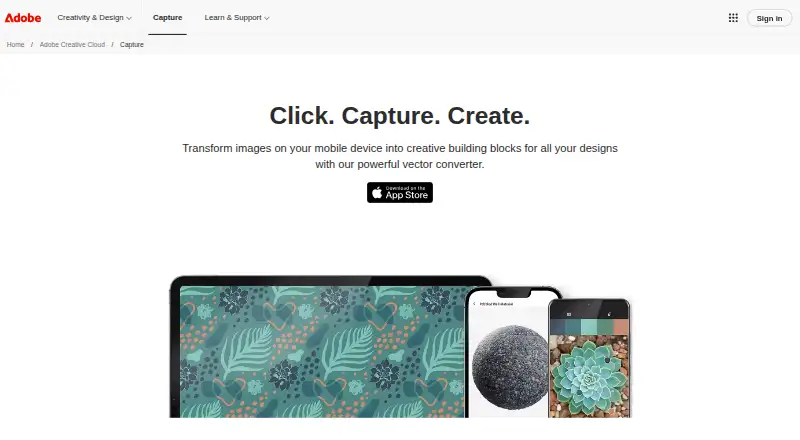
Adobe Capture is a free mobile app for turning images and sound into assets for creative projects. Available on Android and iOS, it can make colors, patterns, shapes, looks, materials, type, and brushes from visual input. It can convert images into scalable vector artwork, with SVG listed as an output format, and supports batch conversion. For typography, it identifies fonts in images and suggests similar fonts for a Creative Cloud account. Image tools can remove or blur a background, or replace it with a solid color.
Capture can also record voice and sound effects, and includes an Enhance Voice Recording feature. Assets saved in Creative Cloud Libraries sync with compatible Adobe desktop and mobile apps. For graphics, Adobe lists Photoshop, Illustrator, InDesign, After Effects, Premiere, Fresco, and Express among compatible apps. Users can share their Creative Cloud Libraries with a team directly from Capture. A free basic Creative Cloud membership includes 2GB of storage for file syncing and sharing; extra 20GB is listed at $1.99/month. On Android, Capture effects are unsupported, and adjustments work only on devices meeting the stated Camera2, hardware, and SDK requirements.
Who it suits
Adobe Capture suits people who want to turn mobile images or recordings into assets for creative projects across compatible Adobe apps. Android users should check the stated device requirements for adjustments and note that effects are unsupported.
What it does well
- Creates colors, patterns, shapes, type, and brushes.
- Converts images to scalable vector artwork and SVG.
- Identifies fonts and suggests similar choices.
- Records voice and sound effects with voice enhancement.
- Creative Cloud Libraries sync with compatible Adobe apps.
What to know first
- Android does not support Capture effects.
- Android adjustments require devices meeting specified requirements.
- Free basic Creative Cloud membership includes 2GB storage.
Limits
The free basic Creative Cloud membership includes 2GB of storage for syncing and sharing. An extra 20GB is listed at $1.99/month. Android effects are unsupported, and adjustments are available only on devices meeting the stated Camera2, hardware, and SDK requirements.
Plans
| Plan | Billed and limits | Price |
|---|---|---|
| Adobe Capture | Free app download · free Creative Cloud membership provides 2GB storage · optional extra 20GB listed at $1.99/month | Free |
As adobe.com lists them, read 8 Oct 2026. The maker's own page has the final word.
Getting started
- Download Adobe Capture on Android or iOS.
- Create or use a Creative Cloud membership to sync and share files.
- Capture images or record voice and sound effects to create assets.
- Save assets to a Creative Cloud Library to sync them with compatible Adobe apps.
- Share a Creative Cloud Library with your team from Capture if needed.
Overview
Adobe Capture is a mobile app for turning images into reusable creative assets, with tools for vector artwork, typography, graphics, and audio. It is best suited to people building projects in Adobe apps who want to collect and develop visual ideas on a phone. Its range is unusually broad for a free app, but Android restrictions and the basic Creative Cloud storage cap narrow its appeal.
Key features
Capture can derive colors, patterns, shapes, looks, materials, type, and brushes from images. That breadth makes it useful when an image is a source for several parts of a design, rather than just a palette. It also converts images into scalable vector artwork, supports batch conversion, and outputs SVG—practical advantages for moving image-based artwork into vector workflows.
For typography, the app identifies fonts in images and suggests similar fonts for a Creative Cloud account. It can remove or blur an image background, or replace it with a solid color. These tools make Capture a capable mobile companion for gathering visual references, though its value is greatest when the resulting assets will be used in Adobe’s ecosystem.
Capture also records voice and sound effects and offers Enhance Voice Recording. Assets saved to Creative Cloud Libraries sync with compatible Adobe desktop and mobile apps. For graphics, Adobe names Photoshop, Illustrator, InDesign, After Effects, Premiere, Fresco, and Express among the compatible apps. Users can share Libraries with a team from Capture, which helps make the app relevant to collaborative Adobe workflows as well as individual projects.
There is an important Android caveat: Capture effects are not supported, and adjustments work only on devices that meet Camera2, hardware, and SDK requirements. That makes iOS the safer choice for someone who needs the full set of mobile capabilities.
Pricing
Adobe Capture is free to download, with no free trial because there is no paid app plan to trial. The free Creative Cloud membership includes 2GB of storage for syncing and sharing files. That is enough to begin collecting assets, but it may constrain people who intend to sync a substantial library. An optional extra 20GB is listed at $1.99/month.
| Plan | Price | What it includes |
|---|---|---|
| Adobe Capture | free | Free app download and a free Creative Cloud membership with 2GB of storage; optional extra 20GB at $1.99/month. |
Platforms
Capture is available on Android and iOS. The Android effects limitation and device requirements for adjustments are substantial qualifications, so users who depend on those functions should favor iOS. Assets can sync onward to compatible Adobe desktop and mobile apps through Creative Cloud Libraries.
Who it's for
Capture is a strong fit for designers and other creators who already use Adobe apps and want to turn images into assets they can carry across that workflow. Its font identification, vector conversion, background tools, and sound recording also suit people who want several kinds of creative capture in one mobile app. It is less compelling for someone seeking a standalone vector tool, a large included cloud allowance, or unrestricted Android effects.
Pros and cons
- Pros: A wide range of image-derived assets, including SVG vector output and batch conversion, supports more than simple color sampling.
- Pros: Creative Cloud Libraries sync with named Adobe apps, and can be shared with a team directly from Capture.
- Pros: Font matching, background editing, and audio recording extend its usefulness beyond vector creation.
- Cons: Android does not support Capture effects, and adjustments depend on device requirements.
- Cons: The basic Creative Cloud membership provides only 2GB of storage for syncing and sharing; more storage costs extra.
Alternatives
For a focused comparison of similar tools, see Image Vectorization Software.
VTracer is a free, open-source alternative for readers who want software available across desktop, web, and self-hosted environments rather than a mobile app tied to Adobe workflows. SVGcode is free to use without login and may suit someone who wants a web-based option or an Android-compatible alternative. Vecto offers a free open-source desktop build, while its Microsoft Store version costs $7.99, paid once; choose it when a desktop vectorization option is the priority. VectorIt is another free, open-source desktop choice for Windows, macOS, or Linux.
AI Vectorizer is web- and API-based; its free tier allows 2 Classic conversions per rolling 24 hours, caps files at 15 MB, adds a watermark to free SVG exports, and retains files for 48 hours. Autotracer is a free web option with a 6 MB upload limit, maximum dimensions of 5000×5000, and 1–256 colors. ImageTracerJS is free across API, self-hosted, and web use, with no paid plans or usage limits stated. Vectorization.eu offers a free online conversion tool without registration, as well as a yearly subscription.
Verdict
Choose Adobe Capture if you want a free mobile way to turn visual inspiration into varied assets and move them through Adobe Creative Cloud apps. Its breadth and library integration are the main reasons to pick it; the 2GB basic storage allowance and Android feature limits are the reasons to look elsewhere or choose another platform.
Verdict
Adobe Capture combines visual asset creation, font identification, and audio recording in a free mobile app. Android feature limits and the 2GB basic storage allocation are important considerations.
Questions
How much does Adobe Capture cost?
The Adobe Capture plan is free. An extra 20GB of storage is listed at $1.99/month.
Which platforms does Adobe Capture support?
Adobe Capture is available on Android and iOS. Android effects are not supported, and adjustments require devices meeting the stated Camera2, hardware, and SDK requirements.
What kinds of assets can Capture create?
It can create colors, patterns, shapes, looks, materials, type, and brushes. It can also create scalable vector images in SVG format.
Which Adobe apps work with its Creative Cloud graphics assets?
Adobe names Photoshop, Illustrator, InDesign, After Effects, Premiere, Fresco, and Express among the compatible apps for graphics.
How much storage comes with the free basic Creative Cloud membership?
It includes 2GB of storage for file syncing and sharing. An extra 20GB is listed at $1.99/month.
Can teams share Creative Cloud Libraries from Capture?
Yes. Users can share their Creative Cloud Libraries with a team directly from Capture.
Facts from Adobe's own pages
- Android feature limit
- Capture effects are not supported on Android; adjustments are supported only on Android devices meeting the stated Camera2, hardware, and SDK requirements. · helpx.adobe.com, 8 Oct 2026
- Asset types
- Adobe lists colors, patterns, shapes, looks, materials, type, and brushes as asset types created with Capture. · helpx.adobe.com, 8 Oct 2026
- Audio
- Capture records voice and sound effects and offers an Enhance Voice Recording feature. · helpx.adobe.com, 8 Oct 2026
- Graphics
- Capture can remove or blur an image background, or replace it with a solid color. · helpx.adobe.com, 8 Oct 2026
- Integrations
- Assets saved in Creative Cloud Libraries sync to compatible Adobe desktop and mobile apps; Adobe lists Photoshop, Illustrator, InDesign, After Effects, Premiere, Fresco, and Express among compatible apps for graphics. · helpx.adobe.com, 8 Oct 2026
- Intended users
- Adobe presents Capture as a tool for turning visual inspiration into assets for use in creative projects across Adobe apps. · adobe.com, 8 Oct 2026
- Library sharing
- Adobe says users can share their Creative Cloud Libraries with a team directly from Capture. · adobe.com, 8 Oct 2026
- Platforms
- Adobe’s help page identifies iPhone, iPad, and Android phones as supported devices. · helpx.adobe.com, 8 Oct 2026
- Purpose
- Adobe Capture turns images from a mobile device into creative assets for design projects. · adobe.com, 8 Oct 2026
- Security and compliance
- Adobe’s Trust Center says the company undergoes independent audits and provides current security and compliance information for its solutions. · adobe.com, 8 Oct 2026
- Storage limit
- The App Store listing says a free basic Creative Cloud membership includes 2GB of storage for file syncing and sharing. · apps.apple.com, 8 Oct 2026
- Support
- Adobe directs Capture users to tutorials, FAQs, and community forums for learning and help. · adobe.com, 8 Oct 2026
- Typography
- Capture identifies fonts in images and suggests similar fonts for a Creative Cloud account. · adobe.com, 8 Oct 2026
- Vector creation
- Capture can turn images into clean, scalable vector images. · adobe.com, 8 Oct 2026
Where Adobe Capture stands on Freedom251
- Image Vectorization Software#3 of 26