Freedom251 › Llm Developer Tools
Arize Phoenix
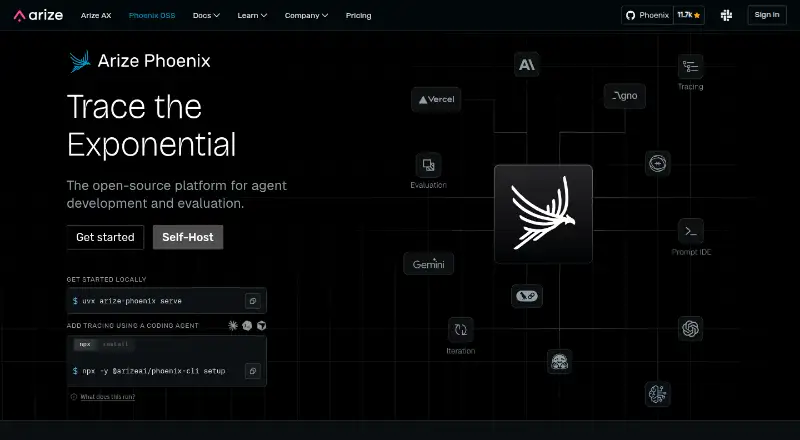
What Arize Phoenix is
Arize Phoenix helps teams trace, evaluate, debug, and improve AI applications. It captures model calls, retrieval, tool use, and custom logic in traces that can be sent through OpenTelemetry. Teams can assess traces and spans with LLM-based evaluators, code checks, or human labels. Prompt tools include version history, side-by-side testing, and replaying calls to inspect the effects of changes. Teams can rerun datasets against different application versions and compare evaluation results. Documented integrations include LlamaIndex, LangChain, DSPy, OpenAI, Bedrock, and Anthropic; evaluation library options include Harbor, Ragas, Cleanlab, and MLflow. Phoenix can run locally or be self-hosted with Docker, Kubernetes, or a cloud environment. Arize says self-hosting keeps traces in the user's own environment. Phoenix is free and open source under the ELv2 license, with users managing trace spans, ingestion volume, projects, and retention. Self-hosted deployments support authentication and OAuth2 identity providers with an OpenID Connect well-known configuration endpoint. The project is built by Arize AI and the open-source community, and its documentation points users to a Slack community for questions and developer discussion.
Who it suits
Phoenix suits teams building AI applications that need to inspect traces, evaluate outputs, or compare application versions. Its local and self-hosted deployment options may suit teams seeking to keep traces in their own environment.
What it does well
- Traces model calls, retrieval, tool use, and custom logic.
- Evaluations can use models, code checks, or human labels.
- Prompt tools include versioning, comparison, and replay.
- Runs locally or through several self-hosted options.
- Free and open source, with user-managed usage limits.
What to know first
- Users manage trace spans, ingestion, projects, and retention.
- Self-hosted authentication requires a compatible OIDC endpoint.
Limits
The free plan leaves trace spans, ingestion volume, projects, and retention under user management.
Plans
| Plan | Billed and limits | Price |
|---|---|---|
| Phoenix | Free and open source · self-hosted · user-managed trace spans, ingestion, projects, and retention | Free |
As arize.com lists them, read 5 Oct 2026. The maker's own page has the final word.
Getting started
- Visit the Phoenix website.
- Choose to run Phoenix locally or self-host it.
- For self-hosting, use Docker, Kubernetes, or a cloud environment.
- Connect an application using a documented integration or send traces over OpenTelemetry.
- Use prompt tools, evaluations, and dataset experiments to inspect application behavior.
Arize Phoenix is an observability and evaluation workspace for AI applications, covering model, agent, retrieval, and tool behavior. It suits engineering teams that need to inspect and improve complex pipelines while choosing where their data runs. The main trade-off is control: Phoenix is free, but teams operate their own usage, storage, and retention boundaries.
Overview
Phoenix follows an application beyond its final answer. It records model calls, retrieval steps, tool use, and custom logic as traces that can be sent through OpenTelemetry, giving developers a workflow-level view of failures and regressions. Those traces can then be scored, replayed, and compared rather than treated as isolated outputs.
Its documented ecosystem covers LlamaIndex, LangChain, DSPy, OpenAI, Bedrock, and Anthropic. Evaluation integrations include Harbor, Ragas, Cleanlab, and MLflow, which helps teams keep existing instrumentation and assessment practices. Arize AI and the open-source community build the project, whose page describes an ELv2 license.
Key features
Tracing and scoring
Phoenix supports LLM, agent, and retrieval tracing, including cost and token-cost tracking. Teams can score traces and individual spans with LLM-based evaluators, code checks, or human labels. That combination is useful when automated grading needs to be checked against human judgment, though the team must define and maintain those evaluators.
Prompts and experiments
Prompt versioning, side-by-side testing, and call replay expose how a prompt revision changes outputs. Dataset experiments go further: teams can rerun the same dataset through different application versions and compare evaluation results. This makes Phoenix a practical choice for iterative quality work, not just incident inspection.
Deployment and control
Run Phoenix locally, or self-host it with Docker, Kubernetes, or a cloud environment. Self-hosting keeps traces in the user’s environment and supports authentication, including OAuth2 identity providers with an OpenID Connect well-known configuration endpoint. That control fits organizations with data-governance requirements, but it also puts deployment and operations on the customer.
Pricing
Phoenix: free. The plan is free and open source, supports self-hosting, and leaves trace spans, ingestion, projects, and retention under user management. There are no published seat, ingestion, project, or retention quotas in this plan; the practical limit is whatever the team’s infrastructure and policies can sustain. Choose it when you want full control and can run the service yourself. Look elsewhere if you want a provider-managed service with fixed capacity and retention terms.
Platforms
Phoenix is offered through an API and web interface, with local and self-hosted deployment options. Docker, Kubernetes, and cloud-environment deployment cover different operational preferences, while OpenTelemetry provides the trace-ingestion path.
Who it's for
Phoenix is a strong fit for AI application developers, platform teams, and evaluators working across multiple model providers or agent frameworks. It is especially suitable where trace data must remain in a controlled environment and where prompt changes need repeatable dataset comparisons. Small teams gain a broad free workflow, but should be prepared to handle infrastructure, authentication, ingestion, and retention themselves.
Pros and cons
Pros
- End-to-end visibility: model calls, retrieval, tools, and custom logic appear in one trace workflow.
- Flexible evaluation: LLM judges, code checks, and human labels can be combined.
- Useful iteration loop: prompt replay, versioning, and dataset reruns connect changes to measured results.
- Deployment control: local and self-hosted options keep traces in the team’s environment.
- Broad integrations: support for major frameworks, providers, and evaluation libraries reduces the need to replace existing tools.
Cons
- Operational responsibility: self-hosting means the team manages deployment, capacity, authentication, and retention.
- User-managed limits: free usage has no provider-set quotas, so infrastructure costs and data growth remain the team’s concern.
- License consideration: the project is described as ELv2 licensed, which organizations should review against their distribution and commercial policies.
Alternatives
For a wider category comparison, see AI LLM Observability Tools, LLM Observability Tools, Model Monitoring Software, Machine Learning Model Monitoring Software, AI LLM Evaluation Tools, and AI Agent Observability Tools.
- OpenLIT is the better fit for unlimited self-hosted usage, users, projects, and environments at no charge.
- W&B Weave suits teams wanting a freemium cloud plan with 1 GB per month of ingestion, 5 GB of storage, and built-in evaluations, tracing, and scorers.
- LangWatch is an alternative for teams seeking an Apache 2.0 open-source option with a free Developer tier.
- Opik fits teams that want open-source observability and evaluation software that can run locally, alongside a free cloud option.
- Agenta is aimed at teams comfortable with explicit free-tier limits such as two members, 5,000 agent runs per month, and one-week trace retention.
- Arize AX is preferable when a managed SaaS free tier with 25,000 spans per month, 1 GB ingestion, and 15-day retention is the priority.
- Braintrust offers a free starter allowance of 1 GB processed data, 10,000 scores, and 14-day retention.
- Confident AI is another evaluation-focused option with a free plan capped at two seats, one project, five weekly test runs, and 1 GB-month of trace spans.
Verdict
Choose Phoenix if your team wants one free, adaptable system for tracing, evaluating, debugging, prompt iteration, and dataset experiments, with deployment and trace data under your control. Its breadth and framework integrations are the main reasons to pick it. Look elsewhere when you prefer a managed service with provider-defined quotas, retention, and operational support instead of running those responsibilities yourself.
Verdict
Phoenix brings tracing, evaluation, prompt inspection, and dataset experiments to AI application teams. It is free and open source, with deployment choices and usage management left to users.
Questions
How much does Arize Phoenix cost?
The Phoenix plan is free. It is described as free and open source.
Is Phoenix open source?
Yes. The Phoenix page describes it as ELv2 licensed and built by Arize AI and the open-source community.
Where can Phoenix run?
Phoenix can run locally or be self-hosted using Docker, Kubernetes, or a cloud environment. The listed platforms are API, self-hosted, and web.
What does Phoenix trace?
It captures model calls, retrieval, tool use, and custom logic in traces that can be sent over OpenTelemetry.
Which integrations are documented?
Framework and provider integrations include LlamaIndex, LangChain, DSPy, OpenAI, Bedrock, and Anthropic. Evaluation library integrations include Harbor, Ragas, Cleanlab, and MLflow.
Who makes Phoenix?
Phoenix is built by Arize AI and the open-source community.
Facts from Arize Phoenix's own pages
- Authentication
- Self-hosted Phoenix supports authentication and OAuth2 identity providers that expose an OpenID Connect well-known configuration endpoint. · arize.com, 5 Oct 2026
- Data control
- Arize says self-hosting keeps traces in the user’s own environment. · arize.com, 5 Oct 2026
- Deployment
- Phoenix can run locally or be self-hosted using Docker, Kubernetes, or a cloud environment. · arize.com, 5 Oct 2026
- Evaluation integrations
- Phoenix can use evaluation libraries including Harbor, Ragas, Cleanlab, and MLflow. · arize.com, 5 Oct 2026
- Evaluations
- Teams can score traces and spans with LLM-based evaluators, code checks, or human labels. · arize.com, 5 Oct 2026
- Experiments
- Teams can rerun datasets through different application versions and compare evaluation results. · arize.com, 5 Oct 2026
- Integrations
- Documented integrations include frameworks and providers such as LlamaIndex, LangChain, DSPy, OpenAI, Bedrock, and Anthropic. · arize.com, 5 Oct 2026
- License
- The Phoenix page describes the project as ELv2 licensed. · arize.com, 5 Oct 2026
- Maker
- Phoenix is built by Arize AI and the open-source community. · arize.com, 5 Oct 2026
- Prompt tools
- Phoenix supports prompt versioning, side-by-side testing, and replaying calls to inspect how changes affect outputs. · arize.com, 5 Oct 2026
- Purpose
- Phoenix helps teams trace, evaluate, debug, and improve AI applications. · arize.com, 5 Oct 2026
- Support
- The Phoenix documentation points users to a Slack community for questions and developer discussion. · arize.com, 5 Oct 2026
- Tracing
- It captures model calls, retrieval, tool use, and custom logic in traces that can be sent over OpenTelemetry. · arize.com, 5 Oct 2026
- Usage limits
- Arize describes Phoenix as free and open source, with user-managed trace spans, ingestion volume, projects, and retention. · arize.com, 5 Oct 2026
Where Arize Phoenix stands on Freedom251
- Llm Developer Tools#5 of 26
- Machine Learning Model Monitoring Software#6 of 20
- AI LLM Evaluation Tools#10 of 30
- Prompt Engineering Tools#9 of 25
- AI Agent Observability Tools#12 of 31
- Model Monitoring Software#11 of 24
- Llm Monitoring#12 of 26
- AI LLM Observability Tools#11 of 23
- LLM Observability Tools#13 of 26