Freedom251 › Dental Appointment Scheduling Software

Apexo
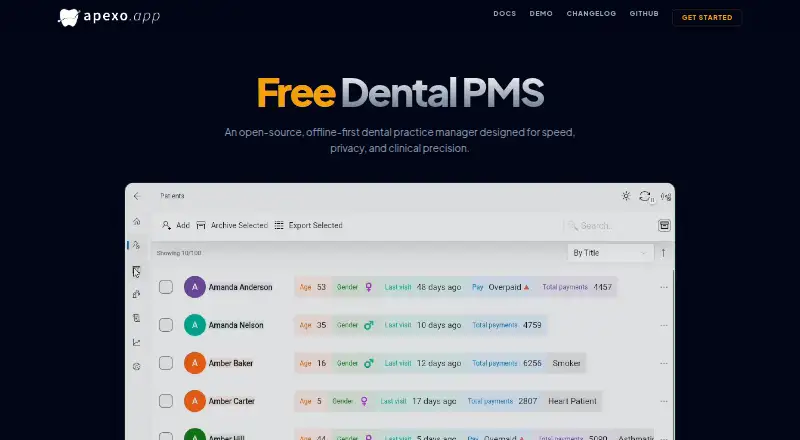
What Apexo is
Apexo is a free, open-source dental practice manager for clinics that need scheduling, patient records, and financial reporting. Its calendar is built to handle scheduling in busy clinics, while patient files can include comprehensive medical and dental records. Automated reports cover clinic finances and operational health statistics.
Apexo is designed to keep data local and continue working without an internet connection, then sync it across endpoints. Clinics can host the required PocketBase backend themselves; Apexo creates its required collections and values on first login. The app supports Android, iOS, macOS, web, and Windows, and lists English, Arabic, Spanish, Polish, and Kurdish.
The manual describes scheduled or manual backups, with optional S3-compatible storage. It also documents AI voice transcription and receipt scanning, with a privacy notice stating that data is not used for training. On Windows, Apexo can monitor folders for DICOM X-ray files from RVG sensors and sync imported images through PocketBase. Documented integrations include PocketBase, SMTP email, and S3-compatible storage. The current version cannot migrate data from the earlier Apexo application because it is a rewrite. Apexo is released under GNU GPLv3.
Who it suits
Apexo suits dental clinics that want scheduling, patient records, and reporting in one practice manager, including clinics that need offline operation and local data hosting. Its language options and availability across mobile, desktop, and web platforms may also suit teams using different devices or languages.
What it does well
- Free and open source under GNU GPLv3.
- Calendar designed for scheduling in high-traffic clinics.
- Tracks comprehensive medical and dental patient records.
- Works offline and syncs data across endpoints.
- Available on Android, iOS, macOS, web, and Windows.
- Supports scheduled backups and optional S3-compatible storage.
What to know first
- Requires users to host their own PocketBase server.
- Cannot migrate data from the earlier Apexo application.
- Windows folder monitoring is the documented route for DICOM X-ray imports.
Limits
The Free plan costs nothing and requires users to host a PocketBase server themselves. The current version cannot import data from the earlier Apexo application.
Plans
| Plan | Billed and limits | Price |
|---|---|---|
| Free | Free dental PMS; open source under GNU GPLv3; requires a PocketBase server that users host themselves | Free |
As apexo.app lists them, read 11 Oct 2026. The maker's own page has the final word.
Getting started
- Visit https://apexo.app/.
- Choose the app for Android, iOS, macOS, web, or Windows.
- Host a PocketBase server for the required backend.
- Log in to Apexo; it creates the required PocketBase collections and values on first login.
- Configure backups, SMTP email, or S3-compatible storage if needed.
Apexo is a free, open-source dental practice manager for clinics that want scheduling, patient records, and reporting with offline use. It best suits practices willing to run their own PocketBase server. Its mix of clinic-controlled data and broad practice tools is compelling, though hosting and backups become the clinic’s responsibility.
Overview
Apexo brings appointments, medical and dental records, financial reporting, and clinic-health statistics into one application. Its calendar is designed for high-traffic clinics, and provider calendars support coordinating appointments across practitioners. This breadth can suit a clinic seeking a practice manager; a practice that only needs booking may not need the added infrastructure.
The local-first design supports work without internet and syncs data across endpoints. That can help clinics with unreliable connectivity keep workflows moving. Users host the required PocketBase backend themselves; the app creates its required collections and values at first login. This gives the clinic control over where its data lives, while also making server operation part of adopting Apexo.
Key features
Clinical and administrative work
Comprehensive medical and dental records sit alongside appointment scheduling and automated financial reports. Clinic-health statistics add an operational view. Together, these tools cover more of a dental practice’s routine work than a scheduling-only product, although no further reporting or record capabilities are established.
Backups, imports, and integrations
The manual describes scheduled automatic backups and manual backups, with optional S3-compatible storage. It also documents SMTP for email and S3-compatible storage for uploaded photos. These options give a self-hosting clinic ways to fit Apexo into its own infrastructure, but the clinic must configure and maintain those services.
On Windows, Apexo can watch folders for DICOM X-ray files from RVG sensors and sync imported images to other devices through PocketBase. That is a useful workflow for clinics receiving images this way, but it is specifically described for Windows folder imports.
AI and languages
The manual describes AI voice transcription and receipt scanning, with a privacy notice saying submitted data is not used for training. The homepage lists English, Arabic, Spanish, Polish, and Kurdish, making the product relevant to clinics that work in those languages.
Pricing
Apexo’s Free plan costs nothing. It includes a free dental practice management system and is open source under GNU GPLv3. There is no paid tier described; the key cost is operational rather than a subscription: users must host their own PocketBase server. That makes the plan attractive to clinics able to manage a server, while a clinic seeking a provider-managed setup may prefer another product.
Platforms
Apexo supports Android, iOS, macOS, web, and Windows. The Windows version also supports the documented DICOM folder-watching workflow. The project lists its headquarters in Mosul, Iraq.
Who it's for
Apexo is a strong fit for dental clinics that want a free, open-source system, need offline work and synchronization, and can take responsibility for PocketBase hosting, HTTPS, and backups. Clinics choosing it for privacy should be comfortable securing their own servers. The maker advises HTTPS and documents account permissions and backup options.
Clinics currently using an earlier Apexo application should weigh the migration limit before switching: data from that earlier application cannot be migrated because the current product is a rewrite. The project directs users to GitHub for bug reports and contributions, and its maker says development happens in free time at their own clinic, so practices that require a different support arrangement may want to look elsewhere.
Pros and cons
Pros
- Free and open source: The Free plan costs nothing and uses GNU GPLv3, so the product itself has no listed subscription charge.
- Offline work with syncing: Local-first operation supports clinics that need to continue working without internet and synchronize across endpoints.
- Broad practice coverage: Scheduling, provider calendars, patient records, and automated reports address several core clinic workflows in one system.
- Clinic-controlled infrastructure: Self-hosting, optional S3 backups, and documented security guidance let clinics manage where their data is kept.
Cons
- Self-hosting is required: Every clinic must run PocketBase, adding setup and ongoing server responsibility.
- Security and backups need attention: The clinic is responsible for its own server and must handle HTTPS and backup configuration.
- Earlier Apexo data cannot move over: Clinics upgrading from the previous application cannot migrate that data into this rewrite.
- Support is project-based: Bug reports and contributions go through GitHub, and the maker describes development as free-time work at their clinic.
Alternatives
Open Dental may suit schools or clinics comparing a freemium product: it has a free plan and trial, supports a wider set of platforms including Linux and self-hosted use, and offers a free plan for qualifying dental, hygiene, and dental-assisting schools.
Oryx Dental is a paid option for clinics considering its startup offer, which starts regular monthly pricing after 200 patients or 12 months, whichever comes first.
Dentella may fit a clinic that wants a free plan for one chair, a public clinic page, and online bookings, with paid monthly AI add-ons priced in INR.
Denteasy offers a free first three months with appointments, digital records, and an analytics dashboard, making it an option for clinics evaluating a time-limited free start.
DentinCloud may suit a small clinic that can work within a free tier capped at two users, 250 patients, and 500 MB, with appointment and patient management and basic reports.
ExACT Medical & Oral is a Windows option with a free Locum plan using the same database.
ABELDent offers a free freemium option for Windows users; telephone support, training, updates, migration, and premium options are chargeable.
DentalPin may suit clinics that want the whole product self-hosted on their own server without a fee; its managed option is available by discussion.
For a broader shortlist, see Dental Appointment Scheduling Software.
Verdict
Choose Apexo if your clinic wants a free, open-source practice manager with offline use, patient records, scheduling, and reporting, and can operate its own PocketBase backend. Its main advantage is bringing those workflows together while keeping data on clinic-controlled servers. Look elsewhere if you need managed hosting or support, or if you must migrate records from the earlier Apexo application.
Verdict
Choose Apexo if your clinic wants a free, open-source practice manager with offline use, patient records, scheduling, and reporting. It requires you to run a PocketBase server, and clinics moving from the earlier Apexo application cannot migrate that data into the current version.
Questions
How much does Apexo cost?
The Free plan costs nothing.
Is Apexo free and open source?
Yes. It is free and open source under GNU GPLv3.
What platforms does Apexo support?
Apexo is available on Android, iOS, macOS, web, and Windows.
Do I need to host anything to use Apexo?
Yes. The Free plan requires a PocketBase server hosted by the user.
Can Apexo import records from the earlier Apexo application?
No. The current version is a rewrite, and data cannot be migrated from the earlier application.
What integrations does Apexo document?
It documents PocketBase for the backend, SMTP for email, and S3-compatible storage for backups and uploaded photos.
Facts from Apexo's own pages
- AI features
- The manual describes AI voice transcription and receipt scanning, with a privacy notice stating that data is not used for training. · docs.apexo.app, 11 Oct 2026
- Backups
- The manual says users can schedule automatic backups, create manual backups, and optionally store backup files with an S3 provider. · docs.apexo.app, 11 Oct 2026
- Headquarters
- Mosul, Iraq · apexo.app, 28 Sept 2026
- Hosting
- The maker says users can host their own PocketBase backend, and the app creates its required collections and values on first login. · github.com, 11 Oct 2026
- Integrations
- The manual documents PocketBase for the backend, SMTP for email, and S3-compatible storage for backups and uploaded photos. · docs.apexo.app, 11 Oct 2026
- Languages
- The homepage lists English, Arabic, Spanish, Polish, and Kurdish. · apexo.app, 11 Oct 2026
- Maker location
- The project README says Apexo was built in Mosul, Iraq. · github.com, 11 Oct 2026
- Notable migration limit
- The maker says data cannot be migrated from the earlier Apexo application because the current version is a rewrite. · github.com, 11 Oct 2026
- Patient records
- It tracks comprehensive medical and dental records for patients. · apexo.app, 11 Oct 2026
- Product
- Apexo is an open-source, offline-first dental practice manager designed for speed, privacy, and clinical precision. · apexo.app, 11 Oct 2026
- Reporting
- It provides automated financial reports and clinic health statistics. · apexo.app, 11 Oct 2026
- Scheduling
- Its calendar is optimized for scheduling in high-traffic clinics. · apexo.app, 11 Oct 2026
- Security
- The homepage says clinic data lives on the user's own servers; the manual advises using HTTPS and describes account permissions and backups. · apexo.app, 11 Oct 2026
- Support
- The project directs users to report bugs or submit contributions through GitHub, and the maker says development is done in free time at their own clinic. · github.com, 11 Oct 2026
- Sync and offline
- The product describes local-first data that works without internet and syncs across endpoints. · apexo.app, 11 Oct 2026
- X-ray import
- Apexo can watch folders on Windows for DICOM X-ray files from RVG sensors and sync imported images to other devices through PocketBase. · docs.apexo.app, 11 Oct 2026