Freedom251 › Music Identification Apps

Annie
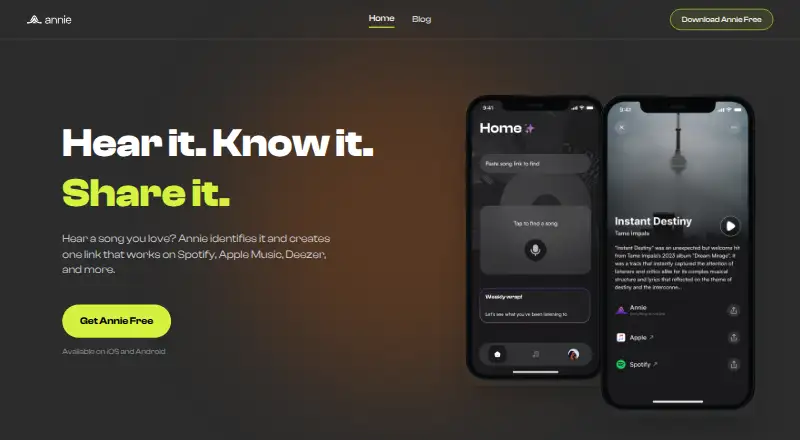
What Annie is
Annie identifies music playing nearby and creates a universal link so recipients can find the track on a supported streaming service. Its built-in Shazam integration captures and identifies songs, while ISRC-based matching looks for the corresponding recording across platforms. You can also paste Spotify, Apple Music, or YouTube links into Annie to convert them into universal links. Recipients can see the track and available listening services, including Spotify, Apple Music, Deezer, and YouTube. Annie lets users save and organize songs across services; an account enables saved finds and playlist syncing, though searching can start without an account. The app is free, with no subscription required for music identification and universal links, and is available on Android and iOS. An internet connection is needed for song identification and streaming-link lookup, so offline identification is not available. Annie does not host or store full tracks; audio previews are typically up to 30 seconds and come from third-party services. The maker describes it as intended for everyday listeners, artists, playlist curators, and DJs.
Who it suits
Annie suits listeners, artists, playlist curators, and DJs who want to identify nearby songs or share tracks across supported services. It also supports saving finds and syncing playlists for account holders.
What it does well
- Identifies nearby songs with built-in Shazam integration.
- Converts selected music-service links into universal links.
- Searching can start without an account.
- Free on Android and iOS.
What to know first
- Requires an internet connection for identification and link lookup.
- Offline identification is unavailable.
- Full tracks are not hosted or stored.
Limits
Annie does not identify songs offline. It does not host or store full tracks; previews are typically up to 30 seconds and come from third-party services.
Plans
| Plan | Billed and limits | Price |
|---|---|---|
| Free | Song identification · universal links · iOS and Android downloads | Free |
As anniemusic.app lists them, read 15 Oct 2026. The maker's own page has the final word.
Getting started
- Download Annie on Android or iOS.
- Open the app and search for music playing nearby; an account is not required to start searching.
- Connect to the internet for song identification and streaming-link lookup.
- Paste a Spotify, Apple Music, or YouTube link to convert it into a universal link.
- Create an account to enable saved finds and playlist syncing.
Overview
Annie is a mobile music-identification and sharing app for listeners who want to turn a song playing nearby—or a link from a supported service—into a link friends can open on their preferred platform. Its strongest case is cross-service sharing without a subscription; the trade-off is that identification and link lookup need an internet connection.
Key features
Annie uses Shazam integration to identify nearby music, then says it matches tracks by ISRC to find counterparts across streaming services. That makes it useful when the goal is to share a song beyond one platform, rather than only identify it. You can also paste Spotify, Apple Music, or YouTube links to create a universal link. Recipients see the track and links to available services, including Spotify, Apple Music, Deezer, and YouTube, and choose where to listen.
Users can save and organize songs across services, and an account enables saved finds and playlist syncing. Searching does not require an account, so casual use has little setup; an account is needed for those library features and advanced functions. Annie does not host full tracks. Previews are typically up to 30 seconds and come from third-party services, so it is a sharing and discovery layer, not a listening service.
Identification and streaming-link lookup both require internet access, and offline identification is not supported. The privacy policy says Annie may collect anonymous queries and shared-link activity to improve the service, retaining collected data only as long as needed.
Pricing
Free — free. Downloading is free, no subscription is required, and music identification and universal links are included. This is a practical fit for listeners who want occasional song recognition and cross-service sharing without a recurring fee. Annie’s free offer is not described with a quota, but it depends on connectivity and does not provide offline identification.
Platforms
Annie is available on Android and iOS. Its mobile focus suits listeners identifying music while out and sharing from a phone, but it is not a desktop option for people who want recognition from a computer.
Who it's for
Annie is best suited to everyday listeners, artists, playlist curators, and DJs who need to identify music and share a track without assuming everyone uses the same streaming service. People who want offline recognition, full-track hosting, or a desktop app should look elsewhere.
Pros and cons
- Cross-service sharing: Universal links let recipients choose among supported platforms instead of requiring the sender and recipient to use one service.
- No subscription for core functions: Music identification and universal links are free, with no subscription required.
- Account optional for searching: Users can start identifying music without creating an account, though saved finds and playlist syncing require one.
- Online-only identification and lookup: Annie cannot identify songs or find streaming links without an internet connection.
- Not a music host: Full tracks are not stored by Annie; previews are typically limited to 30 seconds and supplied by third parties.
Alternatives
Music Identification Apps is the broader category to browse if Annie’s mobile, online-only approach is not a fit.
- AHA Music is a better candidate for readers who want more platform choices, including web and desktop, or BPM and key detection; its Guest plan caps recognition at five per day, is ad-supported, and includes no history or playlists.
- WhoSampled is worth considering for text search or scanning Spotify and Apple Music libraries, rather than Annie’s emphasis on universal sharing links.
- SongRec suits Linux-focused desktop users seeking an open-source Shazam client.
- SoundHound is another Android and iOS option, with an ad-supported free version and a 6.99 USD one-time ad-free option.
- AirScrobble is an iOS alternative.
- Audile is an Android alternative; AudD and ACRCloud may require their own API account or token.
- AudioTag is an option for web and API use, including free non-commercial service.
- Earworm is an iOS alternative offered free while in TestFlight beta, for iPhone and Apple Watch.
Verdict
Choose Annie if you want free mobile song identification and a practical way to share tracks across streaming services. Its combination of nearby recognition, pasted-link conversion, and recipient choice is its clearest advantage. Look elsewhere if you need offline recognition, a desktop app, or a service that hosts complete tracks.
Verdict
Annie focuses on identifying music and sharing service-independent listening links. It is free to use for those functions, but identification and link lookup require internet access.
Questions
How much does Annie cost?
The Free plan costs nothing. No subscription is required for music identification and universal links.
Which platforms support Annie?
Annie is available on Android and iOS.
Can I use Annie without an account?
Yes. You can start searching without an account. An account enables saved finds, playlist syncing, and advanced features.
Which music services does Annie support?
Supported services listed include Spotify, Apple Music, Deezer, and YouTube.
Can Annie identify songs offline?
No. Annie requires an internet connection to identify songs and look up streaming links.
Who operates Annie?
The terms identify LogicalLey as Annie’s operator.
Facts from Annie's own pages
- Account limits
- An account is needed for saved preferences, playlist syncing, and advanced features. · anniemusic.app, 15 Oct 2026
- Account requirement
- Users can start searching without an account; an account enables saved finds, playlist syncing, and advanced features. · anniemusic.app, 4 Oct 2026
- Age requirement
- Users must be at least 13, with parental consent required for minors where applicable. · anniemusic.app, 15 Oct 2026
- Anonymous use
- Song searching and URL resolution can be used without creating an account. · anniemusic.app, 15 Oct 2026
- API mention
- The terms define Annie's service as including APIs, but the official site provides no developer documentation page. · anniemusic.app, 15 Oct 2026
- Apple price
- The iPhone app is listed as free. · apps.apple.com, 15 Oct 2026
- Apple privacy disclosure
- Apple says the developer may collect unlinked crash, performance, and diagnostic data for analytics and functionality. · apps.apple.com, 15 Oct 2026
- Apple size and age
- The iOS listing reports a 17.9 MB app with a 13+ age rating. · apps.apple.com, 15 Oct 2026
- Apple system requirements
- The listing requires iOS 12.3 or later and lists macOS 11 with an Apple M1 chip for Mac compatibility. · apps.apple.com, 15 Oct 2026
- Apple update history
- The latest listed iOS version is 1.4 dated October 10, 2023, with an Instagram sharing fix. · apps.apple.com, 15 Oct 2026
- Audio recognition
- Annie uses built-in Shazam integration to capture and identify music playing around you. · anniemusic.app, 4 Oct 2026
- Availability limitation
- Annie disclaims guarantees that the service will be uninterrupted, error-free, accurate, or continuously available. · anniemusic.app, 15 Oct 2026
- Content limit
- Annie does not host full tracks; previews are typically limited to 30 seconds and come from third parties. · anniemusic.app, 15 Oct 2026
- Feature: link conversion
- Users can paste Spotify, Apple Music, or YouTube links for conversion into universal links. · anniemusic.app, 15 Oct 2026
- Feature: listening
- The app listens to nearby audio through built-in Shazam integration. · anniemusic.app, 15 Oct 2026
- Feature: matching
- It uses ISRC-based matching to select the correct recording across services. · anniemusic.app, 15 Oct 2026
- Feature: playlists
- The service lets account holders save and organize songs into playlists. · anniemusic.app, 15 Oct 2026
- Feature: universal links
- Annie generates one link that opens the track on a recipient's preferred streaming service. · anniemusic.app, 15 Oct 2026
- Google Play availability
- Google Play lists 100+ downloads and an August 15, 2026 update targeting the latest Android platform version. · play.google.com, 15 Oct 2026
- Google Play data safety
- Google Play's developer-provided disclosure says no data is collected and no data is shared with third parties. · play.google.com, 15 Oct 2026
- Google Play developer
- The Android listing identifies LOGIC ALLEY LTD at 12 Okota Road, Isolo, Nigeria. · play.google.com, 15 Oct 2026
- Headquarters
- Nigeria · anniemusic.app, 28 Sept 2026
- Integration: Apple Music
- Apple Music is listed as a supported streaming integration. · anniemusic.app, 15 Oct 2026
- Integration: Deezer
- Deezer is listed as a supported streaming integration. · anniemusic.app, 15 Oct 2026
Where Annie stands on Freedom251
- Music Identification Apps#2 of 23