Freedom251 › AI Photo Animation Tools

Animate Photo AI
What Animate Photo AI is
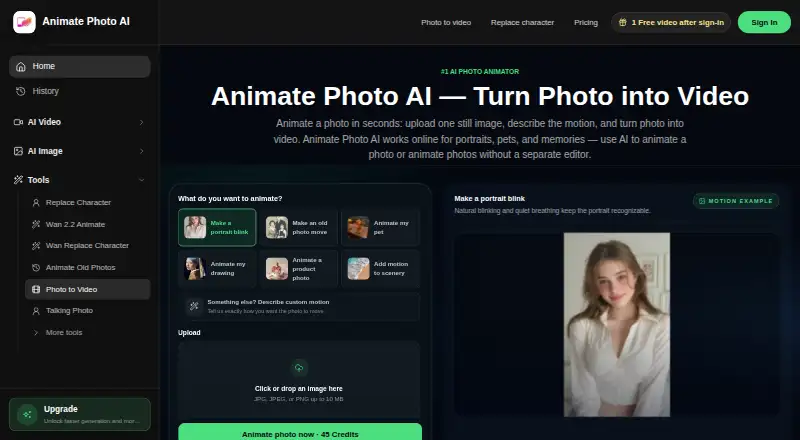
Animate Photo AI is a web service that turns a still photo into a short video based on a description of the motion a user wants. It is presented for portraits, pets, memories, drawings, product photos, and scenery. Photo to Video accepts JPG, JPEG, or PNG images up to 10 MB and offers aspect ratio, quality, duration, camera locking, sound, and professional AI video model choices. Listed durations are 3, 5, and 10 seconds, with quality options of 480p, 720p, and 1080p. The AI Photo Editor accepts JPG, PNG, or WebP images up to 12 MB and up to six reference images; edited results can be sent into Photo to Video. Sketch to Video supports sketches, line art, concept drawings, and storyboard frames, with six aspect ratios, 480p output, and a four-second default duration. Image Stitch processes source files in the browser and says originals are not sent to an upload API. A free plan includes 50 credits. Paid pricing is listed from $7.90/mo billed annually.
Who it suits
Animate Photo AI suits people who want to animate photos, drawings, or storyboard frames into short clips, or edit an image before animating it. Its free plan offers 50 credits to start.
What it does well
- Accepts photos up to 10 MB for video generation.
- Offers 3, 5, and 10-second durations.
- Photo editor supports up to six reference images.
- Image Stitch processes source files in the browser.
- Free plan includes 50 credits.
What to know first
- Photo-to-video input accepts JPG, JPEG, or PNG only.
- Sketch to Video outputs at 480p.
- Paid pricing is listed from $7.90/mo billed annually.
Limits
The free plan includes 50 credits. Sketch to Video provides 480p output and uses a four-second default duration.
Plans
| Plan | Billed and limits | Price |
|---|---|---|
| Free | 50 credits | Free |
| STARTER | $94.8 annual billing · 1,000 credits/month · about 8 video clips/month · all AI video models · all AI image models · standard queue | On request |
| GROWTH | $286.8 annual billing · 5,000 credits/month · about 40 video clips/month · all AI video models · all AI image models · priority queue · audio generation · batch processing | On request |
| PRO | $574.8 annual billing · 11,000 credits/month · about 88 video clips/month · all AI video models · all AI image models · highest queue priority · audio generation · batch processing | On request |
As animatephotoai.com lists them, read 30 Sept 2026. The maker's own page has the final word.
Getting started
- Open https://animatephotoai.com/ in a web browser.
- Choose Photo to Video, AI Photo Editor, or Sketch to Video.
- For Photo to Video, provide a JPG, JPEG, or PNG image up to 10 MB and describe the motion.
- Choose the available aspect ratio, duration, quality, camera locking, sound, or model options.
- Use the free plan with 50 credits or choose a paid plan starting at $7.90/mo (annual).
Animate Photo AI turns still images into short videos from a written motion prompt, and adds photo editing and sketch-animation workflows. It suits creators making brief clips from portraits, pets, memories, drawings, products, or scenery; its strongest case is variety of inputs and controls, not long-form production.
Overview
The core workflow starts with one photo and a description of the movement to create. You can set the aspect ratio, duration, and quality, and control camera locking and sound. This gives short-form creators several ways to shape a clip, but the 3-, 5-, and 10-second duration choices are limiting for scenes that need more time to unfold.
Animate Photo AI is aimed at social clips, playful motion photos, talking-photo experiments, reviving old photos, and quick creative drafts. It is a focused generator, not a replacement for a full video-editing workflow.
Key features
Photo to video
The homepage accepts JPG, JPEG, or PNG images up to 10 MB and offers 480p, 720p, and 1080p output. The quality range accommodates quick drafts as well as sharper clips, while the input cap may require resizing larger files. Face animation, camera motion, lip-sync, and professional AI video models are supported.
Photo editing and sketch animation
The AI Photo Editor accepts JPG, PNG, or WebP files up to 12 MB and allows up to six reference images. Sending an edited result into Photo to Video makes this a useful route for creators who want to revise an image before animating it.
Sketch to Video works with sketches, line art, concept drawings, and storyboard frames. It uses Seedance 1.5 Pro, offers six aspect ratios, and outputs at 480p with a four-second default duration. Credits are charged when a job is submitted and refunded automatically if it fails. The low-resolution output and short default duration suit early visual drafts better than polished, extended sequences.
Browser-based image stitching
Image Stitch processes source files in the browser and says originals are not sent to an upload API. That is a useful option for this specific workflow when keeping source images off an upload API matters.
Pricing
The Free plan costs nothing and includes 50 credits, making it a limited way to start. Paid plans are billed annually: STARTER is billed $94.8 annual billing for 1,000 credits per month and about eight video clips per month, with all AI video and image models and a standard queue. It fits occasional use, but the standard queue and smaller allowance make it less suitable for frequent generation.
GROWTH is billed $286.8 annual billing for 5,000 credits per month and about 40 video clips, adding priority queue, audio generation, and batch processing to all AI video and image models. It is the more practical tier for regular batch work. PRO is billed $574.8 annual billing for 11,000 credits per month and about 88 clips, with the same model access and features as GROWTH but the highest queue priority. That larger allocation is aimed at heavier workloads.
Both higher tiers retain audio generation and batch processing while increasing monthly credits and queue priority; STARTER gives those up. The plans are credit-based, so clip counts are approximate. The annual billing amounts are published, while the plan prices are custom pricing; the stated starting rate is $7.90/mo (annual).
Platforms
Animate Photo AI is available on the web. The homepage email contact is [email protected].
Who it's for
Choose it for short, prompt-directed animation when you want to work from a still photo, edit an image before animating it, or turn a sketch into a brief draft. Its multiple workflows and output controls suit casual creators and visual ideation. Look elsewhere if your work depends on longer clips, higher-resolution sketch output, or predictable production volume beyond the monthly credit allowances.
Pros and cons
- Several routes from image to motion: photo animation, an editor that can pass results into video, and a sketch workflow cover different starting points.
- Useful output controls: Photo to Video offers three durations and three quality settings, plus aspect ratio, camera locking, and sound controls.
- Short clips and credit limits: the main workflow tops out at 10 seconds, and paid plans meter monthly use by credits.
- Sketch output is constrained: it defaults to four seconds and 480p, which makes it better suited to drafts than finished sequences.
Alternatives
AI Photo Animation Tools is the broader category to browse if you want to compare options. Choose HeyGen instead when a free plan with up to three videos per month and a one-minute maximum length better matches your needs. Pika is another freemium alternative with a free plan and API, iOS, and web platforms. Choose AnimateDiff if you want a free option released for academic use, with Linux, self-hosted, and web availability. Hedra, Immersity AI, Kling AI, PicAlive, and Runway are other alternatives to consider.
Verdict
Animate Photo AI is a good fit for creators who want several ways to turn still images or sketches into short, directed clips. Its breadth of workflows is the main reason to choose it; the short durations and credit-metered plans are the main reasons to look elsewhere for longer or heavier production.
Verdict
Animate Photo AI offers several routes from still images to short video, including photo animation, photo editing, and sketch workflows. Review the input limits, output choices, and credit allocation against the clips you want to make.
Questions
Is Animate Photo AI free?
It has a free plan with 50 credits. Paid plans start at $7.90/mo (annual).
What platforms does it support?
Animate Photo AI is available on the web.
What image formats can I use for Photo to Video?
The homepage accepts JPG, JPEG, or PNG images up to 10 MB.
What does the free plan include?
The Free plan is listed as free and includes 50 credits.
What are the paid plans?
STARTER includes 1,000 credits/month, about 8 video clips/month, all AI video and image models, and a standard queue; it is billed $94.8 annually. GROWTH and PRO add more credits, higher queue priority, audio generation, and batch processing; their annual billings are $286.8 and $574.8, respectively.
Can I use it to animate sketches?
Yes. Sketch to Video supports sketches, line art, concept drawings, and storyboard frames, with six aspect ratios and 480p output.
Facts from Animate Photo AI's own pages
- Core function
- Animate Photo AI turns one still photo into a short video by having the user describe the desired motion. · animatephotoai.com, 30 Sept 2026
- Credit charging
- The Sketch to Video page says credits are charged on submission and automatically refunded if the job fails. · animatephotoai.com, 30 Sept 2026
- Homepage durations
- The homepage lists 3s, 5s, and 10s duration options. · animatephotoai.com, 30 Sept 2026
- Homepage resolutions
- The homepage lists 480p, 720p, and 1080p quality options. · animatephotoai.com, 30 Sept 2026
- Input limit
- The homepage accepts JPG, JPEG, or PNG images up to 10 MB. · animatephotoai.com, 30 Sept 2026
- Local processing option
- The Image Stitch tool processes source files in the browser and says the originals are not sent to an upload API. · animatephotoai.com, 30 Sept 2026
- Motion controls
- The homepage offers aspect ratios, quality and duration choices, camera locking, sound, and professional AI video models. · animatephotoai.com, 30 Sept 2026
- Photo editor
- The AI Photo Editor accepts JPG, PNG, or WebP images up to 12 MB, supports up to six reference images, and can send the edited result into Photo to Video. · animatephotoai.com, 30 Sept 2026
- Sketch workflow
- The Sketch to Video page supports sketches, line art, concept drawings, and storyboard frames with Seedance 1.5 Pro, six aspect ratios, 480p output, and a 4-second default duration. · animatephotoai.com, 30 Sept 2026
- Support
- The homepage lists [email protected] as the product email contact. · animatephotoai.com, 30 Sept 2026
- Supported subjects
- The service is presented for portraits, pets, memories, drawings, product photos, and scenery. · animatephotoai.com, 30 Sept 2026
- Typical uses
- The maker describes short social clips, playful motion photos, talking-photo tests, old-photo revival, and quick creative drafts as current use cases. · animatephotoai.com, 30 Sept 2026
Where Animate Photo AI stands on Freedom251
- AI Photo Animation Tools#8 of 25