Freedom251 › Web Accessibility Software
ANDI
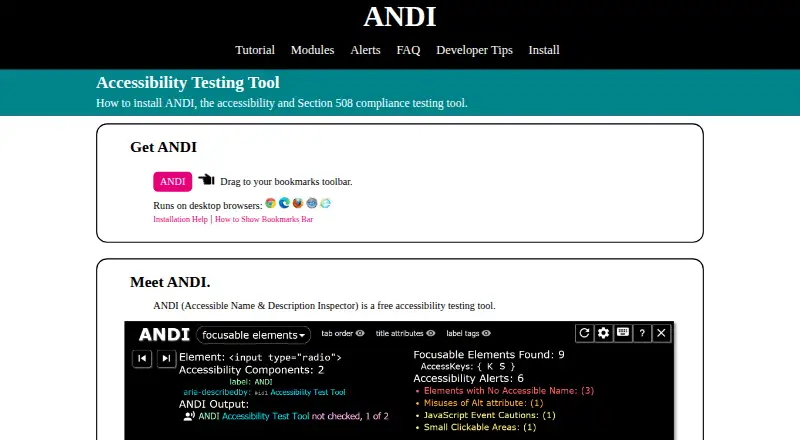
What ANDI is
ANDI is a free, open-source web accessibility testing tool from the Social Security Administration’s Accessible Solutions Branch. It runs as a bookmarklet launched on a web page and analyzes that page for potential HTML accessibility problems. Alerts are grouped as danger, warning, or caution, and ANDI shows what a screen reader should say for interactive elements. Modules cover focusable elements, graphics and images, links and buttons, tables, page structure, color contrast, and hidden content. ANDI is intended for manual inspection rather than whole-site scanning, and it does not create an exportable report. Supported desktop browsers listed by the installation page are Chrome, Edge Chromium, Firefox, Safari, and Internet Explorer. It does not run in mobile browsers, though desktop developer tools can simulate small-screen layouts. Dynamic changes require a refresh. Iframe content is not detected by default, and shadow DOM elements cannot be detected. Organizations can host a modified copy locally or on a server.
Who it suits
ANDI suits accessibility reviewers who need page-level manual inspection in a desktop browser. It can help teams examine interactive elements, structure, contrast, and hidden content.
What it does well
- Free and open-source
- Screen-reader output guidance for interactive elements
- Modules cover major page accessibility areas
- Works across listed desktop browsers
- Organizations can self-host a copy
What to know first
- Cannot scan an entire site
- No exportable report
- Does not run in mobile browsers
- Shadow DOM elements are not detected
Plans
| Plan | Billed and limits | Price |
|---|---|---|
| Free | Free accessibility testing tool | Free |
As ssa.gov lists them, read 12 Oct 2026. The maker's own page has the final word.
Verdict
ANDI provides focused, manual accessibility analysis for individual web pages with useful inspection modules and categorized alerts. It is not a replacement for site-wide scanning or testing dynamic, iframe, or shadow-DOM content.
Facts from ANDI's own pages
- Accessibility modules
- ANDI provides modules for inspecting focusable elements, graphics and images, links and buttons, tables, page structures, color contrast, and hidden content. · ssa.gov, 12 Oct 2026
- Automated alerts
- When launched, ANDI analyzes HTML elements for common accessibility issues and groups alerts into danger, warning, and caution levels. · ssa.gov, 12 Oct 2026
- Browser support
- The installation page lists Chrome, Edge Chromium, Firefox, Safari, and Internet Explorer as supported desktop browsers. · ssa.gov, 12 Oct 2026
- Dynamic content limit
- ANDI does not track dynamic events or content changes after launch, so users need to refresh ANDI to inspect updated content. · ssa.gov, 12 Oct 2026
- Free plan
- Yes · ssa.gov, 21 Sept 2026
- Hosting
- Organizations can download ANDI’s source code and host a copy on a server or locally after changing its host URL. · ssa.gov, 12 Oct 2026
- How it runs
- ANDI is a bookmarklet that users launch on a web page to analyze that page. · ssa.gov, 12 Oct 2026
- Iframe limit
- ANDI cannot detect iframe content by default, though its FAQ describes workarounds for testing it. · ssa.gov, 12 Oct 2026
- Maker
- ANDI is an open-source project created by the Accessible Solutions Branch of the Social Security Administration. · ssa.gov, 12 Oct 2026
- Manual review
- ANDI is intended for manual inspection of web content and cannot scan an entire site or produce an exportable report. · ssa.gov, 12 Oct 2026
- Mobile limit
- ANDI does not run in mobile browsers, but it can test small-screen layouts simulated with desktop browser developer tools. · ssa.gov, 12 Oct 2026
- Purpose
- ANDI is a web accessibility testing tool that detects potential issues, suggests improvements, and reveals what a screen reader should say for interactive elements. · ssa.gov, 12 Oct 2026
- Scan scope
- page · ssa.gov, 21 Sept 2026
- Shadow DOM limit
- ANDI cannot detect elements within a shadow DOM, and its FAQ says there are no workarounds. · ssa.gov, 12 Oct 2026
- Support
- Users can report bugs and submit feature requests by creating an issue on ANDI’s GitHub page. · ssa.gov, 12 Oct 2026
- Updates
- The installation page says ANDI updates itself automatically, so users do not need to reinstall or upgrade it. · ssa.gov, 12 Oct 2026
Where ANDI stands on Freedom251
- Web Accessibility Software#7 of 21
- Accessibility Testing Software#86 of 169
- Website Accessibility Tools#69 of 133