
AndBible
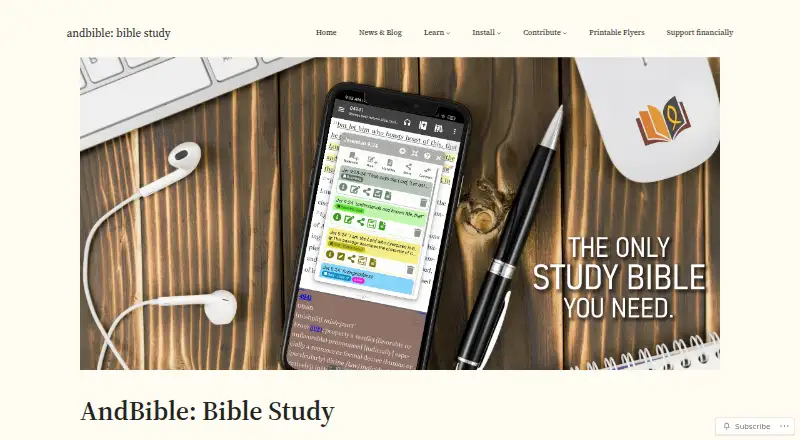
What AndBible is
AndBible is a Bible study app with offline Bibles, commentaries, dictionaries, bookmarks, notes, and study pads. Study tools include Strong’s numbers, morphology, cross-references, and side-by-side commentaries. Workspaces can display split windows with synchronized scrolling and pinned documents. Bookmarks and workspaces can sync through Google Drive or Nextcloud. The app supports Bible, commentary, dictionary, book, and map modules, with thousands of documents available through module repositories. Documentation lists Sword modules and EPUB books, plus experimental support for MyBible and MySword modules. An optional built-in AI assistant can translate, explain, summarize, annotate, and perform word studies on Bible text using an external provider. AI use needs an internet connection and provider API key, may cost money through the provider, and sends selected text to that provider. AndBible is free, with no ads, and is listed for Android, iOS, macOS, and Linux. The iOS app supports sync through the user's iCloud, Nextcloud, or WebDAV account.
Who it suits
AndBible suits readers who want offline Bible study materials and tools across its listed platforms. Its AI features may suit users willing to connect an external provider and send selected text to it.
What it does well
- Core study materials and notes work offline.
- Study tools include morphology and cross-references.
- Workspaces support split windows and pinned documents.
- Free to use with no ads.
- Supports iOS sync through iCloud, Nextcloud, or WebDAV.
What to know first
- AI features require an internet connection and provider API key.
- AI use may incur provider costs.
- AI sends selected text to the chosen external provider.
- MyBible and MySword module support is experimental.
Limits
AI features require an internet connection and provider API key, may incur provider costs, and transmit selected text to the chosen external provider.
Plans
| Plan | Billed and limits | Price |
|---|---|---|
| Free | Free for everyone · Bible study app · No ads · Android and iOS | Free |
As andbible.org lists them, read 10 Oct 2026. The maker's own page has the final word.
Getting started
- Visit https://andbible.org/.
- Choose the Android, iOS, macOS, or Linux version.
- Install or open the app on your platform.
- Use the free plan; no trial is offered.
- For sync, connect Google Drive or Nextcloud, or on iOS use iCloud, Nextcloud, or WebDAV.
- For AI features, provide an API key for a supported provider or compatible endpoint.
Overview
AndBible is a Bible study app for readers who want offline scripture and reference materials alongside tools for close study. Its workspaces, document library and syncing make it a strong fit for people who study across multiple texts or devices; its AI features require a separate provider account and send selected text outside the app.
Key features
AndBible brings together Bible, commentary, dictionary, book and map modules, with thousands of documents available through module repositories. It supports Sword modules and EPUB books, plus experimental support for MyBible and MySword modules. Offline access is central to the app: its study materials and tools can be used without a connection.
For detailed study, Strong’s numbers, morphology and cross-references sit alongside side-by-side commentaries. Workspaces add split windows, synchronized scrolling and pinned documents, which can help readers compare passages and references without repeatedly switching views. Bookmarks and workspaces can sync through Google Drive or Nextcloud.
The built-in AI assistant can translate, explain, summarize and annotate Bible text, and perform word studies. It supports providers including Google Gemini, OpenAI, Anthropic, xAI, Mistral, DeepSeek, Groq, Alibaba Cloud and OpenRouter, as well as compatible custom endpoints. This flexibility comes with meaningful trade-offs: AI requires an internet connection and an API key, may incur provider charges, and sends selected text to the chosen provider. Keys remain on the device and are not backed up or synchronized.
AndBible’s privacy policy says it does not collect or store personal information apart from optional Google Drive synchronization, which is disabled by default. That is a useful baseline for offline study, but readers should consider the separate data flow when using AI.
Pricing
Free — free. The free plan is for everyone and includes a Bible study app with no ads on Android and iOS. There is no free trial because the app is free. The published plan description names Android and iOS, while AndBible’s platform support also includes macOS and Linux.
There are no paid tiers or plan caps to weigh against one another. The main cost caveat is optional AI use: the provider may charge for API usage, so the app’s free price does not make AI access cost-free.
Platforms
AndBible supports Android, iOS, macOS and Linux. Its iOS app is available from the App Store and runs on iPhone, iPad, Apple Silicon Macs and Apple Vision Pro. On iOS, cross-device sync can use the reader’s own iCloud, Nextcloud or WebDAV account; bookmarks and workspaces also support Google Drive or Nextcloud syncing.
Who it's for
AndBible suits readers who want a free, ad-free Bible study environment with offline materials, reference tools and workspace-based comparison. Its breadth of modules and study features makes it a better fit for focused study than for someone seeking only a simple reading interface. The AI assistant is most appropriate for users comfortable setting up an external provider key, connecting to the internet and sharing selected text with that provider.
For questions or problem reports, AndBible directs users to its support page.
Pros and cons
- Pros: Offline access, no ads and a free plan make it practical for regular study without a subscription.
- Pros: Strong’s numbers, morphology, cross-references and synchronized split-window workspaces support comparative study in one app.
- Pros: Google Drive, Nextcloud and, on iOS, iCloud or WebDAV provide several ways to sync personal study data.
- Cons: AI use depends on an external API key and internet access, can add provider costs, and sends selected text to the provider.
- Cons: MyBible and MySword module support is experimental, so readers relying on those formats should not treat it as a settled compatibility option.
Alternatives
For more reading-app choices, browse Reading Apps.
- JW Library is another free option for readers focused on Bible translations, Bible-based publications, videos and audio programs.
- Olive Tree Bible App suits readers who want a free app with over 100 free resources and the option to add paid resources or subscriptions.
- FBReader is worth considering for general ebook reading across Android, iOS, Linux, macOS and Windows; its current code is closed source.
- BookFusion is an alternative for managing ebooks across Android, iOS and the web, though its free plan caps the library at 10 books and limits devices and shelves.
- FreshRSS is a free, self-hosted RSS and Atom feed aggregator rather than a Bible study app.
- ReadTheory is aimed at reading practice, with a free Basic plan limited to one staff member, 30 students, weekly quizzes and progress history.
- Duolingo is a freemium language-learning alternative with a free plan and a one-week free trial.
- Headway offers a free daily book-summary option with one pre-selected summary per day.
Verdict
Choose AndBible if you want a free, ad-free app for offline Bible study, with substantial reference tools and flexible workspaces. Its strongest case is the combination of study depth and cross-device syncing without a subscription. Look elsewhere if you want a simpler reader, or if external-provider setup, possible AI charges or sharing selected text does not suit your needs.
Verdict
AndBible brings offline study materials, study tools, and workspace syncing together in a free app with no ads. Consider the external-provider requirements and text sharing before using its AI assistant.
Questions
How much does AndBible cost?
It is free for everyone at no cost, with no ads.
Can I use AndBible offline?
Yes. Bibles, commentaries, dictionaries, bookmarks, notes, and study pads work offline.
Which platforms are supported?
AndBible is listed for Android, iOS, macOS, and Linux. The iOS app is available from the App Store and runs on iPhone, iPad, Apple Silicon Macs, and Apple Vision Pro.
Can I sync bookmarks and workspaces?
They can sync through Google Drive or Nextcloud. The iOS app also supports sync through the user’s iCloud, Nextcloud, or WebDAV account.
Does AndBible include AI features?
Its optional AI assistant can translate, explain, summarize, annotate, and perform word studies. It requires internet access and a provider API key; use may cost money and sends selected text to the chosen provider.
Which document formats does it support?
Documentation lists Sword modules and EPUB books, with experimental support for MyBible and MySword modules.
Facts from AndBible's own pages
- AI assistant
- The built-in AI assistant can translate, explain, summarize, annotate and perform word studies on Bible text using an external AI provider. · andbible.org, 10 Oct 2026
- AI integrations
- Supported AI providers listed include Google Gemini, OpenAI, Anthropic, xAI, Mistral, DeepSeek, Groq, Alibaba Cloud and OpenRouter, as well as custom compatible endpoints. · andbible.org, 10 Oct 2026
- AI key storage
- AI API keys are stored on the device and are not included in backups or synchronized to the cloud. · andbible.org, 10 Oct 2026
- AI privacy and cost
- AI use requires an internet connection and provider API key, may incur provider costs, and sends selected text to the chosen external provider. · andbible.org, 10 Oct 2026
- Documents
- AndBible supports Bible, commentary, dictionary, book and map modules, with thousands of documents available from module repositories. · andbible.org, 10 Oct 2026
- Formats
- The documentation says AndBible supports Sword modules and EPUB books, with experimental support for MyBible and MySword modules. · andbible.org, 10 Oct 2026
- iOS availability
- The iOS app is available from the App Store and runs on iPhone, iPad, Apple Silicon Macs and Apple Vision Pro. · andbible.org, 10 Oct 2026
- iOS sync
- The iOS app supports cross-device sync through the user's own iCloud, Nextcloud or WebDAV account. · andbible.org, 10 Oct 2026
- Privacy
- The privacy policy says AndBible does not collect or store personal information apart from the optional Google Drive synchronization feature, which is disabled by default. · andbible.org, 10 Oct 2026
- Purpose
- AndBible is a Bible study app with Bibles, commentaries, dictionaries, bookmarks, notes and study pads that work offline. · andbible.org, 10 Oct 2026
- Study tools
- The app supports Strong’s numbers, morphology, cross-references and side-by-side commentaries. · andbible.org, 10 Oct 2026
- Support
- The documentation directs users to its support page to ask questions or report problems. · andbible.org, 10 Oct 2026
- Sync
- Bookmarks and workspaces can sync through Google Drive or Nextcloud. · andbible.org, 10 Oct 2026
- Workspaces
- Workspaces support split windows with synchronized scrolling and pinned documents. · andbible.org, 10 Oct 2026
Where AndBible stands on Freedom251
- Reading Apps#3 of 47