Freedom251 › Guitar Amp Software
AmpForge
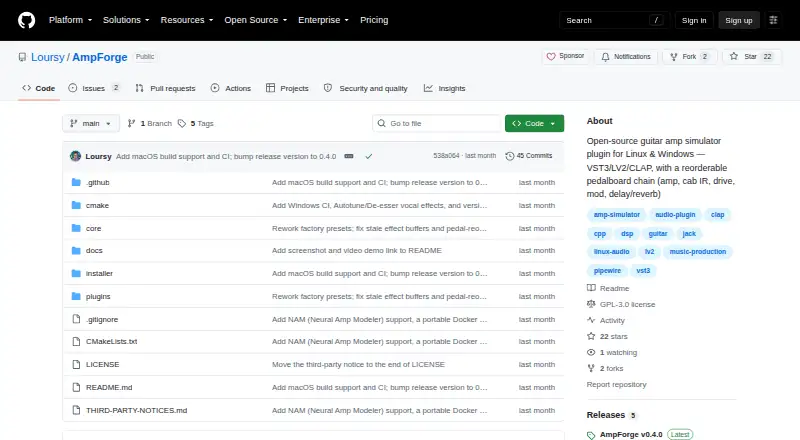
What AmpForge is
AmpForge is a free, open-source guitar amp simulator plugin for Linux, macOS, and Windows, with vocal effects and an IR loader. Its pedalboard contains 19 modules that can be rearranged while the plugin is running. For amp modeling, its NAM module loads Neural Amp Modeler capture files that users provide. Vocal tools include pitch correction with autotune and a de-esser for sibilance. AmpForge comes as VST3, LV2, and CLAP plugins, and as a standalone app on supported platforms. Compatible hosts named in its README include Reaper, Carla, and Bitwig. Users can work with factory presets or save, revise, remove, import, and export custom ones. Hosts can automate every parameter, including pedal positions. AmpForge does not include cabinet impulse responses or NAM captures, so users need to supply those files. On Windows, the installer offers VST3, CLAP, and LV2 formats but no standalone executable. The macOS build is neither code-signed nor notarized; the README provides a Gatekeeper workaround. The project welcomes issues and pull requests through GitHub.
Who it suits
AmpForge suits guitarists and vocalists who want amp simulation and vocal effects in a plugin or, on supported platforms, a standalone app. It is also a fit for users who want to rearrange pedal modules, automate parameters, and manage their own presets.
What it does well
- Free and open-source.
- 19 pedalboard modules can be reordered at runtime.
- Includes autotune pitch correction and a de-esser.
- Supports VST3, LV2, and CLAP formats.
- Every parameter, including pedal positions, is host-automatable.
- Users can import and export custom presets.
What to know first
- Users must supply their own cabinet impulse responses and NAM captures.
- Windows has no standalone executable.
- The macOS build is not code-signed or notarized.
Limits
AmpForge is free, with no paid plan stated. Users must provide cabinet impulse responses and NAM captures; Windows does not have a standalone executable, and the macOS build is unsigned and not notarized.
Plans
| Plan | Billed and limits | Price |
|---|---|---|
| AmpForge | Open-source plugin; available for Linux, Windows, and macOS | Free |
As github.com lists them, read 8 Oct 2026. The maker's own page has the final word.
Getting started
- Visit the AmpForge GitHub repository.
- Choose Linux, macOS, or Windows as your platform.
- Install a plugin format supported by your compatible host: VST3, LV2, or CLAP.
- Use the standalone app on platforms where it is supported.
- Supply your own cabinet impulse responses or NAM capture files if needed.
- On macOS, follow the README's Gatekeeper workaround to install the unsigned build.
Overview
AmpForge is a free, open-source guitar amp simulator plugin with vocal effects, suited to players who want an adaptable signal chain and are comfortable supplying their own amp captures and cabinet files. Its broad plugin support and host automation make it a flexible choice, though the missing bundled files and unsigned macOS build add setup work.
Key features
The pedalboard has 19 internal modules that can be reordered while the plugin is running. That gives players room to shape a signal chain around a session, and host automation extends to every parameter, including pedal positions. This is a meaningful advantage for arranging changes over time in a compatible host.
A NAM module loads user-provided Neural Amp Modeler capture files, and an IR loader supports cabinet impulse responses. AmpForge bundles neither captures nor impulse responses, so players need to bring their own files before those parts of the setup can be useful. The plugin also includes autotune pitch correction and a de-esser, adding vocal processing alongside guitar amp simulation.
Users can save, update, delete, import, and export custom presets, with factory presets included. AmpForge comes as VST3, LV2, and CLAP plugins, plus a standalone app on supported platforms. Its README describes use in compatible hosts including Reaper, Carla, and Bitwig.
Pricing
AmpForge: free. The free plan is the open-source plugin for Linux, Windows, and macOS, with no paid tier described. It suits players who want to use the included modules and manage their own files without a software charge. The trade-off is that users must supply NAM captures and cabinet impulse responses themselves.
Platforms
AmpForge supports Linux, macOS, and Windows. The standalone app is available on supported platforms, but Windows has no standalone executable; Windows users get VST3, CLAP, and LV2 installers instead. The macOS build is neither code-signed nor notarized, and installation requires the Gatekeeper workaround in the README.
Who it's for
AmpForge is a strong fit for players who already have NAM captures or cabinet impulse responses, or who are willing to source them, and who want to rearrange pedals and automate their positions inside a host. Its vocal effects may also appeal to users who want pitch correction and de-essing in the same plugin. It is a weaker fit for anyone who expects a ready-to-play library of captures and cabinet files, or needs a Windows standalone app.
Pros and cons
- Pros: Nineteen reorderable internal modules and automation for every parameter support detailed signal-chain control from a compatible host.
- Pros: VST3, LV2, and CLAP formats, preset import and export, and factory presets give users several ways to fit AmpForge into a plugin-based workflow.
- Pros: The free, open-source release includes autotune and de-essing alongside guitar amp simulation.
- Cons: Users must provide their own NAM captures and cabinet impulse responses, which adds preparation before the amp and cabinet setup is complete.
- Cons: Windows has no standalone executable, and the macOS build requires a Gatekeeper workaround because it is unsigned and not notarized.
Alternatives
For a wider set of guitar amp software options, browse Guitar Amp Software.
- Neural Amp Modeler is another free, open-source option for players focused on NAM; choose it when a dedicated NAM project better suits your workflow.
- Amp Locker offers a free download with extra modules available for individual purchase and outright ownership. Choose it if you prefer to expand a paid selection of amps and effects over time.
- Amplifikation 360 has a free plan and runs on macOS and Windows. Choose it if those are your platforms and you want to compare another freemium amp option.
- GENOME has a free Intro plan with 4 amplifiers, 14 pedals, 5 cabinets, and 4 studio effects, plus a paid plan at $89.99, paid once. Choose it if you want a free starting set that includes cabinets.
- Gjalla is another free, open-source option for Linux, macOS, and Windows.
- Helix Stadium Native has a free, no-time-limit Intro plan for macOS and Windows. Choose it if its listed amps, cabinets, and studio effects match your needs.
- IK Multimedia ReSing is a vocal-focused alternative with a free tier and a 129.99 USD one-time paid plan. Choose it when voice and instrument models are the priority over guitar amp simulation.
- Soundshed Guitar is a free option for Linux, macOS, and Windows, with no licensing, paywall, or extra purchases.
Verdict
Choose AmpForge if you want a free, open-source amp simulator with vocal effects, reorderable pedals, and host automation. Its breadth of plugin formats and parameter control are compelling for host-based workflows. Look elsewhere if you need bundled cabinet impulse responses or NAM captures, or a Windows standalone app.
Verdict
Choose AmpForge if you want a free, open-source amp simulator with vocal effects, flexible pedal ordering, and host automation. Look elsewhere if you need bundled cabinet impulse responses or NAM captures, or a Windows standalone app.
Questions
Is AmpForge free?
Yes. It is open-source and has a free plan priced at $0.
Which operating systems does it support?
Linux, macOS, and Windows. The Windows installer supports VST3, CLAP, and LV2, but does not include a standalone executable.
Which plugin formats are available?
AmpForge is available as VST3, LV2, and CLAP plugins, as well as a standalone app on supported platforms.
Does it include NAM captures or cabinet impulse responses?
No. Users supply their own NAM capture files and cabinet impulse responses.
Which hosts does the README name?
It describes use in compatible hosts including Reaper, Carla, and Bitwig.
Can users create and automate presets?
Users can save, update, delete, export, and import custom presets, and factory presets are included. Every parameter, including pedal position parameters, can be automated by the host.
Facts from AmpForge's own pages
- Automation
- Every parameter is host-automatable, including pedal position parameters. · github.com, 8 Oct 2026
- External files
- AmpForge does not bundle cabinet impulse responses or NAM captures, so users supply their own files. · github.com, 8 Oct 2026
- Host compatibility
- The README describes use in compatible hosts including Reaper, Carla, and Bitwig. · github.com, 8 Oct 2026
- NAM support
- The NAM module loads user-provided Neural Amp Modeler .nam capture files. · github.com, 8 Oct 2026
- Pedalboard
- It includes 19 internal modules that users can reorder at runtime. · github.com, 8 Oct 2026
- Platform limitation
- The Windows installer supports VST3, CLAP, and LV2, but there is no Windows standalone executable. · github.com, 8 Oct 2026
- Plugin formats
- AmpForge is available as VST3, LV2, and CLAP plugins, as well as a standalone app on supported platforms. · github.com, 8 Oct 2026
- Presets
- Users can save, update, delete, export, and import custom presets, and the plugin includes factory presets. · github.com, 8 Oct 2026
- Security and signing
- The macOS build is not code-signed or notarized, and the README provides a Gatekeeper workaround for installation. · github.com, 8 Oct 2026
- Support and contributions
- The project welcomes issues and pull requests through its GitHub repository. · github.com, 8 Oct 2026
- Vocal effects
- The plugin includes autotune pitch correction and a de-esser for sibilance. · github.com, 8 Oct 2026
- What it does
- AmpForge is a free, open-source guitar amp simulator plugin with vocal effects. · github.com, 8 Oct 2026
Where AmpForge stands on Freedom251
- Guitar Amp Software#2 of 35