Freedom251 › Database Performance Monitoring Software

AI SQL Tuner Studio
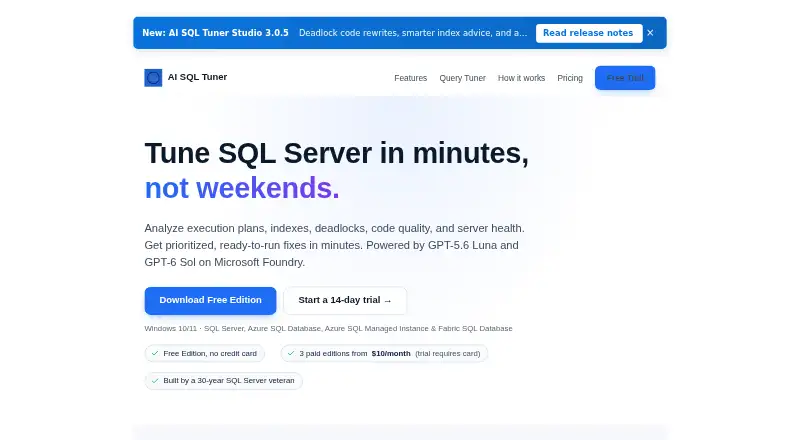
What AI SQL Tuner Studio is
AI SQL Tuner Studio is a Windows tool for analyzing and tuning SQL queries. It supports Microsoft SQL Server, Azure SQL Database, and Azure SQL Managed Instance. Its listed capabilities include query analysis, wait and lock analysis, and query plan capture, giving database users several ways to examine query behavior. The Free plan is limited to SQL Server Developer Edition. Standard costs $10 a month and Pro costs $15 a month; both list up to two server connections. Corporate costs $20 a month and lists unlimited server connections. A 14-day trial is also listed. The product is listed for Windows, rather than web or mobile platforms. The available plan details distinguish the free edition by database edition, while paid plans are differentiated by monthly price and connection limits. Users can consider the Developer Edition option, a paid plan with up to two connections, or Corporate for unlimited connections.
Who it suits
It suits Windows users who work with Microsoft SQL Server or the listed Azure SQL databases and need query, wait, lock, or plan analysis. The Free plan is relevant only to SQL Server Developer Edition; paid tiers specify connection limits.
What it does well
- Analyzes queries, waits, and locks.
- Captures query plans.
- Supports SQL Server and two Azure SQL offerings.
- 14-day trial is listed.
What to know first
- Free plan is limited to SQL Server Developer Edition.
- Standard and Pro allow up to two server connections.
- Windows is the only listed platform.
Limits
The Free plan is limited to SQL Server Developer Edition. Standard and Pro allow up to 2 server connections; Corporate lists unlimited connections.
Plans
| Plan | Billed and limits | Price |
|---|---|---|
| Free | SQL Server Developer Edition only | Free |
| Standard | billed monthly · Up to 2 server connections | $10 a month |
| Pro | billed monthly · Up to 2 server connections | $15 a month |
| Corporate | billed monthly · Unlimited server connections | $20 a month |
As aisqltuner.com lists them, read 23 Sept 2026. The maker's own page has the final word.
Getting started
- Visit https://aisqltuner.com/.
- Use the Windows platform.
- Choose the free plan for SQL Server Developer Edition or select a paid plan.
- Consider the listed 14-day trial.
AI SQL Tuner Studio is a Windows application for examining performance in Microsoft SQL Server and Azure SQL services. It is best suited to developers, database administrators, and small teams whose immediate concern is SQL behavior rather than full-stack observability. The low-cost entry point is attractive, but the Free edition’s database restriction and the connection ceilings on Standard and Pro need careful checking.
Overview
The product focuses on Microsoft SQL Server, Azure SQL Database, and Azure SQL Managed Instance. That narrow scope is a strength when a team needs to investigate statements, blocking, or execution behavior inside Microsoft’s database family. It is not positioned as a general monitoring platform for mixed database engines, operating systems, or application services.
Its freemium structure lets users start without a subscription, although the no-cost option is specifically tied to SQL Server Developer Edition. Teams working with other editions or production-oriented environments should expect to move to a paid plan. A 14-day trial provides a limited period to assess the paid offering before committing.
Key features
Query analysis
Query analysis is the central reason to choose AI SQL Tuner Studio. It gives SQL-focused practitioners a way to examine statement performance directly, making it relevant to developers tuning inefficient queries and administrators tracing database slowdowns. This focus is more useful for query-level diagnosis than a tool that only presents broad host or service metrics.
Wait and lock analysis
Wait and lock analysis addresses contention: situations in which sessions spend time waiting or become blocked. That makes the software a practical fit for diagnosing concurrency problems and identifying whether delays arise from locking behavior rather than simply from an expensive statement.
Query plan capture
Query plan capture adds execution-plan evidence to the investigation. Users looking to understand how SQL Server is executing a statement can use captured plans alongside query and wait information, giving a more complete basis for deciding what to tune. The feature set remains specialized, so it should not be mistaken for a broader application-performance suite.
Pricing
| Plan | Price and allowance | Best fit |
|---|---|---|
| Free | free; SQL Server Developer Edition only | Personal evaluation, learning, or development environments using that edition |
| Standard | $10 a month, billed monthly; up to 2 server connections | Small deployments needing paid access with two servers or fewer |
| Pro | $15 a month, billed monthly; up to 2 server connections | Teams that need the Pro tier while remaining within the same two-connection limit |
| Corporate | $20 a month, billed monthly; unlimited server connections | Organizations connecting multiple servers |
Standard is the lowest paid price at $10.00 per month, but its two-server ceiling is also shared by Pro. That means Pro is not the plan to buy merely for additional connections; Corporate is the meaningful upgrade when a deployment outgrows two servers. The Free plan’s edition restriction makes it unsuitable for users who need to connect to other SQL Server editions or the Azure services supported by the product. Monthly billing keeps the commitment shorter than an annual contract, while the 14-day trial gives prospective subscribers a defined evaluation window.
Platforms
AI SQL Tuner Studio runs on Windows. The supported database targets are Microsoft SQL Server, Azure SQL Database, and Azure SQL Managed Instance. A Windows-based SQL team will find that combination coherent; organizations standardizing on macOS, Linux, or browser-only administration should look at alternatives with those platform options.
Who it's for
This is a sensible choice for SQL developers and database administrators who need focused query diagnostics, wait and lock investigation, and execution-plan capture. It also suits small teams with one or two server connections and Microsoft-centric infrastructure. The Free plan can serve development work on SQL Server Developer Edition without subscription cost.
Look elsewhere if your monitoring requirement spans several database vendors, application services, or infrastructure layers, or if you need more than two connections without paying for Corporate. The Windows-only platform also excludes teams that require native operation on Linux or macOS.
Pros and cons
Pros
- Focused SQL diagnostics: Query, wait/lock, and execution-plan analysis target the problems SQL practitioners actually need to isolate.
- Broad Microsoft database coverage: Support includes SQL Server, Azure SQL Database, and Azure SQL Managed Instance.
- Low paid entry point: Standard starts at $10.00 per month with monthly billing.
- Unlimited connections on Corporate: The $20.00 monthly tier removes the connection ceiling for larger deployments.
- Usable free starting point: SQL Server Developer Edition users can begin at no cost.
Cons
- Free-plan restriction: The no-cost tier is limited to SQL Server Developer Edition, excluding many production setups.
- Two-connection cap on Standard and Pro: Both lower paid tiers limit server connections, which can force a Corporate purchase as environments grow.
- Windows only: There is no listed support for macOS, Linux, or web access.
- Narrow product scope: It concentrates on Microsoft SQL diagnostics rather than cross-platform or full-stack observability.
Alternatives
For a broader catalogue of monitoring tools, see Database Performance Monitoring Software.
- Grafana Cloud Application Observability is the better direction when you need Linux, macOS, web, and Windows coverage plus application observability; its free tier includes 2,232 host hours.
- MySQL fits teams working with MySQL itself, including Community Edition, API, self-hosted, Linux, macOS, and Windows environments.
- DBmarlin is an alternative freemium database-monitoring product with Linux, self-hosted, web, and Windows platforms.
- pgwatch is the appropriate choice for open-source, self-hosted PostgreSQL monitoring, including PostgreSQL 14 and newer.
- Amazon RDS suits AWS-managed database deployments and offers a free tier with credits valid for up to 12 months.
- Percona Monitoring and Management is a free, open-source option for database monitoring, management, and observability.
- Site24x7 Database Monitoring is worth considering for multi-platform monitoring with a Lite plan starting at $9.00 per month when paid annually.
- Sematext Container Monitoring is an alternative for Linux and web-based infrastructure monitoring with metered container and host pricing.
Verdict
Choose AI SQL Tuner Studio if your team works primarily with Microsoft SQL databases and wants concentrated query, contention, and execution-plan analysis at a modest monthly price. Its main advantage is that diagnostic attention stays on SQL behavior instead of being diluted across a broad monitoring stack. Choose another product if you need non-Windows access, multi-vendor coverage, or more than two server connections without moving to the Corporate plan.
Verdict
AI SQL Tuner Studio provides several listed forms of SQL analysis for supported Microsoft databases. Check the Developer Edition restriction and connection limits against the intended setup before choosing a plan.
Questions
Is there a free plan?
Yes. The Free plan costs nothing and is limited to SQL Server Developer Edition.
What do the paid plans cost?
Standard is $10 a month, Pro is $15 a month, and Corporate is $20 a month.
Which databases are supported?
The listed databases are Microsoft SQL Server, Azure SQL Database, and Azure SQL Managed Instance.
Which platforms are listed?
Windows is the listed platform.
Is a trial available?
A 14-day trial is listed.