Freedom251 › Product Configurator Software

Advanced Product Fields for WooCommerce
Visit Advanced Product Fields for WooCommerce Alternatives Pricing
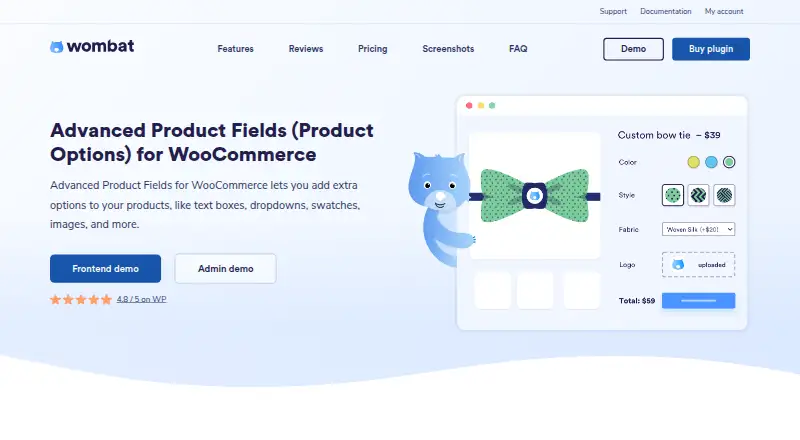
What Advanced Product Fields for WooCommerce is
Advanced Product Fields for WooCommerce adds configurable options to WooCommerce product pages so shoppers can personalize products. It offers 20 input types, including text, dropdowns, swatches, dates, and file uploads. Fields can appear or disappear according to values entered in other fields. Options can also change prices through flat, quantity-based, percentage-based, formula, or lookup-table pricing. The maker describes uses including product configurators, measurement pricing, mix-and-match products, print-on-demand, and product-page upsells. The free plan costs nothing and includes 10 form elements and flat-fee pricing. It does not include separate variation fields, and the maker says it lacks specified third-party integrations and Ajax add-to-cart theme support. Premium supports multilingual stores through WPML or Polylang and multi-currency stores using WOOCS. The maker says the plugin works with WooCommerce-compatible themes and page builders, listing Elementor, Oxygen, WPBakery, Beaver Builder, and Divi as tested. Minimum requirements are WordPress 6.0+, WooCommerce 7.0+, and PHP 7.1+. Licenses cover 1, 3, or 20 live sites, with 100 development sites included for each listed tier. The plugin is available for self-hosted and web use.
Who it suits
The free version may suit small stores or stores that need simple product options. Stores needing separate variation fields, the stated third-party integrations, multilingual or multi-currency support should review premium options and requirements.
What it does well
- Offers 20 types of product input fields.
- Supports conditional field display.
- Pricing options include formula and lookup-table methods.
- Lists tested support for five page builders.
- Includes 100 development sites per listed license tier.
What to know first
- Free plan is limited to 10 form elements.
- Free plan only supports flat-fee pricing.
- Free version lacks separate variation fields.
- Requires WordPress 6.0+, WooCommerce 7.0+, and PHP 7.1+.
Limits
The Free plan includes 10 form elements, flat-fee pricing, and no separate variation fields. The maker also says it lacks third-party integrations such as WooCommerce Subscriptions and Ajax add-to-cart theme support.
Plans
| Plan | Billed and limits | Price |
|---|---|---|
| Extended | 1 live site and 100 dev sites · 3 live sites and 100 dev sites · 20 live sites and 100 dev sites | On request |
| Extended + Addons | 1 live site and 100 dev sites · 3 live sites and 100 dev sites · 20 live sites and 100 dev sites | On request |
| Free | 10 form elements · flat-fee pricing · no separate variation fields | Free |
| Pro | $69/year · 16 field types · conditional logic · advanced pricing · one live site and 100 development sites | $69 a year |
As studiowombat.com lists them, read 22 Sept 2026. The maker's own page has the final word.
Getting started
- Open the maker's product page.
- Use a WordPress installation meeting the listed minimum requirements.
- Install WooCommerce 7.0+ on WordPress 6.0+ with PHP 7.1+.
- Choose the Free plan or a Pro, Extended, or Extended + Addons license.
- Add product options using the available field types and pricing rules.
Advanced Product Fields for WooCommerce is a product-option and pricing extension for self-hosted WooCommerce stores. It is best suited to merchants selling personalised, measured, assembled or made-to-order goods. The free edition covers straightforward add-ons, while stores needing integrations, variation-specific fields or richer pricing rules should budget for a paid licence.
Overview
The embedded plugin adds configurable choices directly to WooCommerce product pages, allowing shoppers to tailor an item before adding it to the cart. Typical applications include product configurators, measurement-based pricing, mix-and-match products, print-on-demand merchandise and upsells attached to a product page. It is a practical fit when an option changes the specification or price of an item, rather than when a shop merely needs a handful of fixed WooCommerce variations.
Advanced Product Fields for WooCommerce comes from a Belgium-based maker founded in 2017. It runs on self-hosted WordPress and requires WordPress 6.0 or newer, WooCommerce 7.0 or newer and PHP 7.1 or newer. The maker says it works with WooCommerce-compatible themes and page builders, with Elementor, Oxygen, WPBakery, Beaver Builder and Divi listed as tested.
Key features
Broad input selection
The product page lists 20 field types, including text inputs, dropdowns, swatches, dates and file uploads. That range lets a store collect personalisation text, dates, visual choices or customer artwork without forcing every use case into a standard variation. File-upload handling is particularly relevant to print and custom-production shops; the changelog also records security hardening for file upload, file deletion and output in version 3.1.7.
Conditional displays
Fields can be shown or hidden according to values entered in other fields. For a complex configurator, this keeps the page focused on relevant follow-up choices and avoids confronting every shopper with the full catalogue of options. Stores with only simple, always-visible choices may not need this extra logic.
Pricing rules
Option prices can use flat fees, quantity-based amounts, percentages, formulas or lookup tables. This supports use cases such as charging by dimensions, applying a percentage surcharge, or mapping a measured value to a price table. The free edition is limited to flat-fee pricing, so stores relying on formulas, quantity calculations or lookup-based pricing need a paid tier.
Store integrations
Premium licences add multilingual support through WPML or Polylang and multi-currency support through WOOCS. Webhooks are supported. The free version does not include third-party integrations such as WooCommerce Subscriptions, Ajax add-to-cart theme support or fields for separate variations. Those omissions matter for subscription businesses, highly dynamic themes and catalogues that need option sets tied to individual variations.
Pricing
Free
The Free plan costs nothing and includes 10 form elements, flat-fee pricing and no separate variation fields. It is aimed at small stores or simple product options. The ten-element cap and missing integrations make it a trial or starter edition rather than a complete configurator for a broad catalogue.
Pro, Extended and Extended + Addons
Pro, Extended and Extended + Addons use custom pricing. Each tier is offered for 1, 3 or 20 live sites, with 100 development sites included at every listed tier. The site-count choices suit freelancers and agencies as well as single-store owners, but buyers should match the licence to the number of production shops rather than development installations. Lifetime updates and support are included with lifetime licences, and the maker offers a 14-day refund policy. Premium activation sends the website URL and licence to the maker's server to track activation limits, a consideration for privacy-conscious operators.
Platforms
This is a self-hosted, web-based WordPress plugin embedded in WooCommerce. It is not a standalone hosted storefront or separate mobile builder. Compatibility depends on meeting the stated WordPress, WooCommerce and PHP minimums and on using a compatible theme or builder.
Who it's for
Choose it for personalised products, print workflows, measured goods, configurable bundles or upsells where customer selections must affect the final price. The free plan makes sense for a small shop collecting a few options with flat surcharges. A paid plan is the more appropriate choice for multilingual or multi-currency stores, subscription integrations, variation-specific fields, Ajax add-to-cart requirements or non-flat pricing.
Pros and cons
Pros
- Twenty listed field types cover text, visual selections, dates and uploads in one product-page tool.
- Conditional logic prevents irrelevant options from cluttering complex configurators.
- Formula, percentage, quantity and lookup pricing can model real production costs beyond fixed variations.
- Premium multilingual and multi-currency integrations support international WooCommerce catalogues.
- Licences cover 1, 3 or 20 live sites and include 100 development sites per tier.
Cons
- The free plan is capped at 10 form elements and flat-fee pricing, limiting advanced calculations.
- Free users miss subscriptions, Ajax add-to-cart theme support and separate variation fields.
- Paid prices are custom, so comparing the tiers' cost requires a quote.
- Premium activation transmits the site URL and licence to the maker for activation-limit tracking.
Alternatives
For broader product-configuration comparisons, browse the Product Configurator Software list. If your priority is collecting leads rather than configuring WooCommerce products, see Lead Capture Software.
Typeform is a better fit for standalone forms across web, desktop and mobile, with a free plan allowing unlimited forms and 10 responses per month. Wufoo suits teams wanting hosted forms with five forms, 100 entries per month and one user on its free plan. Zoho Forms is worth considering when three free forms and 500 submissions per month meet the need. Everest Forms is another self-hosted, web-based form option. PopupForge, EngagePop, LeadXForms and ConvertFlow are alternatives for popup, campaign or lead-capture workflows rather than WooCommerce product configuration.
Verdict
Advanced Product Fields for WooCommerce is a strong choice for WooCommerce merchants whose products need conditional options and price calculations beyond standard variations. Its main reason to choose it is the combination of many input types and flexible pricing methods inside the product page. Look elsewhere if you need a transparent paid price, a hosted form platform, or the free edition's simple flat-fee limits cannot support your catalogue.
Verdict
Advanced Product Fields provides a range of configurable product options and pricing methods, with a free version for simpler setups. Check its platform requirements and the free version's limits before choosing a plan.
Questions
Is there a free plan?
Yes. The Free plan costs nothing and includes 10 form elements.
What does the free version include?
It supports flat-fee pricing. It does not include separate variation fields.
What platforms and requirements does it have?
It is listed for self-hosted and web platforms. The minimum requirements are WordPress 6.0+, WooCommerce 7.0+, and PHP 7.1+.
Which integrations does the premium plugin support?
It supports WPML or Polylang for multilingual stores and WOOCS for multi-currency stores. Webhooks are listed as supported.
What are the license site limits?
The listed tiers offer licenses for 1, 3, or 20 live sites, with 100 development sites included for each tier.
What support and refund terms are offered?
The maker advertises lifetime updates and support with lifetime licenses and a 14-day refund policy.
Facts from Advanced Product Fields for WooCommerce's own pages
- Compatibility
- The maker says it works with WooCommerce-compatible themes and page builders, and lists Elementor, Oxygen, WPBakery, Beaver Builder, and Divi as tested. · studiowombat.com, 9 Oct 2026
- Conditional logic
- Fields can be shown or hidden based on values entered in other fields. · studiowombat.com, 9 Oct 2026
- Field types
- The product page lists 20 input types, including text, dropdowns, swatches, dates, and file uploads. · studiowombat.com, 9 Oct 2026
- Founded
- 2017 · studiowombat.com, 28 Sept 2026
- Free plan
- Yes · studiowombat.com, 22 Sept 2026
- Free version limits
- The free version supports flat-fee pricing, but the maker says it lacks third-party integrations such as WooCommerce Subscriptions, Ajax add-to-cart theme support, and fields for separate variations. · wordpress.org, 9 Oct 2026
- Headquarters
- Belgium · studiowombat.com, 28 Sept 2026
- Integrations
- The premium plugin supports multilingual stores through WPML or Polylang and multi-currency stores using WOOCS. · studiowombat.com, 9 Oct 2026
- License limits
- The product page offers licenses for 1, 3, or 20 live sites and says 100 development sites are included for each listed tier. · studiowombat.com, 9 Oct 2026
- Pricing
- Options can change product prices through flat, quantity-based, percentage-based, formula, or lookup-table pricing. · studiowombat.com, 9 Oct 2026
- Pricing model
- flat_rate · studiowombat.com, 22 Sept 2026
- Primary deployment
- embedded · studiowombat.com, 22 Sept 2026
- Privacy
- Studio Wombat says premium license activation sends the website URL and license to its server to track activation limits. · studiowombat.com, 9 Oct 2026
- Product rules
- Yes · studiowombat.com, 22 Sept 2026
- Purpose
- Adds extra product options to WooCommerce product pages so shoppers can personalize products. · studiowombat.com, 9 Oct 2026
- Requirements
- The product page lists WordPress 6.0+, WooCommerce 7.0+, and PHP 7.1+ as minimum requirements. · studiowombat.com, 9 Oct 2026
- Security
- The plugin changelog reports security hardening for file upload, file deletion, and output in version 3.1.7. · studiowombat.com, 9 Oct 2026
- Support and refund
- The maker advertises lifetime updates and support with lifetime licenses and a 14-day refund policy. · studiowombat.com, 9 Oct 2026
- Use cases
- The maker describes product configurators, measurement pricing, mix-and-match products, print-on-demand products, and product-page upsells as use cases. · studiowombat.com, 9 Oct 2026
- Visual configuration
- none · studiowombat.com, 22 Sept 2026
- Who it is for
- The maker describes the free version as suitable for small stores or stores that need only simple product options. · wordpress.org, 9 Oct 2026
Where Advanced Product Fields for WooCommerce stands on Freedom251
- Product Configurator Software#18 of 111