Freedom251 › Product Configurator Software
Zea Configurators
What Zea Configurators is
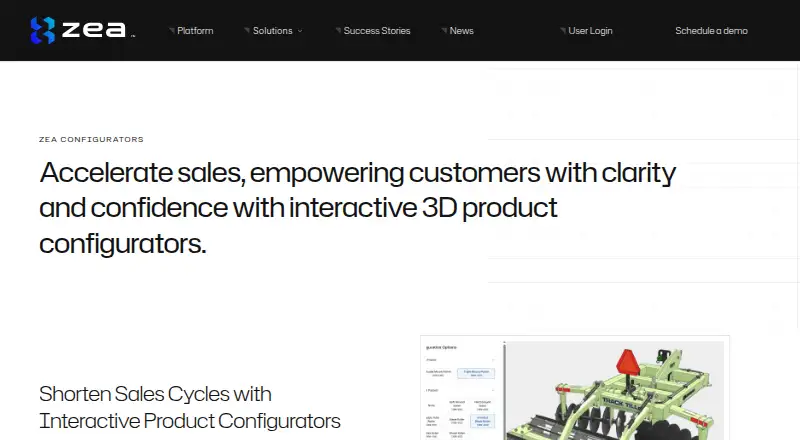
Zea Configurators is a web tool for manufacturers creating interactive 3D product configurators from CAD data. Customers can explore product options and prices, while manufacturers choose which parts, materials and views are adjustable and define how options behave. The Zea JavaScript library supports custom interfaces and branding, and configurators can be embedded in websites and applications. A JavaScript API supports real-time pricing and other functions, including CPQ workflows that reflect ERP prices as buyers change options. The WebGL 2.0 viewer works in modern browsers on tablets and smartphones without plugins or app downloads. Zea Sync processes CAD locally to extract viewing data; the maker says it does not store or expose CAD data. Manufacturers can block proprietary parts from displaying. A purchased configuration can become a digital twin for later service and parts ordering through Zea Parts or Zea Illustrations. The maker describes role-based access, encryption, daily backups and periodic third-party security testing. Pricing is custom, based on users, active Hubs and requested features; a free plan and 30-day trial are listed.
Who it suits
It suits manufacturers building 3D sales configurators, custom quoting tools or interactive showrooms. It is relevant where teams want website or application embeds and real-time pricing workflows.
What it does well
- Creates interactive 3D configurators from CAD data.
- Custom interfaces and branding via JavaScript library.
- Embeds and API support websites and applications.
- Viewer works on tablets and smartphones without plugins.
- CAD processing is local, according to the maker.
What to know first
- Pricing is custom and not listed.
- Fees vary by users, active Hubs and requested features.
Plans
| Plan | Billed and limits | Price |
|---|---|---|
| Custom pricing | Fees vary by users, active Hubs, and requested features or functionalities; contact Zea for fees | On request |
As zeaengine.com lists them, read 8 Oct 2026. The maker's own page has the final word.
Getting started
- Visit https://www.zeaengine.com/configurators/.
- Request a personalized demo or contact Zea through its contact page.
- Discuss users, active Hubs, and required features or functionality for custom pricing.
- Use the Configurator Editor to select adjustable parts, materials, and views.
- Embed the configurator in a website or application and connect a custom interface or JavaScript API as needed.
Verdict
Zea Configurators connects adjustable 3D product views with embeds, custom interfaces and pricing workflows. Its custom pricing means manufacturers will need to contact Zea for fees.
Questions
Is there a free plan or trial?
Yes. Zea lists a free plan and a 30-day trial.
How is Zea Configurators priced?
Pricing is custom. Fees vary by users, active Hubs, and requested features or functionality; Zea asks customers to contact its team.
Which devices can customers use to view configurators?
The WebGL 2.0 viewer works in modern web browsers on tablets and smartphones without plugins or app downloads.
Can configurators be embedded and connected to pricing systems?
Yes. They can be embedded in websites and applications, and a JavaScript API can support real-time pricing and CPQ workflows reflecting ERP prices.
Does Zea store CAD data?
Zea Sync processes CAD locally to extract viewing data, and Zea says it does not store or expose CAD data.
What security controls does Zea describe?
Zea describes role-based access, encryption at rest and in transit, daily backups, and periodic third-party vulnerability and penetration testing.
Facts from Zea Configurators's own pages
- Browser access
- The 3D viewer uses WebGL 2.0 and works in modern web browsers on tablets and smartphones without plugins or app downloads. · zeaengine.com, 8 Oct 2026
- CAD processing
- Zea Sync processes CAD locally and extracts viewing data; the configurator announcement says Zea does not store or expose CAD data. · zeaengine.com, 8 Oct 2026
- Configuration options
- The Configurator Editor lets manufacturers choose which parts, materials, and views are adjustable and define how each option behaves. · zeaengine.com, 8 Oct 2026
- Custom interface
- The Zea JavaScript library can connect the configurator to a custom user interface and branding. · zeaengine.com, 8 Oct 2026
- Digital twin handoff
- The purchased configuration can become a digital twin used later with Zea Parts or Zea Illustrations for service and parts ordering. · zeaengine.com, 8 Oct 2026
- Embedding and API
- Configurators can be embedded in websites and applications and customized through a JavaScript API for real-time pricing or other functionality. · zeaengine.com, 8 Oct 2026
- ERP and CRM workflows
- The JavaScript API can support CPQ workflows that reflect real-time ERP pricing as customers change options. · zeaengine.com, 8 Oct 2026
- Free plan
- Yes · zeaengine.com, 21 Sept 2026
- Headquarters
- Montreal, Quebec, Canada · zeaengine.com, 28 Sept 2026
- Proprietary parts
- Manufacturers can block proprietary parts from displaying to users. · zeaengine.com, 8 Oct 2026
- Purpose
- Zea Configurators lets manufacturers create interactive 3D product configurators from CAD data so customers can explore options and price products. · zeaengine.com, 8 Oct 2026
- Security controls
- Zea describes role-based user access, encrypted data at rest and in transit, daily backups, and periodic third-party vulnerability and penetration testing. · zeaengine.com, 8 Oct 2026
- Support
- Zea offers a personalized demo and directs customers with questions to its team through its contact page. · zeaengine.com, 8 Oct 2026
- Target users
- Zea presents Configurators as a tool for manufacturers building 3D sales configurators, custom quoting tools, or interactive showrooms. · zeaengine.com, 8 Oct 2026
Where Zea Configurators stands on Freedom251
- Product Configurator Software#15 of 111
- 3D Product Configurator Software#6 of 25