Freedom251 › Certificate Management Software
acme.sh
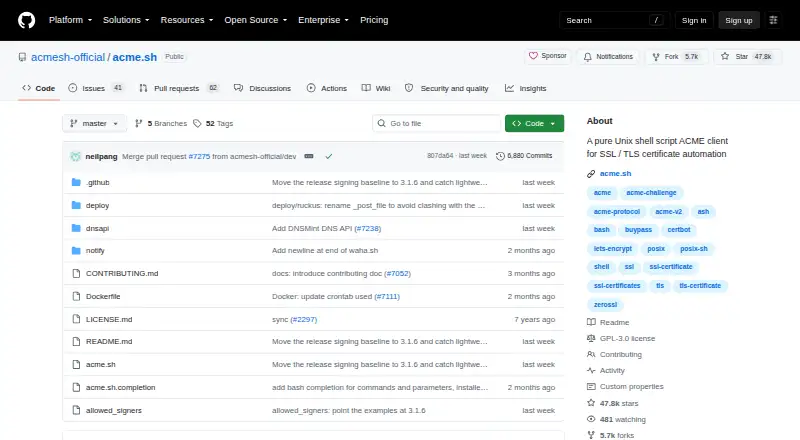
What acme.sh is
acme.sh is a free Unix shell script for automating SSL/TLS certificate tasks. It can issue, renew, and install certificates, and its installer sets up a daily cron job to check whether renewal is due. The script works with Bash, dash, and sh, and general use does not require Python, root, or sudo access. Supported certificate types include ECDSA, RSA, SAN, and wildcard certificates. Validation options include webroot, standalone, standalone TLS-ALPN, Apache, Nginx, DNS, DNS alias, stateless, and DNS persist. ZeroSSL is the default certificate authority; listed alternatives include Let's Encrypt, SSL.com, Google Public CA, Actalis, Pebble strict mode, and other RFC8555-compliant authorities. The project also describes API integrations for most DNS providers. Automatic renewal uses ACME Renewal Information from a certificate authority when available, or a 30-day fallback rule otherwise. Manual DNS mode cannot renew automatically because each renewal needs a new TXT record. The project is GPLv3-licensed and officially maintained by ZeroSSL. Its listed platforms include Linux, macOS, self-hosted environments, and Windows.
Who it suits
acme.sh suits administrators who want a shell-based way to issue, install, and renew certificates across supported environments. Its manual DNS mode is not suited to users who need automatic renewal without adding TXT records each time.
What it does well
- Works with Bash, dash, and sh.
- General use does not require Python, root, or sudo.
- Supports multiple certificate types and validation modes.
- Automatic renewal includes a 30-day fallback rule.
- DNS provider APIs cover most providers, according to the project.
What to know first
- Manual DNS mode cannot renew automatically.
- Windows is listed as tested through Cygwin.
- Release tags through version 3.1.5 are unsigned.
Limits
Manual DNS mode cannot renew automatically because a new TXT record must be added for each renewal. Automatic renewal otherwise follows ACME Renewal Information when available, with a 30-day fallback rule.
Plans
| Plan | Billed and limits | Price |
|---|---|---|
| acme.sh | GPLv3 · shell script ACME client | Free |
As github.com lists them, read 7 Oct 2026. The maker's own page has the final word.
Getting started
- Open the acme.sh project website on GitHub.
- Use a supported platform such as Linux, macOS, self-hosted, or Windows.
- Choose a certificate authority and validation mode.
- Use the installer’s daily cron job for automatic renewal checks.
acme.sh is a command-line client for automating SSL/TLS certificates, aimed at administrators who are comfortable working with shell scripts. Its breadth of validation methods and certificate authority options makes it adaptable; manual DNS validation is the notable snag for anyone expecting every renewal to run unattended.
Overview
Written in Unix shell and compatible with Bash, dash, and sh, acme.sh issues, installs, and renews certificates. The installer sets up a daily cron job to check whether certificates need renewal. No Python dependency and no general requirement for root or sudo access make it a practical fit for lean server environments where administrators want to keep certificate management scriptable.
It supports RSA, ECDSA, SAN, and wildcard certificates. ZeroSSL is the default certificate authority, with Let's Encrypt, SSL.com, Google Public CA, Actalis, Pebble strict mode, and any RFC8555-compliant CA also supported. This flexibility helps when a deployment needs a particular CA or certificate type, while the range of choices means administrators should select settings that match their environment.
Key features
Validation and renewal
Validation options include webroot, standalone, standalone TLS-ALPN, Apache, Nginx, DNS, DNS alias, stateless, and DNS persist. That range suits varied server and DNS arrangements, including setups that need DNS-based validation. DNS API integrations cover most providers, giving users a path to automate DNS validation through provider APIs.
Renewal follows a CA's ACME Renewal Information when available, with a 30-day fallback rule otherwise. Manual DNS mode is the exception: each renewal needs a new TXT record added by hand. It is therefore a poor match for anyone who needs fully unattended renewals and cannot automate DNS another way.
Portability and maintenance
The project lists tested systems across Linux distributions, macOS, FreeBSD, and Windows through Cygwin. Its platform range also includes self-hosted environments. Release tags from version 3.1.6 onward are signed with the maintainer's SSH key; tags through 3.1.5 are unsigned. The repository is GPLv3-licensed and officially maintained by ZeroSSL, with donations directed to original independent maintainer Neil Pang. Project discussion and contributions go through GitHub Issues and Pull Requests.
Pricing
acme.sh is free: the acme.sh plan costs nothing and is GPLv3 licensed. There is no paid tier to unlock its certificate handling capabilities. The trade-off is operational rather than financial: choosing manual DNS validation leaves a recurring TXT-record task with the administrator.
Platforms
acme.sh is available for Linux, macOS, self-hosted use, and Windows. The project specifically lists Windows through Cygwin among tested systems, so Windows users should expect to use that environment.
Who it's for
acme.sh is best suited to technically confident administrators who want a free shell-based client, need a choice of certificate authorities or validation methods, and can manage a cron-based workflow. It is less suitable for people who want manual DNS validation but cannot handle a new TXT record at each renewal, or who prefer a certificate workflow that does not depend on command-line administration.
Pros and cons
- Pros: Broad validation support and DNS API integrations make it adaptable to different hosting and DNS setups.
- Pros: Automatic issuance, installation, and renewal, plus no Python dependency and no general root or sudo requirement, suit lean server workflows.
- Pros: Free GPLv3 licensing and support for multiple CAs and certificate types offer flexibility without a plan fee.
- Cons: Manual DNS validation requires a fresh TXT record for every renewal, preventing a fully automatic workflow in that mode.
- Cons: Windows support is through Cygwin, which makes it a less direct fit for administrators seeking a native Windows workflow.
Alternatives
For a broader directory of options, browse Certificate Management Software.
Certify The Web is worth considering for users who want a free evaluation with no feature limitations and no time limit, alongside a freemium model and a wider platform range that includes web. Certbot is another free option for readers who prefer software made by the Electronic Frontier Foundation. lego suits readers looking for an independent free and open-source project with no paid plans stated.
Let's Encrypt is a direct alternative for readers seeking free Domain Validation certificates from that certificate authority. GeoTrust suits readers considering paid SSL offerings that include AutoInstall SSL with certificates and an SSL Monitor plan priced at $2 a month per standard domain. EJBCA offers a free Community Edition for basic PKI functionality aimed at learning, testing, and prototyping, rather than production use. OpenXPKI is an option for readers seeking a free, fully functional Community Edition with Debian packages, example configuration, documentation, and mailing-list support. Qualys External Attack Surface Management offers a 30-day no-cost trial of CyberSecurity Asset Management with EASM.
Verdict
Choose acme.sh if you can work comfortably in a shell and want free, flexible certificate automation with a choice of CAs and validation methods. Its main advantage is that range combined with automatic installation and renewal; look elsewhere if manual DNS is your only workable validation path and you need renewals to happen without human intervention.
Verdict
acme.sh combines certificate issuance, installation, and renewal with multiple validation methods and certificate authorities. Automatic renewal has a stated exception: manual DNS validation requires a new TXT record for each renewal.
Questions
How much does acme.sh cost?
The listed plan is free, and the pricing model is free.
Is there a free plan or trial?
Yes, it has a free plan. There is no free trial.
Which platforms does it support?
The listed platforms are Linux, macOS, self-hosted, and Windows. Tested systems include Windows through Cygwin, FreeBSD, macOS, and multiple Linux distributions.
Which certificate authorities can it use?
ZeroSSL is the default. Listed alternatives include Let’s Encrypt, SSL.com, Google Public CA, Actalis, Pebble strict mode, and any RFC8555-compliant CA.
Is acme.sh open source?
The repository is licensed under GPLv3.
Can certificates renew automatically?
Yes, except in manual DNS mode, which requires a new TXT record for each renewal. Automatic renewal uses ACME Renewal Information when available and a 30-day fallback rule otherwise.
Facts from acme.sh's own pages
- Certificate authorities
- The README lists ZeroSSL as the default CA and also lists Let's Encrypt, SSL.com, Google Public CA, Actalis, Pebble strict mode, and any RFC8555-compliant CA as supported. · github.com, 7 Oct 2026
- Certificate handling
- It can issue, renew, and install certificates automatically, with a daily cron job created by the installer to check and renew certificates when needed. · github.com, 7 Oct 2026
- Certificate types
- It supports ECDSA, RSA, SAN, and wildcard certificates. · github.com, 7 Oct 2026
- DNS integrations
- The project says it supports most DNS providers through API integrations and links to its DNS API list. · github.com, 7 Oct 2026
- Implementation
- The client is written purely in Unix shell and is compatible with Bash, dash, and sh. · github.com, 7 Oct 2026
- License and maintenance
- The repository is licensed under GPLv3 and says it is officially maintained by ZeroSSL, with donations going to original independent maintainer Neil Pang. · github.com, 7 Oct 2026
- Manual DNS limit
- DNS manual mode cannot renew automatically because a new TXT record must be added manually for each renewal. · github.com, 7 Oct 2026
- Operating systems
- The project lists tested systems including macOS, Windows through Cygwin, FreeBSD, and multiple Linux distributions. · github.com, 7 Oct 2026
- Purpose
- acme.sh is a Unix shell script ACME client for SSL/TLS certificate automation. · github.com, 7 Oct 2026
- Renewal behavior
- Certificates are renewed automatically, using a CA's ACME Renewal Information when available and a 30-day fallback rule otherwise. · github.com, 7 Oct 2026
- Runtime requirements
- The README says the client has no Python dependency and does not require root or sudo access for general use. · github.com, 7 Oct 2026
- Security
- Release tags from version 3.1.6 onward are signed with the maintainer's SSH key, while tags through 3.1.5 are unsigned. · github.com, 7 Oct 2026
- Support
- The README directs users to the project's GitHub Issues and Pull Requests for discussion and contributions. · github.com, 7 Oct 2026
- Validation modes
- Supported modes include webroot, standalone, standalone TLS-ALPN, Apache, Nginx, DNS, DNS alias, stateless, and DNS persist. · github.com, 7 Oct 2026
Where acme.sh stands on Freedom251
- Certificate Management Software#3 of 31