Freedom251 › File Conversion Software

A2Z Converter
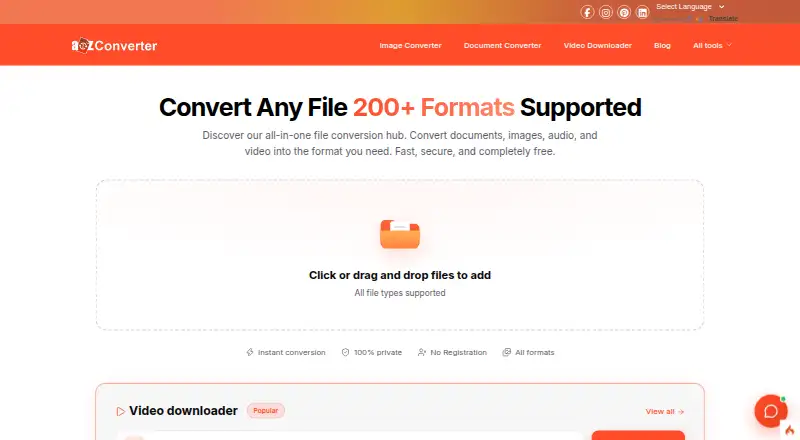
What A2Z Converter is
A2Z Converter is a free online toolkit for file conversion and utilities such as unit conversion, text formatting, and word counting. It covers documents, images, audio, video, spreadsheets, presentations, and compression, with support for more than 200 formats. Users can select a format for each file or convert multiple files together. Other tools include a video downloader that accepts links from YouTube, Facebook, Instagram, and LinkedIn, as well as OCR conversion. Most conversion types offer settings such as video quality, aspect ratio, codec, rotation, and flipping. The tools run in a browser on Windows, macOS, Linux, Android, and iOS; the site says no registration, login, or email verification is needed. The listed maximum file size is 50 GB, though very large files may take longer. The site describes processing both as browser-based, with files not uploaded, and as cloud-based. It also says uploaded and converted files are deleted within 24 hours and are not shared with third parties. The Free plan costs nothing and includes 100+ tools with no file limits for standard use.
Who it suits
A2Z Converter may suit students, lawyers, marketers, designers, developers, creators, businesses, and educators who need browser-based conversion or utility tools. It is also relevant to users who want to work without registering or logging in.
What it does well
- Supports over 200 file formats.
- Batch conversion is available.
- Works in browsers across desktop and mobile platforms.
- No account or email verification required.
- Files are said to be deleted within 24 hours.
What to know first
- Very large files may take longer to process.
- The site describes processing as both browser-based and cloud-based.
Limits
The Free plan lists a maximum file size of 50 GB. Very large files may take longer to process.
Plans
| Plan | Billed and limits | Price |
|---|---|---|
| Free | 100+ tools · no signup · no file limits for standard use | Free |
As a2zconverter.com lists them, read 9 Oct 2026. The maker's own page has the final word.
Getting started
- Open the A2Z Converter website in a browser.
- Choose a conversion or utility tool.
- Select files and choose an output format, or set an output format for each file in a batch.
- Adjust available settings for the conversion type, if needed.
- Convert the files or use the selected utility; no registration or login is required.
Verdict
A2Z Converter groups file conversion and utility tools in a free browser-based service. The site gives conflicting descriptions of processing, so readers should note that it mentions both browser-based and cloud-based conversion.
Questions
How much does A2Z Converter cost?
The Free plan is listed as free.
Is there a free plan or trial?
There is a Free plan with 100+ tools and no signup. The facts list no free trial.
Which platforms does it support?
It runs in a browser on Windows, macOS, Linux, Android, and iOS.
Does A2Z Converter require an account?
The site says its tools work without registration, login, or email verification.
Who makes A2Z Converter?
The site credits Contrivance Softech Pvt. Ltd. as the developer.
What file size can I use?
The listed maximum file size is 50 GB. Very large files may take longer to process.
Facts from A2Z Converter's own pages
- Batch conversion
- Users can choose a format for each file or convert multiple files at once. · a2zconverter.com, 9 Oct 2026
- Browser access
- The site says its tools work in a browser on Windows, macOS, Linux, Android, and iOS. · a2zconverter.com, 9 Oct 2026
- Conversion processing
- The homepage says conversions run in the browser and files are not uploaded, while another section describes conversion as cloud-based. · a2zconverter.com, 9 Oct 2026
- Customization
- The site says most conversion types offer advanced settings, including video quality, aspect ratio, codec, rotation, and flipping. · a2zconverter.com, 9 Oct 2026
- File formats
- The site says it supports over 200 formats, including documents, images, video, audio, and spreadsheets. · a2zconverter.com, 9 Oct 2026
- File privacy
- The site says uploaded and converted files are automatically deleted within 24 hours and are not shared with third parties. · a2zconverter.com, 9 Oct 2026
- File size caveat
- The site says there is no strict file size limit for most tools, but very large files may take longer to process. · a2zconverter.com, 9 Oct 2026
- Intended users
- The site presents tool collections for students, lawyers, marketers, designers, developers, creators, businesses, and educators. · a2zconverter.com, 9 Oct 2026
- Maker
- The site credits Contrivance Softech Pvt. Ltd. as the developer. · a2zconverter.com, 9 Oct 2026
- No account required
- The site says tools work without registration, login, or email verification. · a2zconverter.com, 9 Oct 2026
- Product
- A2Z Converter is an online toolkit for file conversion and utilities such as unit conversion, text formatting, and word counting. · a2zconverter.com, 9 Oct 2026
- Support
- The homepage says users can email support and expect a response within 24 hours. · a2zconverter.com, 9 Oct 2026
- Supported workflows
- The site lists tools for documents, images, audio, video, presentations, spreadsheets, compression, and unit conversion. · a2zconverter.com, 9 Oct 2026
- Video downloads
- Its video downloader accepts links from YouTube, Facebook, Instagram, and LinkedIn. · a2zconverter.com, 9 Oct 2026
Where A2Z Converter stands on Freedom251
- File Conversion Software#11 of 69