Freedom251 › File Renaming Software

A Better Finder Rename
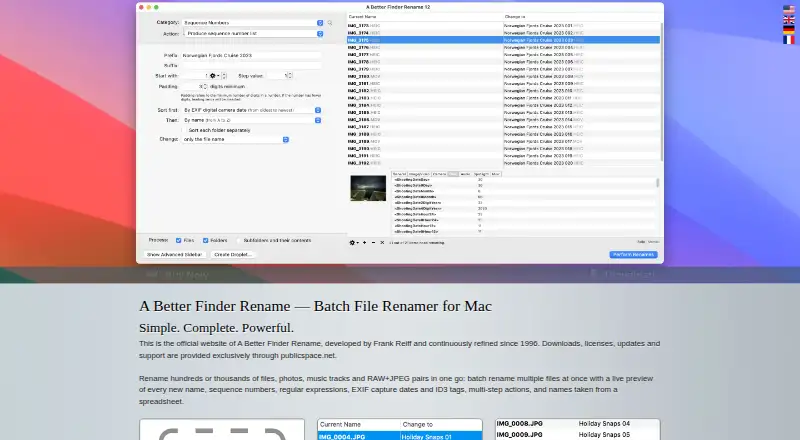
What A Better Finder Rename is
A Better Finder Rename is a macOS app for renaming batches of files, photos, music tracks, and RAW+JPEG pairs. A live preview shows proposed names before changes are applied. Rename options include sequence numbers, regular expressions, EXIF capture dates, ID3 tags, spreadsheet-imported names, and multi-step actions. Photo renaming can use shooting dates and times in metadata, with support for JPEG, HEIC, ARW, NEF, TIFF, and DNG. Music renaming can draw on embedded ID3 data, and supported formats include MP3, AAC, FLAC, OGG, APE, M4V, and iTunes music store files. The app can be opened from Finder’s context menu, hot key, Quick Action, or by dragging files onto it. Presets can be applied by dropping files on the closed app, and settings can be saved as drag-and-drop droplet apps. The paid app has a free trial, but trial mode allows a maximum of 10 files per batch. Version 12.35 is offered for Intel and Apple Silicon Macs running macOS 15 Sequoia or later.
Who it suits
It may suit Mac users who need to rename batches of files using patterns, photo or music metadata, or names from spreadsheets. Finder access options and reusable presets may also suit people who repeat renaming tasks.
What it does well
- Live preview shows proposed filenames before changes.
- Supports regular expressions and multi-step actions.
- Can use photo and music metadata for renaming.
- Finder context menu, hot key, and Quick Action access.
What to know first
- Trial mode permits renaming at most 10 files per batch.
- Offered for macOS 15 Sequoia or later.
- The listed license options are paid.
Limits
Trial mode permits renaming at most 10 files at a time. Purchasing a license removes that limit; the listed Single User Standard plan costs $29.95 once.
Plans
| Plan | Billed and limits | Price |
|---|---|---|
| A Better Finder Rename 12 Major Upgrade | Total $14.95 · Upgrades any earlier version to version 12 · free minor updates up to but not including version 13 · keeps current license tier | $14.95, paid once |
| A Better Finder Rename — Single User, Standard | Total $29.95 · 1 individual · free minor updates up to but not including version 13 · as many installations as you want for one individual | $29.95, paid once |
| A Better Finder Rename Forever Upgrade | $29.95 · Version 12 and all future versions forever · keeps current license tier | $29.95, paid once |
As publicspace.net lists them, read 4 Oct 2026. The maker's own page has the final word.
Getting started
- Open the publicspace.net product page
- Download version 12.35 for a compatible Mac
- Install the macOS application
- Choose Finder, drag-and-drop, or a saved preset workflow
- Preview the new names and apply the rename
Verdict
A Better Finder Rename offers multiple ways to build and apply batch-renaming rules, including metadata-based options and Finder access. The trial’s 10-file batch limit and macOS requirement are key considerations.
Questions
What does the Single User license cost?
The Single User Standard plan costs $29.95 once and covers one individual with as many installations as wanted for that individual.
Is there a free plan?
No. A free trial is available, with trial batches limited to 10 files.
Which Macs and macOS versions are supported?
Version 12.35 is offered for Intel and Apple Silicon Macs running macOS 15 Sequoia or later. The product page also says it is compatible with macOS 27 Golden Gate.
Can it rename using photo or music metadata?
Yes. It can use EXIF shooting dates and times for photos and embedded ID3 metadata for music files.
What license tiers are available?
The order page offers Single User, Family for up to five individuals, Small Business for up to 20, Business for up to 50, and Enterprise for unlimited individuals.
Facts from A Better Finder Rename's own pages
- Automation
- Saved presets can be applied by dragging files onto the closed app, or settings can be saved as droplet mini-applications for drag-and-drop renaming. · publicspace.net, 4 Oct 2026
- Code signing
- The maker says genuine downloads are served by publicspace.net, code-signed with Frank Reiff’s Developer ID and notarized by Apple. · publicspace.net, 4 Oct 2026
- Download and compatibility
- Version 12.35 is offered for Intel and Apple Silicon Macs running macOS 15 Sequoia or later, and the page says it is compatible with macOS 27 Golden Gate. · publicspace.net, 4 Oct 2026
- Finder integration
- The help lists use through the Finder context menu, Finder hot key, Finder Quick Action, and drag-and-drop onto the app or a droplet. · publicspace.net, 4 Oct 2026
- Founded
- 1996 · publicspace.net, 28 Sept 2026
- License tiers
- The order page offers Single User, Family for up to 5 individuals, Small Business for up to 20, Business for up to 50 and Enterprise for unlimited individuals. · publicspace.net, 4 Oct 2026
- Maker
- The maker describes publicspace.net as a one-man operation supported by contractors and services, and says the product has been refined since 1996. · publicspace.net, 4 Oct 2026
- Music metadata
- Its MP3/AAC renaming feature can use embedded ID3 metadata, and metadata support includes MP3, AAC, FLAC, OGG, APE, M4V and iTunes music store files. · publicspace.net, 4 Oct 2026
- Payment security
- The maker says payment processing is outsourced to resellers and it does not have customers’ credit card numbers. · publicspace.net, 4 Oct 2026
- Photo metadata
- It can extract EXIF shooting dates and time and supports major RAW formats including JPEG, HEIC, ARW, NEF, TIFF and DNG. · publicspace.net, 4 Oct 2026
- Privacy and updates
- The maker says Sparkle update requests include app version and anonymous trial progress information, and transmit no personal information beyond what is needed for an HTTP connection. · publicspace.net, 4 Oct 2026
- Purpose
- The app batch renames files, photos, music tracks and RAW+JPEG pairs, with live preview of new names. · publicspace.net, 4 Oct 2026
- Rename tools
- It offers sequence numbers, regular expressions, EXIF capture dates, ID3 tags, multi-step actions and names imported from spreadsheets. · publicspace.net, 4 Oct 2026
- Support
- Mac product support is available by email at [email protected]; the maker recommends including “x14” in the subject line to pass spam filters. · publicspace.net, 4 Oct 2026
- Trial limit
- In trial mode, the app is limited to renaming at most 10 files at a time; purchasing a license removes that limitation. · publicspace.net, 4 Oct 2026
Where A Better Finder Rename stands on Freedom251
- File Renaming Software#24 of 31