Freedom251 › File Renaming Software
RenameRegex
What RenameRegex is
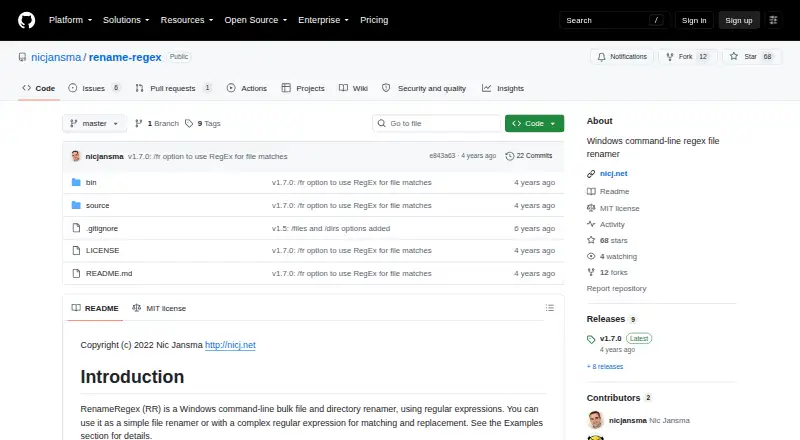
RenameRegex is a free Windows command-line utility for renaming files and directories in batches using matching and replacement rules. It runs as RR.exe and accepts arguments to select what to process and how names should change. Matching can use Windows glob patterns, with an option for regular-expression matching; its search and replacement strings use .NET regular expressions, including capture-group substitutions. Use /p to preview proposed names before changes are made, or /r to include subdirectories. Files are selected by default, while /files and /dirs provide explicit selection. Additional options cover case-insensitive matching, overwriting existing items, and keeping file extensions intact. The repository credits Nic Jansma as author and copyright holder. Its latest listed release is v1.7.0, which added regex matching for file matches. The software is distributed under the MIT License, whose terms permit use, copying, modification, distribution, sublicensing, and sale subject to its conditions; it comes without warranty. Its documented platform is Windows.
Who it suits
RenameRegex suits Windows users comfortable with command-line arguments who need to apply substitutions or regex rules to batches of files or directories.
What it does well
- Previews proposed changes with /p.
- Processes subdirectories recursively with /r.
- Supports .NET regex capture-group substitutions.
- Can preserve file extensions during renaming.
What to know first
- Documented for Windows only.
- Uses a command-line interface.
Getting started
- Open the RenameRegex project website on GitHub
- Run RR.exe on Windows
- Choose glob matching or enable regular-expression matching
- Select files or directories with the documented options
- Use /p to preview proposed names
- Apply /r when processing subdirectories recursively
Verdict
RenameRegex offers batch renaming with preview, recursive processing, and regular-expression substitutions. Its command-line interface and Windows-only documentation are important to consider before choosing it.
Questions
Is RenameRegex free?
Yes. It has a free plan and is distributed under the MIT License.
Which operating systems are supported?
The documented platform is Windows.
Can I preview renames?
Yes. The /p option shows what would be renamed without applying changes.
Does it rename folders as well as files?
Yes. The /files and /dirs options select files or directories; files are selected by default.
What matching and replacement syntax does it use?
Matching supports Windows glob patterns and an option for regular expressions. Search and replacement strings use .NET regular expressions, including capture-group substitutions.
Who made RenameRegex?
The repository credits Nic Jansma as the author and copyright holder.
Facts from RenameRegex's own pages
- Batch options
- Options include recursive processing, case-insensitive matching, overwrite, and preserving file extensions. · github.com, 10 Oct 2026
- File and directory selection
- It can target files, directories, or both; by default, it includes files only. · github.com, 10 Oct 2026
- Intended users
- The command-line interface and bulk file and directory operations suit users who want to rename items with simple substitutions or regex rules. · github.com, 9 Oct 2026
- Interface
- The documented interface runs as RR.exe with command-line arguments. · github.com, 10 Oct 2026
- License
- The project uses the MIT License, which grants permission to use, copy, modify, distribute, sublicense, and sell copies subject to its conditions. · github.com, 10 Oct 2026
- Maker
- The repository credits Nic Jansma as the author and copyright holder. · github.com, 9 Oct 2026
- Matching
- It supports Windows glob matching and an option to use a regular expression for matching file names. · github.com, 10 Oct 2026
- Notable limitation
- The project describes itself as a Windows tool and documents no other operating system platform. · github.com, 10 Oct 2026
- Other options
- Options include case-insensitive matching, overwriting existing files, and preserving file extensions. · github.com, 9 Oct 2026
- Preview
- The /p option shows what would be renamed without applying the changes. · github.com, 10 Oct 2026
- Purpose
- RenameRegex is a Windows command-line tool for bulk renaming files and directories using regular expressions. · github.com, 10 Oct 2026
- Recursive mode
- The /r option enables recursive processing, including subdirectories. · github.com, 9 Oct 2026
- Release
- The repository lists v1.7.0 as its latest release, adding regex matching for file matches instead of Windows glob matching. · github.com, 9 Oct 2026
- Release history
- The README lists version 1.7 dated 2022-02-01 as adding regex-based file matching. · github.com, 10 Oct 2026
- Replacement
- Search and replacement strings use .NET regular expressions, including capture-group substitutions such as $1. · github.com, 10 Oct 2026
- Warranty
- The MIT license provides the software without warranty, including implied warranties of merchantability and fitness for a particular purpose. · github.com, 9 Oct 2026
Where RenameRegex stands on Freedom251
- File Renaming Software#23 of 31