Freedom251 › Window Management Software
4t Tray Minimizer
What 4t Tray Minimizer is
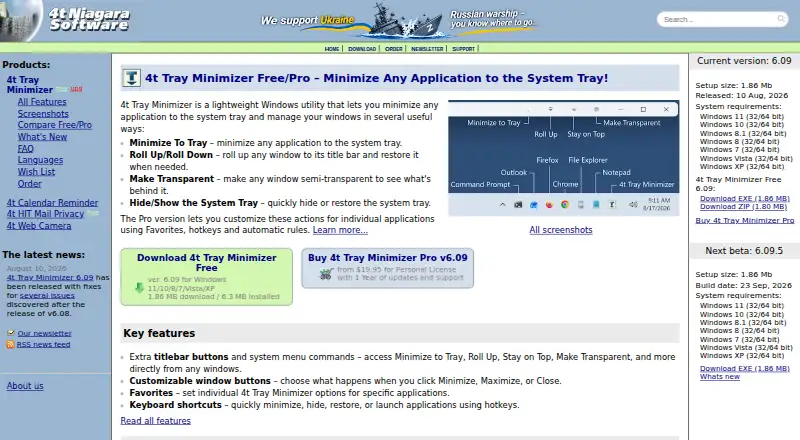
4t Tray Minimizer is a Windows utility for minimizing applications to the system tray and changing how windows behave. Windows can be rolled up to their title bars or made semi-transparent, and the system tray can be hidden or shown. Extra titlebar buttons and system-menu commands provide actions such as minimizing to the tray, staying on top and rolling up. Keyboard shortcuts can minimize, hide, restore or launch applications. The Free version includes window-management features and may be used for personal or commercial purposes. Pro adds per-application settings and hotkeys, along with automatic actions through Favorites. It can minimize applications at startup or when inactive, minimize instead of closing, and use custom tray icons. The Free plan costs nothing. Pro plans are one-time purchases, starting at $19.95, paid once; the listed options include different update and support periods. Version 6.09 supports Windows 11, 10, 8.1, 8, 7, Vista and XP in 32-bit and 64-bit editions, and is available in 12 languages.
Who it suits
It suits Windows users who want to move applications out of the taskbar or control windows with shortcuts and titlebar commands. Pro is for users who want application-specific settings or automated minimize actions.
What it does well
- Free version permits personal and commercial use.
- Keyboard shortcuts minimize, hide, restore or launch apps.
- Pro supports application-specific settings and hotkeys.
- Supports Windows 11 through XP, in 32-bit and 64-bit.
What to know first
- Pro licenses start at $19.95, paid once.
- Purchases are final and non-refundable.
- Pro features require a paid license.
Limits
The free version includes window management features, while application-specific settings and hotkeys, automatic Favorites actions, startup or inactive minimization, minimize-instead-of-close behavior, and custom tray icons are Pro features. The lowest listed Pro plan costs $19.95, paid once and includes one year of updates and email support.
Plans
| Plan | Billed and limits | Price |
|---|---|---|
| 4t Tray Minimizer Free | Free window management features · personal and commercial use | Free |
| 4t Tray Minimizer Pro — Personal License + 1 year updates and support | Current version license · 1 year updates and email support · discount for next version | $19.95, paid once |
| 4t Tray Minimizer Pro — Personal License + 2 years updates and support + 1 upgra | Current version license · 2 years updates and email support · one guaranteed upgrade to next major release | $29.95, paid once |
| 4t Tray Minimizer Pro — Personal License + free updates and support | Current and all next versions · free minor and major updates · free email support | $69.95, paid once |
As 4t-niagara.com lists them, read 8 Oct 2026. The maker's own page has the final word.
Getting started
- Visit the 4t Tray Minimizer website.
- Choose the Free version or review the Pro license options.
- Install version 6.09 on a supported Windows system.
- Use titlebar controls, system menu commands, or keyboard shortcuts to manage windows.
- For Pro, configure application-specific settings, hotkeys, or automatic actions through Favorites.
4t Tray Minimizer is a Windows utility for minimizing applications to the system tray and adjusting how windows behave. It suits people who want direct control over a crowded desktop, with a free option for everyday window management. Its main limitation is that application-specific automation sits behind the paid Pro licenses.
Overview
The utility brings several window actions together: send an application to the tray, roll a window up to its title bar, make it semi-transparent, or hide and show the system tray. Extra titlebar buttons and system menu commands put actions such as stay on top and minimize to tray near the window itself. Hotkeys offer a keyboard route to minimize, hide, restore, or launch applications.
This is a focused set of controls for people who want to manage individual windows without changing their broader desktop setup. It is not a cross-platform choice: supported systems are Windows, and the product's value is in tray handling and window behavior rather than a wider workspace-management feature set.
Key features
Window controls and shortcuts
Rolling up a window or making it transparent can keep it accessible while reducing its presence on screen; hiding the system tray addresses a different kind of desktop clutter. Titlebar controls and system-menu commands make these actions available in context, while hotkeys suit users who prefer to keep their hands on the keyboard. The combination is useful for frequent, small adjustments, though users seeking more elaborate desktop organization may need a different kind of window manager.
Pro automation
Pro adds application-specific settings and hotkeys, plus automatic actions managed through Favorites. It can minimize apps at startup or when they become inactive, minimize instead of closing, and assign custom tray icons. Those options matter most when the same applications need consistent handling; users who only occasionally minimize a window can stay with Free.
Pricing
The freemium model makes the core controls available at no cost: 4t Tray Minimizer Free costs nothing and permits both personal and commercial use. That is a meaningful advantage for workplaces and individuals who need tray minimization and basic window controls without a purchase. Pro is the step up for per-application rules and automation.
- 4t Tray Minimizer Free: free. Includes free window management features and allows personal and commercial use. It does not include the Pro automation described above.
- Pro Personal License + 1 year updates and support: $19.95, paid once. Covers the current version, one year of updates and email support, and a discount for the next version. This is the lowest-cost paid choice for someone who wants Pro capabilities and a year of support.
- Pro Personal License + 2 years updates and support + one upgrade: $29.95, paid once. Includes the current version, two years of updates and email support, and one guaranteed upgrade to the next major release. It suits buyers who value that defined upgrade and longer support period.
- Pro Personal License + free updates and support: $69.95, paid once. Covers the current and all next versions, with free minor and major updates and free email support. It is the broadest update commitment, at a substantially higher upfront cost.
All three paid options are one-time purchases, not recurring subscriptions. The maker says purchases are final and non-refundable, and advises trying the evaluation or freeware version before buying; that makes checking the fit before paying especially important.
Platforms
Version 6.09 supports Windows 11, 10, 8.1, 8, 7, Vista, and XP in both 32-bit and 64-bit editions. The release date is August 10, 2026, and the current version is available in 12 languages. The maker is 4t Niagara Software, a trading name of Holbi Group Ltd, whose registered office is in Kempsford, Fairford, Gloucestershire, United Kingdom.
For support, the maker directs users to product FAQs and offers email support and a feedback form. It says personal information submitted through the support form will not be given, sold, or otherwise transferred.
Who it's for
4t Tray Minimizer fits Windows users who want to send apps to the tray, reduce window clutter, and reach common controls through titlebar buttons or hotkeys. Free is particularly suitable when those controls are enough, including for commercial use. Pro is better for users who want applications to follow distinct rules or to minimize automatically at startup or when inactive.
It is not the right pick for Linux or macOS users, or for anyone whose priority is a tiling window manager rather than tray minimization and individual window controls.
Pros and cons
- Pro: Free use covers both personal and commercial purposes, so the basic utility can be used at work without a paid license.
- Pro: Titlebar controls, system-menu commands, and hotkeys provide several ways to reach tray and window actions.
- Pro: Pro's application-specific rules and automatic minimization can reduce repeated manual window management.
- Con: The product is Windows-only, ruling it out for users who need the same tool across operating systems.
- Con: Application-specific automation is reserved for Pro, so Free may not suit users who want different behavior for different apps.
- Con: Pro purchases are non-refundable, making the evaluation or freeware version an important step before buying.
Alternatives
For a broader browse, see Window Management Software. These alternatives differ in platform and approach:
- herbstluftwm is a free manual tiling window manager for X, installed through a package manager or source tarball. Choose it instead if you use Linux or macOS and want manual tiling rather than Windows tray controls.
- Launchpad has free and commercial project plans. Consider it instead when your need is a project-hosting service rather than desktop window management.
- spectrwm is a free, ISC-licensed window manager for X11, with Linux, macOS, and Windows listed as platforms. Pick it if you want that window-manager approach across one of those systems instead of tray minimization.
- Amethyst is a free, open-source macOS tiling window manager with configurable layouts, keyboard shortcuts, and application floating or tiling rules. It is the clearer fit for macOS users who want configurable tiling.
- AquaSnap is a Windows freemium option with a free trial; its Personal Freeware plan is limited to personal use, and its Standard License is $29, paid once. Choose it if you want to compare another Windows window-management product and its paid license.
- awesome is a free GNU GPLv2 X window manager for Linux. Choose it if you need a Linux window manager instead of a Windows tray utility.
- Dexpot is a Windows freemium option with a free trial and a plan free for private use. Consider it if private-use licensing is suitable and you are looking for a Windows alternative.
- DisplayFusion is a Windows freemium option with a free trial and a Pro Standard license at $34, paid once, billed per machine with a lifetime license. Compare it if a per-machine lifetime license is a better fit for your purchase preference.
Verdict
Choose 4t Tray Minimizer if you use Windows and want a straightforward mix of tray minimization, window controls, and hotkeys, with Pro available for application-specific automation. Its free personal and commercial use makes the core tool an easy place to start. Look elsewhere if you need macOS or Linux support, or if your main goal is a tiling window manager rather than managing individual windows.
Verdict
The Free version covers tray minimization and several window controls, while Pro adds application-specific automation. Check the license terms before buying, since purchases are non-refundable.
Questions
Is 4t Tray Minimizer free?
Yes. Its Free plan costs nothing and may be used for personal and commercial purposes.
How much does Pro cost?
Pro plans are listed at 19.95 USD, 29.95 USD, and $69.95, paid once.
What comes with the lowest-priced Pro license?
The $19.95, paid once plan includes a current-version license, one year of updates and email support, and a discount for the next version.
Which Windows versions does it support?
Version 6.09 lists Windows 11, 10, 8.1, 8, 7, Vista, and XP in both 32-bit and 64-bit editions.
What does Pro add?
Pro adds application-specific settings and hotkeys, automatic actions through Favorites, startup or inactive minimization, minimizing instead of closing, and custom tray icons.
Can I get a refund after purchase?
Purchases are final and non-refundable. The maker advises trying the evaluation or freeware version before buying.
Facts from 4t Tray Minimizer's own pages
- Free use
- The maker says the Free version is free for personal and commercial use. · 4t-niagara.com, 8 Oct 2026
- Headquarters
- Kempsford, Fairford, Gloucestershire, United Kingdom · 4t-niagara.com, 28 Sept 2026
- Hotkeys
- Keyboard shortcuts can minimize, hide, restore, or launch applications. · 4t-niagara.com, 8 Oct 2026
- Language availability
- The current version is available in 12 languages. · 4t-niagara.com, 8 Oct 2026
- Maker
- 4t Niagara Software is a trading name used by Holbi Group Ltd, whose registered office is in Kempsford, Fairford, Gloucestershire, United Kingdom. · 4t-niagara.com, 8 Oct 2026
- Other Pro controls
- Pro supports automatically minimizing applications at startup or when inactive, minimizing instead of closing, and custom tray icons. · 4t-niagara.com, 8 Oct 2026
- Privacy
- The maker says it will not give, sell, or otherwise transfer personal information submitted through its support form. · 4t-niagara.com, 8 Oct 2026
- Pro automation
- Pro adds application-specific settings, hotkeys, and automatic actions through Favorites. · 4t-niagara.com, 8 Oct 2026
- Purchase policy
- Purchases are final and non-refundable, and the maker advises testing the evaluation or freeware version before buying. · 4t-niagara.com, 8 Oct 2026
- Purpose
- The utility minimizes applications to the system tray and provides window management features. · 4t-niagara.com, 8 Oct 2026
- Release
- Version 6.09 was released on August 10, 2026. · 4t-niagara.com, 8 Oct 2026
- Support
- The maker directs users to product FAQs and offers support by email and a feedback form. · 4t-niagara.com, 8 Oct 2026
- Supported systems
- Version 6.09 lists Windows 11, 10, 8.1, 8, 7, Vista, and XP in 32-bit and 64-bit editions. · 4t-niagara.com, 8 Oct 2026
- Titlebar controls
- Extra titlebar buttons and system menu commands provide actions such as minimize to tray, roll up, stay on top, and make transparent. · 4t-niagara.com, 8 Oct 2026
- Window controls
- Features include rolling windows up to their title bars, making windows semi-transparent, and hiding or showing the system tray. · 4t-niagara.com, 8 Oct 2026
Where 4t Tray Minimizer stands on Freedom251
- Window Management Software#4 of 65