Freedom251 › AI Social Media Post Generators

1INAI
What 1INAI is
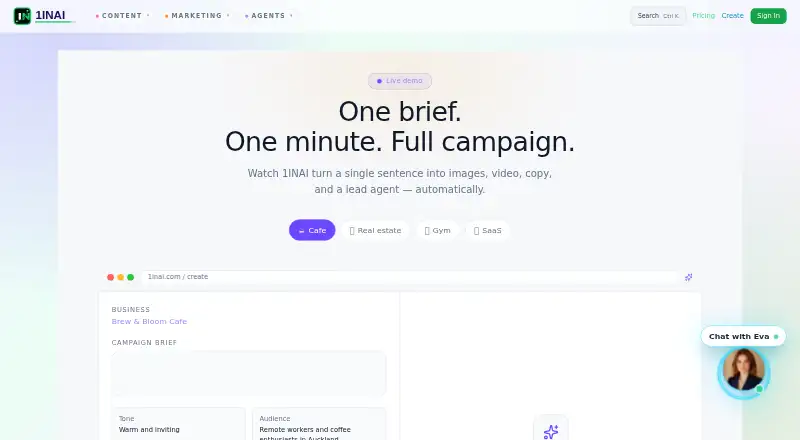
1INAI is an AI platform for campaign assets and lead agents, aimed at creators, micro-agencies, and local businesses. Create Studio turns a sentence into a campaign pack with a hook, caption, call to action, voiceover script, and generated image or video. A campaign brief can also become a lead-capture assistant with a greeting, FAQ, qualification questions, and booking prompt. Users can build custom agents without code for business automation, lead qualification, customer support, and workflow orchestration. Listed media tools include image generation, video creation, campaign analytics, and voiceovers in more than 100 voices and languages. Users can generate portraits, headshots, and cinematic avatars from a photo and add spoken script narration. Before export, the campaign workflow allows review of channels, disclosures, captions, and scheduling. The Trust page says business briefs, campaign data, and generated assets are encrypted and not used to train third-party models. Generated media is stored for 90 days by default; extended storage options include one year with Pro. Plans include a free option, Pay-as-You-Go at $0.50, paid once, Pro at $9.99 a month, and Hero at $29.99 a month.
Who it suits
1INAI is aimed at creators, micro-agencies, and local businesses seeking campaign content or lead-capture agents. Its pricing page also describes Pro as an option for power users and studios.
What it does well
- Create Studio builds campaign packs from a sentence.
- Custom agents can be built without code.
- Voiceovers cover more than 100 voices and languages.
- Campaign workflow includes review before export.
What to know first
- Free plan video is limited to 720p resolution.
- Free plan images are watermarked.
- Generated media is stored for 90 days by default.
- Voice cloning or impersonation requires verified consent.
Limits
The free plan includes one video during the three-day trial, three watermarked images per day, 720p resolution, and five minutes of audio per month. Pro is limited to five 1080p videos and 20 unwatermarked images per month and day, respectively, with 30 minutes of audio; Hero lists unlimited videos, images, and audio.
Plans
| Plan | Billed and limits | Price |
|---|---|---|
| Free | $0/forever · 3-day trial with 1 free video · 3 images per day (watermarked) · 720p resolution · 5 min audio per month · Standard queue | Free |
| Pay-as-You-Go | $0.50/video · From $0.50 per 15s video · 30s standard: $0.99 · 1min standard: $1.99 · 4K and add-ons available · API access included | $0.50, paid once |
| Hero | $29.99/month · Unlimited videos (up to 4K) · Unlimited images (2048p, no watermark) · Unlimited audio · Lip-sync and compositing included · API access ($0.001/s) · Custom LoRA training · Priority queue with custom SLA | $29.99 a month |
| Pro | $9.99/month · 5 videos per month (1080p) · 20 images per day (no watermark) · 30 min audio · Lip-sync available (+$5/video) · Batch export (up to 5) · Priority queue | $9.99 a month |
As 1inai.com lists them, read 30 Sept 2026. The maker's own page has the final word.
Getting started
- Visit https://www.1inai.com/.
- Choose the free plan with its three-day trial, Pay-as-You-Go, Pro, or Hero.
- Use the web platform or API; API access is included with Pay-as-You-Go.
- Create a campaign pack from a sentence or convert a brief into a lead assistant.
- Review channels, disclosures, captions, and scheduling before export.
1INAI brings campaign assets, lead-capture assistants, and no-code business agents into one platform. It suits creators, micro-agencies, and local businesses that need both marketing production and lead handling; the main decision is whether its media limits and retention terms match your workload.
Overview
1INAI can turn a campaign brief into creative assets, a lead assistant, or a custom automation agent. That breadth is valuable for small teams that want these tasks connected, but buyers focused mainly on social publishing may find its media-centered plans a less direct fit.
Key features
Campaigns and lead handling
Create Studio turns a sentence into a campaign pack with a hook, caption, call to action, voiceover script, and generated image or video. A campaign brief can also become a lead-capture assistant with a greeting, FAQs, qualification questions, and a booking call to action. The pairing is practical for local businesses and small agencies that want campaign creation to lead into inquiry qualification.
Agents and media
The no-code agent builder covers business automation, lead qualification, customer support, and workflow orchestration. Media tools include image generation, video creation, voiceovers in more than 100 voices and languages, and campaign analytics. Users can also create portraits, headshots, and cinematic avatars from a photo, then animate them to speak a script with AI narration. These capabilities make the platform broader than a copy generator, though the plan quotas put real bounds on routine production.
Review, privacy, and consent
The campaign workflow lets users review channels, disclosures, captions, and scheduling before export, a useful checkpoint for teams managing several campaign elements. Business briefs, campaign data, and generated assets are stored in encrypted storage with access controls and are not used to train third-party models. Generated media is retained for 90 days by default; extended storage options include one year with Pro, which matters for teams that need a longer asset archive.
Generation requests pass through moderation intended to block hate speech, harassment, explicit content, and impersonation without consent. Voice cloning or impersonation of real people requires verified consent and a legal audit trail, while the voice models are limited to synthetic voices. These rules provide clear guardrails for voice use, but teams should account for the consent process before building a workflow around a real person's voice.
Pricing
The freemium model ranges from a constrained free tier to monthly subscriptions and per-video purchases. The right choice depends less on the entry price than on resolution, output volume, watermarking, and whether you need API access or bundled production tools.
- Free — free, billed $0/forever: includes a 3-day trial with 1 free video, 3 watermarked images per day, 720p resolution, 5 minutes of audio per month, and standard queue. It is a useful way to assess the workflow, but the image watermark, low resolution, and small audio allowance limit ongoing professional use.
- Pay-as-You-Go — $0.50, paid once, billed $0.50/video: starts at $0.50 per 15s video; a 30s standard video costs $0.99 and a 1min standard video costs $1.99. 4K and add-ons are available, and API access is included. This avoids a subscription for occasional video work, but repeated production can make per-video charges less predictable.
- Pro — $9.99 a month, billed $9.99/month: includes 5 videos per month at 1080p, 20 images per day without watermark, 30 minutes of audio, batch export of up to 5, and priority queue. Lip-sync is available for +$5/video. Pro suits power users and studios with moderate recurring demand; the five-video allowance and paid lip-sync mean it is not an unlimited production tier. One year of retention is also offered with Pro.
- Hero — $29.99 a month, billed $29.99/month: includes unlimited videos up to 4K, unlimited 2048p images without watermark, unlimited audio, lip-sync and compositing, custom LoRA training, and a priority queue with custom SLA. API access is $0.001/s. It is aimed at heavier production needs, but API use still carries a usage charge.
No seat limits are given for these plans. Business includes a dedicated support channel, and the team investigates user reports within 24 hours; no price is provided for Business, so it is custom pricing.
Platforms
1INAI is available on the web and through an API. Its social network support covers 5 networks, and platform variations and brand voice controls are supported. Those controls help adapt campaign material across channels, while teams needing a broader published network count should weigh the stated coverage against their own channels.
Who it's for
Creators and micro-agencies can use it to produce campaign media and vary it for multiple platforms. Local businesses may benefit most from the path from campaign brief to lead qualification and booking. Studios with recurring media needs have Pro and Hero options, while occasional users can buy video output without a subscription. It is less compelling for teams whose priority is only social scheduling or publishing rather than campaign assets and agent workflows.
Pros and cons
- Pro: Campaign creation, lead capture, and custom no-code agents sit in one platform, connecting promotional work to follow-up.
- Pro: The approval workflow includes channels, disclosures, captions, and scheduling before export, supporting a review step before campaign handoff.
- Pro: The free plan and per-video option give low-commitment ways to start, while monthly tiers add higher resolutions and larger media allowances.
- Con: Free output is watermarked, capped at 720p, and limited to 5 minutes of audio monthly, restricting its usefulness for polished recurring work.
- Con: Pro allows only 5 videos monthly, and lip-sync adds +$5/video, so teams generating videos regularly may need Hero or manage add-on costs.
- Con: Default media retention is 90 days, so users who need a longer archive must consider extended storage, including the one-year option with Pro.
Alternatives
For a broader set of social-media post-generator options, see AI Social Media Post Generators.
- Content Drifter is a better fit if you want a free plan with 8 AI posts and 10 publishes per month across Android, iOS, Linux, macOS, web, and Windows.
- PostMimic is worth considering if a one-time allowance of 5 cloud AI posts, one profile, basic analytics, and a read-only web portal better matches a small initial trial of social content.
- Brandlyre may suit teams that want unlimited brand workspaces and 100 starting AI credits in a free early-access plan.
- lumad.ai is an alternative if you want a web-based free tier with no credit card required.
- Noryn may suit users who want 3 free generations per month across up to 4 platforms, with text, URL, and YouTube inputs.
- Postology offers a free plan with 1 project and 10 AI posts per month, a more focused option for a small content workload.
- SocialCTL is worth comparing if API and web access with 150 signup credits and a 6-day full trial are the main draws.
- Gamma is an alternative if your priority is generating presentations, with 10 cards per prompt on its free plan.
Verdict
Choose 1INAI if you are a creator, micro-agency, or local business that wants campaign production connected to lead qualification and custom automation. Its strongest case is that combination, backed by substantial media options and a review workflow. Look elsewhere if you chiefly need social publishing, or if the free and Pro video limits, add-on lip-sync cost, or 90-day default retention do not suit your production needs.
Verdict
1INAI combines campaign creation, lead agents, and custom automation tools with free and paid plans. Review the free plan's media limits and the stated retention and voice-consent terms before relying on it.
Questions
Is there a free plan?
Yes. The free plan is billed at $0/forever and includes a three-day trial with one free video, three watermarked images per day, 720p resolution, five minutes of monthly audio, and a standard queue.
What do the paid plans cost?
Pay-as-You-Go is $0.50/video, with listed examples of $0.99 for a 30-second standard video and $1.99 for one minute. Pro is $9.99/month and Hero is $29.99/month.
Which platforms does 1INAI support?
The listed platforms are web and API.
What is included with Pro and Hero?
Pro includes five videos per month at 1080p, 20 images per day without watermarks, 30 minutes of audio, and priority queue. Hero includes unlimited videos up to 4K, unlimited 2048p images without watermarks, unlimited audio, and priority queue with a custom SLA.
How long are generated assets stored?
Generated media is stored for 90 days by default. The terms describe extended retention options, including one year with Pro.
How does 1INAI handle campaign data?
The maker says business briefs, campaign data, and generated assets are encrypted and are not used to train third-party models.
Facts from 1INAI's own pages
- AI agent builder
- Users can build custom agents for business automation, lead qualification, customer support, and workflow orchestration without code. · 1inai.com, 30 Sept 2026
- Asset retention
- Generated media is stored for 90 days by default; the terms describe extended storage options, including one year of retention with Pro. · 1inai.com, 30 Sept 2026
- Avatars
- Users can generate portraits, headshots, and cinematic avatars from a photo and make them speak a script with AI voice narration. · 1inai.com, 30 Sept 2026
- Campaign creation
- Create Studio turns a sentence into a campaign pack containing a hook, caption, CTA, voiceover script, and AI-generated image or video. · 1inai.com, 30 Sept 2026
- Content moderation
- The maker says each generation request passes an AI moderation layer that blocks hate speech, harassment, explicit content, and impersonation without consent. · 1inai.com, 30 Sept 2026
- Headquarters
- Auckland, New Zealand · 1inai.com, 28 Sept 2026
- Intended users
- The maker describes the platform as built for creators, micro-agencies, and local businesses; its pricing page describes Pro for power users and studios. · 1inai.com, 30 Sept 2026
- Lead agents
- A campaign brief can be converted into a lead-capture assistant with a greeting, FAQ, qualification questions, and booking CTA. · 1inai.com, 30 Sept 2026
- Media tools
- The home page lists AI image generation, video creation, voiceovers in 100+ voices and languages, and campaign analytics. · 1inai.com, 30 Sept 2026
- Product
- 1INAI is an AI platform for campaign assets and lead agents, aimed at creators, micro-agencies, and local businesses. · 1inai.com, 30 Sept 2026
- Security and privacy
- The Trust page says business briefs, campaign data, and generated assets are not used to train third-party models and are stored in encrypted storage with access controls. · 1inai.com, 30 Sept 2026
- Support
- The Business plan includes a dedicated support channel, and the Trust page says the team investigates user reports within 24 hours. · 1inai.com, 30 Sept 2026
- Voice restrictions
- The Trust page says voice cloning or impersonation of real people requires verified consent and a legal audit trail, and says its voice models are limited to synthetic voices. · 1inai.com, 30 Sept 2026
- Workflow approval
- The campaign workflow lets users review channels, disclosures, captions, and schedule before export. · 1inai.com, 30 Sept 2026
Where 1INAI stands on Freedom251
- AI Social Media Post Generators#2 of 27