Use AI interview practice tools to prepare; do not use a live assistant to generate answers during an interview unless that employer explicitly allows it. The difference is whether AI helps you get ready before evaluation or supplies responses while you are being evaluated. Rules vary by employer and hiring stage, so check the instructions for each interview, assessment, or exercise.
What is the difference between an AI interview assistant and a practice tool?
An interview practice tool helps before an interview: it can suggest role-relevant mock questions, help you organize genuine examples, support spoken rehearsal, and give feedback on clarity. A live interview assistant listens to or captures questions during an evaluation and suggests answers or talking points while you respond. These are different uses of AI, and permission to practice does not automatically authorize live assistance.
As an Amazon Associate I earn from qualifying purchases.
Employer guidance makes that distinction explicit. Bumble says, “Use AI to prepare, research, practice, and refine your ideas,” but asks candidates not to use it to generate, suggest, or refine responses in real time unless the stage is explicitly an AI collaboration exercise (Bumble’s AI guidance). PNC similarly calls practice questions, company research, and reflection on past experience appropriate preparation, while generally restricting AI during live interviews and assessments (PNC’s guidance).
Free tools Windows power users keep installed
One-click scans. No signup required.
Can you use AI during a job interview?
There is no universal rule. Follow the employer’s instructions for the specific stage; an employer may allow preparation but prohibit AI during a live interview, take-home exercise, or assessment. Some processes explicitly invite AI collaboration, and accessibility arrangements may be handled differently from answer generation.
#1 Best Overall

- WHAT'S IN THE BOX: Meet the ultimate job interview prep system: a premium communication card deck featuring 54 interview flashcards, each pairing a key question or scenario with a high-impact answer, 100+ fill-in-the-blanks for authentic responses, and bonus access to 4.5 hours of video tutorials.
- EXPERT CRAFTED CARDS: Developed by Gorick Ng—Harvard career advisor, Wall Street Journal bestselling author, and career strategist—these 54 scenario-based interview flash cards teach you the proven response and storytelling frameworks for high-stakes interviews.
- BONUS VIDEO COACHING: Have Gorick Ng personally walk you through every card scenario and script. Simply use the included secret password to create an account and get instant access.
- MASTER LANDMINE QUESTIONS: Learn what to say—and what not to say—when facing the toughest questions that trip up 99% of candidates and turn high-stakes pressure into a job offer.
- COMPREHENSIVE INTERVIEW PREP: Covers both formal job interviews and informational coffee chats. Like a job hunter’s workbook meets flashcards, just draw a card, practice the framework, and walk in fully prepared.
| Employer or process | What its published guidance says | Scope |
|---|---|---|
| Bumble | Allows preparation, research, practice, and refining ideas; disallows real-time response generation or refinement unless the stage is expressly an AI collaboration exercise. | Careers policy last updated July 24, 2026; applies to its hiring process (Bumble). |
| PNC | Supports practice, company research, and reflection on past experiences. Unless instructions say otherwise, candidates should not use AI to generate answers or assist during live interviews; assessments and take-home exercises should be completed without AI. | PNC’s candidate guidance (PNC). |
| Anthropic | Encourages preparation and refining authentic ideas; says not to use AI during assessments unless permitted. | Anthropic’s interview process guidance (Anthropic). |
| Deloitte US | Allows AI before interviews for research and practice; disallows real-time assistance, AI-generated answers, talking points, or work product during interviews or assessments unless explicitly allowed. | U.S. hiring guidance (Deloitte US). |
| Pfizer | Encourages interview practice; prohibits AI and other external tools from generating answers during live or recorded interviews and restricts assessment use unless specifically allowed. | Pfizer candidate guidance (Pfizer). |
| College Board | Says live interviews should be completed without AI assistance tools or third-party recording software. | College Board’s own interview process; it separately says it may record and transcribe with advance notice and an opt-out (College Board FAQ). |
| USA Hire | Prohibits AI use during its assessments and treats it as assistance; applicants certify independent work. | Specific federal assessment policy. The Applicant Resource Center article was updated July 29, 2026 (USA Hire). |
| U.S. Department of State | Does not allow AI tools to aid written application responses. | Applies to the Department’s written application materials, not all employers or all interview formats (Department of State FAQ). |
| Public Service Commission of Canada | Guidance says hiring organizations can allow AI, but should specify permitted tools and stages, communicate consequences, and require identification of AI-generated content where required. | Public-service hiring guidance, not a universal private-sector rule (Government of Canada guidance). |
These examples show why another employer’s policy cannot answer whether a tool is allowed in your interview. Even within one hiring process, an AI exercise, assessment, live interview, and application response may have different rules.
How to practice for an interview with AI
- Read the instructions for the exact stage. Check the interview invitation, assessment brief, and employer careers policy for rules on AI, recording, and outside assistance.
- Ask if the rule is unclear. Contact the recruiter before the interview. Ask specifically whether AI may be used in that stage, and whether any accessibility support needs advance approval.
- Generate practice questions, not invented credentials. Ask a practice tool for questions tied to the role, then answer using real examples from your experience. Verify factual claims about the organization and job rather than relying on generated details.
- Rehearse aloud and review the delivery. Use feedback to improve the structure, clarity, and concision of your own answers. Keep the underlying experience, judgment, and wording yours.
- Keep live responses your own unless collaboration is invited. If the assessment explicitly asks you to work with AI, follow its boundaries and be ready to explain your contribution and process.
- Prepare an offline alternative. A notebook or job-interview practice workbook can help you collect examples, rehearse concise answers, and draft questions without sending information to an AI service.
Anthropic encourages candidates to use Claude to strengthen applications and prepare while showcasing an authentic story (Anthropic’s interview guidance). That is an example of preparation guidance from one employer, not permission to use AI in another organization’s assessment.
Rank #2
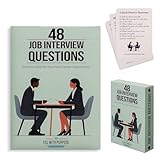
- Essential Phrases: Carefully selected flashcards feature common questions and advice to enhance your preparation and answers.
- Targeted Content: Curated by a career pathways and ESL instructor to help advanced language learners, as well as recent graduates and job seekers.
- Strategic Practice: Organized into 4 categories of relationship, knowledge, character, and leadership, allowing you to delve deep into each question and refine your responses.
- Insightful Guidance: The 8 tip cards such as the STAR method, along with what to ask the interviewer and more thoughtful ideas.
- Hiring Managers: Compact and portable, it provides a convenient resource to identify and draw out meaningful and honest responses.
What should you check before using a live interview assistant?
- Policy: Does the employer explicitly permit the tool during this stage? If not, do not assume it is allowed because practice use is permitted.
- Disclosure: Does the brief require you to identify AI-generated content or disclose AI use? Follow that requirement.
- Accessibility: If you need captions, transcription, note-taking, or another adjustment, discuss the specific setup with the recruiter ahead of time. Bumble asks candidates to disclose AI-based accessibility adjustments in advance (Bumble’s guidance).
- Confidentiality: Do not enter confidential employer, client, assessment, or personal information into a third-party model unless its use and handling are approved. Bumble warns candidates not to put confidential information into AI tools, and Canadian public-service guidance highlights confidentiality, security, data protection, and intellectual-property considerations (Bumble; Government of Canada).
- Data flow and retention: Find out whether the tool captures audio, creates transcripts, includes resume context, sends prompts to an outside model provider, or stores session data—and for how long.
For example, CoPilot Interview says its audio capture and transcription occur locally, while the transcribed question, optional uploaded resume context, and a system prompt are sent over HTTPS to the AI provider selected by the user. It says transcripts and responses remain in app memory until the session closes, with optional summaries saved locally; its page also says screen-sharing behavior varies by sharing mode (CoPilot Interview security information). Those are the vendor’s statements about its own service, not an independent audit or a description of other assistants. Do not infer that a live tool is hidden or undetectable.
Windows Errors? Fix Them Before They Spread
Repair common Windows errors and clear accumulated junk for a smoother, more stable PC - no reinstall needed.Free scan · no reinstallCrashes, No Sound, or Screen Glitches?
Random freezes, missing sound and display glitches usually trace back to one bad driver. Find and replace yours safely.Free scan · under a minuteHow to choose between practice software and a live assistant
| What matters | What to look for or ask |
|---|---|
| Timing and purpose | Does it help you prepare before evaluation, or generate answers during the live evaluation? |
| Policy fit | Can you use it only for practice, and does the employer permit that use at this stage? |
| Authenticity | Does feedback clarify your actual experience, or produce claims you did not make and cannot explain? |
| Practice format | Does it support role-specific mock questions, spoken rehearsal, and useful reflection? |
| Privacy | What audio, transcripts, resume context, or prompts leave your device? Which provider receives them, and what is retained? |
| Accessibility | Can you arrange approved captions, transcription, or another accommodation with the recruiter? |
Employer guidance supports using AI for preparation, but the cited sources do not establish comparative product performance, interview-success effects, prices, subscription limits, or supported platforms. Evaluate tools on their current official terms, and do not treat one vendor’s privacy statement as evidence about another.
Quick Recap
Best Value

- ALL 128 OFFICIAL 2026 USCIS QUESTIONS – Every question and answer from the current 128-question civics test used in the naturalization interview, not the outdated 100-question version. Question on the front, official answer with a photo illustration on the back.
- READING & WRITING PRACTICE INCLUDED – 10 double-sided practice cards cover the English reading and writing portions of the interview, so one set prepares you for every part of the test. 140 cards total in a sturdy storage box.
- ANSWERS THAT STAY CURRENT – Cards whose answers change (President, Vice President, Speaker of the House, your governor and senators) carry a QR code to the official government page, so you always study the right answer.
- COMPANION APP – Search “US Citizenship Test 128” on the App Store or Google Play for the free US Civics Test app: audio for every question, mock interview practice and progress tracking in English, Spanish and Arabic.
- BUILT TO LAST – Thick 5 x 3 inch card stock with rounded corners and large, easy-to-read type. Ideal for self-study, ESL classes, tutors, seniors preparing under the 65/20 rule, and family quiz sessions.
Rank #4
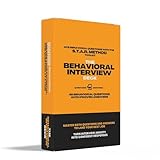
- 48 Essential Behavioral Questions: Curated by recruiters and hiring experts, each flashcard provides real-world behavioral questions covering Leadership, Teamwork, Communication, Problem-Solving, Initiative, and more—exactly what top employers ask.
- STAR Framework Only (No Confusion!): Every example answer is crafted exclusively using the proven Situation-Task-Action-Result framework, the #1 structure hiring managers recommend for clear, persuasive storytelling.
- Front Card Structure (Question-Focused): Each card’s front includes: a behavioral interview question you’ll likely encounter, core competencies clearly listed (e.g., "Leadership, Adaptability"), 2-3 alternate versions of the main question to help you confidently adapt on the spot.
- Back Card Structure (STAR Example): Each card’s back is carefully designed to guide you: Full STAR-formatted example answer, expertly written to model top-tier responses, “Make it Yours” tips: Actionable, concise guidance to personalize each answer authentically, "Avoid" section: Highlights common pitfalls clearly so you’ll steer clear of interview-damaging mistakes.
- Comprehensive Preparation Guide Included: An insightful, compact Z-fold leaflet explains the STAR method, outlines how to use the cards effectively, and provides quick-reference success tips—perfect for last-minute prep or deeper practice sessions.
Rank #3

- Comprehensive Preparation Made EASY: a smart system to get you mentally prepared for every interview question possible. Cards are categorized by evaluation criteria, topic, and difficulty levels by age group (teens, young adults, graduate students).
- Get INSIDE the Interviewer's Head: clever cards guide you through the secrets of answering questions confidently. Know the types of questions asked by interviewers from elite private high schools, universities, and graduate schools.
- Coaching Videos to Help You Brand Yourself to STAND OUT: includes expert advice providing examples of poor, okay, good, great, and memorable candidate responses.
- Build CONFIDENCE and COMMUNICATION SKILLS. It's not just about getting into your dream school or job. The card deck is designed to help you build the essential human skills to succeed in an AI-powered world.
- Perfect for conducting and practicing mock interviews anytime and anywhere while playing a card game. For students, parents, counselors, coaches, career services office, and recruitment professionals
Product prices and availability are accurate as of the date/time indicated and are subject to change. Any price and availability information displayed on Amazon at the time of purchase will apply.




