AI is already being used in education for adaptive practice, tutoring, lesson preparation, accessibility, analytics and administrative work. Those applications can support students and teachers, but they do not guarantee better learning: outcomes depend on the tool, the teaching around it and human review. Here are ten ways AI is entering education—and the conditions that determine whether each is useful.
How is AI changing education?
AI is being applied across instruction, student support, accessibility, teacher workflows and assessment. These are distinct use cases, not ten equally mature interventions or proof that AI improves achievement. The OECD cautions that the effectiveness of many AI-enabled tools—and whether they improve learning outcomes or reduce educators’ workload—is not always well established (OECD Digital Education Outlook 2023).
As an Amazon Associate I earn from qualifying purchases.
10 ways AI is being used in education
1. Adaptive practice can respond to learner progress
AI-enabled learning systems can track progress and help identify areas where a student may need more practice or is ready for a greater challenge. That is a capability, not a guarantee of personalized learning. Its value depends on the quality of the learning design, the information collected and how teachers use the results.
2. Generative AI can offer responsive explanations
A student can ask a generative AI system a question and receive an explanation tailored to the wording of that question. This may support independent exploration, but answers can be wrong, irrelevant or poorly matched to the student’s age and needs. Learners should verify important claims, and educators should help them judge when an explanation is trustworthy.
#1 Best Overall

- 🤖【AI Learning Companion for Kids】Designed to grow with your child, the AI Robot combines learning and entertainment in one interactive companion. Kids can practice drawing, learn letters, listen to stories, sing songs, chat with AI, watch educational videos, and play fun games—all through a friendly touch-screen robot that keeps children engaged while encouraging creativity and curiosity.
- 🎨 【Interactive Drawing & Educational Content】Children can trace pictures directly on the 7-inch HD touchscreen, learn step by step how to draw, color their artwork, recognize letters, and explore educational activities designed to improve creativity, hand-eye coordination, and early cognitive development.
- 📱【 Powerful Android System with Endless Apps】Built-in Google Play Store lets you download your favorite educational apps, learning software, streaming services, and games. Equipped with 1GB RAM, 16GB internal storage, expandable TF card support, Wi-Fi (2.4GHz), Bluetooth connectivity, and OTA online updates to keep your robot up to date.
- 💬【Smart AI Conversations & Fun Moving Companion】More than just a learning device, Voltix features intelligent AI voice interaction that can answer questions, chat with kids, tell stories, and sing songs. Smooth wheels allow the robot to move around, dance, and interact naturally, creating a more engaging companion experience.
- 🔋【Long Battery Life & Family-Friendly Design】Powered by a built-in 4000mAh rechargeable battery, the robot provides approximately 4–6 hours of continuous use on a single charge. The bright 7-inch HD display (1024 × 600 resolution) delivers vivid visuals while the compact design makes it perfect for bedrooms, playrooms, travel, and family activities.
3. Teachers can draft lessons and curriculum materials
Generative AI can help teachers create a first draft of a lesson plan, activity or curriculum resource. Teachers still need to check factual accuracy, curriculum alignment, accessibility and appropriateness for their students. A generated draft is an input to professional judgment, not a substitute for it.
4. Analytics can help teachers review learning and classroom activity
Some systems monitor learning progress, while classroom analytics may give teachers information about classroom management or instruction after a lesson. These signals can help inform reflection, but they do not automatically tell a teacher what to change or whether a change will help. Interpretation should remain connected to classroom context and direct knowledge of students.
5. Speech-to-text and captions can support access
Speech-to-text and automatic captions may help learners with hearing or visual impairments participate in learning activities. Their usefulness depends on the accuracy and accessibility of the implementation. Schools should check how well the tools work in the actual learning environment rather than assuming that an AI feature is accessible simply because it is available.
The Tool Desk
Outbyte PC Repair FREEClear out junk files and repair common Windows errorsFree Scan →Outbyte Driver Updater FREEFix the driver behind crashes, sound loss and screen glitchesFind Drivers →Rank #2

- Meet EMO, Your New Desk Buddy - Say hello to EMO, the ultimate desk robot that’s here to jazz up your workspace. With built-in AI model and wide-angle camera, it can see you, hear you and understand you, just like a real pet would
- Voice Commands Enabled - The EMO robot comes with a series of built-in voice commands, you can talk and play with EMO like with a real pet. And with the ability to connect to network and powered by ChatGPT, you can have more complex conversations with EMO like talking to a tech-savvy friend who’s always up for a chat
- Dance Party & Game Time - EMO is ready to party! Simply turn up your favorite tunes and tell EMO to dance with you, it’ll be your perfect desk-side party buddy. Plus, EMO supports to connect to the EMO app for a range of interactive games and activities. Whether you’re solo or with friends, EMO ensures you’re always entertained
- Endless Fun - The EMO robot features with multiple sensors built-in to bring more interactions with you, you can rub it, shake it and even “shoot” it with finger gesture, making it feel like you’re playing with a real pet. It even “gets sick” with weather changes, so you can care for it like you would a furry friend
- Enjoy Every Moment with EMO - With the EMOPET App has a unique achievement system that helps record all the big and little moments you have spent with EMO, like a new dance moves, a new expression, celebration of your birthday, and more...Enjoy all the life events with your new best buddy!
6. Earlier signals may prompt support for learning needs
Some systems may help identify possible learning difficulties earlier. A signal from a tool is not a diagnosis: follow-up requires human judgment and, where appropriate, further assessment and support. OECD describes this work as involving both technology and human intervention.
7. Early-warning systems can flag students who may need help
In education systems with advanced information infrastructure, AI-powered early-warning tools may flag students at risk of leaving school so staff can consider interventions. A flag is not an objective verdict about a student. If treated as a fixed label rather than a prompt to offer support, it can stigmatize or disadvantage the very student it is meant to help.
8. Simulators can provide vocational practice
Simulators and virtual or augmented reality may let vocational learners practise skills in a controlled setting designed to resemble a workplace. This can add a practice opportunity, but it should not be presented as a proven replacement for hands-on instruction or the experience of working with real equipment and people.
Rank #3

- Remote Control and Hand Gesture Control : This gesture sensing robot not only can be controlled by infrared controller, but also can turn left ,turn right, slide backward, and slide forward according to how your hand gesture commands; Multi function includes auto display and obstacles avoidance as well;The toy robot’s eyes light up with bright blue illuminating LED when it moves
- Intelligent Programming: This smart robot toy can demonstrating a set of 50 actions inputted by the user.If you switch programming function,this Interactive robot will playback using its moves record feature to repeat the movement one by one as you created like turn left+turn right+walk forward+walk backward+patrol+dance+and many others action mode you selected
- Premium Material : This Remote Control Robot is made of non-toxic ABS plastic, with flexible multi-joint in shoulder,elbows and thumbs ,and the bottom skating wheels are pretty sturdy to well carry out a various combination of moves;This playful robot really entertain your kids and bring you endless joys
- Convenient Rechargeable Robot Toy : this RC robot is powered by built-in batteries.Directly connect to USB charging interface like your power bank,plug,computers.Rechargeable way saves your money for batteries and you only recharge the robot about 2 hours, and its playtime is about 60 minutes
- Ideal Birthday Xmas Gift & Kids Intimate Companion : The infrared control Robot is versatile and vivid can dance,sing,walk,patrol,even can speak with a charming accent;Don’t scratch your head to search gifts but directly pick this intelligent robot for your kids;It is an amazing gift kids will be thrilled with and this robot will entertain you so much.
9. Administrative tools may change teachers’ workloads
Some AI tools are intended to reduce administrative tasks, provide feedback or free time for instructional design. They can also introduce new work, such as checking outputs, managing systems and correcting errors. Teachers should have a role in selecting and evaluating tools, with workload effects assessed rather than assumed.
Crashes, No Sound, or Screen Glitches?
Random freezes, missing sound and display glitches usually trace back to one bad driver. Find and replace yours safely.Free scan · under a minuteWindows Errors? Fix Them Before They Spread
Repair common Windows errors and clear accumulated junk for a smoother, more stable PC - no reinstall needed.Free scan · no reinstall10. AI literacy changes research and assessment
When students can quickly generate answers, education has to address how they find, evaluate and use information—not just whether they can produce a response. OECD suggests using generative AI to prompt questions, navigate ambiguity and distinguish fact from opinion. Teaching source evaluation, verification and transparent expectations for AI use can make these capabilities part of learning rather than a hidden shortcut. Assessment also needs to make clear what work students are expected to do themselves and what uses of AI are permitted.
What are the benefits and risks of AI in schools?
Potential benefits include more responsive practice, additional ways to access learning, support for lesson preparation and new opportunities for feedback or vocational simulation. Each depends on a specific educational purpose and responsible implementation; a tool’s presence alone does not establish a learning gain.
Rank #4
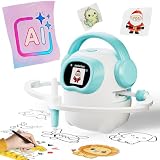
- 【10000+ Free Images, AI-Powered Drawing Robot for Early Learning】 Children can simply tell the IBEED robot what they want to draw using their voice. Once connected to WiFi, the AI instantly generates new pictures. With access to over 10,000 free AI-generated images—from animals and plants to imaginative fantasy characters—every voice command becomes a creative adventure, unlocking limitless imagination.
- 【Touchscreen Drawing Companion, More Than Just Cards】 Our drawing robot is a fun and engaging creative partner, featuring a high-definition touchscreen and built-in storage. Children can simply tap the screen to select from a library of local images without the need to insert or swap cards (card functionality is also included). The intuitive operation helps kids develop coordination and concentration while drawing, eliminating the frustration of lost or damaged cards and offering endless choices at their fingertips.
- 【AI Prompt Learning — Build Creativity Together with Kids】 Our robot is more than a drawing teacher—it’s your child’s first step into AI. By describing what they want to draw using voice, kids learn how to communicate with AI through prompts, boosting language and logical thinking. We highly encourage parents to explore prompt crafting first, then guide their little ones. This innovative parent-child interaction not only strengthens bonding but also prepares children with future-ready AI collaboration skills.
- 【Cloud Gallery with Regular Updates, Endless Freshness】 The robot connects via WiFi to our cloud server, granting access to an ever-expanding official image library. We regularly add new patterns and themes, ensuring children always have fresh content to learn and draw, sustaining long-term interest and exploration. No need for extra card purchases—one purchase, continuous updates.
- 【Parental Mode & Privacy Protection, Safe and Secure】 We prioritize children's privacy and safety. Parents can activate Parental Mode with one click to disable network access for offline use, or turn off the microphone to ensure no recording risks. All AI generation processes comply with child privacy protection standards, giving parents complete peace of mind.
UNESCO’s guidance puts human involvement and age suitability at the center of responsible use, proposing “a human-agent and age-appropriate approach to the ethical validation and pedagogical design processes” (UNESCO guidance for generative AI in education and research). The practical questions for schools include:
- Accuracy and relevance: Can students and teachers check outputs against reliable information and the lesson’s aims?
- Privacy and security: What student information is collected, where is it handled and who can access it?
- Bias and representation: Could outputs or automated flags treat groups unfairly or fail to reflect students’ cultures and circumstances?
- Accessibility and equity: Can learners with different needs use the tool, and do connectivity or access gaps exclude some students?
- Teacher control and workload: Can educators review and adjust outputs, and does the tool reduce work in practice or add to it?
- Evidence and fit: Is there evidence for the intended task and age group, and does the tool fit the curriculum and assessment?
High-stakes feedback, assessment and decisions about student support call for particular care and human review. Predictive systems should be treated as fallible signals, not neutral authorities.
How widely are educators using AI?
Available figures describe different populations and periods, so they should not be read as a single global adoption rate. In the United States, 25% of surveyed teachers reported using AI tools for instructional planning or teaching during the 2023–24 school year, and nearly 60% of U.S. principals reported using AI tools for their work, according to a 2025 ERIC record summarizing a RAND American Educator Panels report (ERIC record: Uneven Adoption of Artificial Intelligence Tools among U.S. Teachers and Principals in the 2023–2024 School Year).
Best Value

- 【Humanoid Robot with ESP32】 Powered by ESP32 and 17 intelligent servos, Tonybot smart humanoid robot delivers smooth, dynamic performance. Use the app to easily control it for walking, dancing, kicking, and more. Tonybot can stand up automatically, which is great for playing football and performing gymnastics.
- 【Multimodal Large AI Models】Powered by an AI model module that combines language, voice, and vision models, Tonybot Ultimate Kit unlocks advanced embodied AI functions such as natural conversation and scene understanding. (Ultimate Kit Only)
- 【AI Vision & Voice Interaction】Equipped with an ESP32-S3 vision module and voice interaction module, Tonybot AI robot enables offline face recognition, target tracking, visual line following, voice control, and more. Customize commands and train it to be your AI assistant.
- 【Expandable AI Development with Sensors】 Tonybot robot kit comes with an ultrasonic sensor, IMU sensor, buzzer, and supports modules like dot matrix display, fan, temp/humidity sensors, and WiFi for endless AI-driven development.
- 【3 Programming Options & Comprehensive Tutorials】Tonybot smart AI robot supports Arduino, Python, and Scratch programming, with open-source low-level code and step-by-step tutorials covering everything from beginner learning to advanced humanoid robot development.
Separately, OECD’s 2023 Digital Education Outlook reported that around 20% of secondary education teachers across OECD countries said they needed further training, while 60% had undertaken digital-education training in the previous year. These are figures about digital education training, not AI-specific training. In the same 2023 report, among 18 jurisdictions with comparative information, none had issued an education-specific regulation on generative AI and nine had published non-binding guidance. That is a dated snapshot, not a current worldwide policy count (OECD Digital Education Outlook 2023).
How should schools evaluate an AI tool?
Start with the learning or teaching task, not the novelty of the technology. A practical evaluation should establish what the tool is meant to do, what information it uses and how people will respond when it is wrong.
- Define the purpose: Name the specific task—such as captioning, practice or lesson drafting—and the intended benefit.
- Check suitability: Assess age appropriateness, accessibility, curriculum fit and whether the tool works for the relevant subject and learners.
- Review data and reliability: Understand data handling, privacy and security; test output quality and whether claims can be checked against traceable sources.
- Plan human oversight: Decide who reviews outputs and how students or staff can question or correct them, especially where assessment or support decisions are involved.
- Evaluate in use: Look at actual learning, equity and workload effects, not just whether the tool is adopted. Involve teachers in interpreting the results and adjusting practice.
OECD and Education International’s guidance emphasizes evaluating tools against their educational purpose and considering whether they work better in some subjects or contexts than others (Opportunities, guidelines and guardrails for effective and equitable use of AI in education).
Quick Recap
Product prices and availability are accurate as of the date/time indicated and are subject to change. Any price and availability information displayed on Amazon at the time of purchase will apply.




