Quick wins for a faster PC:
Clear out junk files and repair common Windows errorsFree Scan →Scan for outdated or missing drivers - takes under a minuteDriver Scan →Repair Windows errors before they cause bigger problemsFix Now →Check both the app’s Git repository and the files its deployed website sends to browsers. A key removed from the latest source can remain in Git history, and a credential embedded in browser-delivered JavaScript is visible to users. If you confirm an active secret is exposed, revoke or rotate it with its provider; deleting the code or rewriting Git history does not make the credential safe again.
What counts as an exposed secret?
A value in frontend JavaScript is available to anyone who can load and inspect the app. That includes JavaScript bundles and, when accessible, source maps that make bundled code easier to read. OWASP’s guidance on mapping client-side execution paths identifies credentials in client code and exposed source maps as inspection targets.

As an Amazon Associate I earn from qualifying purchases.
Not every key-looking string is private. Some services issue public or publishable keys intended for client-side use. Identify the provider and credential type, then verify the key’s intended restrictions—such as allowed services, website origins or referrers, applications, or IP ranges. An unrestricted key can still be abused even if the provider permits it to appear in frontend code.
The Tool Desk
Outbyte PC Repair FREERepair Windows errors before they cause bigger problemsFix Now →Outbyte Driver Updater FREEFix the driver behind crashes, sound loss and screen glitchesFind Drivers →Check what the deployed app sends to browsers
- Open the deployed app. Use the browser’s developer tools to inspect the page and identify the JavaScript files it loads. You can also inspect page source, but the loaded files are the important output to review.
- Review the bundles and accessible source maps. Search for credential-like strings, private keys, internal endpoints, sensitive routes, and configuration that should not be public. A source map may reveal more readable source than the minified bundle.
- Validate any suspicious value with its issuer. Determine whether it is a secret or a deliberately public key, and check its restrictions. Do not paste a complete suspected credential into a public issue, screenshot, article, or AI prompt.
A repository scan cannot substitute for this browser-side check: build steps may place values in delivered assets, and a scan limited to source files does not establish what the deployed site exposes.
#1 Best Overall

- 20 Positions: The storage case has been greatly optimized to make the best use of space. Practical to hold up to 20 keys. Ideal for schools, houses, companies, real estate agencies, etc. Install it INDOORS ONLY!
- Key-Lock Design: Come with 2 unlocking keys for 2 users. It keeps the key cabinet from unauthorized access, excluding possible theft or anxiety of losing keys.
- Secure Construction: 6.3" L x 2.9" W x 7.8" H. Made of 1 mm scratch-proof frosted steel sheet for optimal security. And the solid piano hinge makes it unlikely to be broken to avoid forced entry.
- 20 Tags in 4 Colors: Each flexible key tag contains a removable blank paper for labeling. And its transparent window allows you to identify items at a glance.
- Easy to Track: Contain 4 sheets of number stickers and 20 hooks to arrange keys in numerical order and keep them neatly organized. (Screws and wall anchors are included.)
Search the repository, including Git history
Search source and configuration files for credential-like values, then run a secret scanner over the repository. Make sure the scan includes the full Git history, not just the current checkout. Removing a line or file in a new commit does not erase earlier commits or branches that may still contain the credential.
When a scanner reports a match, treat it as a lead rather than proof: scanners can miss unfamiliar formats and can flag harmless strings. GitHub’s secret-scanning guidance recommends identifying the credential type and provider, its repository, file and line, and the secret’s owner so the finding can be assessed and routed safely. Confirm a suspected credential through the issuer without exposing its full value.
Rank #2

- Avoid expensive locksmith calls & never be locked out of home, office, rental vacation homes, garge or car again
- Alazco key case includes 2 premium quality magnets.
- Tough against outdoor weather ABS case stays securely closed, protects key
- MULTI-USE: Great way of hiding not just keys but small valuables, money, notes, tracking device and more
- JUMBO SIZE: Pre-Measure to ensure proper sizing, each measures 4" L x 2" W x 5/8"D
- Check the latest source and configuration files.
- Include old commits and branches in the scan.
- Use local or pre-commit checks, and add server-side checks rather than relying only on a developer’s machine.
- Schedule periodic full-history scans and monitor for public exposure where applicable.
GitHub notes that push protection does not cover every secret type by default. Secret scanning reduces risk, but no single scanner or commit-time control proves that a repository or app contains no exposed credentials.
What to do if you find a live credential
- Revoke or rotate it with the provider. Treat an active exposed credential as compromised. If revoking it immediately would interrupt service, GitHub’s remediation guidance describes generating a replacement and moving the application to it before revoking the old one where appropriate.
- Update the app’s legitimate secret storage. Put the replacement where the server-side application or deployment configuration can use it without shipping it to browsers. Confirm the app works with the replacement, then ensure the exposed credential is no longer active.
- Review provider activity. Check usage or access logs for activity you do not recognize, and follow the provider’s response process if you find it.
- Consider repository cleanup after rotation. History rewriting and notifying people who cloned the repository may be appropriate, but cleanup is secondary: it cannot invalidate the leaked credential. Do not treat a cleanup commit as remediation by itself.
Stop AI-generated code from reintroducing secrets
Keep live credentials out of files an AI coding assistant can read. OWASP’s Secure Coding with AI guidance recommends excluding files such as .env, .env.*, private keys, and credential files from assistant context, and storing secrets in environment variables, vaults, or encrypted stores instead of project files available to the AI tool.
Rank #3
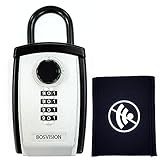
- Secure Storage: Durable portable lock box designed specifically to protect car key fobs and multiple house keys with ample storage capacity
- Faraday Protection: Includes one specialized Faraday bag to block unwanted RF signals and prevent car key fob hacking attempts
- Versatile Capacity: Accommodates one car key fob plus up to 8 standard house keys (3 1/2 inches) in a compact yet spacious design
- Portable Design: Lightweight and easy-to-carry safe box perfect for home, office, or travel use while maintaining security
- Enhanced Security: Robust locking mechanism ensures your valuable keys and fobs remain protected from unauthorized access
.gitignore controls what Git tracks; it does not stop an AI tool from reading a file directly. Exclude sensitive files in the assistant’s own context or workspace settings as well as keeping them out of version control.
- Use editor or pre-commit secret detection for early feedback.
- Enforce a server-side CI or push check so a local bypass is not the only barrier.
- Scan full history periodically, not only new changes.
- Review generated code and security-sensitive changes to build scripts, CI workflows, container files, and deployment configuration.
Controls differ in when they run—editor, pre-commit, push, CI, scheduled history scan, or public-repository monitoring—and in which standard or custom patterns they recognize. When choosing or configuring them, check whether findings can be validity-checked, how false positives and bypasses are handled, whether deployed browser bundles are covered, and what plan or hosting requirements apply. Keep a separate deployed-output check if your repository control does not inspect what the browser receives.
Rank #4

- Magnetic Key Holder Box: This key hider is perfect for storing keys and any other items you want to stash out of sight and keep secure
- Waterproof Key Holder: This magnetic key box is waterproof (ipx7) and durable; this key holder design keeps your contents safe and dry
- Secure Magnetic Key Box: The powerful neodymium magnets on this magnetic storage box secure the Hideout to any metal surface in your car or house
- Versatile Key Storage Box: This key organizer case attaches to wood, plastic, and metal; includes 3M VHB adhesive-backed metal plate for attaching hideout to surfaces
- About Nite Ize: Our inventor-driven products organize your life, protect your gear, light your way, and creatively solve everyday problems
What a clean scan can and cannot tell you
A clean scan means only that the configured checks did not identify a match in the material they scanned. It cannot rule out unknown credential formats, missed history or branches, values introduced during the build, or exposed data in deployed assets the scanner never inspected. Use repository scanning, full-history checks, and browser-side inspection together; treat each as a layer rather than a guarantee.
Quick Recap
Product prices and availability are accurate as of the date/time indicated and are subject to change. Any price and availability information displayed on Amazon at the time of purchase will apply.




