Outdated Drivers Are Slowing You Down
One free scan finds every outdated or missing driver and matches the right update for your exact hardware.Free scan · exact hardware matchPC Slower Than It Used to Be?
A free scan shows the junk files, broken settings and background clutter dragging Windows down - then fixes them in one click.Free scan · Windows 10 & 11A website chat widget is more than a badge in the corner: it adds third-party code, data collection, support expectations, and accessibility requirements to the pages where it runs. Before launch, configure the provider deliberately, choose where and how the code loads, check the widget’s security and privacy behavior, test it with keyboard and assistive technology, and make its hours and follow-up promises accurate.
How should a website chat widget be installed?
Treat installation as a software integration, not a copy-and-paste decoration. The usual sequence is to enable the provider’s chat or messaging feature, configure its appearance and behavior, then add the vendor-provided code to the pages where visitors should be able to use it. Follow the current instructions for the specific product and account type: available settings and setup flows differ between services.
As an Amazon Associate I earn from qualifying purchases.
For example, Zendesk’s chat setup guidance covers enabling live chat, appearance, forms, security rules, and placing the snippet on relevant pages. Depending on configuration, its widget can provide chat alone or chat alongside other channel functions. Zendesk documents product-specific controls such as allowed domains, blocked countries, and visitor authentication; do not assume another vendor offers the same controls.
Zendesk’s separate messaging setup guidance describes customizing details such as color and title, testing a preview, and adding a privacy notice that can include a recording notice. Confirm current browser support and configuration steps in the documentation for the product version you use rather than relying on an old compatibility list.
#1 Best Overall
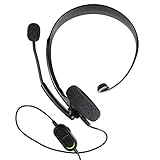
- Chat privately with your friends while gaming
- Chat in crystal-clear digital audio
- Lightweight and comfortable for long gaming sessions
- Responsive microphone with adjustable boom
- Easy to use
Choose the pages and audience deliberately
- Embed the widget only where live help is useful; a checkout, support, or product page may have different needs from every page on the site.
- Use domain restrictions or visitor authentication where the provider offers them and your use case requires them.
- Test the published pages, not just the provider’s preview. Check that the widget opens, submits, and routes messages as expected on the actual site.
Will the widget slow down the site?
It can affect rendering or interaction, so measure its effect on the pages where it is enabled. A script loaded in a render-blocking position can delay page rendering. Zendesk describes its snippet as lightweight but recommends placing it at the end of the body when load performance is a concern, so the browser can continue rendering while the script loads. That is vendor-specific guidance, not a guarantee that moving any widget script will solve performance problems. See Zendesk’s installation guidance and compare actual loading and interaction behavior before and after installation.
- Check whether the script blocks rendering or delays important interactions.
- Measure on representative pages and devices with the widget enabled, including pages where visitors are most likely to need it.
- Confirm that deferred or end-of-body loading still allows the widget to initialize and receive messages reliably.
What security and privacy checks matter?
A widget becomes part of the site’s security boundary. Its architecture determines how much it can access on the host page, while its network requests, cookies, and message handling affect what visitor data leaves the site. Review the selected product’s implementation and data flows rather than assuming every chat badge behaves alike.
Rank #2

- FOCUS ON YOUR WORK - 2 soft ear pads provide the all-day comfort you need to focus on your tasks.
- NOISE-CANCELLING TECHNOLOGY - Be heard clearly with the noise-cancelling microphone.
- COMFORTABLE DESIGN - Sennheiser headsets are built for comfort and fit securely to prevent slippage.
- ADJUSTABLE MICROPHONE - For clear communication, pull the mic in close or rotate it up to 180° out of your way when not in use.
- TRUSTED REPUTATION - For years, we’ve been providing customers near and far with products they can count on.
Check isolation and content handling
Google Cloud’s CX Agent Studio documentation warns that its <chat-messenger> custom element runs in a shadow DOM on the host page and does not provide strict iframe-like sandboxing by default. In that product’s documented architecture, sharing the window origin means widget scripts can access host-page sessionStorage and localStorage. Google recommends sanitizing custom code, validating content received from external sources, and adding isolation when the application’s security needs call for it. This is specific to that product’s documented custom-element setup, not a description of every vendor’s widget. See Google Cloud CX Agent Studio’s web-widget documentation.
Do these 3 things before closing this tab:
1Fix the driver behind crashes, sound loss and screen glitches2Repair Windows errors before they cause bigger problems3Scan for outdated or missing drivers - takes under a minuteWhen comparing an iframe with a custom element or script, ask whether the widget is isolated from the page and what host-page data it can reach. Sanitize customization and validate externally supplied rich content; choose stronger isolation where your application’s threat model requires it.
Rank #3

- [Clear Sound] : Built-in noise reduction microphone picks-up your voice loud and clear, also the flexible microphone boom ensures accurate talking position for every word.
- [Adjustable] : Super lightweight computer headset with adjustable headband to fit all head sizes.
- [Simple Audio Control] : Easy to access volume and mute controls in the cord, you can quickly adjust the headset volume up/down, mute/un-mute the microphone or speaker.
- [Usage] : Perfect for those who take a high volume of calls each day, such as call center staff, office workers, customer service users, phone job staff etc.
- [Plug And Play] : The USB headphone is plug and play, no software installation is required.
Review requests, cookies, and notices
Inventory the third-party domains the widget contacts, the cookies it sets, the information collected in forms and messages, and how messages are transported. Confirm whether a privacy or recording notice is needed for your implementation and jurisdiction. Zendesk’s messaging setup supports adding a notice and a link to your own privacy notice, but that feature alone does not establish legal compliance.
A 2022 study by authors affiliated with the University of Technology Sydney, Macquarie University, and the University of Wollongong examined five chatbot services and reported that 13,515 sites among the top one million Alexa websites (1.59%) used one of those five chatbots. In its sampled embeds, 850 (6.29%) used insecure protocols to transfer chats in plain text; more than two-thirds (68.92%) of identified cookies in chatbot iframes were used for ads and tracking. These are historical results from that study’s sample and definitions, not current prevalence estimates for all chat products. Read the paper, An Empirical Assessment of Security and Privacy Risks of Web-based-Chatbots.
Rank #4

- Ships in unmarked, bulk packaging
- 3.5mm connector (see picture)
- Chat privately with your friends while gaming in crystal-clear digital audio
- Lightweight and comfortable for long gaming sessions
- Responsive microphone with adjustable boom
How do you check accessibility?
Test the selected, current widget itself. A site can be accessible while its chat control is not, and a vendor’s general claim or an old conformance report is not proof that the version you deploy works for your visitors.
Quick wins for a faster PC:
Repair Windows errors before they cause bigger problemsFix Now →Scan for outdated or missing drivers - takes under a minuteDriver Scan →Clear out junk files and repair common Windows errorsFree Scan →- Navigate to the launcher and through the panel using only a keyboard; verify visible focus and a sensible tab order.
- Open and close the panel, send a message, and move between controls without losing focus or getting trapped.
- Check that screen readers announce the launcher, panel, incoming messages, errors, and status changes clearly.
- Verify that controls and text remain visible at zoomed sizes and that color is not the only way to convey meaning.
- Review current accessibility conformance materials for the exact product and version, then test the live deployment with assistive technologies.
Digital.gov’s contact-center guidance says that Section 508 requirements apply to live-help software in the federal context it addresses. Its page also cautions that many chat applications were not built with accessibility in mind. A LiveChat Accessibility Conformance Report dated May 5, 2021 concerns the product identified as “LiveChat Chat Widget”; its date makes it an example of a vendor report, not current proof of conformance. See Digital.gov’s accessibility guidance for contact centers and the LiveChat Accessibility Conformance Report.
Best Value

- Platform Compatibility: Compatible with PlayStation 4 and PlayStation 5 controllers with On/Off Mute Microphone Controls and Earbud Style Design
- Direct Controller Connection: Connects directly to PS5 and PS4 controllers using a standard 3.5mm connector for seamless audio communication
- Convenient Microphone Controls: Features easy-to-use On/Off/Mute microphone controls for quick audio management during gameplay
- Portable and Lightweight Design: Compact and lightweight construction makes these earbuds easy to carry and store for gaming on the go
- Dual Pack Value: Includes 2 mono chat game gaming earbuds with microphones, providing a backup or option for multiple users
What should visitors be told about support?
Set expectations before someone types. Make clear whether a visitor is reaching a person, a bot, or a message queue; state staffed hours; and explain what happens outside them. An unavailable message should be honest about response expectations and provide a useful next step, such as collecting an email address or phone number for follow-up.
- Configure business hours and the message shown when no agent is available.
- Explain whether a bot answers first and how a visitor can ask for a person, if human escalation is offered.
- Say what information will be collected for an offline follow-up and who owns responding to it.
- Test routing and fallback behavior so submitted requests have a clear destination.
Microsoft’s Teams Live chat documentation describes relaying requests during configured business hours and collecting contact details or offering appointment scheduling outside those hours. It also says new customers could no longer set up the feature starting August 6, 2026, and support ends October 5, 2026. As of October 3, 2026, it is not a suitable choice for a new deployment; its documented hours and fallback behavior illustrate operating concepts, not a recommendation to adopt the retiring service. See Microsoft’s Teams Live chat documentation.
Quick Recap
Pre-launch checks
- Confirm the provider feature, account requirements, current setup instructions, and pages where the widget should appear.
- Set appearance, forms, allowed domains or other available access controls, hours, routing, and the unavailable-state response.
- Review the widget’s isolation model, custom code, external content, network requests, cookies, collected information, and applicable notices.
- Measure loading and interaction on representative live pages; adjust loading strategy only after verifying that the widget still initializes correctly.
- Test keyboard operation, focus, screen-reader announcements, and current product-version conformance evidence.
- Send test messages during and outside staffed hours; verify ownership and follow-up for every submitted request.
- Check that the service remains supported and that its documented capabilities still match the live configuration.
Product prices and availability are accurate as of the date/time indicated and are subject to change. Any price and availability information displayed on Amazon at the time of purchase will apply.
What’s actually slowing this PC down?
Pick the symptom - the matching free tool is one click away.




