PC Slower Than It Used to Be?
A free scan shows the junk files, broken settings and background clutter dragging Windows down - then fixes them in one click.Free scan · Windows 10 & 11Crashes, No Sound, or Screen Glitches?
Random freezes, missing sound and display glitches usually trace back to one bad driver. Find and replace yours safely.Free scan · under a minuteFor written support chat, start with your organization’s approved collaboration platform. In Microsoft Teams, you can translate an incoming message on demand or configure translation preferences. For spoken one-to-one conversations or group meetings, use a live translation or interpretation feature instead; the workflow, licensing, permissions, and data handling differ. Keep the original message available and have a person check consequential wording before acting on it.
Choose the workflow that matches the conversation
Translating a message already written in a chat is different from translating speech as people talk. A message translation feature works on individual text in a chat. Live conversation tools process spoken audio and may transcribe it, translate it, and read translated speech aloud or display subtitles.
| Option | Best fit | How it works | Requirements and qualifications |
|---|---|---|---|
| Microsoft Teams message translation | Incoming written messages in Teams chat | Translate an individual message or set preferences for suggested or automatic translation. | The organization may control availability. Automatic translation is not supported for short messages. Microsoft’s feature documentation does not establish a price here. |
| Microsoft Teams Interpreter | Spoken Teams meetings and calls | Provides a Teams interpretation workflow for meetings and calls. | Check tenant policy and feature availability with the administrator. The documentation cited here does not establish a price or detailed language coverage. |
| DeepL Voice for Conversations | Spoken one-to-one exchanges | Provides real-time translation on web, iOS, and Android; speech is transcribed and read aloud using device text-to-speech. | An eligible DeepL Voice plan is required. The documentation cited here does not establish plan prices or a full language list. |
| DeepL Voice for Online Meetings | Live meetings in Teams, Zoom, or Google Meet | Offers live subtitles and voice-to-voice translation. In the Teams workflow described by DeepL, a bot joins the meeting to stream audio. | For Teams, the documented requirements include a Voice for Meetings license, permission for external participants, and meeting chat enabled. The documentation cited here does not establish plan prices or a full language list. |
These options are not interchangeable: use chat translation for written messages and a live interpretation or translation workflow for speech. Product documentation describes capabilities and setup, but it does not establish which service will translate a particular team’s languages or terminology most accurately.
Translate a written message in Microsoft Teams
- Open the message menu. On an incoming message in another language, select Translate above the message. If that prompt is absent, hover over the message and choose More options > Translation > Translate.
- Choose how Teams handles future messages. Open Settings > General > Translation. Set the destination language, then choose whether Teams should ask before translating, automatically translate incoming messages, or never offer translation. You can also exclude specific languages.
- Request a translation manually when a short message is not translated automatically. Microsoft says automatic translation is not supported for short messages. Where the control is available, use the message menu to request a translation yourself.
- Compare the result with the source when meaning matters. Select See original to view the original message alongside the translated version. Keep that original available in the chat, ticket, or handoff rather than relying on a translated copy alone.
- Escalate a missing control to your Teams administrator. Microsoft advises contacting the IT administrator if Translate is unavailable. The administrator can check whether message translation is enabled for the organization or tenant; Microsoft’s settings and policy references document a configurable message-translation setting.
Microsoft’s help article is the authority for the current Teams labels and behavior. Settings and availability can vary by tenant and may change, so confirm the workflow in the organization’s deployed Teams environment.
Recommended Free Tools
#1 Best Overall

- Seamless communication; farewell to distance limits; embrace endless possibilities; Our wireless tour guide system works up to 200m/656ft; ensuring clear communication everywhere; from museum corners to open spaces
- Ultra-long battery life; the ear hook receiver of tour guide system boasts a battery life of up to 50 hours; equipped with a 450mAh battery that can be fully charged in just 3 hours
- 2.4GHz Clear sound quality; stable signal; whether city tours, museum visits, trade show, classes or outdoor guided tours, you can have a good experience; even in noisy environments, the wireless microphone transmitters receivers can clearly hear the speaker's voice
- 9999 channels; multiple tour groups or training sessions can operate simultaneously in the same venue without cross-channel interference. Simply set each team to a different channel—no signal collision, no voice bleeding
- Lightweight and stylish; The conference communication equipment delivers a completely new level of comfort, eliminating the pressure that traditional headphones can cause in the ear canal; wireless headsets features a receiver weighing just 18g; Relax Your Hands, boasting a lightweight, stylish design that is easy to carry and comfortable to wear
Translate spoken conversations and meetings
One-to-one spoken conversations
DeepL Voice for Conversations is documented for real-time one-to-one translation on web, iOS, and Android. It transcribes speech and uses device text-to-speech to read translated speech aloud. An eligible Voice plan is required; the documented feature description does not provide a price or complete supported-language list.
Meetings in Teams, Zoom, or Google Meet
DeepL Voice for Online Meetings documents live subtitles and voice-to-voice translation for Teams, Zoom, and Google Meet. For its Teams connection, DeepL lists three requirements: a Voice for Meetings license, organizational permission for external participants, and meeting chat enabled. A bot joins to stream meeting audio, so this is a different data flow from translating text inside a chat.
DeepL’s translation manager lets the meeting’s translation manager pause translation. In the described workflow, pausing removes the bot from the meeting. That can provide a way to stop streaming for a sensitive discussion, subject to the organization’s policy and the meeting setup.
Teams Interpreter
Microsoft also documents Interpreter for Teams meetings and calls. Its availability is subject to the organization’s tenant policy and the feature’s availability in that deployment. Ask the Teams administrator to confirm those conditions before planning a meeting around it.
Rank #2

- FCC certified; church translation system can quick and easy device pairing; 12-18h working time; 99 channels allow multiple groups to operate simultaneously in the same area with no cross-talk or interference; Note: remove the white sponge when charging; Retekess T130, T130S, and T130P are compatible. Note: T130, T130S, and T130P are not compatible with T130U
- Tour guide audio system is ideal for tourism; plant tour; employee training; etc; It can also be used for language translation and for auditory assistance in church or performance venues; Note: it can't translate automatically but can assist the translator
- Easy to set up; Retekess T130 translate device for church features auto/manual pairing function; auto pairing allows all receivers to sync to the transmitter's channel in 5 seconds, no need to spend time manually syncing each receiver
- Lightweight comfort; your audience will appreciate the high-quality audio and the ultra-lightweight receivers they wear around their neck; tour guide microphone and speaker has a hand-free way to ensure your guests get the most out of any tour
- 2 wireless mic; it can be used as a general headset mic; or remove the head-worn bracket to use as a handheld mic; it has low interference; high signal stability; short audio delay; provides clear; high-fidelity sound; very suitable for teachers and speech
Review translated text before making support decisions
A fluent-sounding translation can still obscure ambiguity, tone, domain vocabulary, or a fragment whose meaning depends on earlier messages. The WMT 2024 Shared Task on Chat Translation includes bilingual customer-support conversations and examines the role of conversational context. It shows that context is a relevant translation problem; it does not establish a best product or guarantee accuracy for a specific language pair.
- Keep the original with the translation, especially in tickets, escalations, and shift handoffs.
- Check names, product terminology, error codes, amounts, dates, negation, and any promise about a fix, refund, deadline, or next step.
- Ask a fluent colleague or qualified interpreter to review high-impact, ambiguous, or sensitive messages before acting on them.
- Where the tool allows it, make clear to colleagues that a message was machine translated.
- Do not send secrets, personal data, or regulated information through an unapproved service. Confirm the exact product’s current contract, retention terms, and data-flow documentation against organizational policy.
There is no universal review protocol or measured error rate established for this internal-support use case in the cited materials. The checks above are practical safeguards, not a guarantee that a translation is correct.
Check governance before using a separate translation service
Before connecting a live meeting tool or routing internal conversation content through another service, determine what the integration processes and who can authorize it. For a meeting-bot workflow, confirm whether the organization permits the bot to join and stream audio, whether external-participant access is allowed, and whether the meeting-chat requirement can be met. DeepL directs organizations to its Trust Center voice-data-flow documentation for its voice-data handling details.
For any option, check the approved-tool list, permissions, contractual terms, retention rules, access controls, and applicable internal policies. General product help pages do not determine whether a deployment complies with an organization’s legal obligations.
The Tool Desk
Outbyte PC Repair FREERepair Windows errors before they cause bigger problemsFix Now →Outbyte Driver Updater FREEFix the driver behind crashes, sound loss and screen glitchesFind Drivers →Rank #3
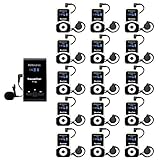
- Clear sound quality; tour guide microphone and speaker uses PLL technology to automatically avoid interference, obtain a more stable signal and clear sound quality; even in a noisy environment, the speaker's voice can be clearly heard; Retekess T130, T130S, and T130P are compatible. Note: T130, T130S, and T130P are not compatible with T130U
- Slim and stylish; smooth front surface of the transmitter; matte finish on the receiver buttons with a non-slip metal backplate; making Retekess T130 tour guide headsets durable and easy to use
- Automatic pairing; one-click automatic pairing synchronizes all receivers to the transmitter channel within 5 seconds; therefore, you don't need to waste valuable time changing receiver IDs one by one
- Compact and portable; translation equipment for church is lightweight and small; the transmitter weighs 56g and receiver weighs only 46g; you can easily take it anywhere; Note: it can't translate automatically but can assist the translator
- Rechargeable battery; the transmitter of assistive listening device for church has a built-in 900mAh battery, which can work for 12h; and the receiver can work for 18h; reduce your troubles of sudden interruptions and frequent charging
How to choose for an internal support team
- For written Teams threads: begin with Teams message translation if it is enabled and its language options meet the team’s needs. It keeps the translation in the existing chat workflow.
- For a spoken one-to-one exchange: consider a dedicated conversation-translation workflow such as DeepL Voice for Conversations, after confirming the eligible plan, language coverage, and data handling.
- For a group meeting: compare the organization’s available Teams Interpreter workflow with a meeting service such as DeepL Voice for Online Meetings. Check tenant policy, license, permissions, meeting setup, and whether a bot joining is acceptable.
- For consequential or sensitive support: keep a human review step. Translation feature documentation is not a substitute for evaluating the actual language pair, context, or risk of the decision.
Check supported source and target languages for the exact feature and plan before rollout. Coverage can differ across products and features, and the cited product pages do not provide one comparable language list. The available material also does not provide independent head-to-head accuracy results for a particular support team’s languages or terminology, so feature descriptions alone cannot identify a universal winner.
Independent reader supportYour contribution helps us test, update, and keep practical guides available for everyone.Frequently Asked Questions
Does Teams translate every incoming message automatically?
No. Automatic translation is a preference users can configure, but Microsoft says it is not supported for short messages. Depending on the available controls, you can request a translation manually instead.
Can I assume a translation feature is legally compliant for our organization?
No. Compliance depends on the organization, jurisdiction, product, plan, configuration, and information being processed. Review the actual service contract and data-flow terms with the appropriate internal teams; the general feature descriptions do not settle that question.
Does the cited information establish which tool is most accurate?
No. The WMT 2024 Shared Task studies customer-support chat translation and the importance of conversation context, but the cited materials do not provide independent, head-to-head accuracy results for these products in a specific team’s language pairs.
Free tools Windows power users keep installed
One-click scans. No signup required.
Rank #4
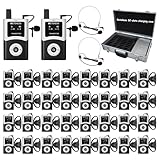
- DSP Noise Clarity:DSP chip reduces background noise and allows adjustable noise reduction and microphone gain; factory tour guide system delivers every word accurately in 80-100dB workshop environment
- EFFORTLESS ONE-TOUCH CONTROL; Simultaneous interpretation system supports multi-channel management and can pair 50+ students with one click; enhance your travel adventures with school tour guide system; with the ability to mute; power off; and pairing, you're empowered to manage your device with minimal effort
- CLEARER SOUND QUALITY; Compared to analog tour guide system;digital tour guide system are more resistant to interference and noise reduction;Sound quality is improved through digital modulation;Encoding technology minimizes noise or echo;ensuring clear sound even in noisy tourist attractions or factory environments
- 200M LONG WORKING RANGE(UNOBSTRUCTED DISTANCE); As the fourth-generation upgrade of the T130 series;the T130U U-band tour guide headsets offers an effective range of 200 meters/656 feet;a 1.5-4 times increase in range;enabling guides/leaders and participants to maintain clear and uninterrupted communication even when they are far apart
- 40-HOUR ULTRA-LONG BATTERY LIFE;The Assistive Listening System transmitter provides 10 hours of operation time; the receiver can be used continuously for 40 hours; no frequent charging is required;If you don't want this product or you bought the wrong one, or it doesn't meet your needs/expectations, we can replace it with a product that meets your needs
Frequently Asked Questions
Does Teams translate every incoming message automatically?
No. Automatic translation is a preference users can configure, but Microsoft says it is not supported for short messages. Depending on the available controls, you can request a translation manually instead.
Can I assume a translation feature is legally compliant for our organization?
No. Compliance depends on the organization, jurisdiction, product, plan, configuration, and information being processed. Review the actual service contract and data-flow terms with the appropriate internal teams; general feature descriptions do not settle that question.
Does the cited information establish which tool is most accurate?
No. The WMT 2024 Shared Task studies customer-support chat translation and the importance of conversation context, but the cited materials do not provide independent, head-to-head accuracy results for these products in a specific team’s language pairs.
Quick Recap
Product prices and availability are accurate as of the date/time indicated and are subject to change. Any price and availability information displayed on Amazon at the time of purchase will apply.




