What’s actually slowing this PC down?
Pick the symptom - the matching free tool is one click away.
Before docking, read the conditions and traffic, prepare the boat and everyone aboard, then approach slowly enough to stop safely at the planned point of contact. There is no single docking angle, speed, or control input that suits every boat: wind, current, location, vessel size and type, and the abilities of the operator and crew all affect the maneuver.
1. Read the conditions and traffic before committing
Assess the wind, current, available space, and nearby boat traffic before beginning the approach. Consider how those conditions may move your vessel and whether there is room to adjust or abandon the approach safely. Docking technique varies with the location, boat type and size, and the skills of the operator and crew, as well as wind, current, and harbor traffic. That is the practical point of the NASBLA standards rationale approved April 10, 2012.


A Coast Guard-hosted merchant-marine exam offers a useful but limited example: in its docking question, the answer key marks “go in against the current” as true. That is one formal exam item, not a complete recreational docking procedure or a rule that overrides the conditions at your dock. Choose an approach for the actual boat, location, wind, current, and traffic rather than treating one direction as universally correct. See the U.S. Coast Guard National Maritime Center Q130 examination.
2. Prepare the boat, gear, and people before arrival
Do the preparation while there is still room and time to maneuver—not during the final approach. The Coast Guard-hosted NASBLA skills material calls for preparing the boat for arrival, readying lines and equipment, preparing passengers or crew, and checking that the approach is clear. Its POWER Standards Alignment Matrix, Version 4 of 5, distributed March 2015, treats these as docking skills.
#1 Best Overall
- Have the appropriate dock lines and boat fenders ready for the vessel and the intended contact point; the standards do not prescribe one size or arrangement for every boat.
- Brief passengers and crew on what they are expected to do, where they should be, and when to act. Keep people clear of pinch points between the boat and dock.
- Check that the intended approach and point of contact are clear, including of nearby traffic or obstacles.
Docking and mooring can cause boat or property damage, accidents, and injuries, particularly in adverse weather, according to the NASBLA standards rationale. It does not provide a numerical accident rate.
Independent reader supportYour contribution helps us test, update, and keep practical guides available for everyone.3. Approach under control and stop at the planned contact point
Use a stopping procedure suited to the boat and the conditions. Account for wind, current, and traffic, and bring the vessel to a full, safe stop at the intended point of contact. The Coast Guard-hosted NASBLA skills matrix describes a training criterion of stopping within 12 inches of that point. That figure is a skills standard, not a guarantee or a universal operational tolerance; the safe approach and stopping distance depend on the circumstances.
Keep the maneuver deliberate. If the approach is no longer clear or the boat is not responding as expected, do not force contact; reassess and make another approach when it is safe to do so. Navigation rules are legally binding, and the applicable rules differ depending on the COLREGS demarcation line. For the rules relevant to a particular waterway, consult the U.S. Coast Guard Rules of the Road.
Quick Recap
Rank #4
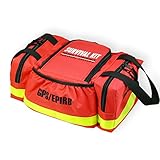
- Boat Safety Kit includes all the minimum safety requirements for boating, no need to buy separately
- Throw Bag with 60 feet floatable throw rope for SAVE, distress flag, signal mirror, rescue whistle for HELP
- Multitool 12 function, heavy-duty knife and water resistant flashlight for SURVIVAL
- First aid kit is definitely a nice-to-have item
- High visibility red bag to hold all required equipment
Rank #3
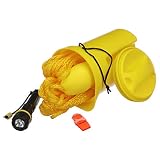
- 4-PIECE BOAT SAFETY KIT: Includes a watertight LED flashlight, safety whistle with lanyard, 50 ft buoyant heaving line and bailer.
- DUAL-PURPOSE BAILER: Bailer can be used to remove water from your boat or store essential safety equipment when not in use.
- SECURE, EASY-TO-USE DESIGN: Bailer features a molded grip for handling and a screw-top lid for convenient access.
- HELPS KEEP CONTENTS DRY: Screw-top lid features an O-ring gasket designed to help keep water out.
- CANADIAN COAST GUARD REQUIREMENTS: Kit contains equipment required by the Canadian Coast Guard for vessels up to 8 meters.
Product prices and availability are accurate as of the date/time indicated and are subject to change. Any price and availability information displayed on Amazon at the time of purchase will apply.



